Design Portfolio Webinar Takeaways
Design portfolio webinar takeaways were a goldmine! This post dives into the key lessons I learned from attending a recent webinar focused on building killer design portfolios. We’re talking everything from crafting a compelling narrative around your projects to mastering the art of constructive criticism and even leveraging post-webinar actions to supercharge your design career. Get ready for actionable tips and insights that will transform your portfolio and your approach to presenting your work.
The webinar covered a wide range of topics, from structuring your presentation for maximum impact to navigating the tricky waters of feedback and critique. I’ll share specific strategies for showcasing your work effectively, building professional connections, and even the technical aspects of hosting or attending these events. It wasn’t just about the “what,” but the “how” – practical advice I can immediately implement to improve my own portfolio and presentation skills.
Webinar Content Overview: Design Portfolio Webinar Takeaways
Design portfolio webinars are invaluable resources for designers at all levels, from students building their first portfolio to seasoned professionals looking to revamp their online presence. These webinars offer a structured approach to creating a compelling portfolio that effectively showcases skills and attracts potential clients or employers. Understanding the common themes and formats will help you choose the right webinar to maximize your learning.Successful design portfolio webinars typically follow a logical progression, guiding participants through the process step-by-step.
They start with foundational concepts, move into practical application, and often conclude with Q&A sessions or actionable next steps. This structured approach ensures participants leave with a clear understanding and a plan for creating or improving their portfolio.
Key Themes Covered in Design Portfolio Webinars
Design portfolio webinars generally focus on several key areas crucial for creating a successful portfolio. These themes help designers understand not only the technical aspects of building a portfolio but also the strategic considerations for presenting their work effectively.
- Portfolio Structure and Organization: This involves discussing optimal layouts, navigation, and ways to present projects logically to guide viewers through the designer’s work.
- Project Selection and Presentation: This focuses on choosing the right projects to showcase, highlighting key skills and accomplishments, and crafting compelling narratives around each project.
- Visual Design and Branding: This covers the importance of consistent branding, visual hierarchy, and creating a visually appealing and professional portfolio that reflects the designer’s personal style and target audience.
- Writing Effective Case Studies: This delves into the art of crafting concise, compelling case studies that explain the design process, challenges overcome, and results achieved.
- Online Platforms and Tools: This explores different online platforms (e.g., Behance, Dribbble, personal websites) and tools to create and host a professional online portfolio.
- Networking and Promotion: This provides strategies for sharing the portfolio and networking with potential clients or employers, including utilizing social media and online communities.
Typical Structure of a Successful Design Portfolio Webinar
A well-structured webinar typically follows a clear progression, building upon concepts and providing practical examples. This ensures participants grasp the material effectively and can apply the learning directly to their portfolios.The typical structure includes an introduction outlining the webinar’s objectives, followed by a series of modules covering the key themes mentioned above. Each module often includes demonstrations, interactive elements, and opportunities for questions.
Finally, a conclusion summarizes key takeaways and provides resources for further learning. Many webinars also include a dedicated Q&A session.
Comparison of Design Portfolio Webinar Formats
Different formats cater to various learning styles and preferences. Choosing the right format depends on individual needs and learning goals.
| Feature | Live Q&A Webinar | Pre-recorded Webinar | Interactive Workshop Webinar |
|---|---|---|---|
| Engagement | High; real-time interaction with the presenter and other attendees. | Moderate; relies on audience engagement through comments or a dedicated Q&A section. | High; hands-on activities and collaborative exercises. |
| Flexibility | Low; requires attendance at a specific time. | High; can be viewed at any time, at the viewer’s convenience. | Moderate; scheduled sessions with potential for asynchronous components. |
| Cost | Often higher due to presenter’s time and live support. | Potentially lower as it requires less immediate resource allocation. | Can vary; depends on the complexity and duration of the interactive elements. |
| Learning Style | Best for those who prefer real-time interaction and immediate feedback. | Suitable for self-paced learning and review. | Ideal for hands-on learners who benefit from practical application and collaborative learning. |
Portfolio Presentation Strategies
Source: lucieshearer.com
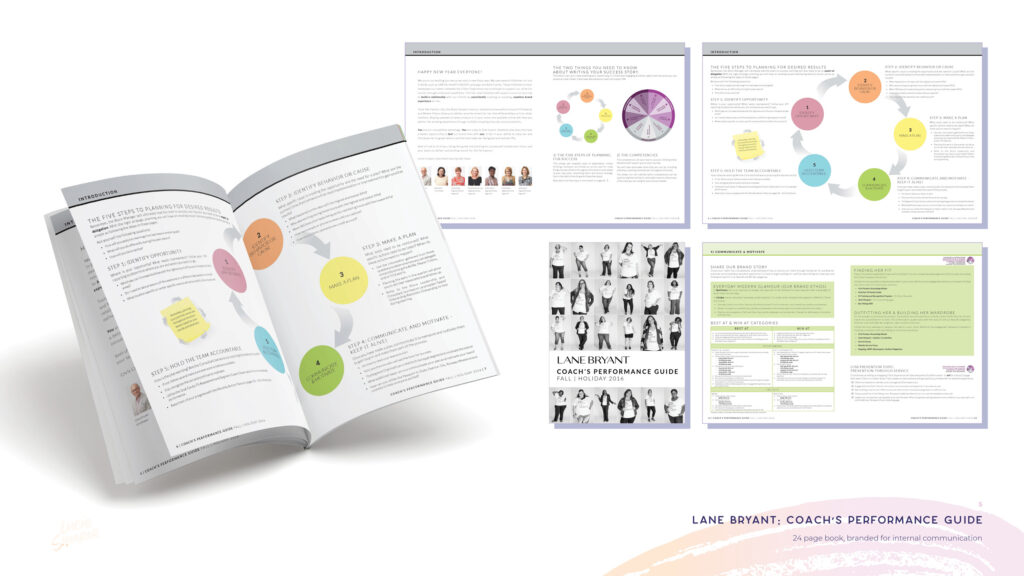
Presenting your design portfolio effectively in a webinar setting requires a strategic approach that goes beyond simply showcasing your work. It’s about crafting a compelling narrative that resonates with your audience and leaves a lasting impression. This involves careful consideration of presentation methods, audience engagement techniques, and the overall structure of your presentation.Effective methods for showcasing design work in a webinar setting leverage the visual nature of the medium.
High-quality images and videos are crucial. Think about using screen recording software to demonstrate your design process, showing the evolution of an idea from initial concept to final product. This adds depth and transparency, making your work more relatable and understandable to the audience. Remember to maintain a consistent visual style throughout your presentation – use a cohesive color palette and font selection for a professional and polished look.
Consider pre-preparing visuals rather than creating them live to ensure a smooth and uninterrupted presentation flow.
Showcasing Design Work
To maximize impact, organize your portfolio around a clear theme or narrative. For example, a portfolio focusing on user interface (UI) design could be structured around the design principles employed (e.g., a section on accessibility, another on usability). Alternatively, a portfolio focused on branding could be structured chronologically, showcasing the evolution of your design thinking. Each project should be presented with a concise overview, highlighting the design challenge, your approach, and the results achieved.
Use strong visuals and keep the text to a minimum, focusing on key accomplishments and quantifiable results wherever possible (e.g., “Increased website conversions by 15%”). Remember, less is often more in a webinar setting; avoid overwhelming the audience with too much detail.
Engaging the Audience
Active audience participation significantly boosts engagement. Incorporate interactive elements like polls, Q&A sessions, and short quizzes to gauge understanding and foster discussion. For example, a poll asking viewers to vote on their favorite design element in a particular project encourages participation and reveals audience preferences. Addressing audience questions directly not only provides valuable insights but also demonstrates your expertise and willingness to engage.
Use clear and concise language, avoiding jargon, to ensure accessibility for a broad audience. A well-paced presentation with engaging visuals will keep the audience captivated and attentive.
Structuring a Compelling Narrative
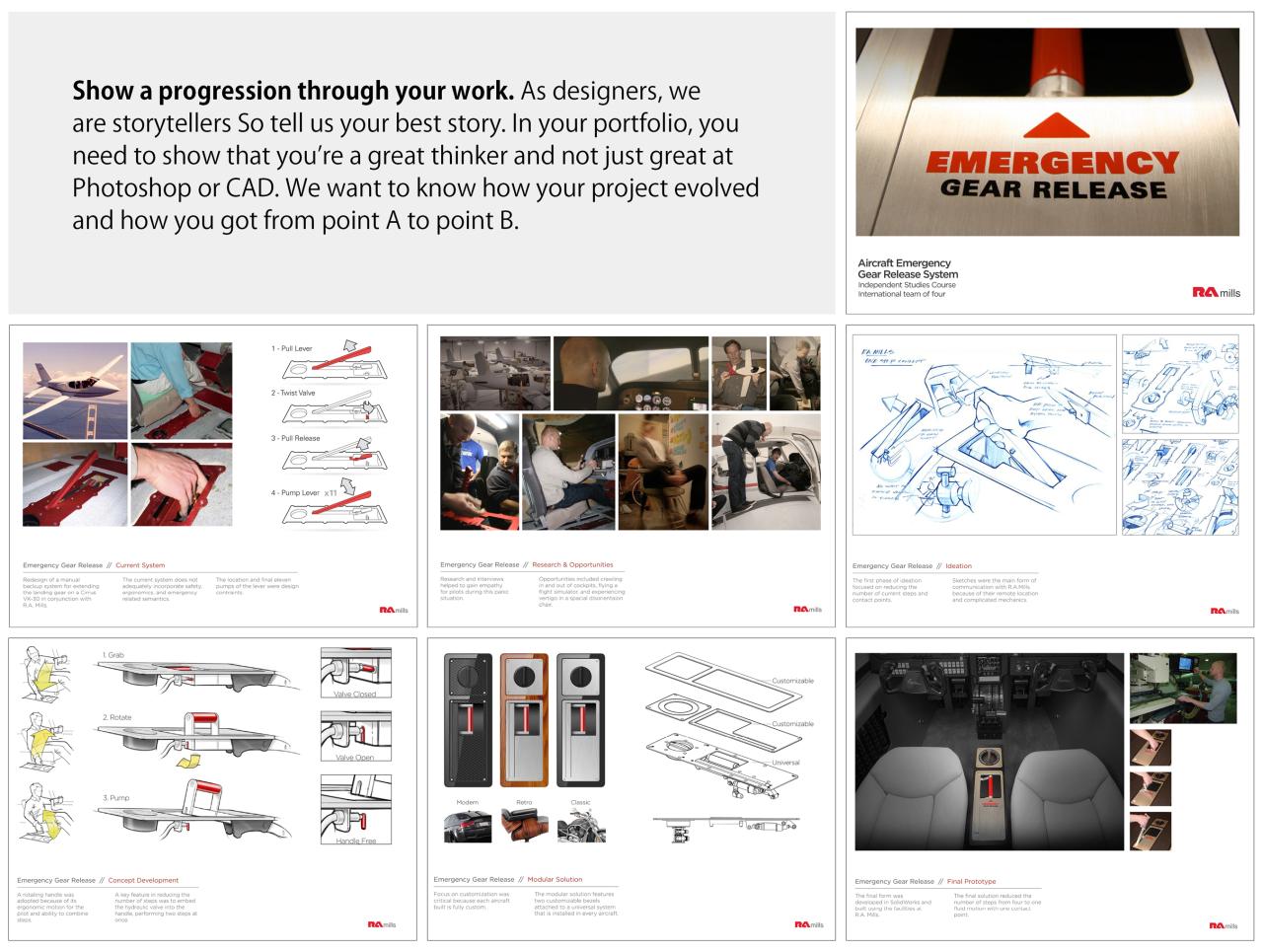
The most effective portfolio presentations tell a story. This narrative should begin with a brief introduction of yourself and your design philosophy. Next, present your projects strategically, progressing from simpler projects to more complex ones, demonstrating growth and expertise. Highlight the problem each project solved, your design process, and the successful outcomes. Each project should have a clear beginning, middle, and end, mirroring the structure of a well-crafted narrative.
Conclude by summarizing your key skills and accomplishments, reiterating your design philosophy, and leaving the audience with a clear understanding of your capabilities and unique value proposition.
Visual Representation of Portfolio Presentation Flow
Imagine a flowchart.Stage 1: Introduction (2 minutes)A captivating opening slide with your name, a concise tagline summarizing your design philosophy, and a brief overview of the webinar’s content. This sets the stage and grabs the audience’s attention.Stage 2: Project Showcase (10-12 minutes)This section is divided into 2-3 project spotlights. Each project begins with a brief problem statement (15 seconds), followed by a visual presentation of the design process (1-2 minutes), culminating in a summary of the results (30 seconds).Stage 3: Interactive Q&A (5 minutes)This section allows for audience interaction, fostering engagement and showcasing your responsiveness.
Prepare for common questions beforehand.Stage 4: Conclusion (3 minutes)A concise summary of your key skills, a call to action (e.g., visit your online portfolio), and a thank you to the audience. End with a memorable closing slide.
Feedback and Critique Techniques
Giving and receiving feedback is a crucial part of the design process. A well-structured critique can elevate your portfolio and help you grow as a designer. Learning effective feedback techniques will not only improve your own work but also enhance your collaborative skills and build stronger professional relationships. This section focuses on providing and receiving constructive criticism, emphasizing honesty and actionable steps.Constructive criticism is more than just pointing out flaws; it’s about offering guidance and support to improve.
The design portfolio webinar takeaways were super helpful, especially the tips on showcasing process. To really boost my reach, though, I need to up my video game, which is why I’m diving into Grafex Media’s awesome guide on getting it on with youtube – I figure strong YouTube presence will complement my portfolio perfectly and attract more clients.
Ultimately, it all feeds back into making my portfolio even more effective.
It requires a delicate balance of honesty and empathy, ensuring the recipient feels understood and empowered to make positive changes. Effective feedback is specific, actionable, and focused on the design itself, rather than personal attacks.
Effective Feedback Delivery Methods
Effective feedback delivery involves considering both the presenter’s and the audience’s perspectives. For presenters, a structured approach, such as starting with positive aspects before addressing areas for improvement, can be beneficial. This approach softens the blow of criticism and makes the feedback more receptive. For example, a presenter might start by saying, “I really appreciate the bold use of color in this piece,” before suggesting, “However, I think the typography could be improved for better readability.” For attendees, offering specific suggestions instead of general statements is crucial.
Instead of saying “This is confusing,” a more effective approach would be to say, “I found the navigation a bit challenging. Perhaps simplifying the menu structure would help users find what they need more easily.” Active listening and a genuine desire to help are key to delivering effective feedback in any context.
The Importance of Honest and Actionable Feedback
Honest feedback, even when difficult to hear, is invaluable for growth. It’s important to remember that criticism isn’t personal; it’s about improving the design. Actionable feedback goes beyond simply identifying problems; it suggests concrete solutions. For example, instead of saying “The layout is messy,” a more helpful comment would be, “The layout feels cluttered. Try using a grid system to organize the elements more effectively, perhaps grouping related items together.” This provides a clear path to improvement, turning criticism into a catalyst for progress.
The value of honest, actionable feedback cannot be overstated; it allows for self-reflection, identifying weaknesses, and improving skills. Receiving feedback with an open mind is vital for growth.
Common Pitfalls to Avoid When Giving or Receiving Feedback
Providing and receiving constructive criticism effectively requires awareness of common pitfalls. These pitfalls can hinder growth and create unnecessary tension.
- Personal attacks: Focus on the design, not the designer. Avoid statements that are insulting or demeaning.
- Vague or general comments: Be specific. Instead of saying “It’s bad,” explain what aspects need improvement and why.
- Overly critical or negative feedback: Balance criticism with positive reinforcement. Start with positive aspects before addressing areas for improvement.
- Ignoring context: Consider the design’s purpose and target audience when providing feedback.
- Defensive responses: Receiving feedback requires an open mind. Avoid becoming defensive or dismissive of constructive criticism.
- Lack of specificity: Instead of saying “It needs work,” suggest specific improvements and offer concrete examples.
- Unrealistic expectations: Remember that design is an iterative process. Perfection is rarely achieved in a single iteration.
Networking and Collaboration
Source: beyonddesign.com
Design portfolio webinars aren’t just about showcasing your work; they’re invaluable opportunities to build your professional network and collaborate on exciting projects. Strategic networking can significantly boost your career trajectory, opening doors to new opportunities and collaborations that might otherwise remain hidden. This section explores effective strategies to maximize your networking potential during and after these events.
The power of networking lies in building genuine relationships, not just collecting business cards. A collaborative spirit, demonstrated both during and after the webinar, can lead to mutually beneficial partnerships and a richer professional experience. This section details how to leverage these events to foster connections and showcase the value of collaborative work.
Effective Networking Strategies During and After Webinars
Successful networking requires a proactive approach. It’s not enough to simply attend; you need to engage meaningfully with other participants and speakers. Consider these strategies:
- Active Participation: Ask thoughtful questions during Q&A sessions, demonstrating your engagement and interest in the topic. This positions you as someone knowledgeable and curious.
- Engage in the Chat: Participate in the webinar’s chat function, sharing relevant insights and engaging with other attendees’ comments. This creates opportunities for initiating conversations.
- Follow Up Promptly: After the webinar, send personalized emails to individuals whose work or perspectives resonated with you. Refer to a specific point discussed to personalize your message.
- Leverage Social Media: Connect with attendees and speakers on LinkedIn or other relevant platforms. A brief, personalized message referencing the webinar can be effective.
Showcasing Collaborative Projects
Highlighting collaborative projects effectively demonstrates your teamwork skills and ability to contribute to a shared vision. This is crucial in showcasing your design capabilities and maturity as a professional.
- Clear Role Definition: In your portfolio, clearly define your role and contributions within each collaborative project. Quantify your achievements whenever possible (e.g., “increased user engagement by 15%”).
- Case Study Approach: Present collaborative projects using a case study format. This allows you to thoroughly explain the project’s goals, challenges, your contributions, and the overall results.
- Team Member Acknowledgement: Always acknowledge the contributions of your team members. This shows respect and professionalism, while also highlighting your collaborative nature.
Building Professional Relationships Through Webinar Participation, Design portfolio webinar takeaways
Webinars provide a unique environment to forge professional relationships. Building trust and rapport is essential for long-term professional connections.
- Authenticity: Be genuine in your interactions. People appreciate authenticity and will be more likely to connect with you if you’re yourself.
- Active Listening: Pay attention to what others are saying and respond thoughtfully. Show genuine interest in their work and experiences.
- Offer Value: Share your knowledge and expertise generously. Helping others can be a great way to build rapport and establish yourself as a valuable member of the community.
Step-by-Step Guide to Following Up After a Webinar
A well-crafted follow-up email can significantly impact your networking success. Here’s a step-by-step guide:
- Within 24 hours: Send a brief, personalized email to individuals you connected with during the webinar. Reference a specific point from the discussion to personalize your message.
- Share Relevant Resources: If appropriate, share relevant articles, tools, or resources that might be helpful to your contacts.
- Suggest a Follow-up Meeting: If you’re interested in a more in-depth conversation, suggest a brief virtual meeting to discuss potential collaborations or further networking opportunities.
- Maintain Contact: Continue engaging with your contacts on social media or through email. Sharing relevant industry news or insights can help maintain the connection.
Post-Webinar Actions
The webinar is over, but the work on your design portfolio shouldn’t be. Following up effectively after a design portfolio webinar is crucial for maximizing its value and seeing tangible improvements in your work. This post-webinar phase is where you transform the knowledge gained into actionable steps, leading to a stronger portfolio and ultimately, better design career prospects.The information shared during the webinar provides a framework for enhancing your design skills and portfolio presentation.
However, its true power lies in your proactive application of this knowledge. Don’t let the webinar’s insights gather digital dust; actively engage with the materials and put them into practice.
Leveraging Webinar Content for Portfolio Improvement
This section details practical steps to translate the webinar’s content into concrete portfolio improvements. Begin by revisiting the webinar recording and your notes. Identify key takeaways, focusing on areas where you can immediately strengthen your portfolio. This might involve refining existing projects, adding new ones, or completely reworking your presentation style.Consider the feedback provided on portfolio presentation strategies.
Did the webinar suggest a new layout, a better way to showcase your process, or improved ways to highlight your design thinking? Implement these suggestions in your portfolio, meticulously reviewing the changes for impact and clarity. For instance, if the webinar emphasized the importance of strong visual hierarchy, rework your portfolio pages to ensure a clear path for the viewer’s eye.
If it highlighted the importance of storytelling, rework your project descriptions to focus on the narrative behind each project.
Utilizing Feedback for Skill Enhancement
The feedback received during the webinar, whether from instructors or fellow participants, is invaluable. Don’t simply read it; analyze it critically. Identify recurring themes or patterns in the comments. Are there consistent criticisms regarding a specific aspect of your design process or portfolio presentation? These are areas requiring focused attention.For example, if multiple people commented on the lack of clarity in your design rationale, focus on improving your communication skills.
This might involve taking an online course on design writing or practicing explaining your design choices to friends or colleagues. If the feedback consistently pointed towards weak typography choices, dedicate time to studying typography principles and experimenting with different font combinations in your future projects. Turn this feedback into a roadmap for improvement.
Resources for Portfolio Refinement
To further refine your portfolio after the webinar, consider these resources:
- Online design communities (e.g., Behance, Dribbble): These platforms offer inspiration, feedback, and networking opportunities. Analyze the portfolios of successful designers to identify best practices and innovative approaches.
- Design blogs and articles (e.g., Awwwards, Smashing Magazine): These resources offer insights into current design trends, best practices, and portfolio building strategies. Look for articles focusing on portfolio reviews and critique.
- Design books on portfolio creation and presentation: These offer structured guidance and in-depth knowledge, often providing templates and case studies to emulate.
- Online courses on portfolio building and design communication: Platforms like Skillshare, Udemy, and Coursera offer courses dedicated to enhancing your portfolio and communicating your design process effectively.
- Design critique websites and platforms: These sites offer a structured environment for receiving feedback on your work from other designers.
Remember, the post-webinar phase is not a one-time activity. It’s an ongoing process of refinement and improvement. Regularly revisit your portfolio, incorporating new projects and iterating based on the feedback you receive. Consistent effort is key to building a compelling and effective design portfolio.
Technical Aspects and Tools

Source: jillianlare.com
Successfully hosting and attending a design portfolio webinar hinges on understanding the technical requirements and leveraging the right tools. A smooth, professional experience for both presenter and audience is crucial for making a strong impression. This section will Artikel the essential technical aspects and introduce you to useful tools for enhancing your webinar’s impact.
Essential Technical Requirements for Webinar Hosting and Attendance
Hosting a design portfolio webinar requires a reliable internet connection with sufficient upload and download speeds to handle video and audio streaming without interruptions. A stable computer system with adequate processing power and RAM is essential to prevent lag or crashes. For attendees, a stable internet connection and a device capable of running the chosen webinar platform (laptop, desktop, tablet, or smartphone) are necessary.
Having a headset with a microphone is recommended for both hosts and attendees to ensure clear audio communication. A backup internet connection or plan is advisable for the host in case of unforeseen outages. For presentations involving large files, ensuring sufficient storage space and fast upload speeds is crucial.
Webinar Platform Comparison
Choosing the right webinar platform is key to a successful event. Different platforms offer varying features and capabilities. Below is a comparison of some popular options:
| Platform | Features | Pricing | Ease of Use |
|---|---|---|---|
| Zoom | Video conferencing, screen sharing, breakout rooms, recording, live chat, polls | Free and paid plans available | User-friendly interface |
| GoToWebinar | Robust webinar features, advanced analytics, registration and marketing tools, attendee engagement features | Paid plans only | Intuitive, but may have a steeper learning curve than Zoom |
| Microsoft Teams | Integrated with Microsoft Office suite, screen sharing, recording, chat, polls, live captions | Included with Microsoft 365 subscriptions | Familiar interface for Microsoft users |
| Google Meet | Simple video conferencing, screen sharing, recording, live captions, integration with Google Workspace | Free and paid plans available | Easy to use, ideal for smaller webinars |
Useful Tools for Creating and Sharing Design Portfolio Presentations
Effective presentation creation and sharing are vital. The right tools can significantly enhance the process and the overall impact of your portfolio.Creating high-quality presentations requires software that allows for professional design and animation.
- Adobe Creative Suite (Photoshop, Illustrator, InDesign): Industry-standard software for creating visually stunning presentations.
- Canva: User-friendly platform with pre-designed templates and intuitive drag-and-drop functionality.
- Figma: Collaborative design tool suitable for creating interactive prototypes and presentations.
- PowerPoint/Keynote: Widely accessible presentation software offering basic design and animation features.
- Google Slides: Cloud-based presentation software with collaborative features and easy sharing options.
Sharing your presentation seamlessly is just as important as creating it.
- Screen recording software (OBS Studio, QuickTime Player): Capture your presentation and commentary for asynchronous viewing.
- Cloud storage services (Google Drive, Dropbox, OneDrive): Share your presentation files easily and securely.
- Portfolio websites (Behance, Dribbble, personal website): Showcase your work online for broader reach.
Using Visual Aids to Enhance Webinar Presentations
Visual aids are indispensable for engaging your audience and conveying information effectively. Charts, graphs, and mockups can simplify complex data, illustrate concepts, and make your presentation more memorable.Using charts and graphs to represent data concisely improves comprehension. For example, a bar chart can compare the usage of different design tools across projects, while a pie chart can show the proportion of time spent on different design phases.
Mockups are essential for showcasing design solutions in context. A website mockup, for example, allows viewers to understand the functionality and aesthetic of a design. Visual aids should be visually appealing, easy to understand, and relevant to the topic. Avoid overwhelming the audience with too much information on a single visual. Ensure that all visual aids are high-resolution and easily visible on the screen.
Maintain consistency in style and design across all visuals to create a professional and cohesive presentation.
Final Review
Overall, the design portfolio webinar was an incredibly valuable experience. I walked away with a renewed sense of purpose and a clear roadmap for enhancing my portfolio. The insights on presentation strategies, constructive feedback, and networking were especially helpful. More than just technical tips, the webinar emphasized the importance of storytelling and building genuine connections within the design community.
I highly recommend attending similar events to gain a competitive edge and refine your approach to showcasing your creative work. Now, it’s time to put these takeaways into action and see the results for myself!
Essential Questionnaire
What’s the best way to follow up after a design portfolio webinar?
Connect with speakers and attendees via LinkedIn, email, or other relevant platforms. Share your thoughts on the webinar, mention something specific you found helpful, and perhaps suggest a future collaboration.
How do I handle negative feedback on my portfolio?
Listen carefully, ask clarifying questions, and focus on actionable steps for improvement. Don’t take it personally; use it as an opportunity for growth.
What are some common pitfalls to avoid when presenting my portfolio?
Avoid rambling, stick to a clear structure, and don’t overwhelm the audience with too much information. Practice your presentation beforehand and be mindful of your time.