Free Design Mockups, Templates & Icons
Free design mockups templates icons – Free design mockups, templates, and icons: They’re everywhere, right? But finding genuinely useful, high-quality freebies that don’t look… well,
-cheap*… can feel like searching for a needle in a digital haystack. This post dives into the world of free design resources, exploring where to find them, how to use them effectively, and what to watch out for.
We’ll uncover the trends, discuss licensing, and even show you how to create something amazing using only free assets. Get ready to level up your design game without breaking the bank!
From sleek website mockups to eye-catching app icons and versatile social media templates, we’ll cover it all. We’ll examine the popularity of different design styles, the quality variations you’ll encounter, and the best practices for integrating these free resources into your projects. Think of this as your ultimate guide to navigating the exciting – and sometimes overwhelming – world of free design assets.
Popularity and Trends of Free Design Resources
The demand for high-quality design assets is booming, fueled by the rise of digital marketing, social media, and the increasing need for visually appealing content across various platforms. This has led to a surge in the popularity of free design resources, offering designers, marketers, and even hobbyists access to mockups, templates, and icons without significant financial investment. However, navigating this landscape requires understanding current trends and the quality variations offered by different platforms.
Popular Platforms Offering Free Design Resources
Several websites have established themselves as go-to destinations for free design resources. These platforms vary in their offerings, ranging from specialized collections to vast libraries encompassing diverse design elements. Some of the most popular include Freepik, Pixabay, Vecteezy, and Flaticon. These platforms leverage community contributions and curated selections to provide a wide array of choices, catering to different design styles and project needs.
The ease of access and search functionality on these sites contributes significantly to their popularity. The competitive landscape encourages continuous updates and expansions of their free resources.
Quality Variations Across Free Resource Providers
The quality of free design resources varies significantly depending on the platform and the individual contributor. While some platforms maintain strict quality control measures, others rely more heavily on user submissions, leading to inconsistencies in design quality, file formats, and usability. Generally, platforms with more established reputations and active moderation tend to offer higher-quality resources. Factors like resolution, vector vs.
raster formats, and the overall aesthetic appeal of the designs contribute to the perceived quality. It’s crucial to carefully review the details and preview the assets before downloading to ensure they meet the project’s requirements. For instance, a low-resolution image might look fine on a small screen but appear pixelated when enlarged.
Types of Designs Most Frequently Downloaded
The most popular categories of free design resources reflect current design trends and the demands of various industries. Website mockups remain consistently popular, allowing designers to quickly visualize and present website layouts to clients. App icons are another highly sought-after category, as developers need visually appealing and easily recognizable icons for their applications. Social media templates are increasingly in demand, reflecting the importance of visually engaging content on platforms like Instagram, Facebook, and Twitter.
Finding awesome free design mockup templates and icons can seriously level up your YouTube thumbnails, and that’s where planning comes in! To really make your videos pop, check out this guide on getting it on with YouTube for killer strategies. Once you’ve got your content planned, those free design resources will help you create eye-catching visuals that perfectly complement your videos.
Finally, infographic templates are frequently downloaded as they provide a visually appealing way to present data and information.
| Category | Popularity Ranking | Average Quality Rating (1-5) | Example Use Cases |
|---|---|---|---|
| Website Mockups | 1 | 4 | Client presentations, portfolio showcases, internal design reviews |
| App Icons | 2 | 3.5 | Mobile app development, software applications, brand identity |
| Social Media Templates | 3 | 4 | Marketing campaigns, social media posts, brand awareness |
| Infographic Templates | 4 | 3 | Data visualization, educational materials, presentations |
Types and Uses of Free Mockups: Free Design Mockups Templates Icons
Free design mockups are invaluable tools for designers of all levels, offering a quick and easy way to visualize designs before committing to expensive print or development. They allow for client presentations, internal design reviews, and even personal portfolio building. Understanding the different types and their applications is crucial for maximizing their effectiveness.
Categorization of Free Mockups by Application
Free mockups are broadly categorized based on the design area they serve. This allows designers to select the most relevant and useful tool for their specific project. A poorly chosen mockup can hinder the presentation of a great design, whereas a well-chosen one can significantly enhance it.
- Website Mockups: These depict website layouts, showcasing navigation, content placement, and overall user experience. Examples include mockups of landing pages, e-commerce sites, or blogs. They are essential for demonstrating website structure and functionality to clients or stakeholders.
- Mobile App Mockups: These visualize mobile app interfaces, showing screen layouts, interactive elements, and user flows. They’re crucial for presenting app designs, highlighting user journeys, and demonstrating functionality on different mobile devices (phones and tablets).
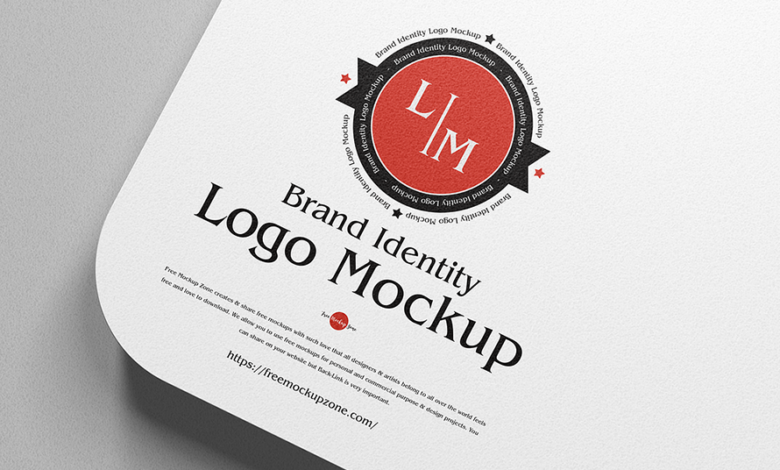
- Branding Mockups: These display branding elements like logos, stationery, and packaging on realistic products. Examples include mockups showcasing a logo on a t-shirt, business cards, or coffee cups. These help clients visualize their brand identity across various applications.
- Packaging Mockups: These show how a product’s packaging will look, considering dimensions, design elements, and overall aesthetics. They’re particularly useful for presenting product packaging designs to manufacturers or clients.
- Print Mockups: These illustrate how designs will appear on printed materials like brochures, flyers, posters, and magazines. They offer a realistic preview of the final printed product, allowing for adjustments before printing.
Examples of Mockup Usage in Design Projects
The application of mockups varies greatly depending on the project. A simple brochure design might only require a print mockup, while a complex e-commerce website would need website and potentially branding mockups.
- A new mobile game app: A designer would use mobile app mockups to illustrate the user interface, game screens, and in-app purchase flows to investors and potential publishers. This helps them understand the user experience and the overall app concept.
- A rebranding effort for a coffee shop: A designer would utilize branding mockups to showcase the new logo on coffee cups, bags, and other merchandise, providing a clear visual representation of the rebranding initiative to the coffee shop owner.
- A marketing campaign for a new product: The designer would use print mockups (for flyers and posters) and website mockups (for the campaign landing page) to demonstrate the cohesive marketing strategy and the visual consistency across different media.
Advantages and Disadvantages of Free Mockups
Free mockups offer a compelling alternative to paid options, but it’s important to weigh the pros and cons.
- Advantages: Accessibility, cost-effectiveness, variety of styles and designs readily available. They’re perfect for experimentation and quick prototyping.
- Disadvantages: Limited customization options, potential for lower quality or resolution, possible licensing restrictions that need careful review. The lack of unique designs might make your presentation less distinctive compared to using custom or paid mockups.
Sample Webpage Design Using Free Mockups and Icons
Let’s imagine designing a simple landing page for a fictional yoga studio. I would start by selecting a free website mockup that showcases a clean and minimalist design. This mockup would provide the basic structure of the page, including sections for hero image, about us, class schedule, and contact information. Then, I’d incorporate free icons to visually represent yoga poses, location, and contact details.
The color scheme would be calming and earthy, using pastel shades of green and beige. The hero image would be a high-quality photo of people practicing yoga in a serene setting. The typography would be clean and easy to read, using a sans-serif font for headings and a serif font for body text. This process allows for a professional-looking landing page to be created quickly and cost-effectively using readily available free resources.
The overall design aims to convey a sense of tranquility and well-being, consistent with the brand identity of a yoga studio.
Quality and Licensing of Free Templates
Navigating the world of free design templates can be a treasure hunt, but it’s crucial to understand the licensing and quality aspects to avoid potential pitfalls. Using free resources can significantly reduce design costs, but overlooking licensing can lead to legal issues, and poor quality templates can hinder your project’s success. This section will guide you through evaluating both the quality and the legal aspects of free design templates.
Free design templates often come with various licensing terms, impacting how you can use them. Understanding these licenses is paramount to avoid copyright infringement. Common licenses include Creative Commons (CC) licenses with different levels of permissiveness (e.g., CC0, which allows for almost any use, or CC BY, requiring attribution to the original creator), and proprietary licenses that might have specific restrictions on commercial use or modification.
Common Licensing Terms for Free Design Templates
Free design templates typically fall under different licensing schemes. Understanding these licenses is crucial for legal and ethical use. A common type is the Creative Commons license, offering varying degrees of freedom. For example, a CC0 license grants the public the right to use, adapt, and distribute the work without any restrictions, while a CC BY license requires attribution to the original creator.
Other licenses might restrict commercial use or modification. Always check the license details before using any free template. Ignoring these terms can lead to legal repercussions, including copyright infringement lawsuits. Always prioritize templates with clearly stated and easily understandable licenses.
Potential Risks of Unclear or Restrictive Licenses
Using templates with unclear or restrictive licenses poses significant risks. Ambiguity can lead to unintentional copyright infringement, potentially resulting in legal action from the copyright holder. Restrictive licenses might limit your ability to use the template for commercial purposes or modify it to fit your specific needs, thus restricting your creative freedom and potentially requiring you to start from scratch.
This can be particularly problematic if you’ve already invested significant time and resources into adapting the template for your project. It’s always safer to err on the caution side and choose templates with clear and permissive licenses.
Evaluating the Quality and Usability of Free Templates
Before downloading a free template, carefully assess its quality and usability. Check for high-resolution images and well-structured layers in vector-based templates (like those using AI or SVG). Pixelated images or poorly organized layers can indicate low quality. Test the template’s functionality; ensure all elements work as expected and that the design is responsive across different devices. Read user reviews to gauge the template’s overall performance and potential issues.
Consider the template’s design aesthetics and whether it aligns with your brand’s visual identity.
Comparison of Free Template Providers
Several websites offer free design templates, each with its strengths and limitations. Direct comparison helps in selecting the most suitable platform for your needs.
- Provider A: Offers a wide variety of templates but may have a less user-friendly interface and inconsistent quality across templates. Licensing is generally clearly stated.
- Provider B: Provides high-quality templates with a focus on specific niches, but the selection might be limited. Licensing information is consistently clear and easy to find.
- Provider C: Boasts a large community and regular updates, but some templates may have restrictive licenses or require attribution. Quality varies.
Effective Use of Free Icons
Source: graphicsfamily.com
Free icons are a powerful tool for designers, offering a visually appealing and efficient way to communicate information and enhance user experience. Choosing the right style and integrating them thoughtfully can significantly impact the overall design aesthetic and usability of a website or application. This section explores the effective use of free icons, focusing on style choices, integration techniques, and showcasing successful examples.
Icon Styles and Their Impact on Design
Different icon styles evoke different feelings and suit various design aesthetics. Line icons, with their minimalist approach, often create a clean and modern feel, working well in contexts where simplicity and clarity are paramount. Filled icons, on the other hand, offer a bolder presence and can be more easily recognizable at smaller sizes. They are well-suited for applications requiring a more playful or attention-grabbing aesthetic.
Flat icons, characterized by their two-dimensional nature and lack of gradients or shadows, provide a contemporary and consistent look, often aligning well with flat design principles. The choice of icon style should always be aligned with the overall branding and design language of the project. For example, a corporate website might opt for sleek line icons, while a children’s app might utilize bright, filled icons.
Incorporating Free Icons into Website and App Design, Free design mockups templates icons
Successful icon integration involves careful consideration of several factors. Firstly, consistency is key. Maintain a unified style across all icons used, whether they are line, filled, or flat. Secondly, ensure appropriate sizing and spacing. Icons should be neither too small to be easily discernible nor too large to overwhelm the surrounding content.
Consistent spacing between icons and other elements creates visual harmony. Thirdly, context is crucial. The meaning of an icon should be immediately clear within its context. Poorly chosen or ambiguous icons can confuse users. Finally, accessibility is vital.
Ensure sufficient color contrast between the icon and its background, and consider providing alternative text for screen readers to enhance accessibility for users with visual impairments.
Examples of Successful Icon Usage
Many popular websites and apps effectively leverage free icons. For instance, consider the minimalist line icons often used in navigation menus on numerous websites. These icons, usually representing common actions like home, search, or profile, provide a clear and concise visual cue for users, improving navigation efficiency without overwhelming the design. Alternatively, apps like Slack utilize a diverse range of filled icons to represent various functions and features, making the interface visually engaging and easy to understand.
The selection of icon styles in these examples is directly related to the overall design language and the target audience.
Visual Representation of Webpage Section Using Free Icons
Imagine a webpage section promoting a travel blog. The section features three distinct destinations: Paris, Tokyo, and New York. We’ll use a combination of icon styles to illustrate this. A simple, filled icon representing the Eiffel Tower (Paris) could be placed prominently to the left, perhaps slightly larger than the other icons, establishing a visual hierarchy. Next, a line icon depicting Mount Fuji (Tokyo) and a flat icon of the Statue of Liberty (New York) could be placed to the right, smaller in size, but still clearly visible.
The visual hierarchy emphasizes Paris as the primary focus, while still providing clear visual cues for the other destinations. The selection process involved choosing icons that are instantly recognizable and visually consistent with the overall website’s clean and modern aesthetic. The icons’ role is to enhance user experience by quickly conveying information about the blog’s featured destinations, improving engagement and scannability.
Color contrast is ensured by using a consistent color palette for all icons against the background.
Finding and Utilizing Free Resources
Source: graphicdesignjunction.com
Scoping out and effectively using free design resources can significantly boost your project’s efficiency and visual appeal without breaking the bank. Knowing where to look and how to leverage these assets is key to maximizing their potential. This section will guide you through the process of finding, downloading, and customizing free mockups, templates, and icons.Finding high-quality free design resources requires a strategic approach.
While many websites offer freebies, the quality and licensing can vary widely. Prioritizing reputable sources ensures you’re working with legally sound and visually appealing assets. Efficient searching is equally important, as sifting through vast collections can be time-consuming. By employing smart search strategies and filtering techniques, you can streamline your workflow and quickly locate exactly what you need.
Reliable Sources for Free Design Resources
Several websites consistently deliver high-quality free design mockups, templates, and icons. These platforms often have robust search functions and user-friendly interfaces, making it easier to find the perfect asset. Regularly checking these sites for updates is also a good practice, as new resources are frequently added.
- Freepik: Freepik offers a vast library of free vectors, photos, PSD files, and more, with a user-friendly interface and robust search capabilities.
- Vecteezy: Similar to Freepik, Vecteezy provides a large selection of free vector graphics, illustrations, and mockups, with clear licensing information.
- Pexels: While primarily known for free stock photos, Pexels also hosts some free design resources, including mockups and illustrations.
- Canva: Canva offers a mix of free and paid templates and design elements. Their free options are often sufficient for many projects.
- Creative Market (Freebies): While Creative Market mainly focuses on paid assets, they regularly offer free resources, often of exceptional quality.
Efficient Search and Filtering Strategies
Searching effectively within these platforms is crucial to save time. Using specific s, combining terms, and employing advanced filters will dramatically narrow your search results. For example, instead of searching for just “mockup,” try “phone mockup, iPhone 13, free,” to obtain more precise results.
- Combinations: Combine specific s to refine your search (e.g., “free psd mockup t-shirt”).
- File Type Filters: Filter by file type (e.g., PSD, AI, SVG, PNG) to ensure compatibility with your design software.
- License Filters: Always check the license to confirm the asset’s usage rights (commercial vs. non-commercial).
- Color Filters: Some platforms allow filtering by color, helping you find assets that match your brand’s palette.
- Sorting Options: Utilize sorting options (e.g., popularity, newest, rating) to prioritize high-quality or recently added resources.
Downloading, Integrating, and Customizing Free Resources
Once you’ve found suitable assets, downloading and integrating them into your project is straightforward. Remember to always review the license before use and properly attribute the creator if required.
- Download: Download the chosen resource in the appropriate file format. Pay attention to file size and resolution.
- Open in Design Software: Open the downloaded file in your preferred design software (e.g., Adobe Photoshop, Illustrator, Figma).
- Integration: Place the asset into your project. For mockups, replace the placeholder images or text with your own content.
- Customization: Adjust colors, fonts, and other elements to match your brand’s style and project requirements. This might involve using layers, adjustment layers, or other design tools.
- Save and Export: Save your project and export the final design in the desired format and resolution.
Ending Remarks
So, there you have it! Unlocking the potential of free design mockups, templates, and icons is entirely possible with a little know-how. Remember to always check licensing, prioritize quality over quantity, and let your creativity shine. By combining smart searching with a discerning eye, you can create stunning designs without spending a fortune. Happy designing!
Key Questions Answered
What are the best websites to find free design resources?
Many sites offer free resources, but quality varies. Explore sites like Freepik, Pixabay, and Vecteezy, but always double-check licenses.
How do I avoid copyright issues when using free resources?
Always read the license agreement! Some resources are only for personal use, others require attribution. Ignoring these terms can lead to legal trouble.
What file formats should I look for?
Vector formats like SVG and AI are generally best because they scale without losing quality. For images, PNGs are a good choice.
Can I use free mockups for commercial projects?
It depends on the license! Some licenses allow commercial use, while others restrict it. Always check before using them in a commercial project.