
The selection of interface icons is a critical aspect of web design that directly dictates user navigation, accessibility, and overall site usability. Recent empirical research from the Nielsen Norman Group (NN/g) has shed light on the efficacy of various visual markers used for accordion components, revealing that design choices—often made for aesthetic reasons—can inadvertently hinder user interaction. By analyzing user behavior patterns, designers can move toward more predictable, efficient, and user-centric navigation systems that prioritize clarity over ornamentation.

The Anatomy of Accordion Design and User Expectation
An accordion component is a vertically stacked list of headers that, when interacted with, expand or collapse to reveal or hide associated content. Because these elements are ubiquitous in modern web interfaces, they serve as foundational pillars for site architecture. However, the inconsistency in how these components are labeled has created a fragmented experience for the average user.
Historically, designers have experimented with a variety of symbols to denote the presence of hidden content, ranging from standard plus signs (+) and arrows to more abstract geometric shapes. Research indicates that when no icon is present, users overwhelmingly interpret the menu item as a direct hyperlink to a new page. When custom or non-standard icons are introduced, users often hesitate, unsure of whether the interaction will trigger a page load or an in-page expansion. This ambiguity stems from a lack of standard mental models regarding digital iconography.

Chronology of Iconography Trends
The evolution of web navigation has seen a shift from text-only lists to heavily icon-reliant interfaces. In the early 2010s, the rise of mobile-first design prompted a reliance on symbols to save screen real estate. During this period, the "plus" sign became the standard for "adding" or "expanding" content, while arrows were frequently used to denote navigation or "sliding" to a new page.
By the mid-2010s, as mobile navigation became more complex, designers began using "split menus," which attempted to perform two tasks at once: the text label would link to a category page, while a secondary icon would expand the sub-menu. Usability testing conducted throughout the last five years has confirmed that this pattern is fundamentally flawed. Users frequently fail to distinguish between the two touch targets, leading to unintended navigation events and frustration. Consequently, the industry is currently trending back toward simplicity, favoring the "caret" as the most reliable indicator of an accordion-style interaction.

Empirical Findings on Icon Performance
The NN/g study, which involved extensive eye-tracking and interaction analysis, provides quantitative evidence regarding the reliability of specific icons. Data indicates that participants were significantly more likely to click the icon specifically when a caret was present, compared to other symbols.
- The Caret (Downward Triangle): Currently holds the highest success rate for signaling expansion. It is rarely misinterpreted as a page navigation tool, making it the most "honest" icon for accordions.
- The Plus/Minus Pair: While well-understood, these are prone to "semantic overloading." A plus sign can mean "add to cart," "zoom in," or "increase quantity," which introduces cognitive load in complex e-commerce environments.
- Arrows: The use of right-facing or down-facing arrows is particularly problematic. Arrows have historically signaled directional movement—often implying a page transition. Using an arrow for an accordion frequently results in users expecting a page refresh that does not occur, leading to a breakdown in the user’s mental model of the site’s architecture.
The Pitfalls of Split-Button Navigation
One of the most persistent issues in current web architecture is the implementation of the split-button pattern. This design, intended to provide maximum utility, often results in the worst user experience. When a single component is split—with the text label serving as a navigation link and an icon serving as an expansion toggle—the hit area for each action is often too small for mobile users.

Data shows that users do not differentiate between the label and the icon in terms of interaction. When a user clicks a label intending to expand a menu but is instead whisked away to a landing page, the result is a "navigation error." This forces the user to navigate backward, increasing the bounce rate and lowering task completion efficiency. Major international brands, such as DHL, have moved toward a more consolidated approach: the primary header opens the accordion, and the "overview" or "landing" page link is housed within the expanded list. This strategy minimizes accidental clicks and provides a consistent experience.
Standardizing for Accessibility and Clarity
For designers and developers, the path forward involves adopting a "less is more" philosophy. The following guidelines are derived from recent usability audits:

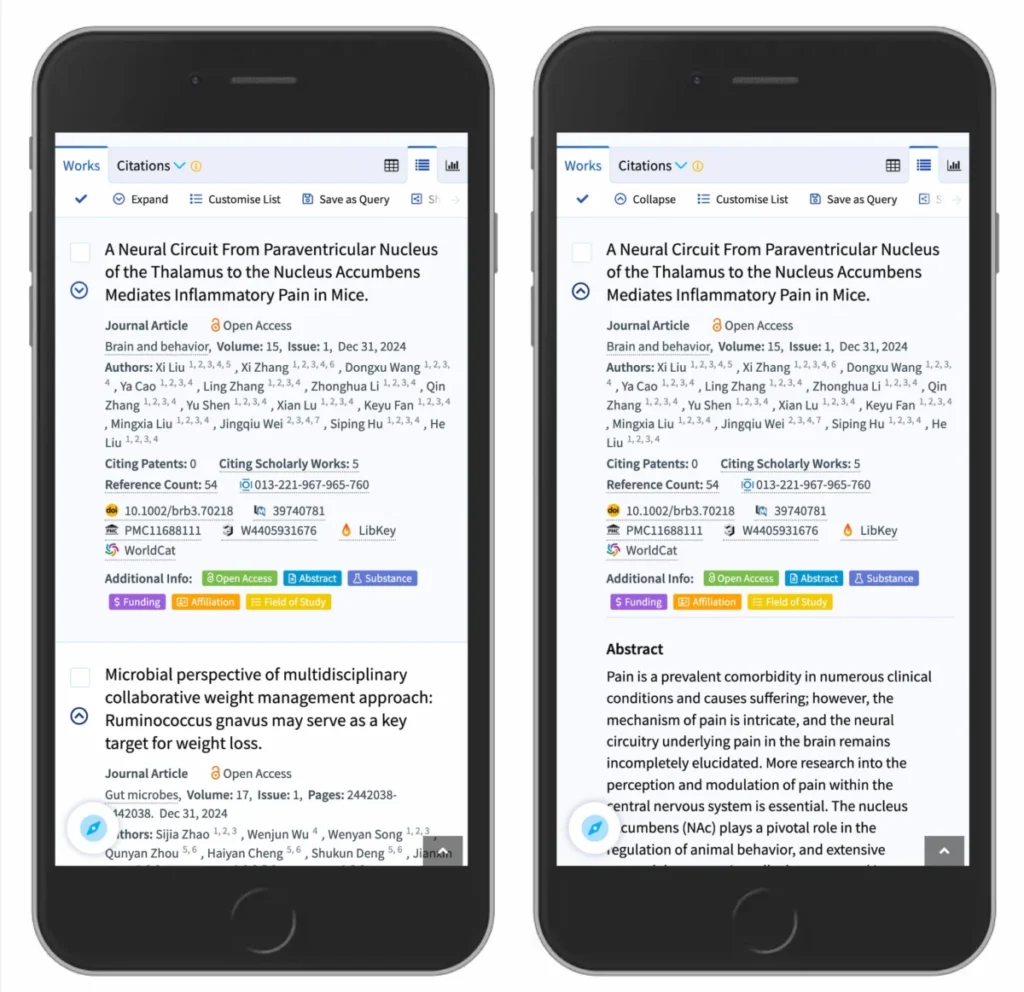
- Prioritize the Caret: Use a downward-facing caret for collapsed states and an upward-facing caret for expanded states. This is the most widely recognized convention for accordion behavior.
- Abandon Ambiguity: If an item is meant to be a link to a separate page, use standard link styling—specifically, an underline or a clear, contrasting color. Do not use icons like arrows or chevrons next to text that acts as a navigation link, as these confuse the user’s expectation of interaction.
- Avoid Split-Menus: Do not force users to choose between expanding a menu and navigating to a page via a single, multi-functional button. If a category needs a landing page, include that page as the first item inside the expanded accordion list.
- Consider Mobile Hit Zones: Ensure that the interaction area for the accordion is large enough to be tapped reliably. The icon is not just a visual signal; it is an active component of the interface’s touch surface.
Broader Implications for Web Architecture
The implications of these findings extend beyond simple aesthetic choices. In an era where web traffic is predominantly mobile, the efficiency of navigation dictates the commercial success of a site. E-commerce platforms, in particular, suffer when users cannot easily locate product categories due to confusing accordion interactions.
Furthermore, these findings align with broader web accessibility standards (WCAG). Clear, predictable interactions reduce the need for visual searching and cognitive processing, which is essential for users with motor impairments or cognitive disabilities. When icons follow established conventions, the barrier to entry for new users is lowered, and the overall "findability" of content is increased.

Official Perspectives and Industry Consensus
Industry experts and organizations like Smashing Magazine have long advocated for the democratization of design knowledge. The shift away from over-complicated, "clever" iconography toward standardized, functional symbols represents a maturation of the digital design field. By focusing on the "language" of the web, developers can create environments that feel intuitive rather than challenging.
The move toward standardized symbols like the caret is not an admission of a lack of creativity; rather, it is a professional acknowledgment that the user’s time and attention are the most valuable assets in the digital economy. Designers who prioritize the user’s mental model over personal stylistic preference are seeing higher engagement rates and fewer user complaints regarding navigation difficulties.

Conclusion
The research is clear: the most effective accordion icons are those that remain invisible to the user’s conscious thought process because they behave exactly as expected. By reserving arrows for navigation, using underlines for hyperlinks, and adopting the caret for in-page expansion, developers can eliminate the confusion that plagues modern web interfaces. As the web continues to grow in complexity, the importance of these foundational UI elements will only increase, making it vital for designers to adhere to evidence-based practices that prioritize clarity, accessibility, and functional consistency. The goal of any interface should be to facilitate the user’s journey, not to add hurdles to it. Through simple, deliberate design choices, the digital landscape can become a more efficient and user-friendly environment for everyone.