Get Ad Designs Approved Faster
Get ad designs approved faster? It’s the dream of every designer and marketer! We all know that agonizing wait for feedback, the back-and-forth revisions, and the pressure to meet deadlines. This post dives deep into strategies to streamline the entire ad design approval process, from understanding typical workflows to leveraging technology and building stronger client relationships. Get ready to say goodbye to those endless approval cycles and hello to faster turnaround times!
We’ll explore proven techniques to improve communication, optimize your designs for approval, and even choose the right project management tools. Think clearer briefs, more effective visual presentations, and a proactive approach to client management. By the end, you’ll have a toolbox of actionable tips to dramatically reduce your approval time, leaving you more time to create amazing ads!
Understanding Ad Design Approval Processes: Get Ad Designs Approved Faster

Source: adpushup.com
Getting your ad designs approved quickly is crucial for timely campaigns and maximizing impact. A well-defined approval process streamlines the workflow, minimizing delays and ensuring everyone is on the same page. Understanding the different stages and methods is key to optimizing this process.
Typical Stages of Ad Design Approval
The typical ad design approval process involves several key stages. First, the design is created and internally reviewed by the designer or design team. This often involves self-checking for errors and ensuring the design meets initial briefs. Next, the design is submitted to a designated approver, often a team lead or senior designer. This person checks for adherence to brand guidelines, overall quality, and creative effectiveness.
Following this, the design might undergo review by a wider team, possibly including marketing managers, account managers, or even legal and compliance personnel, depending on the complexity and scope of the campaign. Finally, once all approvals are secured, the design is released for production or deployment.
Comparison of Approval Workflows
Several workflows exist for managing ad design approvals. A simple linear workflow involves sequential approval from one person to the next. This is straightforward but can be slow if one approver is delayed. A parallel workflow allows simultaneous review by multiple parties, accelerating the process but potentially leading to conflicting feedback. A hybrid approach combines aspects of both, allowing for initial parallel review by key stakeholders followed by final approval from a single authority.
The linear workflow is best for smaller teams or simpler designs; the parallel workflow is suited to larger teams and complex projects requiring multiple perspectives. The hybrid model offers a balance between speed and control.
Streamlined Approval Process Flowchart
Imagine a flowchart. It begins with “Design Submission.” An arrow points to “Internal Review (Designer).” Another arrow from “Internal Review” leads to “Team Lead/Senior Designer Review.” If approved, an arrow leads to “Client/Stakeholder Review (if applicable).” If approved, an arrow leads to “Final Approval (Marketing Manager).” Finally, an arrow points to “Production/Deployment.” If rejected at any stage, the arrow loops back to the previous stage for revisions.
This visual representation clearly Artikels the steps involved and responsible parties, promoting transparency and accountability.
Comparison of Approval Methods
| Method | Time to Approval (Estimate) | Advantages | Disadvantages |
|---|---|---|---|
| Linear Workflow | 2-5 days | Simple, clear accountability | Slow, potential bottlenecks |
| Parallel Workflow | 1-3 days | Fast, multiple perspectives | Potential for conflicting feedback, requires strong communication |
| Hybrid Workflow | 1-4 days | Balances speed and control, efficient use of resources | Requires careful planning and coordination |
Improving Ad Design Communication
Getting your ad designs approved quickly hinges on clear and effective communication. A well-crafted message, delivered using the right methods, can significantly reduce the back-and-forth and delays that often plague the approval process. This means understanding your stakeholders’ needs and presenting your designs in a way that resonates with them.Effective communication starts long before the presentation. It begins with a comprehensive design brief.
A poorly defined brief is a recipe for disaster, leading to multiple revisions and frustrated stakeholders. By meticulously outlining the project’s goals, target audience, and key messaging, you set a solid foundation for a successful design process.
Clear and Concise Design Briefs
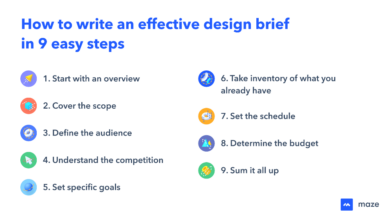
A well-structured design brief should include: Project Overview (a concise description of the campaign and its objectives), Target Audience (detailed demographics and psychographics), Key Messaging (the core message to be conveyed), Brand Guidelines (logo usage, color palettes, typography), Design Specifications (dimensions, file formats), Timeline (key deadlines and milestones), and Approval Process (who needs to approve and how). For example, a brief for a social media ad campaign might specify the platform (Instagram), target audience (young adults interested in sustainable fashion), key message (“Eco-friendly fashion that doesn’t compromise style”), and required dimensions (1080 x 1080 pixels).
Utilizing Visual Aids for Effective Presentations
Visual aids are crucial for conveying design ideas effectively. Instead of just presenting the final design, walk stakeholders through the design process. A presentation could start with mood boards showing the inspiration behind the design, followed by wireframes illustrating the layout and information architecture. Then, present various design iterations, highlighting the rationale behind specific choices. Finally, show the final design alongside key metrics, such as click-through rates or conversion rates from similar past campaigns (if available).
This structured approach transforms a simple design reveal into a compelling narrative that fosters understanding and buy-in. Imagine a slide showing three different color palettes, each with a brief explanation of its intended emotional impact. Another slide could show A/B tested headlines with the corresponding click-through rates, illustrating the impact of copywriting on campaign performance.
Overcoming Communication Barriers, Get ad designs approved faster
Several factors can hinder effective communication. One common barrier is jargon. Designers often use technical terms that stakeholders may not understand. To address this, use clear, plain language, avoiding industry-specific jargon. Another barrier is differing perspectives.
Designers and stakeholders might have different interpretations of the brief or design goals. To overcome this, actively seek feedback and clarification throughout the process. Schedule regular check-ins to address concerns and ensure everyone is on the same page. Finally, a lack of context can lead to misunderstandings. Ensure that the presentation clearly explains the design’s purpose and how it aligns with the overall marketing strategy.
This could involve showing the ad within the context of a broader marketing campaign, showcasing its role in the overall customer journey.
Optimizing Ad Designs for Faster Approval
Getting your ad designs approved quickly is crucial for timely campaigns and maximizing your marketing ROI. A streamlined approval process means less wasted time and more opportunities to reach your target audience. This section focuses on strategies to optimize your designs for faster approval, minimizing revisions and delays.
Common Reasons for Ad Design Rejection and Solutions
Understanding why ad designs get rejected is the first step towards optimization. Common reasons include violations of platform advertising policies (size, format, content restrictions), poor design quality (low resolution, illegible text, inconsistent branding), and a lack of clarity in the message. Let’s address these individually. Addressing platform policy violations requires careful pre-submission review against the specific platform’s guidelines.
For example, Facebook has strict rules on text-to-image ratios; ensuring your design adheres to these is paramount. Poor design quality can be tackled by investing in high-resolution assets, using clear and legible fonts, and maintaining a consistent brand identity across all designs. Finally, a lack of clarity can be overcome by focusing on a single, strong call to action and ensuring the overall message is concise and easy to understand.
Thorough proofreading and testing before submission are also key.
Incorporating Client Feedback Effectively into Ad Design Revisions
Client feedback is invaluable, but incorporating it efficiently is key to a smooth approval process. Begin by actively listening to and documenting all feedback. Categorize the feedback (e.g., major design changes, minor tweaks, content adjustments). Prioritize feedback based on impact and feasibility. Communicate clearly with the client about the changes you’re making and why, providing visual mockups of the revisions.
A collaborative approach, demonstrating that you understand their concerns and are addressing them effectively, often leads to faster approvals. For example, if a client requests a change in color scheme, provide them with several options to choose from, showcasing how each option impacts the overall design and message.
Ad Design Approval Checklist
A comprehensive checklist is an essential tool for ensuring all criteria are met before submission. This checklist should be tailored to the specific platform and client requirements, but should generally include:
- Ad Size and Format: Verify the dimensions and format strictly adhere to platform specifications.
- Image Resolution: Ensure all images are high-resolution and sharp.
- Text Legibility: Check font size, contrast, and readability across different devices.
- Brand Consistency: Confirm the design aligns with the brand’s guidelines (logo, colors, fonts).
- Call to Action (CTA): Ensure the CTA is clear, concise, and compelling.
- Platform Policies: Verify compliance with all relevant platform advertising policies (e.g., prohibited content, text-to-image ratios).
- Client Feedback: Confirm all necessary revisions based on client feedback have been implemented.
- Proofreading: Thoroughly check for any typos or grammatical errors.
Design Elements Causing Approval Delays and Suggested Improvements
| Design Element | Common Issue | Improvement Suggestion |
|---|---|---|
| Image Quality | Low resolution, blurry images | Use high-resolution images (at least 300 DPI) and optimize for web |
| Text Legibility | Small font size, poor contrast, illegible fonts | Use larger, easily readable fonts with sufficient contrast against the background |
| Color Palette | Inconsistent or inappropriate color usage | Adhere to brand guidelines or create a visually appealing and consistent color scheme |
| Layout and Composition | Cluttered design, unbalanced elements | Use a clean and balanced layout, guiding the viewer’s eye to the key message |
| Call to Action (CTA) | Weak or unclear CTA | Use a strong, concise, and visually prominent CTA button or text |
| Brand Consistency | Inconsistent logo usage, brand colors, or fonts | Maintain a consistent brand identity across all design elements |
Leveraging Technology for Streamlined Approvals
Source: semrush.com
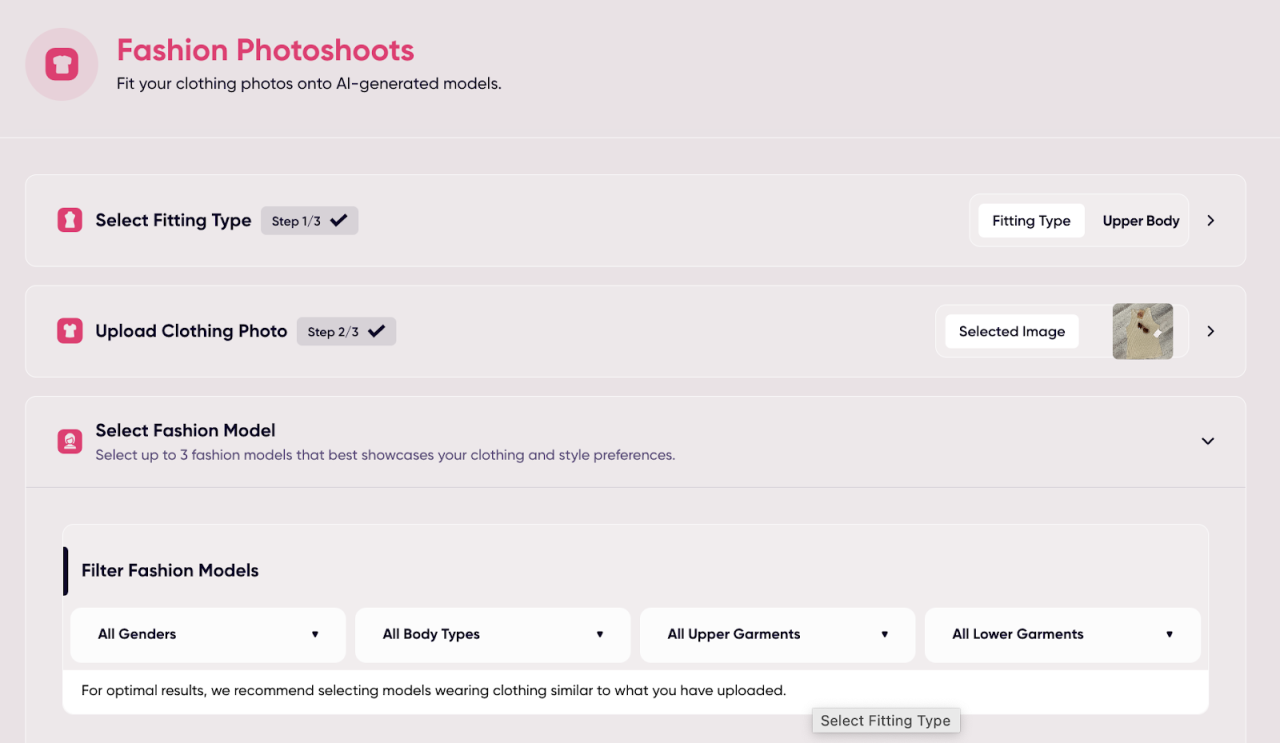
In today’s fast-paced advertising world, getting ad designs approved quickly is crucial. Manual processes and inefficient communication can lead to significant delays and missed opportunities. Fortunately, leveraging technology can dramatically streamline the approval process, saving time, reducing frustration, and ultimately boosting efficiency. This involves adopting tools and platforms designed to manage workflows, facilitate collaboration, and provide clear, concise feedback.Project management software provides a central hub for organizing, tracking, and managing the entire ad design approval workflow.
This centralized approach ensures everyone involved has access to the latest versions of designs, comments, and deadlines, eliminating the confusion and delays caused by scattered emails and files.
Project Management Software for Ad Design Approvals
Choosing the right project management tool is vital for optimizing your ad design workflow. Different platforms offer various features and functionalities, catering to diverse team sizes and project complexities. Consider factors like ease of use, integration with other design tools, and the level of customization offered. Popular options include Asana, Trello, Monday.com, and Wrike. Asana, for example, offers robust task management, customizable workflows, and excellent communication features, ideal for managing multiple ad campaigns simultaneously.
Trello’s Kanban-style boards provide a visual overview of the approval process, making it easy to track progress and identify bottlenecks. Monday.com allows for greater customization and automation, while Wrike offers advanced features for larger teams and complex projects. The choice ultimately depends on your team’s specific needs and preferences.
Digital Proofing and Annotation Tools for Faster Approvals
Digital proofing and annotation tools significantly accelerate the approval process by eliminating the need for physical printouts and manual markups. These tools allow reviewers to provide feedback directly on the design files, highlighting specific areas requiring changes and adding comments for clarification. For instance, a tool like Adobe Acrobat Pro allows for precise annotation and markup on PDF files, while Figma offers in-app commenting and version control directly within the design software.
This eliminates the back-and-forth email exchanges that often delay the approval process. Imagine the scenario: instead of printing a design, mailing it to a client, waiting for feedback, scanning it back, and then making changes, the entire process can be completed digitally within a fraction of the time. The clarity and precision of digital annotations also minimize misunderstandings and ensure everyone is on the same page.
Essential Features in a Collaborative Design Platform
A truly effective collaborative design platform will include a range of features designed to enhance the approval workflow. These features should work together seamlessly to create a streamlined and efficient process. Here’s a list of key features to look for:
- Version Control: Track all changes made to a design, allowing for easy rollback to previous versions if needed.
- Centralized Communication: A built-in communication system that keeps all feedback and discussions in one place.
- Real-time Collaboration: Multiple users can work on the same design simultaneously, speeding up the revision process.
- Automated Workflows: Automate tasks such as notifications, reminders, and approvals to reduce manual intervention.
- Customizable Approval Processes: Tailor the workflow to fit your specific needs and team structure.
- Integration with Other Tools: Seamless integration with other design and project management software.
- Secure File Sharing: Ensure the confidentiality and security of design files.
By incorporating these technological solutions into your ad design workflow, you can significantly reduce approval times, improve team communication, and ultimately achieve a more efficient and productive advertising process.
Building Strong Client Relationships for Faster Approvals
Smooth sailing through the ad design approval process isn’t just about creating killer visuals; it’s heavily reliant on a robust, collaborative relationship with your clients. A strong connection built on trust and clear communication significantly reduces the back-and-forth, leading to faster approvals and happier clients. This means proactively engaging them throughout the entire design journey, not just at the final presentation.Proactive communication is the cornerstone of a successful client relationship.
Regular updates, even if there’s nothing groundbreaking to report, keep the client in the loop and prevent misunderstandings. This might involve a quick email summarizing progress, a brief phone call to discuss a particular design element, or a shared online document tracking the project’s evolution. The key is to maintain consistent contact and keep the lines of communication open.
Managing Client Expectations and Setting Realistic Timelines
Setting clear expectations from the outset is crucial. This includes establishing a realistic timeline that accounts for potential delays and incorporates client feedback cycles. Providing a detailed project plan with milestones and deadlines ensures transparency and allows the client to understand the process involved. For example, clearly outlining the number of revisions included in the project scope and the turnaround time for each revision prevents later conflicts.
Always present a realistic timeline, avoiding overpromising and underdelivering. This builds trust and prevents frustration down the line.
Addressing Client Concerns and Resolving Conflicts Efficiently
Inevitably, disagreements or concerns may arise. Addressing these promptly and professionally is essential. Active listening is key—truly understanding the client’s perspective before offering solutions. If a conflict arises, focus on finding a mutually agreeable solution, perhaps by offering alternative design options or compromising on certain aspects. Maintain a calm and respectful tone, even when faced with challenging feedback.
Want to get your ad designs approved faster? A key factor is understanding YouTube’s ad specs, and that’s where knowing the ins and outs of YouTube advertising really helps. Check out this awesome guide on getting it on with YouTube to learn the platform’s best practices. By understanding their guidelines, you’ll create ads that meet their requirements, leading to quicker approvals and a smoother campaign launch.
Remember, the goal is a collaborative solution, not a win-lose scenario. Documenting all communication and agreed-upon changes helps avoid future misunderstandings.
Key Strategies for Fostering Positive Client Relationships
Building strong client relationships requires a proactive and thoughtful approach. Here are some key strategies:
- Establish clear communication channels: Decide on the preferred methods of communication (email, phone, project management software) and stick to them for consistency.
- Provide regular updates and progress reports: Keep clients informed about the project’s status, even if it’s just a brief update.
- Actively listen to and address client concerns: Show that you value their input and are willing to work with them to find solutions.
- Set clear expectations and realistic timelines: Avoid overpromising and underdelivering, ensuring transparency throughout the process.
- Be responsive and readily available: Respond to client inquiries and feedback promptly and professionally.
- Build rapport and trust: Create a personal connection with your clients through genuine interaction and understanding their needs.
- Document all communication and agreements: This helps avoid misunderstandings and ensures everyone is on the same page.
- Offer multiple design options: Presenting various options allows clients to actively participate in the creative process, fostering a sense of ownership.
- Go the extra mile: Small gestures, such as offering a complimentary revision or going above and beyond to meet a tight deadline, can significantly strengthen the relationship.
Final Conclusion
Ultimately, getting ad designs approved faster isn’t just about speed; it’s about efficiency and collaboration. By implementing the strategies Artikeld here – from understanding approval workflows and optimizing your designs to leveraging technology and nurturing strong client relationships – you can create a smoother, more productive process for everyone involved. So ditch the delays, embrace the improvements, and watch your approval times shrink! Happy designing!
Essential Questionnaire
What if my client keeps changing their mind?
Establish clear revisions limits upfront in your contract. Regular check-ins and setting realistic expectations can help manage these situations. Document all changes clearly.
How can I handle conflicting feedback from different stakeholders?
Designate a single point of contact for feedback to avoid confusion. Facilitate a discussion among stakeholders to reach a consensus before making revisions.
What are some free project management tools I can use?
Trello and Asana offer free plans with basic project management features, suitable for smaller teams or projects.
What if my design gets rejected repeatedly?
Analyze the feedback carefully. Are there consistent issues? Revisit the design brief and ensure you’re meeting all requirements. If needed, seek a second opinion from a colleague.