In the contemporary digital landscape, where the average human attention span is estimated to be less than nine seconds, the nuances of interface design have become the primary battleground for user retention. Microinteractions—those subtle, single-purpose animations or feedback loops embedded within digital products—have evolved from mere decorative flourishes into essential pillars of modern User Experience (UX) architecture. As digital transformation continues to accelerate across global industries, the strategic deployment of these elements serves as a critical differentiator for businesses aiming to reduce cognitive load and increase customer loyalty.
What Are Microinteractions?

At their core, microinteractions are the contained moments of dialogue between a user and a system. They are the granular building blocks that aggregate into a cohesive user journey. Whether it is the haptic feedback on a smartphone when a notification arrives, the subtle shift in a button’s state upon interaction, or the progress bar that provides transparency during a data-heavy task, these elements function as the "glue" of digital interaction.
The conceptual framework for these interactions was popularized by Dan Saffer in his seminal work, Microinteractions: Designing with Details. Saffer argued that the most successful products are those that prioritize the "little things," recognizing that users evaluate a digital service not by the sum of its complex features, but by the fluidity of their daily interactions with it.
The Anatomy of an Interaction

To effectively implement these features, designers must understand the four-part structure that governs them. First, the Trigger initiates the interaction; this can be explicit, such as a user clicking a call-to-action button, or implicit, such as a system-triggered modal appearing based on exit-intent data. Second, the Rules define the logic of the interaction—the "if-this-then-that" programming that dictates how the system should respond. Third, the Feedback serves as the vital communication channel, providing the user with visual, auditory, or tactile confirmation that their action has been registered. Finally, Loops and Modes manage the temporal aspect of the experience, defining how long an animation persists or how the interface behaves during distinct states, such as a toggle between dark and light modes.
Why Microinteractions Drive Business Value
The importance of these design elements extends beyond aesthetic satisfaction; they represent a significant economic lever for companies. Data from recent usability studies suggest that applications utilizing intuitive micro-feedback loops experience a 15% to 20% increase in task completion rates. By minimizing ambiguity, these interactions reduce the frustration that often leads to churn. When a user enters a password incorrectly and the text field shakes—a common microinteraction—it provides immediate, non-verbal feedback that prevents the user from wondering if the system has frozen or if the input was simply ignored.
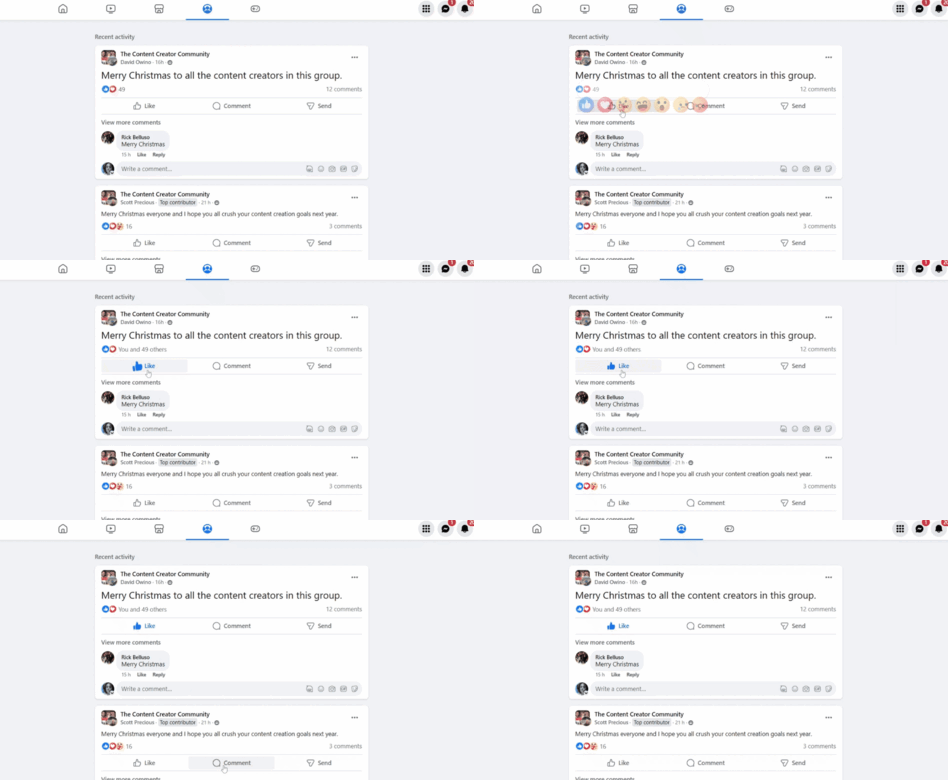
Chronology of UX Evolution
The rise of microinteractions is intrinsically linked to the transition from desktop-centric computing to the mobile-first era. In the early 2000s, digital interfaces were often static and text-heavy. However, the introduction of gesture-based navigation on mobile devices necessitated a new language of interaction. Designers had to account for "touch" as a primary input, leading to the development of animations that signaled successful gestures—the "pull-to-refresh" animation is perhaps the most iconic example of a functional microinteraction that changed how users engage with data feeds.
By 2015, the industry saw a widespread shift toward "Material Design," a design language pioneered by Google that emphasized the physical properties of light and motion. This period marked the professionalization of microinteractions, moving them from optional "delighters" to mandatory components of a professional, accessible, and responsive user interface.

7 Best Practices for Implementation
Achieving the right balance requires a disciplined approach to design and development. Organizations looking to refine their digital products should adhere to the following seven best practices:
- Prioritize Intentional Purpose: Every microinteraction must solve a specific problem. Avoid "animation bloat," where excess movement distracts the user from the primary goal. Each element should be utilitarian first and delightful second.
- Maintain User-Centered Design: Before implementation, teams must develop detailed user personas. A microinteraction that appeals to a Gen Z audience on a social media app may be entirely inappropriate for a legacy enterprise accounting platform. Research must dictate the tone and frequency of these elements.
- Establish Design Consistency: Maintain a unified visual language. If a "success" state in one part of your app uses a green checkmark animation, do not use a different color or motion for the same state elsewhere. Consistency builds the user’s mental model of how the system functions.
- Embrace Simplicity: The prefix "micro" is intentional. These interactions should be short, snappy, and barely noticeable to the conscious mind. If a user spends more than a fraction of a second processing the animation, it is likely too long or too complex.
- Ensure Accessibility Standards: The web must be inclusive. Designers must ensure that all animations have corresponding ARIA labels for screen readers and that motion-sensitive users have the option to disable animations. Contrast and clarity must never be sacrificed for the sake of flair.
- Optimize for Performance: Excessive use of JavaScript or heavy graphical assets can significantly increase page load times, which directly correlates to bounce rates. Optimization is not just a technical requirement but a business necessity.
- Conduct Rigorous Usability Testing: Quantitative data should be supplemented with qualitative feedback. Usability testing platforms allow designers to observe where users encounter friction. If a microinteraction is confusing rather than clarifying, it must be iterated upon or removed entirely.
Case Studies in Successful Application

Several industry leaders have set the standard for the effective use of microinteractions. Pinterest utilizes a sophisticated "Save" button transition that instantly confirms the user’s action, providing a sense of completion without interrupting the browsing experience. Reddit’s use of scroll-triggered animations in its "Recap" features demonstrates how motion can guide a user through a narrative, increasing time-on-page metrics. Similarly, Canva’s use of hover-based tooltips and loading animations helps users navigate complex design software without feeling overwhelmed by the sheer number of available tools.
Broader Implications for the Future of UX
As we look toward the future, the integration of microinteractions will likely intersect with advancements in Artificial Intelligence and voice-user interfaces (VUI). We are already seeing the emergence of "conversational microinteractions"—subtle feedback, such as a pulsating light or a nuanced audio tone, that acknowledges when a smart speaker is listening or processing a query.

The implication for developers and businesses is clear: the digital experience is no longer about the big, marquee features alone. It is about the thousands of microscopic connections that occur between the user and the software every day. By mastering these small details, companies can foster a sense of responsiveness and reliability that translates into long-term user trust.
In conclusion, the efficacy of a digital product is determined by its ability to facilitate communication between the human user and the digital system. Microinteractions act as the silent ambassadors of this communication. By adhering to a strategy of purpose, simplicity, and accessibility, designers can transform functional interfaces into intuitive, human-centric experiences that stand out in an increasingly crowded marketplace. The success of a product is found in the details; those who invest in these subtle elements today are building the foundation for the user experience of tomorrow.