
The landscape of web development has long grappled with the intricate balance between dynamic user interfaces and efficient code. For years, achieving common visual effects, such as a staggered cascade animation or an adaptive grid, often necessitated convoluted CSS rules or the intervention of JavaScript. This challenge is now being fundamentally addressed with the introduction of two powerful new CSS functions: sibling-index() and sibling-count(). These additions, part of the CSS Values and Units Module Level 5 specification, promise to streamline development workflows, enhance performance, and unlock new possibilities for purely declarative layouts.
The Pre-Existing Challenge: A History of Workarounds
Before the advent of these new functions, front-end developers frequently encountered a recurring dilemma when attempting to apply styles based on an element’s position among its siblings. A classic example is the staggered fade-in effect for a grid of cards. While visually appealing and seemingly straightforward, its implementation was anything but.
Traditionally, developers had two primary, often frustrating, approaches:
-
Proliferation of
:nth-child()Rules: This method involved writing a distinct:nth-child()rule for each item in a list, hardcoding a custom property (like--idx) to represent its position. For a list of 10 items, this meant 10 individual CSS rules. As the number of items grew to 50, 100, or even more, this approach became unsustainable, leading to bloated stylesheets and significant maintenance overhead. If the list length changed, the CSS often needed manual updates or complex pre-processor loops (e.g., Sass) generating hundreds of selectors at build time. While clever CSS hacks, like Roman Komarov’s O(√N) strategies, offered partial solutions for larger element counts, they still introduced complexity, generating a considerable number of rules (e.g., 63 rules to cover 1,023 elements). -
JavaScript for Dynamic Indexing: The alternative was to iterate through elements using JavaScript, dynamically injecting inline styles such as
style="--index: 3". While functional, this approach blurred the lines between presentation and behavior, scattering layout concerns across JavaScript files. It introduced a dependency where the CSS relied on a JavaScript-injected variable, a brittle connection prone to breaking silently during refactoring or when components were updated without full awareness of these interdependencies.
Both methods shared a fundamental flaw: they forced developers to explicitly "tell" the browser information it inherently possessed. The browser, in constructing the Document Object Model (DOM) tree, already knew the precise position of every element relative to its siblings. The limitation was that CSS, until now, lacked a direct mechanism to access this intrinsic data.
Introducing sibling-index() and sibling-count(): A Paradigm Shift
The new sibling-index() and sibling-count() functions directly address this long-standing gap. They empower CSS to query the DOM tree for an element’s position among its siblings and the total number of its siblings, respectively, without any JavaScript intervention or a barrage of :nth-child() selectors.
sibling-index(): This function returns an integer representing the 1-based index of the current element among its siblings. For instance, the first sibling returns1, the second2, and so on.sibling-count(): This function returns an integer representing the total number of siblings the current element has within its parent.
The most compelling aspect of these functions is their simplicity and directness. A staggered animation delay, which previously required multiple lines of hardcoded CSS or JavaScript, can now be achieved with a single, declarative line:
li
  animation-delay: calc(sibling-index() * 100ms);
This single rule dynamically applies a staggered delay to any number of list items, whether it’s 5 or 5,000, adapting automatically as items are added or removed from the DOM. This shift represents a significant leap towards more maintainable, scalable, and performant CSS.
Unlike counter(), which returns a string and is primarily used with the content property for pseudo-elements, sibling-index() and sibling-count() resolve to actual <integer> values. This critical distinction means they can be seamlessly integrated into calc(), min(), max(), round(), mod(), and even trigonometric functions like sin() and cos(). CSS handles the necessary type coercion, allowing for complex mathematical operations directly within stylesheets, producing valid <time>, <length>, or <angle> values without any hacks.
It’s crucial to differentiate these functions from :nth-child(). While :nth-child() is a selector used to target elements based on their position, it does not produce a calculable value. sibling-index() and sibling-count(), conversely, are value-producing functions that operate within declarations, providing numerical data for calculations. They solve a different problem, effectively relieving :nth-child() from a role it was never fully designed for.
Revolutionizing Web Design: Practical Applications
The immediate click that these functions provide raw integer values quickly sparks a cascade of innovative design possibilities. Their ability to dynamically adapt to content changes opens doors for a more declarative and robust web.
-
Dynamic Staggered Animations: Beyond basic fade-ins,
sibling-index()enables sophisticated animation sequences. A "reverse stagger," where the last item animates first, is easily implemented:
.card
  animation: fade-in 0.4s ease both;
  animation-delay: calc((sibling-count() - sibling-index()) * 80ms);
This ensures the animation begins instantly upon page load, rather than waiting for the first element’s delay, improving perceived performance.
-
Automatic Equal Widths for Flex Items: Manually calculating percentages for navigation tabs or grid items based on their count becomes obsolete:
.tab
  width: calc(100% / sibling-count());
With five tabs, each gets 20%; add a sixth, and they automatically become 16.66% each. This eliminates the need for media queries to handle varying item counts or JavaScript to adjust widths, though considerations for overly narrow tabs in extreme cases might still lead to Flexbox wrapping solutions.
-
Harmonious Hue Distribution: Designers can now effortlessly distribute colors across the HSL color wheel, ensuring visual balance regardless of the number of elements:
.swatch
  background-color: hsl(
    calc((360deg / sibling-count()) * sibling-index()) 70% 50%
  );
Three items receive hues 120° apart, while twelve items get 30° increments. This dynamic palette generation adapts to the DOM structure, a task previously requiring complex JavaScript color libraries.
-
Declarative Radial Layouts: Distributing items evenly in a circle, once a JavaScript-heavy trigonometric calculation, now collapses into pure CSS, especially when combined with native CSS
sin()andcos()functions:.radial-item --angle: calc((360deg / sibling-count()) * sibling-index()); --radius: 120px; position: absolute; left: calc(50% + var(--radius) * cos(var(--angle))); top: calc(50% + var(--radius) * sin(var(--angle))); transform: rotate(calc(var(--angle) * -1));Adding or removing items automatically recalculates the layout, forming perfect hexagons for six items or octagons for eight, without any JavaScript computing coordinates.
-
Elegant Z-Index Stacking: Creating a visually layered "card fan" effect becomes a single line of CSS:
.card
  z-index: calc(sibling-count() - sibling-index());
The first card stacks highest, while the last receives a
z-indexof 0, creating a natural visual hierarchy that adapts to content changes.
Standardization and Browser Adoption Timeline
The journey of sibling-index() and sibling-count() from proposal to implementation highlights the collaborative process of web standards. These functions are officially part of the CSS Values and Units Module Level 5 specification, specifically Section 9, which deals with "Tree-Counting Functions." The proposal gained significant traction and was ultimately approved via CSS Working Group (CSSWG) issue #4559 after extensive discussion and refinement among browser vendors and web development experts.
The first major browser to ship these functions in stable releases was Chrome/Edge 138 in June 2025. This was quickly followed by Safari 26.2, further solidifying their presence across a significant portion of the global browser market. Together, Chrome and Safari represent approximately 75-80% of global web traffic, making these functions immediately impactful for a vast user base.
Firefox’s development team has also expressed a positive stance on the specification, with Mozilla’s standards position documented on GitHub (issue #1194). Implementation work is actively underway, tracked under Bugzilla issue #1953973. While not yet stable, this commitment suggests full cross-browser support is on the horizon. Developers can monitor caniuse.com/wf-sibling-count for the latest compatibility information.
For immediate production use, a progressive enhancement strategy using @supports is recommended:
/* Baseline that works everywhere */
.item
  width: 25%; /* Default for, say, 4 items */
  animation-delay: 0ms;


/* Progressively enhance where supported */
@supports (z-index: sibling-index())
  .item
    width: calc(100% / sibling-count());
    animation-delay: calc(sibling-index() * 80ms);
This ensures a functional, albeit less dynamic, experience for browsers without native support (like current Firefox versions), while providing the full, enhanced experience where supported. The CSS community has also explored "polyfill-like" strategies using existing CSS techniques (such as Roman Komarov’s tree-counting hacks) as a bridge, rather than resorting to JavaScript, as detailed in resources like Juan Diego Rodríguez’s "How to Wait for the sibling-count() and sibling-index() Functions."
Navigating Implementation: Key Considerations and Gotchas
While powerful, these functions come with specific behaviors and edge cases that developers must understand to avoid unexpected results.

-
Shadow DOM Scoping: A crucial distinction lies in how
sibling-index()andsibling-count()interact with the Shadow DOM. They operate on the DOM tree, not the flattened visual tree. This means that within a Web Component’s Shadow DOM, these functions will only count elements that are direct children within that shadow tree. Projected Light DOM content (elements passed into<slot>) is ignored for counting purposes. For example, if a custom element’s shadow root contains<slot>and<div class="internal">, styling.internalwithsibling-index()will always return2, regardless of how many elements are projected into the slot. This behavior is deliberate and serves as a security measure, preventing external CSS from probing the internal structure of third-party components. -
Pseudo-Elements Don’t Count:
::beforeand::afterpseudo-elements are not considered real nodes in the DOM tree. Consequently, they do not contribute tosibling-count(), nor do they possess their ownsibling-index(). However, these functions can be used within pseudo-element declarations. Whensibling-index()is used inside#target::before ..., it evaluates the index of#targetitself, not the pseudo-element. This tracing back to the originating element also applies to::slotted(*)::before, which checks the slotted element’s index in the Light DOM. -
display: noneStill Counts: This is a common pitfall. Elements withdisplay: noneare visually removed from the layout tree and ignored by screen readers. However, they remain present in the DOM tree. Sincesibling-index()andsibling-count()read the DOM tree, hidden elements are still counted. An<li>withdisplay: nonewill still occupy its position in the count. This means that if a search filter hides non-matching items withdisplay: none, any staggered animations or radial layouts will develop visual "gaps," as visible items retain their original, non-sequential indexes. For layouts requiring continuous counting, such as radial menus or proportional widths, filtered nodes may need to be physically removed from the DOM, or JavaScript-managed indexes might still be necessary. Conversely,visibility: hiddenandopacity: 0elements also count, which is often more intuitive as they still occupy layout space. -
Custom Properties Evaluate Immediately: A subtle but important detail is how custom properties (CSS variables) interact with these functions. If a parent element declares
--idx: sibling-index();,--idxwill resolve to the parent’s sibling index at the point of declaration. All child elements inheriting this variable will then receive this single, fixed value, which is rarely the desired outcome. The solution is to declare the function directly on the elements that need its dynamic value:.child --idx: sibling-index(); animation-delay: calc(var(--idx) * 100ms);While discussions within the CSSWG have explored additions to
@property(likeinherits: declaration) to control evaluation timing, such features are still speculative and not available. For now, direct application remains the reliable approach.
Performance and Scalability
The performance implications of these new functions are generally positive. When the DOM changes (elements are added, removed, or reordered), the browser triggers a style recalculation for affected siblings. This process occurs during the cascade phase, before layout and paint, making it typically faster and more efficient than the old method of looping through elements in JavaScript and stamping inline styles, which can trigger multiple reflows.
However, these functions are not zero-cost. For extreme scenarios, such as inserting an element at the beginning of a container with 10,000 children, the engine must recalculate the sibling index for all subsequent 10,000 elements. While negligible for typical UI components like navigation menus, card grids, or tab bars, applications with highly dynamic, high-frequency DOM manipulations (e.g., live stock tickers, infinite-scroll feeds with thousands of constantly churning nodes) might still benefit from JavaScript-managed indexes within a virtualization window. Developers should consider the scale and frequency of DOM changes in such niche cases.
Ensuring Inclusive Experiences: Accessibility Notes
It is paramount to remember that sibling-index() and sibling-count() are purely visual tools. They influence how elements appear, but they do not alter their underlying semantic meaning or logical order in the DOM.
If these functions are used to visually reorder a list (e.g., via order in Flexbox or Grid placement), screen readers will still interpret the content in its original source order. Similarly, keyboard navigation (tab order) follows the DOM structure. A discrepancy between visual layout and semantic structure constitutes an accessibility failure, potentially disorienting users of assistive technologies.
For interactive components like data grids, radial menus, or custom listboxes that rely on tree-counting for their visual arrangement, JavaScript remains essential for synchronizing ARIA attributes. aria-posinset (the item’s position in a set) and aria-setsize (the total number of items in a set) must accurately reflect the user’s perceived order and count, not just the visual presentation. Without this synchronization, assistive technology users will receive an inconsistent or broken experience.
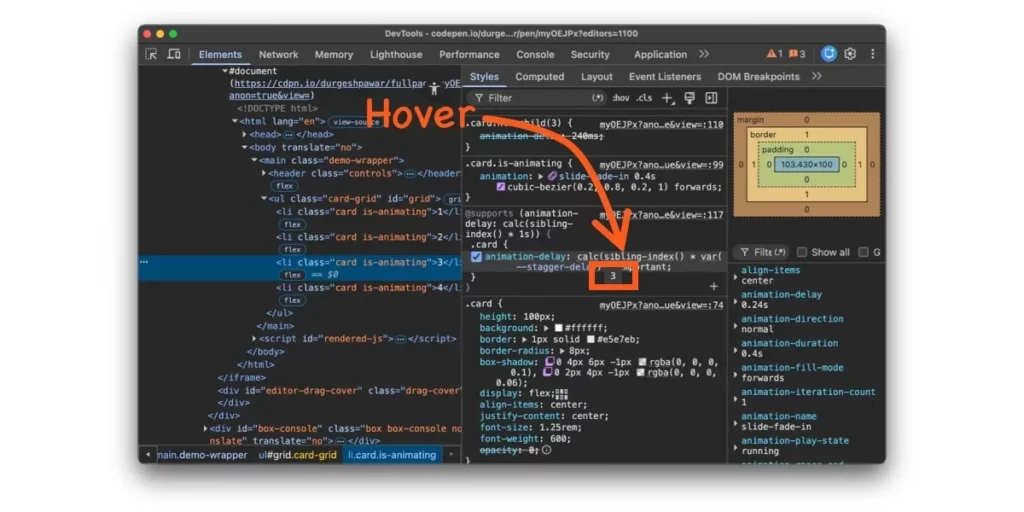
To aid developers in debugging, recent versions of Chrome DevTools offer direct inspection of computed sibling-index() and sibling-count() values within the Elements panel, a valuable tool for understanding how the browser is interpreting these functions.
The Future of CSS Tree-Counting
The current implementation of sibling-index() and sibling-count() counts all element siblings. However, the CSSWG has already documented planned extensions to further enhance their utility. Issue #9572 outlines a proposed of <selector> argument, mirroring the functionality of :nth-child(). This would allow developers to count only siblings that match a specific selector, for instance, sibling-index(of .active). An element that is the eighth child overall but the third .active child would then return 3. This feature would be invaluable for dynamic UIs involving filtering or toggling visibility, maintaining sequential indexing without requiring DOM manipulation.
Further discussions within the CSSWG (issues #11068 and #11069) have also revolved around children-count() and descendant-count() functions. children-count() would return the number of direct children an element has, useful for parent-driven layouts, while descendant-count() would recursively count all descendants. These proposed functions would complete the tree-counting narrative: sibling-index() and sibling-count() provide a horizontal view (an element’s position among its peers), while children-count() and descendant-count() would offer a vertical perspective (what lies beneath an element).
The introduction of sibling-index() and sibling-count() represents a pivotal moment for CSS, moving it closer to a truly declarative and self-sufficient language for complex UI. The previous frustration of writing repetitive :nth-child() rules or relying on JavaScript for basic positional logic was a symptom of a missing capability. That capability has now arrived, enabling developers to build more elegant, efficient, and dynamic web experiences directly within their stylesheets, paving the way for a more robust and intelligent web.