
The rapid proliferation of artificial intelligence, particularly large language models (LLMs), has inadvertently led the design community into a period of "conversational tunnel vision," where the chat-based interface has become the default, almost reflexive, solution for nearly every AI capability. This widespread adherence to a chat-first approach, largely influenced by LLMs’ training on dialogue data, overlooks a fundamental principle of effective user experience (UX): matching the interaction modality to the user’s immediate context, intent, and cognitive load. True innovation in AI interface design demands an adaptive approach, where the interface molds itself to the user’s needs, rather than forcing the user to conform to a singular interaction paradigm.
The Genesis of Chat-First AI: A Brief History and Its Limitations
The journey of AI interfaces has seen significant evolution. Early AI systems, often command-line driven, required users to master specific syntax. The advent of graphical user interfaces (GUIs) in the 1980s and 90s revolutionized human-computer interaction, making technology accessible to a broader audience through visual metaphors like desktops, windows, icons, and menus. The late 20th and early 21st centuries saw the rise of rule-based chatbots, often found in customer service, which offered a text-based, conversational facade but were inherently limited by their predefined scripts.
The current wave, ignited by the breakthroughs in deep learning and the development of sophisticated LLMs like GPT-3 and its successors, dramatically shifted the landscape. LLMs excel at understanding and generating human-like text, making conversational interfaces incredibly powerful for a vast array of tasks. This inherent strength, coupled with the relative ease of integrating text-based prompts and responses, naturally led product developers and designers to gravitate towards the chat bubble. It was a blank slate, promising boundless capability, and seemed to offer a "natural" way to interact with AI. Data from platforms like OpenAI and Google’s Gemini models indicated rapid adoption rates, with millions engaging daily through chat interfaces, reinforcing the perception that this was the preferred, if not sole, method of interaction.
However, this convenience has created a critical blind spot. While chat interfaces are indeed powerful for ambiguous or exploratory queries, their universal application creates significant friction and cognitive burdens in scenarios where other modalities would be far superior. The industry’s collective decision to house every AI capability within a chat interface, though understandable from a development perspective, risks compromising the very user-centricity that UX design strives for.
Deconstructing the "Myth of the Do-It-All Chatbot"
The allure of the chatbot, with its implied omnipotence, often masks its inherent limitations, particularly concerning cognitive load and linguistic barriers. These challenges manifest in both input and output modalities, creating a psychological tax on users.
-
Input: The Linguistic Barrier of the Blank Text Box: A fundamental flaw of a blank chat box is the absence of discoverability. In traditional GUIs, menus, buttons, and form fields provide clear visual cues, signaling available actions and guiding users. A chat box, by contrast, presents users with "choice paralysis." They are forced to guess the AI’s capabilities, remember precise phrasing, or articulate complex logic in complete sentences. Consider a data analyst needing to filter a dataset: instead of clicking a "filter" button and selecting parameters, they must construct a prompt like, "Show me all sales data from Q3 2023 for products with revenue exceeding $10,000 in the North American region." This transforms a simple task into a complex linguistic exercise. For creative professionals, describing visual elements like lighting or texture in text can be cumbersome and inefficient compared to direct manipulation via sliders or color pickers. Composing a prompt is a creative act, demanding a translation from vague intent to specific command, which for many, is a significant cognitive overhead.
-
Output: The Cognitive Cost of Dense Text: When AI responses consistently arrive in long blocks of text, the system transfers the interpretive work directly to the user. Text is a serial medium; the brain processes information sequentially, word by word, to extract meaning. While necessary for nuanced tasks like legal analysis, this becomes inefficient and frustrating for data that could be communicated faster visually. For instance, a project manager asking for a status update might receive three paragraphs detailing every completed task, forcing them to mentally summarize to find the key information. This "reading assignment" replaces what could have been a quick visual scan of a color-coded dashboard. This cognitive tax is amplified in high-stakes professional environments. A doctor reviewing patient vitals requires immediate numerical displays, not narrative descriptions, where speed and accuracy are paramount. Similarly, a stock trader needs a real-time line graph to spot price spikes, not a written account of market movements. The mental effort of extracting critical data from dense text can lead to errors and anxiety, underscoring the need for "glance verification" facilitated by visual or auditory cues.
A Framework for Intentional Design: Modality Taxonomy and Task Audits
To move beyond conversational tunnel vision, UX and product teams must adopt a rigorous, evidence-based approach to modality selection. This begins with a shared vocabulary and systematic frameworks.

-
Taxonomy of Input and Output Modalities: The first step is to recognize the diverse toolkit available. Input modalities include:
- Button/Tap: Best for single-step, binary actions (e.g., launching a feature, confirming an alert), maximizing execution speed and eliminating recall.
- Voice: Ideal for "hands-busy" or "eyes-busy" contexts (e.g., field technician queries, driving navigation), offloading physical interaction.
- Natural Language Chat: Suited for ambiguous or exploratory queries (e.g., research, follow-up questions), offering user freedom but requiring precise phrasing.
- Form/Wizard: Structured for multi-field data entry (e.g., contracts, report configuration), ensuring completeness and guiding users.
- GUI (Filters, Sliders, Drag-and-drop): Excellent for complex parameter setting or spatial tasks (e.g., scheduling, image editing), preventing mistakes through direct manipulation.
- Multi-modal (Image + Text): Combines visual input with description (e.g., design mockups with annotations), reducing effort by referencing objects directly.
- Gesture: For hands-free spatial interaction (e.g., acknowledging alerts in sterile environments), allowing quick, non-contact input.
Output modalities similarly vary:
- Push Notification/Alert: For time-sensitive, ambient awareness (e.g., price spike alerts, task completion), providing quick updates without demanding full concentration.
- Audio Summary: For hands-busy or eyes-busy contexts (e.g., status updates while walking, navigation instructions), delivering information directly to the ear.
- Short Text Summary: For focused queries needing brief answers (e.g., definition lookup, single-metric status), allowing fast reading without fatigue.
- Visual Dashboard: For high-density, comparative analysis (e.g., project status, resource allocation), enabling rapid trend and outlier detection.
- Interactive Canvas: For generative or iterative creative tasks (e.g., design iteration, layout adjustment), allowing direct manipulation of output.
- Inline Confirmation: For guided task flows needing feedback (e.g., step-by-step wizards), providing visual proof of correct system recording.
Crucially, these choices must also prioritize accessibility, ensuring that alternatives (e.g., screen-reader-optimized audio for visual dashboards) are provided.
-
The Task Audit: Grounding Decisions in Evidence: Before interface design commences, a formal Task Audit is essential. This framework moves teams from assumptions to evidence by gathering data about the physical, social, and cognitive context of user tasks. Key areas of focus include:
- Input Constraints: What physical and social barriers prevent users from entering data easily? (e.g., thick gloves, noisy environments, need for privacy).
- Output Constraints: What environmental factors make it difficult for users to receive and process information? (e.g., screen glare, small screen size, need for ambient awareness).
- Cognitive Load: How much mental effort is the user already expending on their primary task? (e.g., high-stress, multi-tasking, complex decision-making).
- Required Fidelity: What level of detail and precision is necessary for the task? (e.g., a quick "yes/no" vs. a detailed report).
Evidence for the Task Audit is gathered through methods like:
- Contextual Inquiry and Observation: Observing users in their natural environment reveals "hidden work" and provides rich data on physical constraints. This might involve noting if users are "hands-busy" (carrying objects, operating machinery) or "eyes-busy" (monitoring equipment, driving).
- Focused Interviews: Uncovering mental models and decision points that observation alone cannot capture, particularly valuable for understanding cognitive load and the user’s perception of task difficulty. Questions might delve into past failures or moments of anxiety.
- Collaborative Workshops: Bringing together designers, engineers, product managers, and business analysts to build a shared Task Inventory, define task boundaries, and establish required fidelity levels, ensuring alignment on system requirements and user needs.
The Modality Task Audit Field Template, a practical tool, guides teams to document specific physical barriers (e.g., "State of Hands: Thick gloves, Wet/dirty hands," "Visual Focus Requirements: Ambient monitoring, Moving target," "Ambient Noise Level: Loud, Intermittent"), cognitive baseline (e.g., "Required Reading Density: Single numbers vs. Legal contracts," "Verification Anxiety: Low stakes vs. Safety risks"), and a "Handoff Map" charting user journeys across different environments. This systematic approach ensures that modality choices are grounded in the user’s real-world environment.

Strategic Modality Selection: The Input/Output Alignment Matrix
With robust Task Audit findings, the Input/Output Alignment Matrix provides a structured way to map user intent to optimal modality combinations. This matrix focuses on what the user is trying to accomplish at a given moment, acknowledging that intent can shift even within a single workday. For example:
| User Intent | Optimal Input Modality | Optimal Output Modality | Environmental Fit |
|---|---|---|---|
| Quick Status Check | Voice or Single-tap Button | Audio or Push Notification | Hands-busy, Eyes-busy (e.g., Technician on ladder) |
| Specific Detail Query | Natural Language Chat | Short Text Summary | Focused, low-density data need |
| Complex Analysis | GUI (Filters, Sliders) | Visual Dashboard (Charts, Tables) | Desk-based, high-resolution screen |
| Creative Generation | Multi-modal (Image + Text) | Interactive Canvas | Design or drafting environment |
| Monitoring / Alert | Passive (background system) | Push Notification or Audio Alert | Any environment; task is ambient awareness |
| Guided Task Completion | Structured Form or Step-by-step Wizard | Inline Confirmation + Progress Indicator | Focused workflow; user needs verification feedback |
This matrix, informed by field evidence, guides designers away from arbitrary defaults. It acknowledges that visual layouts enable rapid scanning, structured inputs remove linguistic burdens, and audio outputs serve users whose hands and eyes are otherwise occupied. The right modality combination respects the user’s physical and cognitive state, fostering acceptance and effective use of AI capabilities.
Case Study: Adaptive Modality for Field Technicians
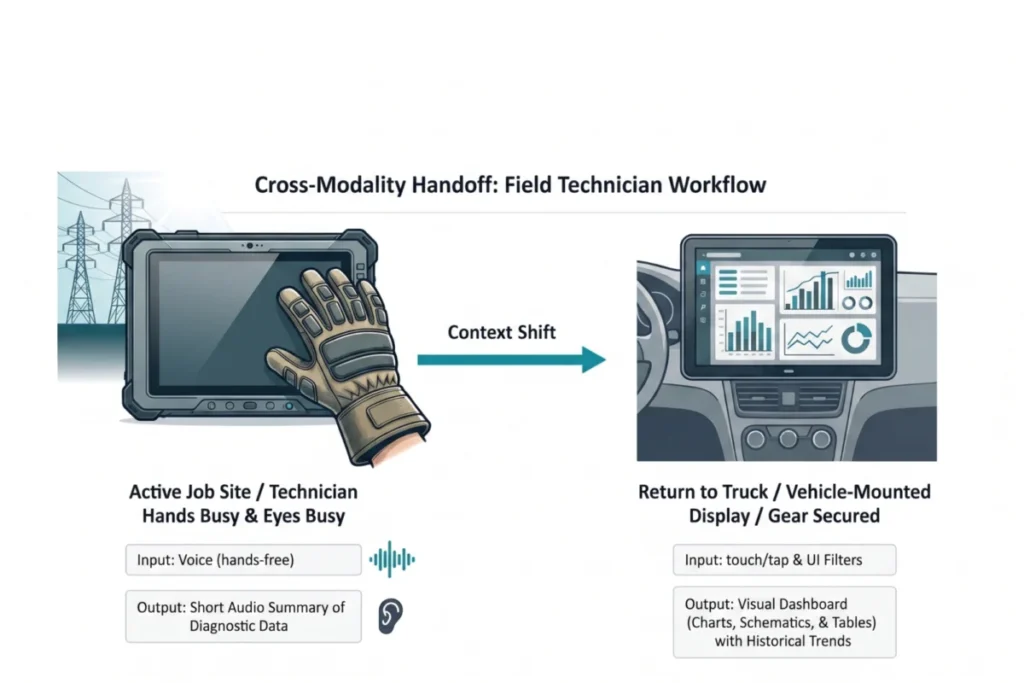
A compelling real-world example demonstrates the power of this approach. Field technicians servicing high-voltage electrical grids faced significant safety and efficiency challenges due to a misalignment of interface modality. Traditionally, they used ruggedized tablets to access manuals and log updates. However, contextual inquiry and observation revealed technicians frequently worked in "hands-busy, eyes-busy" states: wearing thick protective gloves that made touchscreen interaction impossible, enduring screen glare from direct sunlight at high altitudes, and needing to maintain constant situational awareness of dangerous live wires. Trying to manipulate a tablet while balanced precariously in a bucket truck created dangerous distractions and high cognitive load, increasing safety risks.
Focused interviews corroborated these findings, highlighting the commonality of these challenges across diverse work sites and confirming the critical need for "glance verification" for vital signs (e.g., voltage readings, fault locations) rather than lengthy text reports. Technicians articulated that immediate, unambiguous answers were paramount to safety, not detailed narratives.

The resolution was a multi-modal handoff solution. On the job site, technicians use voice input to query the system, allowing interaction while wearing gloves. The AI responds with a short audio summary of immediate diagnostic data, bypassing screen glare and enabling technicians to maintain situational awareness. This hands-free, eyes-free channel provided the critical "glance verification" for safety-critical information. Once back in the truck, workflows automatically transition to a larger, vehicle-mounted visual dashboard, allowing for complex schematic review and parallel processing of historical trend data. This adaptive approach, grounded in a thorough Task Audit, reduced diagnostic time by 20% and significantly increased daily tool adoption among field crews, validating the principle that fitting the modality to the person and place is key to successful AI integration.
Implications for the Future of Human-AI Interaction
The journey beyond conversational tunnel vision holds profound implications for the future of human-AI interaction. By prioritizing context-aware and adaptive modality design, industries can unlock significant benefits:
- Enhanced Productivity and Efficiency: When interfaces align with user needs, tasks are completed faster, with fewer errors and less frustration. This translates directly into operational efficiencies and improved output across various sectors, from healthcare to manufacturing.
- Improved Safety: As demonstrated by the field technician case study, selecting appropriate modalities in high-risk environments can drastically reduce the potential for accidents by minimizing distractions and cognitive overload.
- Greater Accessibility and Inclusivity: A diverse ecosystem of interaction modalities inherently caters to a wider range of users, including those with disabilities. Offering visual, auditory, haptic, and gestural options ensures that AI tools are accessible to everyone, promoting inclusivity in the digital age.
- Higher User Adoption and Satisfaction: Users are more likely to accept and consistently use AI capabilities that feel natural and intuitive, rather than those that demand adaptation. This leads to higher satisfaction rates and stronger user loyalty.
- Competitive Advantage: Companies that invest in sophisticated, context-aware AI interfaces will differentiate themselves in a crowded market, offering superior user experiences that competitors relying on generic chat solutions cannot match.
- Ethical AI Design: Thoughtful modality selection is an aspect of ethical AI design, ensuring that technology serves human well-being rather than imposing unnecessary burdens or risks.
The future of AI interface design is not monolithic; it is a diverse, adaptive ecosystem calibrated to individual user intent and environmental context. While the chat window remains a powerful tool for specific jobs, it is often the wrong tool for the myriad tasks we reflexively assign to it. Researchers, designers, and product developers must embrace the complexity of human interaction, leaving the confines of the screen to observe work in its actual environment. The physical and social realities of these spaces are not "edge cases"; they are the foundational design brief. By diligently applying frameworks like the Task Audit and Input/Output Alignment Matrix, we can move past interface conventions to build AI tools that truly augment human capabilities, seamlessly integrating into our lives and work. This commitment to human-centric design, backed by field evidence, is not merely a matter of good practice but a strategic imperative for the successful and responsible deployment of AI.