
In the dynamic landscape of digital product development, particularly within the sensitive realm of financial technology (FinTech), the fidelity of a prototype can significantly impact the validity of user research and, consequently, the success of the final product. A recurring observation in usability sessions highlights a critical flaw in many prototyping methodologies: participants frequently pause at login screens, often glancing up after typing, seeking validation that they are "doing it right." This subtle yet pervasive behavior signals a profound disengagement; users recognize they are interacting with an artificial construct, not a genuine application. Every data point collected thereafter is inherently filtered through this awareness, compromising the authenticity of the feedback and leading to findings that reflect a demonstration, rather than real-world user behavior.
The implications of this recognition are particularly acute in financial product testing. FinTech users are inherently conditioned to detect anomalies—a balance that fails to reconcile, a field accepting invalid inputs, or a login sequence that bypasses genuine authentication. When a banking prototype omits realistic authentication, participants do not merely disengage; they frequently interrupt sessions to flag these inconsistencies. This results in research outcomes that capture user reactions to a simulated environment, not their genuine interaction with a live product. The imperative, therefore, is to inject a deeper layer of realism into prototypes, transforming them from static mock-ups into interactive experiences that genuinely reflect a shipped product’s behavior.
The Imperative of Authenticity in FinTech Prototyping

The unique nature of financial services amplifies the need for high-fidelity prototyping. Trust is the bedrock of any financial relationship, and digital interfaces are increasingly the primary touchpoint for building and maintaining that trust. Users expect security, precision, and reliability from their banking applications. A prototype that fails to deliver on these fundamental expectations, even in simulation, inadvertently erodes potential user confidence and introduces biases into the research process. For instance, if a login screen accepts any arbitrary input, users might develop a false sense of security or, conversely, become highly critical of the entire application, assuming a lack of robustness.
According to a recent industry report, over 70% of FinTech users cite security and reliability as their top priorities when choosing a financial application. This statistic underscores why even the smallest details, such as a fully functional login screen, can have a disproportionate impact on user perception. Furthermore, inadequate prototyping can lead to significant downstream costs. Flawed user research often results in design iterations based on inaccurate insights, necessitating expensive rework during the development phase. Industry data suggests that rectifying design flaws post-development can be up to 100 times more costly than addressing them during the prototyping stage.
Bridging the Fidelity Gap with Advanced Prototyping Tools
The solution to this challenge lies in a focused approach: identifying and authenticating the critical moments where participant trust is established. In a banking application, this pivotal moment is unequivocally the login process. Modern prototyping tools, such as ProtoPie, offer a sophisticated yet accessible pathway to achieve this level of realism without requiring a single line of code. These platforms empower UX designers and researchers to build interactive prototypes that mimic the behavior of a fully functional application, including dynamic input fields, conditional logic for validation, and even biometric authentication animations.
The evolution of prototyping tools has been a gradual journey, moving from static wireframes and clickable mock-ups to highly interactive and data-driven simulations. Early tools focused primarily on visual design and basic navigation. However, as user expectations for digital experiences have matured, so too has the demand for prototyping environments capable of replicating complex interactions and real-time feedback. Tools like ProtoPie represent a significant leap forward, enabling designers to craft experiences that are virtually indistinguishable from their final counterparts, thereby yielding richer, more reliable user insights.
A Blueprint for a Realistic Login Flow in ProtoPie
The process of constructing a highly realistic login flow, exemplified by a hypothetical "Pie Bank" mobile banking prototype, involves several strategic steps designed to replicate the nuances of a live application. This includes functional text inputs, a masked password field, credential validation, a live error state, and a biometric animation timed to feel native to operating systems like iOS.
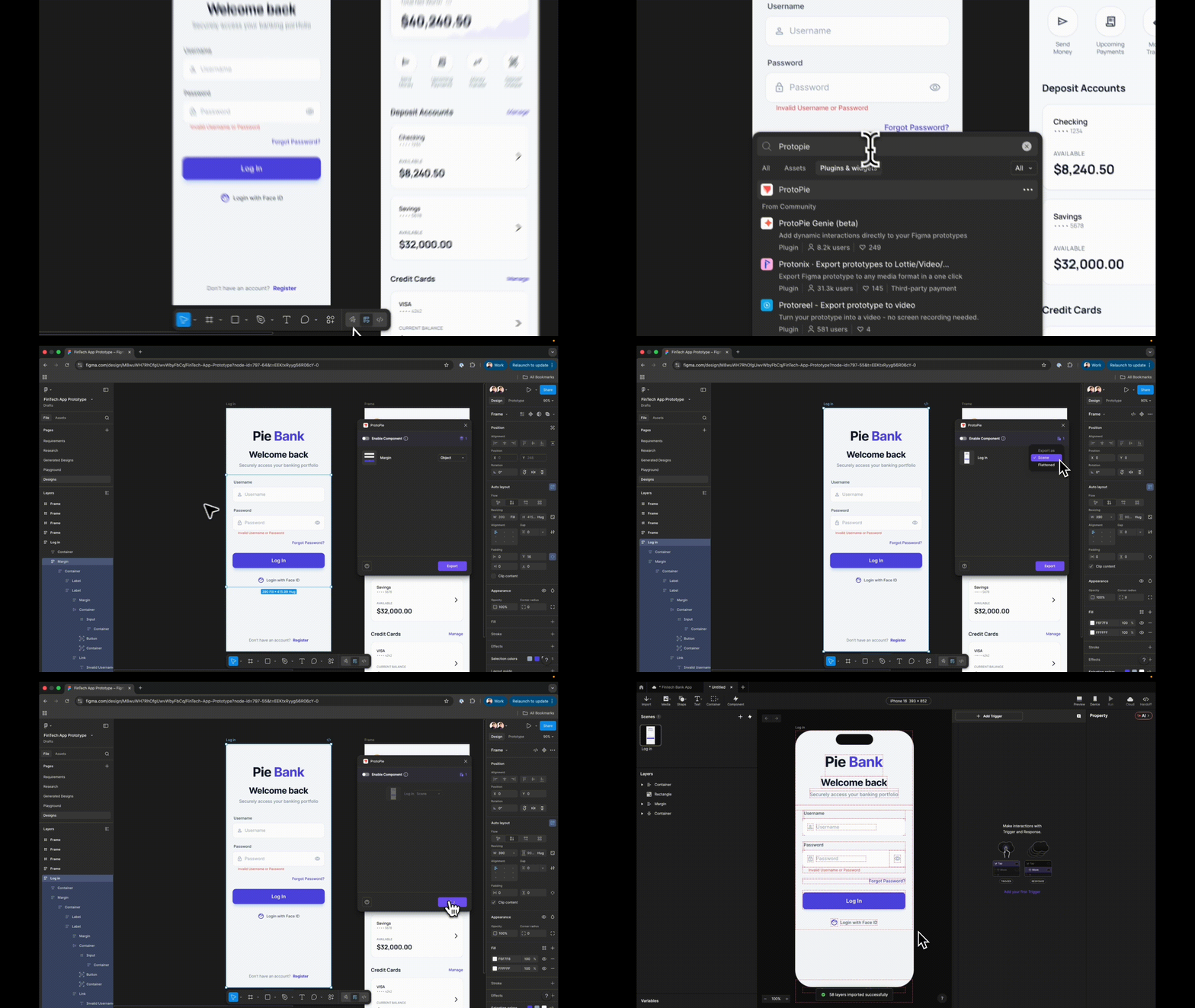
The journey begins with the foundational design in a tool like Figma. Step 1: Seamless Import from Figma with Layer Preservation. The initial step involves importing the login frame from Figma into ProtoPie. Crucially, selecting the "Scene" option during export, rather than "Flattened," ensures that the entire layer hierarchy is preserved. This distinction is vital because a flattened import would consolidate all elements into a single image, rendering them un-targetable for interaction. By maintaining the layer structure, each element arrives in ProtoPie as a separate, manipulable layer, forming the building blocks for interactivity. Before proceeding, a critical organizational practice is to rename every layer meaningfully—for instance, "Input Username" instead of "Rectangle 14." Vague naming conventions inevitably lead to confusion and lost time when referencing these layers in formulas and conditions later in the process.
Step 2: Transforming Static Fields into Interactive Input Layers. The next phase involves replacing static design elements with ProtoPie’s native "Input" layers, which are engineered to accept real keyboard entry. This is a fundamental shift from a visual depiction to an interactive component. A designer drags an Input layer onto the canvas, nests it within the existing username field group, and visually matches it to the design by setting placeholder text (e.g., "Username"), background fill, and font. A quick preview immediately demonstrates the impact: users can click the field and type, initiating the transformation of the prototype from a mere depiction to an behaving application. This layer is then renamed "Input Username," duplicated, and the copy is nested within the password field group.

Step 3: Implementing Password Masking with a Single Property Change. Authenticity in a login flow demands proper handling of sensitive information. On the duplicated input layer, the placeholder text is changed to "Password," and the "Type" property is set to "Text Password." ProtoPie automatically handles the masking of characters, displaying dots instead of typed letters, without requiring any custom logic or intricate coding. This seemingly minor detail significantly enhances the perceived realism of the prototype. When both fields are previewed, the username shows legible text while the password displays masked characters, instantly elevating the experience and conveying a sense of security, even before any validation logic is applied.
Step 4: Preparing the Destination Scene for Navigation. A common procedural error in prototyping is attempting to configure a navigation response before the target destination exists. To prevent this, a new scene, even if initially blank, is added. This ensures that when the login button is configured to navigate, it has a valid target.
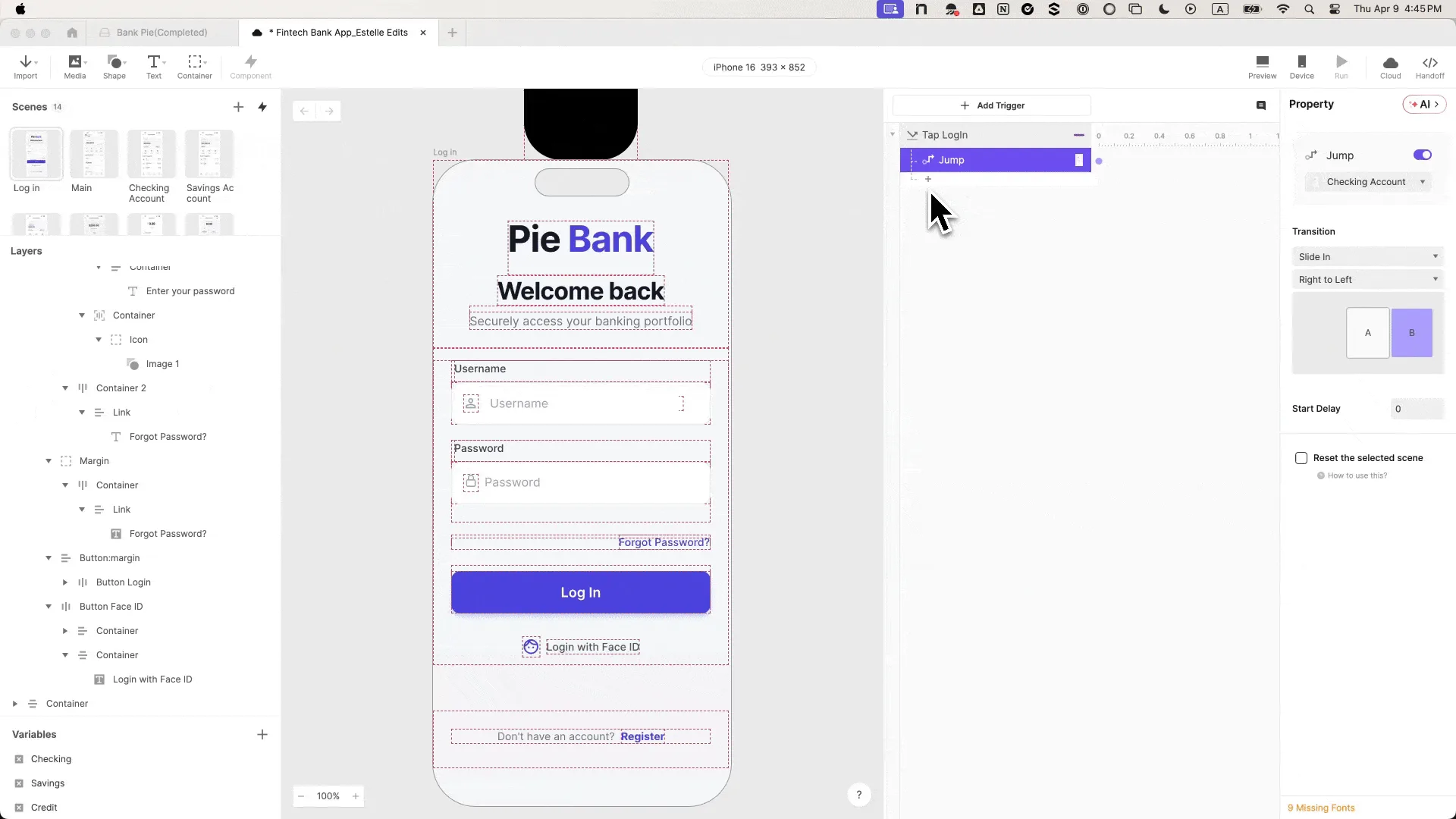
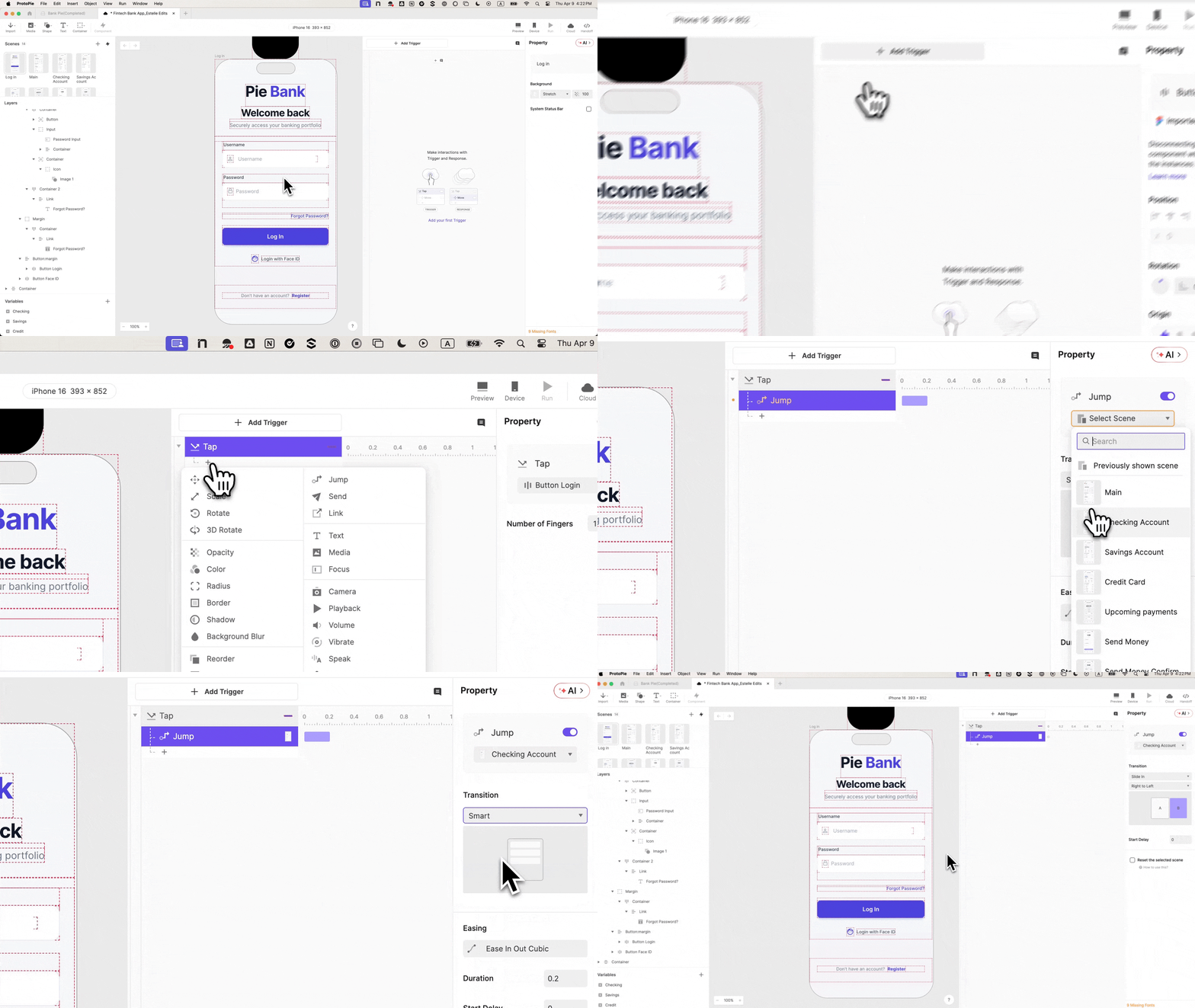
Step 5: Wiring the Login Button for Basic Navigation. The login button is then selected, and a "Tap" trigger is added. This trigger’s response is set to "Jump," targeting the previously created dashboard scene with a "Slide in from right to left" transition. At this stage, a preview confirms that the button navigates to the dashboard, but critically, it still permits entry regardless of input. The prototype continues to "lie," accepting any credential, or even none at all. This highlights the next crucial steps in achieving true fidelity.
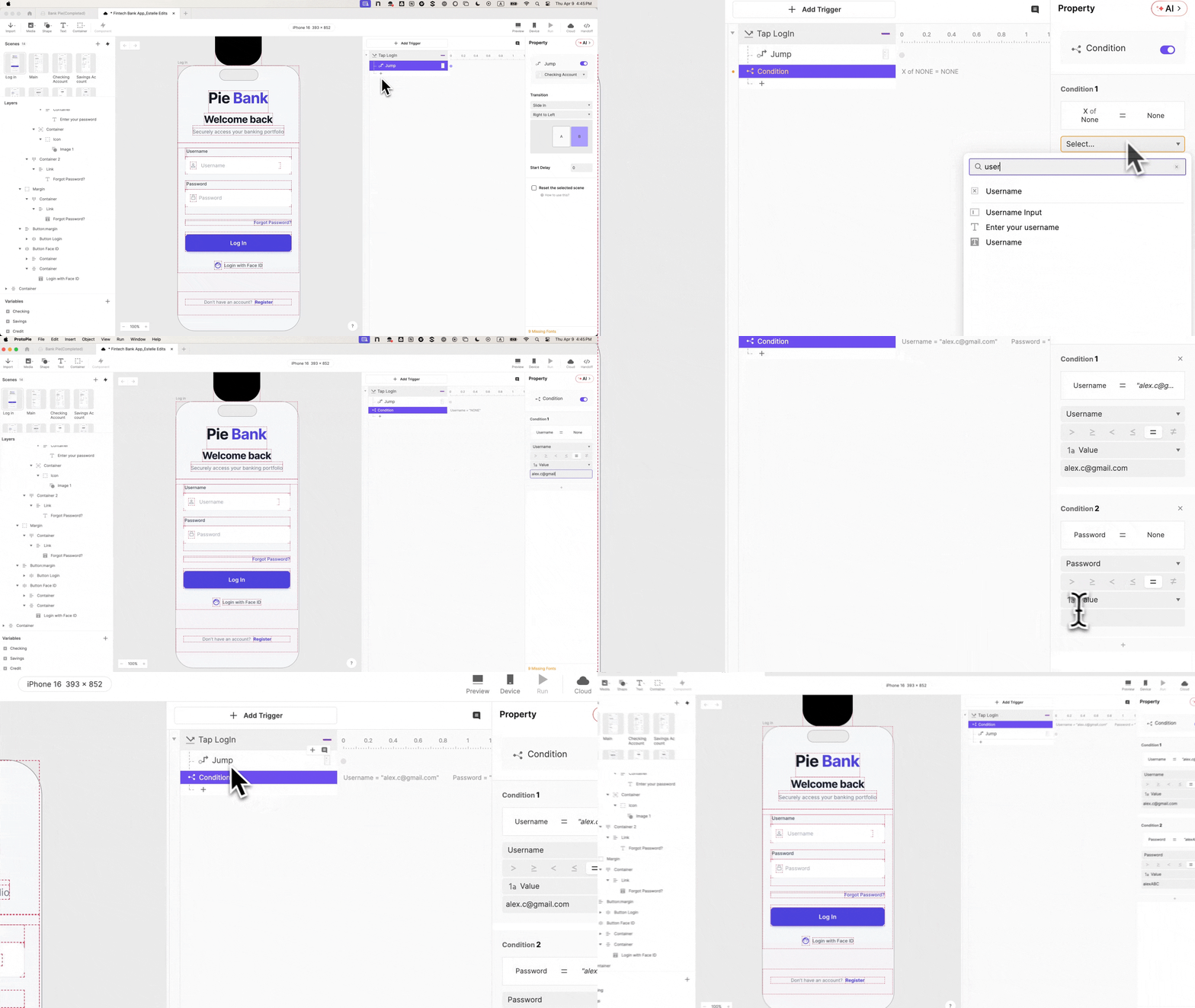
Step 6: Incorporating Variables for Input Retention. To introduce intelligence into the prototype, two "Text" type variables, username and password, are created in ProtoPie’s bottom-left panel. Each variable is then bound to its respective input layer using a simple formula: input("Input Username").text and input("Input Password").text. Enabling debug icons reveals green overlays that display live variable values as text is typed, confirming the successful binding. This step empowers the prototype to "remember" what the user has entered, laying the groundwork for validation.
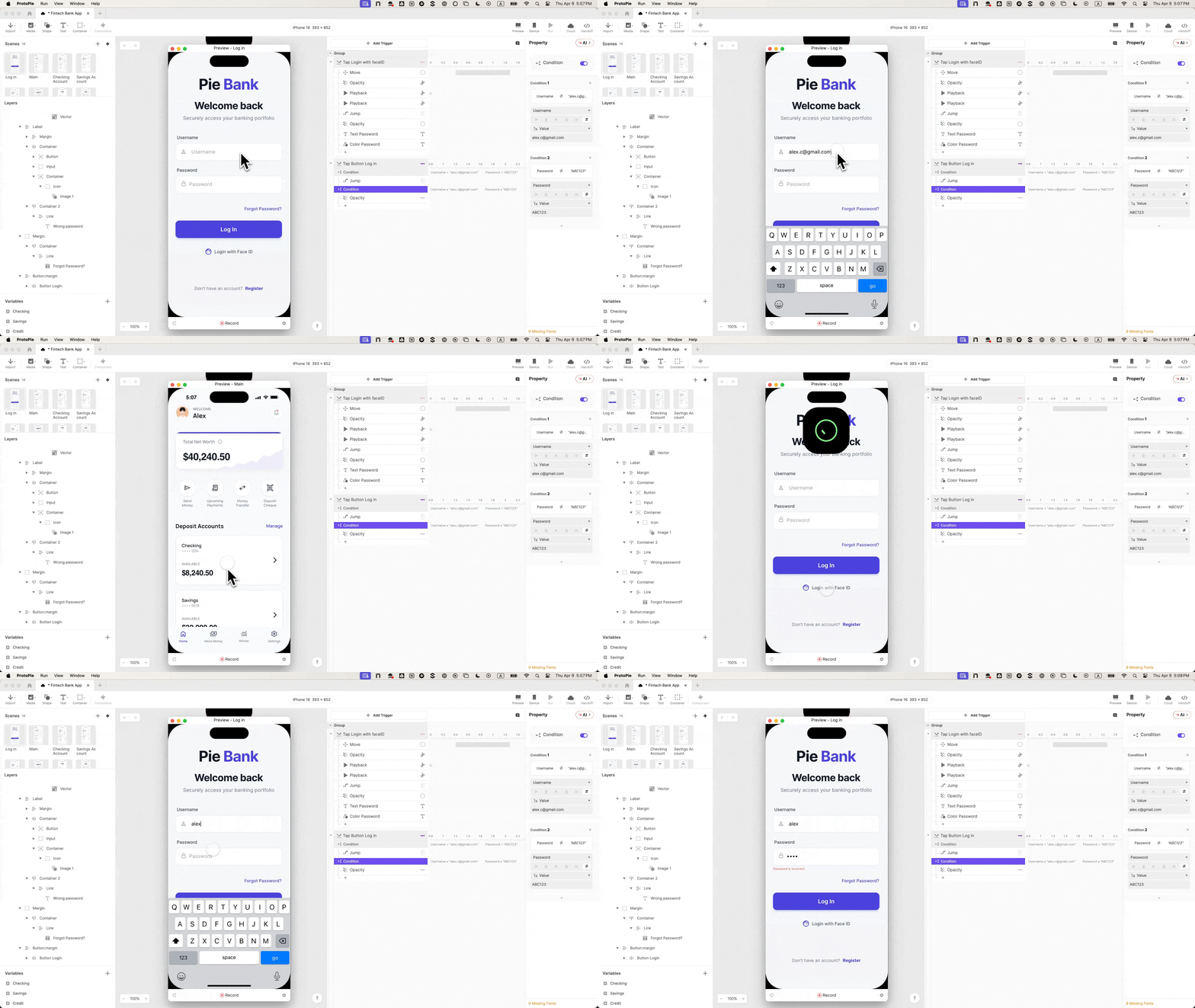
Step 7: Enforcing Credential Validation with Conditional Logic. Returning to the "Tap" trigger on the login button, a "Condition" is added. This condition incorporates two rules, both of which must be true for the login to succeed: username == "demo" and password == "password". The "Jump" response, previously configured for navigation, is then moved inside this condition. This means that only valid credentials—"demo" for username and "password" for password—will trigger the navigation to the dashboard. Any incorrect input, empty fields, or invalid formats will now be blocked, forcing participants to genuinely log in. This single constraint fundamentally alters the nature of subsequent test sessions, making them far more representative of real-world interactions.
Step 8: Designing a Responsive Error State. A robust login experience includes clear feedback for incorrect attempts. The error message layer in the design is renamed "Error Text" and its initial opacity is set to 0. A second condition is then added, acting as the inverse of the first (i.e., when username is not "demo" OR password is not "password"). Inside this inverse condition, a "Change Property" response is configured to set the "Error Text" opacity to 100. Now, incorrect credentials will cause the error message to appear, while correct credentials will lead to the dashboard. This dual-outcome system provides genuine testability, allowing researchers to observe user reactions to both success and failure states.

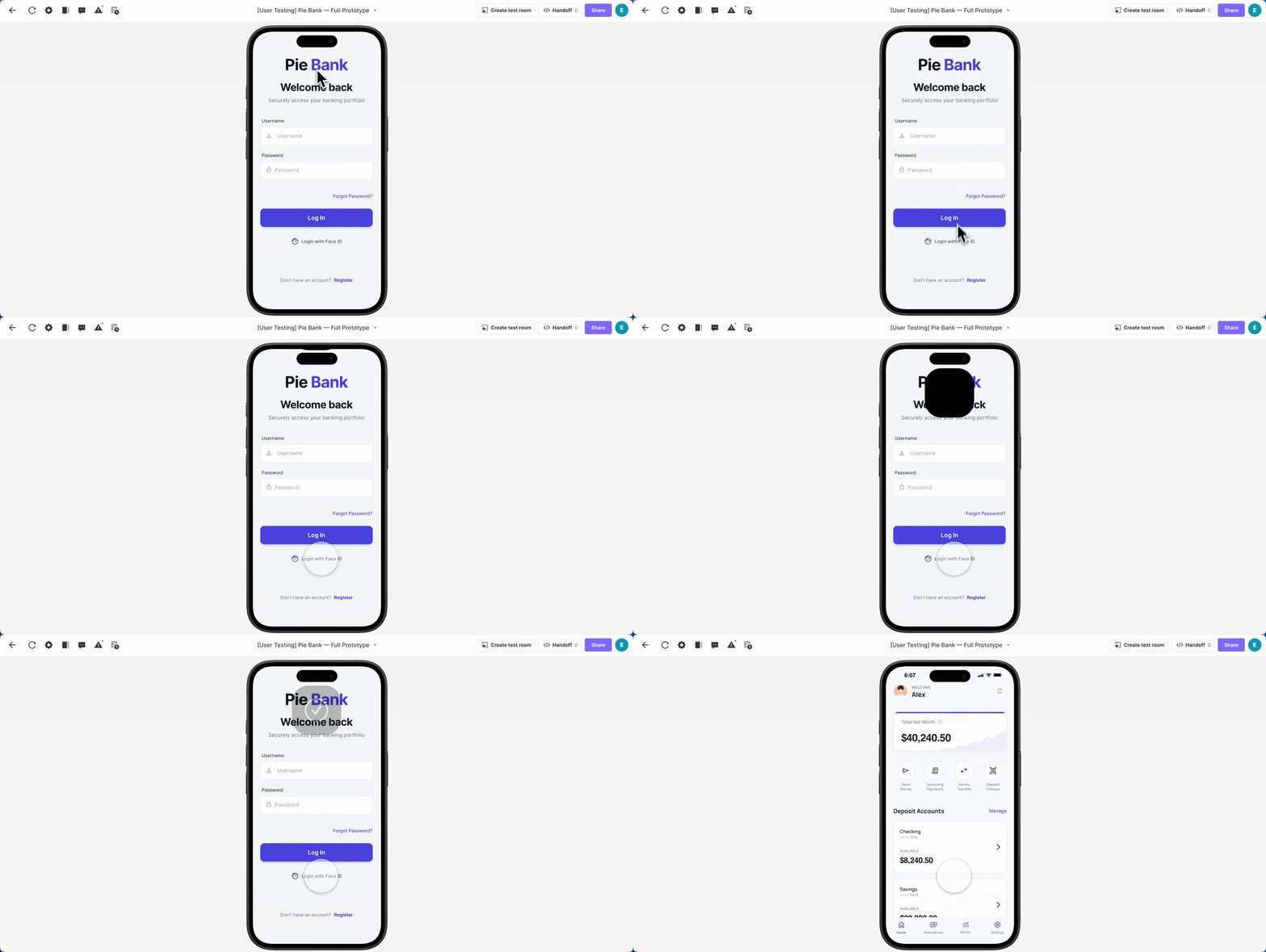
Step 9: Integrating a Biometric Authentication Animation. To further enhance realism, a Face ID animation is incorporated. A "Lottie" layer is dragged onto the canvas, loaded with the Face ID animation file, and positioned off-screen above the iPhone frame. On the "Login with Face ID" button, a "Tap" trigger (renamed "Tap Face ID") is added, comprising four sequential responses: "Move" (to bring the Lottie layer into view), "Seek" (to reset the animation to its start), "Play" (to execute the animation), and "Jump" (to navigate to the dashboard).
Step 10: Optimizing User Experience with Staggered Timing. Without proper timing, all four responses for the Face ID animation would fire simultaneously, causing an abrupt jump to the dashboard before the animation completes. To achieve a native feel, delays are introduced: the "Move" and "Seek" responses are set to 0 seconds, "Play" to 0.5 seconds, and "Jump" to 1 second. Additionally, "Reset selected scenes" is enabled on the "Jump" response to prevent the animation from remaining stuck if the user navigates back. The final preview reveals a seamless experience: tapping Face ID triggers the animation to drop in, play smoothly, and then transition to the dashboard, creating a biometric login that is virtually indistinguishable from a real application.
Impact on Research Validity and Development Efficiency
The implementation of such a realistic login flow profoundly changes what can be learned from a prototype. When authentication functions genuinely, the error state transcends a mere visual cue; it becomes a critical research touchpoint. Researchers can now observe whether users comprehend the error message, whether they attempt to retry, or if they instinctively opt for alternative authentication methods like Face ID. These are nuanced behavioral insights that a faked login can never yield. This level of fidelity allows for the capture of authentic user journeys, revealing true pain points and preferences, rather than reactions to an obviously artificial environment.
Furthermore, these high-fidelity prototypes significantly streamline stakeholder reviews. The functional flow speaks for itself, eliminating ambiguity and allowing stakeholders to experience the product as users would. This fosters more informed discussions and reduces the need for extensive explanations of intended behavior. For engineering handoff, the interaction panel in ProtoPie meticulously documents the conditional logic, variable bindings, and timing, providing engineers with a clear, unambiguous understanding of the desired behavior and intent, rather than relying on subjective interpretations of static designs or verbal descriptions. This precision can drastically reduce miscommunications, rework cycles, and overall development time.
Industry Perspectives and Future Outlook
UX researchers consistently emphasize that the quality of insights is directly proportional to the realism of the testing environment. "When users don’t believe they’re in a real application, their behavior shifts dramatically," notes Dr. Anya Sharma, a leading expert in human-computer interaction. "They become less invested, less critical, and their feedback reflects an ‘as if’ scenario rather than genuine interaction. For FinTech, where trust is paramount, this simply isn’t acceptable." Product managers often report faster decision-making cycles and greater alignment within teams when presented with functional prototypes that demonstrate complex interactions effectively.
The trend towards advanced prototyping tools that bridge the gap between design and development is set to continue. As FinTech companies increasingly compete on user experience, the ability to rapidly iterate on realistic, testable prototypes will become a non-negotiable competitive advantage. This investment in login fidelity, even when the login itself isn’t the primary feature under examination, is a strategic choice. It’s the foundational interaction where participant trust is either established or undermined. Getting it right ensures that every subsequent interaction within the prototype yields higher-quality, actionable insights, ultimately leading to more robust, user-centric financial products. This shift from mere demonstration to authentic interaction represents a critical evolution in how digital products are conceived, tested, and ultimately brought to market.