Author: Laily UPN

  • The Symbiotic Imperative: Unifying Website Design and Social Media for Modern Business Success

    The Symbiotic Imperative: Unifying Website Design and Social Media for Modern Business Success

    In today’s hyper-connected digital landscape, while social media platforms frequently command the lion’s share of marketing budgets and attention, discerning businesses recognize that website design and social media marketing are not disparate entities but rather interdependent pillars of a cohesive brand strategy. Building a resilient brand presence fundamentally hinges on consistency across all touchpoints. Therefore, it is paramount for a business’s website design to meticulously align with its social media content, and vice versa. A failure to achieve this seamless integration risks confusing the target audience, eroding trust, and ultimately impeding the development of a loyal customer base.

    The Evolving Digital Ecosystem and the Need for Integration

    How Web-Site Design and Social Media Work Together :: UXmatters

    The digital marketing paradigm has undergone a profound transformation over the past two decades. Initially, websites served as static online brochures, while social media emerged as a separate, more interactive space for community building. However, the modern consumer journey is rarely linear. It often begins with brand discovery on platforms like Instagram or TikTok, transitions to deeper engagement on a website, and circles back to social media for reviews, customer service, or further content consumption. This fluid interaction necessitates a unified approach, where all owned channels—including social media pages, official websites, and various marketing platforms—function in concert. To view these channels as isolated silos is to invite fragmented messaging, dilute brand impact, and inevitably lead to diminished conversion rates.

    Strategic Advantages of Integrating Social Media and Web Design

    The deliberate integration of social media with website design offers a multitude of strategic advantages that extend far beyond mere aesthetic consistency.

    How Web-Site Design and Social Media Work Together :: UXmatters

    1. Cultivating a Stronger, Recognizable Brand Identity:
    A consistent visual identity and brand voice across all owned channels are the bedrock of a robust brand identity. This uniformity significantly enhances brand recognition, making it easier for potential customers to identify and recall a business amidst a deluge of competitors. In a marketplace saturated with options, a strong brand identity—manifested through consistent colors, logos, typography, and visual language—allows an audience to instantly recognize a brand. This familiarity breeds trust and positions the business favorably to encourage conversions. According to a 2023 study by Lucidpress, consistent brand presentation across all platforms can increase revenue by up to 23%, underscoring the tangible benefits of a unified visual strategy.

    2. Expanding Reach and Optimizing the Customer Journey:
    Modern consumers frequently leverage social media as a primary avenue for discovering new brands, products, and services. Yet, the critical stages of research, detailed product exploration, and ultimately, the purchasing experience, predominantly occur on a business’s website. By strategically utilizing social media to cast a wider net for audience reach and then leveraging sophisticated website design to facilitate seamless conversions, businesses can craft a holistic customer experience. This integration ensures that the transition from discovery on social media to engagement and transaction on the website is frictionless, guiding potential customers efficiently through their purchasing journey. Data from Statista indicates that as of 2023, over 4.9 billion people use social media globally, highlighting its unparalleled reach for initial brand exposure.

    3. Amplifying Social Proof and Building Consumer Trust:
    Social proof is an indispensable marketing tool, instrumental in cultivating trust and credibility with an audience. It manifests in various forms, including authentic customer testimonials, endorsements from industry experts, user-generated content (UGC), and product reviews. A well-designed section on a website that dynamically incorporates UGC sourced from social media platforms, bolstered by compelling testimonials, significantly strengthens a business’s legitimacy. Leveraging social proof consistently across all channels—from a social media post showcasing customer satisfaction to a dedicated review section on the website—reinforces trust and validates the brand’s value proposition. Research from Trustpilot reveals that websites featuring UGC experience a 20% increase in returning visitors and a remarkable 90% increase in time spent on the page, illustrating its profound impact on engagement. Furthermore, a rigorous content-creation workflow ensures that only high-quality, brand-aligned content is published on social pages, further reinforcing the brand’s identity, values, and goals. The overall user experience and design quality of a business’s website serve as a direct reflection of its professionalism and commitment to quality, influencing audience perception profoundly.

    How Web-Site Design and Social Media Work Together :: UXmatters

    4. Streamlining Content Production and Enhancing Efficiency:
    Managing multiple digital channels can be resource-intensive. While bespoke content for each platform is often beneficial, the strategic repurposing of content offers significant efficiencies. For instance, embedding a company’s Instagram or TikTok feed directly onto its website ensures a continuous flow of fresh, dynamic content without constant manual updates. Conversely, key website content can be distilled into bite-sized, engaging formats for social media, accompanied by direct links to the website to drive traffic and increase conversions. This approach not only optimizes content creation efforts but also ensures a consistent narrative across platforms, maximizing the return on content investment. This dual-directional repurposing strategy is a cornerstone of agile content marketing.

    5. Maximizing Website Traffic and Social Engagement:
    A truly integrated strategy fosters a symbiotic relationship where each channel mutually benefits the other. Social media pages are enriched by the comprehensive information and transactional capabilities of the website, while the website gains visibility and engagement from social media’s expansive reach. A potential customer might initially discover a product via an Instagram ad or a trending TikTok video, prompting them to visit the website for detailed specifications and purchase options. Conversely, a user landing on a webpage through a search engine might seek out the business’s social profiles to view more dynamic content, community interactions, or customer support. This interconnectedness ensures that both brand discovery and deeper engagement are facilitated. It’s particularly noteworthy that as of 2024, nearly 60% of all internet traffic originates from mobile devices. Consequently, ensuring a mobile-friendly and responsive website design is not merely advantageous but absolutely critical for capturing and retaining a vast segment of the online audience and converting social media interest into tangible website actions.

    Five Essential Strategies for Seamless Integration

    How Web-Site Design and Social Media Work Together :: UXmatters

    To ensure that website design and social media marketing work in perfect concert, businesses must implement deliberate and well-considered actions:

    1. Integrate Social Media Elements Directly into Your Website Design:
    Beyond merely displaying social media icons, true integration involves embedding interactive elements that enrich the user experience and can even bolster search engine rankings. This includes consistently applying the same brand fonts, color palettes, and logos across all digital assets. However, advanced integration can involve:

    • Live Social Feeds: Displaying curated Instagram, X (formerly Twitter), or TikTok feeds on relevant website pages (e.g., a "Community" page, product pages).
    • Social Sharing Buttons: Implementing prominent, easy-to-use social sharing buttons on product listings, blog posts, and articles. As exemplified by fashion brand Urban Outfitters (Figure 2 in original content), integrating social-sharing buttons with a clear call-to-action on every product listing allows users to effortlessly share product links to their social profiles, significantly extending organic reach.
    • Social Login Options: Offering the convenience of logging in or signing up using social media accounts (e.g., Google, Facebook), streamlining the user journey and reducing friction.
    • Interactive Widgets: Integrating social media polls, contests, or Q&A widgets directly onto the website to increase engagement and gather immediate feedback.
      Such integration creates a cohesive user experience, encouraging visitors to spend more time on the website and engage more deeply with the brand.

    2. Strategically Repurpose Social Media Posts for Website Content:
    While the common practice is to adapt website content for social media, the reverse is equally powerful and often underutilized. Given the significant time and effort invested in creating engaging social media content, leveraging it on the website is a smart move. Beyond embedding entire social feeds, businesses can creatively use individual social posts:

    How Web-Site Design and Social Media Work Together :: UXmatters
    • Dynamic Product Displays: Instead of relying solely on static product shots, incorporate social media posts—especially videos or carousels featuring products "in action" or styled by influencers. The cosmetics brand Fenty (Figure 3 in original content) excels at this, showcasing TikTok and Instagram Reels content directly on product pages, allowing users to see products in real-world use cases, complete with purchase links and pricing. This adds authenticity and a dynamic visual dimension.
    • Testimonial Showcases: Curate positive social media mentions, comments, and reviews into a visually appealing section on the website.
    • Behind-the-Scenes Content: Use engaging social media stories or posts about company culture, events, or product development to add a human touch to the "About Us" or "Careers" pages. This not only scales content production but also adds a layer of authenticity and social proof that resonates with website visitors.

    3. Incorporate User-Generated Social Media Content (UGC) into Your Website:
    UGC, whether fan-made photos, videos, or written reviews, is a powerful trust-builder that extends its benefits beyond social platforms to the website. While social media is an ideal collection ground for UGC, its display on a website significantly boosts credibility, enhances customer trust, and introduces a dynamic design element. The athleisure brand Outdoor Voices (Figure 4 in original content) masterfully integrates UGC on its homepage via a carousel, prominently featuring customer photos and aligning it with their iconic social media hashtag, "#DoingThings," as a headline. This strategy not only improves brand reputation but also significantly impacts user engagement. According to BrightLocal’s 2023 Local Consumer Review Survey, 98% of customers read online reviews for local businesses, and 60% consider the sheer volume of reviews before making a purchase decision. Websites with integrated UGC have been shown to experience higher engagement rates and longer dwell times.

    4. Leverage Web-Site Design Analytics to Deepen Audience Understanding:
    Once social media elements are integrated into a website, understanding audience response through comprehensive analytics is critical for iterative improvement. Before finalizing design choices, A/B or multivariate testing can provide invaluable insights into what resonates most effectively with the target audience. Key metrics such as average time spent on a page, bounce rate, and conversion paths offer quantitative data on engagement. Furthermore, qualitative tools like heatmaps (Figure 5 in original content, exemplified by Hotjar) visually represent user interaction patterns, revealing which areas of a page garner the most attention, clicks, and scrolls. By cross-referencing these web analytics with social media engagement data, businesses can gain a holistic understanding of how social traffic behaves on their site, allowing for data-driven optimization of both content and design for maximum impact. This analytical feedback loop ensures continuous refinement of the integrated strategy.

    5. Systematically Collect and Display Customer Reviews from Social Media and Beyond:
    Customer reviews are a cornerstone of social proof and directly influence purchasing decisions. The collection of these reviews should be an active and integrated process. Social media platforms are fertile ground for initiating user-generated content campaigns that encourage customers to post reviews. Beyond social platforms, dedicated review sites like Google Reviews and TripAdvisor (for relevant industries) are indispensable sources of authentic feedback. The monthly dog-goodies subscription service Barkbox (Figure 6 in original content) exemplifies effective review integration, prominently featuring customer reviews—often accompanied by photos of pets enjoying their products—directly in the middle of their homepage. This strategic placement, combined with visual proof, immediately establishes legitimacy and trustworthiness. The impact of reviews is undeniable: a study by Brightlocal indicated that 98% of consumers read reviews for local businesses, and Trustpulse reported that 60% of customers consider the number of reviews a business has before committing to a purchase. More reviews equate to higher perceived legitimacy and reliability.

    How Web-Site Design and Social Media Work Together :: UXmatters

    Broader Implications and The Future of Integrated Digital Marketing

    The imperative for integrating website design and social media extends beyond immediate marketing gains; it positions businesses for long-term resilience in an ever-evolving digital landscape. As new social platforms emerge and technologies like AI-driven content creation become more sophisticated, an integrated strategy ensures adaptability and agility. UX designers play a pivotal role in championing this integration, translating brand values and marketing objectives into seamless, intuitive, and engaging user experiences across all channels.

    Ultimately, the goal is to forge a cohesive, interactive, and meaningful user experience that guides the customer effortlessly from initial discovery to lasting loyalty. By aligning web designs with social media strategies, businesses can not only strengthen brand identity and boost brand awareness but also significantly increase engagement, drive traffic, and, most importantly, elevate conversion rates. The digital future belongs to brands that master this symbiotic relationship, creating a unified narrative that resonates powerfully across every touchpoint of the customer journey.

  • The Unseen Hurdles: Why 90% of Aspiring Developers Discontinue Their Journey Within Six Months and the Strategies Employed by the Resilient 10%.

    The Unseen Hurdles: Why 90% of Aspiring Developers Discontinue Their Journey Within Six Months and the Strategies Employed by the Resilient 10%.

    The journey into software development, often perceived as a straightforward path to innovation and lucrative careers, presents a formidable psychological and intellectual challenge that leads a significant majority of beginners to abandon their efforts within their first six months. This high attrition rate, estimated by various industry observers to affect as many as 90% of self-taught programmers, is not primarily a result of the inherent difficulty of coding itself, but rather a widespread misunderstanding of the fundamental cognitive shifts and learning methodologies required for sustained progress. Thousands embark on this path annually, drawn by the promise of the tech industry, often commencing with online tutorials and introductory projects. While initial successes, such as replicating basic web pages or cloning simple applications, can foster a sense of accomplishment and momentum, this early confidence frequently gives way to disillusionment and stagnation around the critical three-to-six-month mark. Progress decelerates, motivation wanes, previously comprehensible tutorials become opaque, and the insidious grip of imposter syndrome takes hold, culminating in a quiet, often unacknowledged cessation of coding activities. This phenomenon is less about a lack of innate intelligence or talent and more about an unpreparedness for the predictable traps that ensnare almost every novice.

    The Initial Lure and the Abrupt Shift to Cognitive Overload

    The initial phase of learning to code is characterized by what can be described as concrete learning and immediate gratification. Beginners typically engage with foundational concepts like HTML, CSS, and basic JavaScript, where changes in a line of code translate almost instantaneously into visible alterations in a web browser. This direct feedback loop fosters a sense of linear progression, making the learning process feel manageable and rewarding. The immediate visual output reinforces understanding and builds initial confidence, creating a positive feedback cycle that encourages continued engagement. This period often involves following step-by-step guides, replicating existing interfaces, and experiencing a rapid accumulation of surface-level knowledge.

    However, this linear progression reaches an abrupt halt when learners transition beyond rudimentary concepts. The curriculum inevitably moves into more abstract domains, introducing complex data structures, algorithms, advanced JavaScript frameworks (such as React or Angular), backend technologies (like Node.js or Python with Django/Flask), database management, and version control systems. At this juncture, the brain, which was comfortably processing simple patterns and direct correlations, is suddenly confronted with multiple layers of abstraction simultaneously. This is the precise moment when cognitive overload becomes a dominant factor. Instead of merely asking "What code should I type?", the aspiring developer must now grapple with "What is happening?", "Where is it happening?", "When is it happening?", and "Why is it happening?"—questions that demand a sophisticated level of systems thinking rather than rote memorization. This transition from merely coding to understanding the intricate interplay of various system components is often unanticipated and can quickly transform initial excitement into profound frustration, leading to feelings of being utterly lost despite a foundational grasp of earlier concepts. This psychological collapse is a common and predictable hurdle for self-taught developers, often mistaken for a personal failing rather than a universal challenge in the learning curve.

    The "Valley of Abandonment": A Critical Juncture

    This period of intense cognitive strain and perceived stagnation is widely referred to as "The Valley of Abandonment." It represents a critical psychological phase where individuals possess enough knowledge to no longer feel like absolute beginners but lack the comprehensive understanding and practical experience to feel genuinely competent. This uncomfortable intermediate state is characterized by several disheartening experiences. Aspiring developers often find themselves overwhelmed by the sheer volume of information they encounter, struggling to connect disparate concepts or understand how different components of a system interact. The joy of solving simple problems gives way to the arduous task of debugging complex errors that offer little immediate feedback, leading to prolonged periods of frustration. Furthermore, the supportive scaffolding provided by structured tutorials diminishes, forcing learners to confront problems independently, a shift for which many are unprepared. This disorienting phase marks a significant turning point; those who persevere through this valley are often the ones who ultimately succeed in their programming journey.

    Beyond Memorization: The Foundational Misconception

    A core reason for the high attrition rate stems from a pervasive misconception about what it truly means to be a developer. Many beginners approach programming as a subject to be memorized, akin to learning a new language by rote or studying for a history exam. They diligently consume tutorials, memorize syntax rules, copy-paste code snippets, and attempt to recall specific commands for particular tasks. While this strategy yields initial results and can be effective for mastering basic syntax and small, isolated problems, it fundamentally fails when confronted with the dynamic and interconnected nature of real-world software development. Programming is not about remembering what to type; it is about understanding why things work, how different pieces fit together, and how to solve novel problems.

    This distinction becomes painfully evident around the six-month mark. The challenges evolve from syntax recall to debugging complex systems, integrating multiple libraries, optimizing performance, and designing scalable architectures. These tasks demand conceptual understanding, logical reasoning, and an iterative problem-solving approach, rather than mere recall. Faced with this paradigm shift, many beginners instinctively double down on their memorization strategies—seeking more tutorials, copying more code, and attempting to cram more facts—a futile effort that only deepens their frustration and reinforces the feeling of inadequacy.

    Understanding the "Why": Cognitive Shifts in Learning

    The hidden transition that every successful developer undergoes involves a fundamental shift from concrete learning to abstract thinking. Initially, learners operate in Phase 1: Concrete Learning. This involves following explicit instructions, understanding specific syntax, building small, isolated components, and receiving immediate, tangible results. The focus is on the "how-to" and the direct application of learned rules.

    However, the real transition occurs in Phase 2: Abstract Thinking. This phase demands understanding underlying principles, designing system architecture, debugging complex interactions, and integrating various components into a cohesive whole. It requires connecting seemingly unrelated concepts, anticipating consequences, and developing a mental model of how an entire system operates. This is where learners move from "what to type" to "why it works" and "how to design it." For many, this shift feels like moving from simple arithmetic to solving intricate puzzles with missing pieces—a leap for which they were not adequately prepared. The failure to make this cognitive transition, rather than a lack of capacity, is often the primary reason for abandonment.

    Industry Perspective and Supporting Data

    The high attrition rate among aspiring developers has significant implications for the global tech industry, which faces a persistent demand for skilled professionals. According to reports from organizations like Stack Overflow, while interest in learning to code remains high, the journey from beginner to proficient developer is fraught with challenges. Data often indicates that a significant percentage of individuals who begin online courses or bootcamps do not complete them, or struggle to secure employment within the field. For instance, some coding bootcamps report completion rates ranging from 70-85%, but these figures often don’t account for those who drop out before official enrollment or the long-term retention in the field. The broader "learn to code" movement, while democratizing access to education, has also inadvertently contributed to unrealistic expectations. Many online platforms emphasize quick results and simplified paths, potentially downplaying the rigorous cognitive demands and sustained effort required.

    Industry experts and educators frequently highlight the need for greater emphasis on problem-solving, critical thinking, and resilience from the outset. Dr. Angela Yu, a prominent programming instructor, often speaks about the "trough of sorrow" in learning, aligning with the "Valley of Abandonment" concept, where students face their greatest challenges. Similarly, psychological research on expertise development, such as that by K. Anders Ericsson on deliberate practice, underscores that true mastery in complex domains like programming comes from focused, effortful engagement with challenges that push learners beyond their current capabilities, rather than passive consumption of information.

    The background context here is the explosion of digital learning resources. The accessibility of free and low-cost tutorials has lowered the barrier to entry, but it has not necessarily prepared learners for the depth of understanding required. The tech industry’s rapid evolution, with new frameworks and tools emerging constantly, also contributes to the sense of overwhelm, as learners feel a perpetual need to keep up, often before they’ve mastered fundamentals. This dynamic creates a talent pipeline issue where many start, but few endure to become truly job-ready, contributing to a persistent skills gap despite a large pool of aspiring developers.

    The Path Less Travelled: What the Top 10% Do Differently

    The minority of developers who successfully navigate the initial six months and establish a solid foundation are not endowed with superhuman abilities; they simply adopt fundamentally different approaches to learning. Their strategies revolve around a proactive embrace of challenges and a deep commitment to understanding over memorization.

    Firstly, these successful learners prioritize understanding over rote memorization. Instead of merely asking "What code should I write?", they relentlessly pursue the question, "What is actually happening here?" This involves active debugging, dissecting existing codebases to grasp their underlying logic, and consistently questioning the "why" behind every line of code. They focus on internalizing core concepts, understanding data flow, and comprehending the architecture of systems, rather than just memorizing syntax or patterns.

    Secondly, the top 10% build without excessive reliance on tutorials. While beginners often find comfort and initial guidance in structured lessons, advanced learners deliberately seek out opportunities to struggle independently. This means attempting projects from scratch, even if it requires extensive research and trial-and-error, rather than following prescriptive guides. This "deliberate struggle" is crucial for developing problem-solving skills, fostering independent thinking, and building the mental resilience necessary to overcome complex technical challenges. They understand that true learning occurs when they are actively engaged in solving problems, not passively consuming information.

    Thirdly, they accept confusion as an intrinsic and necessary part of the learning process. Most aspiring developers equate confusion with failure, interpreting it as a sign that they are not smart enough or lack talent. However, successful learners reframe confusion as an indicator of growth and an opportunity for deeper understanding. They recognize that if everything were always clear and straightforward, they would not be expanding their knowledge base or developing new cognitive pathways. This mindset shift—viewing ambiguity and difficulty as stepping stones rather than roadblocks—is pivotal for sustained progress.

    Finally, these resilient individuals cultivate systems thinking, rather than merely focusing on isolated lines of code or syntax. They strive to comprehend how different components of a software application interact, how data flows through a system, and how architectural choices impact performance and scalability. This holistic perspective transforms them from mere "coders" who write instructions into "developers" who design, build, and maintain complex, functional systems. This shift enables them to anticipate problems, design robust solutions, and debug with greater efficiency, ultimately leading to more sophisticated and impactful contributions.

    Strategies for Navigating the Early Stages of Programming

    For those currently entrenched in the challenging initial phase of programming, specific strategies can significantly increase the likelihood of success. It is crucial to re-evaluate learning methodologies and adopt practices that foster deeper understanding and resilience.

    Firstly, transition from tutorial consumption to active project building. After grasping fundamental concepts, learners should immediately apply them by attempting independent projects. These projects should be challenging enough to require research and problem-solving, but not so complex as to be entirely overwhelming. This hands-on application solidifies understanding and reveals gaps in knowledge more effectively than passive learning.

    Secondly, embrace deliberate debugging as a primary learning tool. Instead of viewing errors as setbacks, interpret them as opportunities to learn about how systems fail and how to diagnose issues. Spend time understanding error messages, using debugging tools, and tracing code execution. This process is instrumental in developing a deep understanding of code logic and system behavior.

    Thirdly, seek out and engage with a supportive community. Connecting with other learners, mentors, or online forums provides invaluable resources for problem-solving, sharing experiences, and receiving encouragement. A community can offer alternative perspectives on challenges, reduce feelings of isolation, and combat imposter syndrome.

    Fourthly, cultivate a growth mindset. Understand that intelligence and ability are not fixed traits but can be developed through effort and perseverance. Frame challenges as opportunities for growth rather than insurmountable obstacles. This psychological resilience is often more critical than raw technical aptitude.

    Most importantly, individuals should resist the urge to quit precisely when the learning process transitions from superficial understanding to profound comprehension. The six-month mark is not an endpoint of failure, but rather the true beginning of the rigorous, yet ultimately rewarding, journey of becoming a proficient software developer.

    Broader Implications for the Tech Ecosystem

    The high attrition rate among aspiring developers has significant implications extending beyond individual learners. For the tech ecosystem, it represents a persistent challenge in addressing the global demand for skilled software engineers. Companies invest heavily in training and upskilling initiatives, but the early dropout rate means a substantial portion of this investment may not yield the desired return. Educational institutions, particularly coding bootcamps and online learning platforms, are increasingly recognizing this issue and adapting their curricula to emphasize problem-solving, resilience, and realistic expectations from the outset. There is a growing movement to integrate more project-based learning, peer mentorship, and psychological support into programming education to help students navigate the "Valley of Abandonment."

    Furthermore, the societal impact of a robust and diverse tech workforce is immense. A higher retention rate of aspiring developers would contribute to greater innovation, economic growth, and the creation of solutions for complex global challenges. The narrative around "learning to code" needs to evolve from one of simplistic accessibility to one that accurately portrays the intellectual rigor and sustained effort required, while simultaneously providing better structured support systems for beginners. This includes developing curricula that progressively introduce abstraction, providing clear benchmarks for cognitive development, and fostering environments where struggle is normalized and celebrated as a precursor to mastery.

    Conclusion

    The six-month mark in an aspiring developer’s journey is not where failure occurs, but rather where the real and often arduous journey truly commences. Those who discontinue their efforts often perceive difficulty as an insurmountable barrier, a definitive stop sign signaling a lack of inherent capability. Conversely, the successful minority views these same challenges as essential transitional phases, critical indicators of intellectual growth and deeper engagement with the subject matter. To feel overwhelmed, stuck, or unsure of oneself during this period is, paradoxically, a positive sign—it signifies that the learner is confronting genuine complexity and pushing the boundaries of their current understanding. This is precisely where authentic growth is initiated. The fundamental question for every aspiring developer facing this critical juncture is not whether they possess innate talent, but rather whether they will choose to persevere through the psychological wall, embracing the discomfort and rigorous demands of abstract thinking, or retreat like the majority. The future of their coding journey, and potentially their career, hinges on this pivotal decision.

  • Advanced Techniques for Precision Color Correction in Digital Post-Production Mastering the Lumetri Hue vs Saturation Curve for Pristine Visuals

    Advanced Techniques for Precision Color Correction in Digital Post-Production Mastering the Lumetri Hue vs Saturation Curve for Pristine Visuals

    In the contemporary landscape of digital cinematography and high-end video production, the pursuit of visual perfection often hinges on the minute details of color fidelity. One of the most persistent challenges faced by editors and colorists is the presence of unwanted color casts—specifically yellow and orange tints—that can compromise the perceived quality of white elements within a frame. These chromatic aberrations frequently arise from improper white balance settings during the acquisition phase or as a result of complex lighting environments where mixed color temperatures coexist. While traditional global adjustments can sometimes mitigate these issues, they often lack the surgical precision required to maintain a naturalistic aesthetic. The solution lies in the advanced application of the Hue vs. Saturation curve within professional grading suites like Adobe Premiere Pro’s Lumetri Color panel, a technique that allows for the isolation and suppression of specific color frequencies without degrading the integrity of the surrounding image.

    The Technical Evolution of Color Correction

    The science of color grading has undergone a radical transformation over the last two decades. In the era of celluloid film, color correction was a photochemical process involving timed lights and chemical baths, limiting the ability of a creator to target specific hues. The transition to the Digital Intermediate (DI) process in the early 2000s, followed by the democratization of Non-Linear Editing (NLE) software, shifted this power to the desktop.

    Quick Tip: Remove Yellow from Footage for Cleaner Whites

    Adobe introduced the Lumetri Color engine in 2015, integrating technology from their high-end dedicated grading software, SpeedGrade, directly into Premiere Pro. This integration represented a pivotal moment for independent filmmakers and corporate video editors, providing them with a 32-bit floating-point color pipeline that could handle high-dynamic-range (HDR) footage with professional-grade precision. Within this engine, the Curves tab—specifically the Hue vs. Saturation curve—serves as a primary tool for "corrective grading," the essential first step before "creative grading" or "look-making" begins.

    The Chronology of Color Accuracy: Identifying the Source of the Tint

    To understand why yellow and orange tints occur, one must look at the chronology of a typical video shoot. Digital sensors are calibrated to interpret "white" based on a specific color temperature measured in Kelvin. Daylight is generally rated around 5600K, while tungsten indoor lighting sits near 3200K.

    1. The Acquisition Phase: If a camera is set to a Daylight white balance while filming under indoor incandescent lights, the resulting footage will appear excessively orange. Conversely, if a camera’s auto-white balance (AWB) fails to adjust rapidly to changing clouds or artificial light flickering, a subtle yellow "wash" may settle over the highlights.
    2. The Observation Phase: During post-production, the editor identifies that "true whites"—such as snow, white clothing, or studio backgrounds—exhibit a "muddy" or "warm" quality.
    3. The Diagnostic Phase: Using technical tools like the Vectorscope in Premiere Pro, the editor can see the color information "pulling" toward the yellow and red axes, confirming that the whites are not neutral.

    A Systematic Methodology for Removing Yellow Casts

    The process of removing these unwanted tints requires a strategic approach to the Lumetri Color panel. While the "White Balance Selector" (the eyedropper tool) is the most common first attempt at a fix, it often introduces a counter-tint of blue or magenta that can make skin tones look sickly or unnatural. The Hue vs. Saturation curve offers a superior alternative by targeting only the problematic wavelengths.

    Quick Tip: Remove Yellow from Footage for Cleaner Whites

    To execute this technique, the editor must first apply the Lumetri Color effect to the desired clip on the timeline. Navigating to the Curves section, the editor finds the Hue vs. Saturation graph, which is represented by a horizontal rainbow spectrum. The methodology involves creating a "gate" or a "range" to isolate the yellow frequencies.

    By placing three distinct control points on the curve—one in the orange sector, one in the yellow, and one in the green—the editor effectively creates an anchor system. The orange and green points act as boundaries, ensuring that the colors outside this range remain untouched. The central yellow point is then manipulated; by dragging this point downward toward the bottom of the graph, the editor reduces the saturation of only the yellow hues. Depending on the severity of the cast, the point may be lowered slightly to maintain some warmth or pulled to the baseline to completely desaturate the yellow channel, resulting in a clean, neutral white.

    Supporting Data: Why Curves Outperform Global Sliders

    Data-driven analysis of digital signals reveals why curve-based correction is the preferred industry standard. When an editor uses the "Temperature" slider to fix a yellow cast, they are applying a mathematical offset to every pixel in the frame. In an 8-bit video file, which contains only 256 levels of brightness per channel, aggressive global sliding can lead to "banding" or "posterization," where the smooth gradients of a sky or a wall break into visible blocks of color.

    Quick Tip: Remove Yellow from Footage for Cleaner Whites

    In contrast, targeted saturation reduction via curves preserves the luminance (brightness) of the pixels while only altering their chromaticity. According to technical benchmarks in color science, maintaining the luminance-to-chroma ratio is critical for "visual transparency"—the feeling that the image has not been manipulated. Furthermore, for footage shot in 10-bit or Log formats (such as S-Log3 or V-Log), the Hue vs. Saturation curve allows the editor to utilize the full breadth of the color space, ensuring that even after the yellow is removed, the highlights retain their detail and do not "clip" into a flat, digital white.

    Industry Perspectives and Professional Reactions

    Professional colorists often describe the removal of yellow tints as "cleaning the plate." In interviews with industry experts, the consensus is that "dirty" whites are the most common indicator of amateur production. "The human eye is incredibly sensitive to white," notes a veteran colorist for commercial broadcast. "We know what white should look like. If a white shirt has a 5% yellow bias, the viewer’s brain subconsciously flags the image as ‘off.’ By desaturating the yellows specifically, you satisfy the viewer’s biological expectation for neutral highlights without destroying the warmth of the talent’s skin."

    Reactions from the cinematography community emphasize that this technique is particularly vital in the "prosumer" era. With the rise of high-quality mirrorless cameras, more content is being produced in uncontrolled lighting environments—coffee shops, offices, and street exteriors—where yellow-tinted sodium vapor lamps or warm interior LEDs are prevalent. The ability to "save" this footage in post-production using Lumetri curves has been hailed as a significant productivity gain for fast-turnaround news and documentary workflows.

    Quick Tip: Remove Yellow from Footage for Cleaner Whites

    Broader Impact and the Future of Color Grading

    The implications of these refined color correction techniques extend beyond mere aesthetics. In the realm of e-commerce and product videography, color accuracy is a legal and commercial necessity. If a product’s white packaging appears yellow in a promotional video, it can lead to consumer mistrust or increased return rates. Precise control over the Hue vs. Saturation curve ensures that brand identities are maintained across all viewing platforms, from mobile screens to high-definition televisions.

    Looking toward the future, the integration of Artificial Intelligence (AI) and Machine Learning (ML) into NLEs is beginning to automate some of these processes. Adobe’s "Auto Color" feature already uses the Lumetri engine to suggest initial corrections. However, experts argue that the human eye will remain the ultimate arbiter of color balance. The "surgical" manual method of curve manipulation remains a foundational skill for any serious editor, providing a level of intentionality that AI cannot yet replicate.

    As video content continues to dominate global communication, the demand for high-fidelity visuals will only increase. Mastering the nuances of the Lumetri Color panel is no longer an optional skill for specialists; it is a core competency for anyone looking to produce professional, broadcast-ready content. By understanding the relationship between light temperature, sensor interpretation, and digital manipulation, editors can transform problematic footage into pristine cinematic experiences, ensuring that their whites are always clean and their visual storytelling remains uncompromised.

  • Blackmagic Design Revolutionizes Post-Production with DaVinci Resolve 21 Featuring Dedicated Photo Page and Advanced AI Toolset

    Blackmagic Design Revolutionizes Post-Production with DaVinci Resolve 21 Featuring Dedicated Photo Page and Advanced AI Toolset

    In the strategic window leading up to the NAB 2026 convention in Las Vegas, Blackmagic Design has officially unveiled DaVinci Resolve 21, marking one of the most significant architectural shifts in the software’s history. While the platform has long been recognized as the industry standard for color grading and a formidable competitor in non-linear editing, the latest iteration expands its ecosystem into the realm of professional still photography. The introduction of a dedicated Photo page, alongside a massive infusion of artificial intelligence tools and enhanced immersive video capabilities, signals Blackmagic Design’s intent to provide a truly unified creative environment for hybrid creators who move fluidly between motion and still imagery.

    The release of version 21 follows a consistent pattern of aggressive innovation from the Australian-based company. Over the last decade, DaVinci Resolve has evolved from a high-end color correction tool requiring specialized hardware into a comprehensive post-production suite encompassing editing, visual effects (Fusion), audio post-production (Fairlight), and now, professional photo management and retouching. By integrating these disparate disciplines into a single application, Blackmagic Design continues to challenge the subscription-heavy models of its competitors, offering the update as a free download for existing Studio license holders.

    The Convergence of Stills and Motion: The New Photo Page

    The headline feature of DaVinci Resolve 21 is undoubtedly the Photo page. For years, cinematographers and photographers have shared similar color science needs, yet they have been forced to oscillate between different software ecosystems to manage their workflows. The Photo page aims to eliminate this friction by allowing users to import, organize, and develop still photographs within the same interface used for high-end film production.

    This new workspace provides dedicated tools for reframing and cropping images while maintaining the original source resolution and aspect ratio, ensuring that high-megapixel RAW files are handled with precision. Once imported, these images can be passed to the existing Color page, where the software’s legendary node-based grading system can be applied to still frames. This allows photographers to utilize sophisticated tools like the HDR grading palette, Color Warper, and the AI-driven Magic Mask—features that often exceed the capabilities of traditional photo editing software.

    Furthermore, the Photo page introduces professional tethering support for Sony and Canon cameras. This functionality allows photographers to capture images directly into the DaVinci Resolve environment. During a live shoot, users can remotely adjust critical camera parameters such as ISO, shutter speed, aperture, and white balance. The inclusion of a live view monitor and the ability to save and apply capture presets ensures that the look of a shoot can be established and maintained in real-time, bridging the gap between the set and the grading suite. To assist in high-volume workflows, a new LightBox view has been implemented, providing a bird’s-eye view of an entire album with color grades applied, facilitating visual consistency across a project.

    Advanced Artificial Intelligence and the DaVinci Neural Engine

    Artificial intelligence remains at the forefront of the DaVinci Resolve 21 update, powered by an enhanced version of the DaVinci Neural Engine. The new toolset focuses on solving complex optical and aesthetic challenges that previously required hours of manual labor or expensive third-party plugins.

    One of the most technically impressive additions is AI CineFocus. This tool allows editors to redefine the focal point of a shot after it has been filmed. By analyzing the depth map of a scene, AI CineFocus can simulate changes in aperture and focal range, effectively altering the depth of field. This tool is particularly powerful for narrative storytelling, as it allows for the addition of keyframed rack focus effects in post-production, directing the viewer’s eye with surgical precision.

    Complementing this is AI UltraSharpen, designed to salvage footage that may suffer from slight focus errors or to enhance the clarity of upscaled low-resolution media. In tandem with AI Motion Deblur, which removes artifacts such as streaks and softness from fast-moving subjects, these tools provide a safety net for production mishaps. The Motion Deblur tool is especially useful for high-action sports or wildlife cinematography, where it can clean up freeze-frame effects and slow-motion sequences that would otherwise be unusable due to shutter speed limitations.

    The software also pushes the boundaries of digital makeup and character aging. The AI Face Age Transformer enables editors to modify the perceived age of a subject by analyzing facial geometry and adjusting features such as wrinkles and skin fullness via a simple slider. For more structural changes, the AI Face Reshaper allows for the subtle repositioning of facial features on moving subjects, while the AI Blemish Removal tool automates the process of retouching skin imperfections like acne and pores, significantly reducing the workload for beauty work in commercials and high-end fashion content.

    Streamlining the Editorial Workflow

    Beyond creative effects, Blackmagic Design has leveraged AI to tackle the administrative bottlenecks of the editing process. The new AI Slate ID tool uses computer vision to automatically detect clapperboard details, extracting scene, take, and shot information directly into the project’s metadata. This automation significantly reduces the time required for media management during the "dailies" phase of a production.

    DaVinci Resolve 21 adds Photo page, AI focus tools and free upgrades

    In a move that will likely transform documentary and unscripted workflows, AI IntelliSearch allows users to search their entire media pool using natural language. By analyzing the visual and auditory content of clips, the system can identify specific people, objects, or even keywords within dialogue. This means an editor can instantly locate every instance of a specific actor’s face or every time a certain topic is mentioned in an interview, bypassing the need for manual logging.

    Immersive Media and Spatial Video Support

    As the industry pivots toward spatial computing and virtual reality, DaVinci Resolve 21 introduces what Blackmagic calls its most comprehensive immersive toolset to date. The software now supports a wide array of formats tailored for delivery to platforms like Meta Quest and YouTube VR.

    A key addition is the spherical Panomap rotation, which offers a more intuitive way to orient immersive media using standard pitch, tilt, pan, yaw, and roll adjustments. This makes the process of leveling horizons and centering points of interest in a 360-degree environment far more accessible. Furthermore, the Fusion page now supports ILPD (Image Layer Position Data) retargeting, providing advanced handling for stereoscopic media and complex 3D compositing, which is essential for creating high-quality content for the burgeoning VR market.

    Audio and Motion Graphics Integration

    The integration between the various "pages" of Resolve has also been strengthened. The new Fairlight Animator modifier creates a direct link between the Fusion visual effects engine and Fairlight’s professional audio tools. This allows for automated animation driven by audio analysis; for example, the movement of a character’s lips or eyes can be dynamically synchronized to a voice track or a musical score.

    For narrative editors, the IntelliScript feature now supports industry-standard formats like Final Draft and plain text screenplays. Upon importing a script, Resolve compares the text against transcribed audio from the footage and can automatically generate a "radio cut" or a rough assembly of a scene, drastically accelerating the first-pass editing process. Additionally, the Fusion page receives a significant boost with the inclusion of the Krokodove toolset, adding over 70 new graphics and nodes for advanced motion design and procedural animations.

    Industry Impact and Market Positioning

    The announcement of DaVinci Resolve 21 has sent ripples through the post-production industry. Analysts suggest that the addition of the Photo page is a direct shot at Adobe’s dominance with the Creative Cloud. By offering a high-end photo editing solution within a video-centric application, Blackmagic is appealing to the "multihyphenate" creator who is increasingly common in today’s digital landscape.

    "Blackmagic is effectively removing the walls between different creative disciplines," says industry analyst Mark Sullivan. "By offering these tools without a subscription fee, they are not only fostering loyalty but are also making high-end post-production accessible to a much broader demographic. The AI features aren’t just gimmicks; they are functional tools that solve real-world problems that used to require a specialist."

    The decision to keep the software free for the standard version and a one-time payment for the Studio version remains a cornerstone of Blackmagic’s business strategy. In an era where "subscription fatigue" is a common complaint among professionals, Blackmagic’s model continues to garner significant praise and market share.

    Availability and Future Outlook

    The public beta of DaVinci Resolve 21 is available immediately for download from the Blackmagic Design website. As with all beta releases, the company advises caution, recommending that users do not migrate active, critical projects to the new version until the software reaches its stable, final release.

    As NAB 2026 approaches, the industry expects more hardware announcements from Blackmagic Design that will likely complement the new features in version 21. Whether it be new consoles for the Photo page or specialized processors for the DaVinci Neural Engine, the company has once again positioned itself at the vanguard of the digital revolution, proving that the future of post-production is not just about moving images, but about the total convergence of all visual media.

  • Google Mandates Multi-Factor Authentication for Google Ads API to Strengthen Ecosystem Security and Data Protection

    Google Mandates Multi-Factor Authentication for Google Ads API to Strengthen Ecosystem Security and Data Protection

    Google has announced a significant shift in its security protocols for the Google Ads ecosystem, making multi-factor authentication (MFA) a mandatory requirement for all users accessing the Google Ads API. This strategic update, set to commence on April 21, 2026, represents a major escalation in Google’s efforts to safeguard sensitive advertising data and prevent unauthorized account access. The move is expected to fundamentally alter the way developers, digital marketing agencies, and enterprise advertisers interact with Google’s advertising infrastructure, shifting the baseline from simple password-based entry to a more robust, multi-layered identity verification process.

    The implementation of mandatory MFA is not merely a technical adjustment but a response to the increasingly sophisticated landscape of cyber threats targeting high-value advertising accounts. By requiring a second form of verification—such as a mobile push notification, a code from an authenticator app, or a physical security key—Google aims to neutralize the risks associated with credential stuffing, phishing, and automated account takeover (ATO) attacks. For the advertising industry, which manages billions of dollars in spend and handles vast amounts of proprietary consumer data, this change marks a transition toward a "Zero Trust" security model where identity must be continuously and rigorously verified.

    Detailed Timeline and Scope of Enforcement

    Google’s rollout strategy for mandatory MFA is designed to be phased, allowing organizations a brief window to adjust their internal workflows before full enforcement takes hold. The initial phase begins on April 21, 2026, targeting users who generate new OAuth 2.0 refresh tokens through standard authentication flows. While the requirement will not immediately invalidate existing tokens, any new credential generation or re-authentication event will trigger the MFA prompt.

    Following the initial launch, Google expects full enforcement across its global user base over the subsequent weeks. During this period, the mandate will extend beyond the core Google Ads API to include a suite of essential advertising tools. These include Google Ads Editor, the desktop application used for bulk campaign management; Google Ads Scripts, which automates tasks within the account; BigQuery Data Transfer Service for Ads, used for large-scale data warehousing; and Looker Studio (formerly Data Studio), where advertisers visualize performance metrics. This comprehensive coverage ensures that no entry point into the Google Ads environment remains protected by only a single layer of security.

    Technical Implications for Developers and Advertisers

    The technical core of this update lies in the OAuth 2.0 authentication framework. Currently, many developers use "user-based" authentication, where a refresh token is tied to a specific user account. Under the new rules, when a user initiates the process to obtain a refresh token, Google’s authorization server will check if MFA is enabled and completed. If the user has not verified their identity via a second factor, the token generation will fail.

    This change specifically impacts "installed app" flows and "web server" flows where a user is present to perform the authentication. It raises significant questions for automated systems and "headless" environments where manual intervention is difficult. While service accounts are often used to bypass user-level MFA in other Google Cloud services, the Google Ads API has traditionally leaned heavily on user-based OAuth tokens. Developers are now tasked with auditing their current authentication pipelines to ensure that any process requiring a new token can accommodate a human-in-the-loop for the MFA step.

    The Security Imperative: Data and Industry Trends

    Google’s decision is backed by compelling data regarding the efficacy of multi-factor authentication. According to research from Google’s security team and the Cybersecurity & Infrastructure Security Agency (CISA), MFA can block more than 99.9% of automated cyberattacks. In an era where data breaches cost companies an average of $4.45 million per incident, according to IBM’s 2023 Cost of a Data Breach Report, the advertising sector has become a prime target.

    Advertising accounts are particularly lucrative for bad actors because they provide access to credit lines, sensitive customer lists (First-Party Data), and competitive strategy insights. An unauthorized user gaining access to a Google Ads account could potentially drain budgets into fraudulent campaigns or export valuable Remarketing Lists for Search Ads (RLSA). By mandating MFA, Google is effectively raising the "cost of attack" for hackers, making it exponentially more difficult to exploit stolen passwords.

    Furthermore, this move aligns Google with broader regulatory trends. The General Data Protection Regulation (GDPR) in Europe and the California Consumer Privacy Act (CCPA) in the United States place a heavy burden on platforms and businesses to implement "reasonable security measures" to protect user data. As ad platforms handle more granular personal data for targeting, the definition of "reasonable" has evolved to include MFA as a standard requirement rather than an optional feature.

    Google Ads API to require multi-factor authentication

    Impact on Workflow and Operational Friction

    While the security benefits of the MFA mandate are clear, the advertising community has expressed concerns regarding operational friction. For large agencies managing hundreds of client accounts, the requirement for a physical device or a specific person to be available for authentication can create bottlenecks. This is especially true for teams that rely on shared credentials—a practice Google strongly discourages but which remains prevalent in some sectors of the industry.

    The "friction" mentioned in Google’s announcement refers to the disruption of automated workflows that have not been updated to handle modern authentication challenges. For instance, if an agency’s reporting tool requires a new refresh token every 90 days, a team member will now have to manually intervene to provide the second factor. This necessitates a shift in how agencies manage their "Master" accounts and Manager Accounts (MCC), encouraging the use of more secure, individual-based access controls rather than shared logins.

    Official Responses and Industry Reaction

    In their official developer blog, Google emphasized that this change is part of a broader commitment to account integrity. "As the threat landscape evolves, we are constantly looking for ways to strengthen the security of our users’ accounts," a Google spokesperson noted in the announcement. The company has been providing documentation and support resources to help developers transition their apps to be "MFA-ready" well in advance of the 2026 deadline.

    Industry reactions have been a mix of cautious approval and technical concern. Cybersecurity experts have praised the move as a long-overdue standard for a platform of Google Ads’ scale. However, some independent developers have voiced concerns on forums like Stack Overflow and the Google Ads API forum regarding the impact on legacy applications. The consensus among digital marketing leaders is that while the transition may be painful in the short term, the long-term reduction in account vulnerability is a necessary evolution for the ecosystem.

    Strategic Analysis of the Broader Impact

    The mandatory MFA requirement for the Google Ads API is a clear signal that Google is moving toward a more integrated and secure advertising cloud. This shift is likely the precursor to further security enhancements, such as mandatory hardware-based security keys for high-spend accounts or more granular permission sets within the API itself.

    For advertisers, the implications are clear: security can no longer be an afterthought of the marketing strategy. Companies must now include IT and security teams in their advertising operations to ensure that access management is handled with the same rigor as financial or customer data. This may lead to an increased adoption of Single Sign-On (SSO) solutions and Enterprise Identity Management systems that can bridge the gap between corporate security policies and Google’s advertising tools.

    Additionally, this change may drive a shift in the third-party tool market. Platforms that offer "seamless" integration with Google Ads will need to prove their security credentials and demonstrate how they handle MFA-compliant authentication. Tools that fail to update their infrastructure to support these new workflows risk obsolescence as they will no longer be able to access the API reliably.

    Conclusion: Preparing for a More Secure Advertising Future

    As the April 21, 2026, deadline approaches, Google Ads API users must prioritize the audit of their authentication processes. The transition to mandatory MFA is a definitive step by Google to fortify the advertising industry against the rising tide of cybercrime. While it introduces new complexities for developers and agencies, the collective benefit of a more secure ecosystem—characterized by reduced fraud and protected data—far outweighs the operational challenges.

    The "bottom line" remains that Google is setting a new standard for the industry. By making MFA a non-negotiable component of API access, Google is not only protecting its own infrastructure but is also forcing a higher level of security maturity upon the entire digital marketing landscape. Advertisers and developers who act early to integrate these changes into their workflows will be best positioned to navigate the transition without disruption, ensuring that their campaigns remain secure and their data remains private in an increasingly volatile digital world.

  • March 2026 Unveils Significant Advancements Across Major Web Browsers, Enhancing Developer Capabilities and User Experience.

    March 2026 Unveils Significant Advancements Across Major Web Browsers, Enhancing Developer Capabilities and User Experience.

    The month of March 2026 has marked a pivotal period for web platform evolution, with the stable releases of Chrome 146, Firefox 149, and Safari 26.4 introducing a suite of powerful features designed to empower developers and enrich user interactions. These updates span critical areas from responsive design and animation to improved JavaScript ergonomics and native UI integration, reflecting a concerted effort by browser vendors to push the boundaries of what’s achievable on the open web. Key highlights include enhanced container query functionality, native scroll-triggered animations, refined popover controls, and foundational JavaScript improvements, setting a new standard for web application development.

    Overview of March 2026 Stable Browser Releases

    March 2026 witnessed a coordinated rollout of significant updates across the triumvirate of leading web browsers. Chrome 146, Firefox 149, and Safari 26.4 each delivered a distinct set of capabilities, yet collectively contributed to a more robust, performant, and flexible web platform. This synchronized progress underscores an industry-wide commitment to standardizing and accelerating web innovation. The features introduced are not merely incremental improvements but often represent the culmination of years of work within W3C working groups and browser developer communities, moving from experimental flags to broadly available tools.

    Deep Dive into Key Features: Enhancing Web Design and Interactivity

    The stable releases brought forth several game-changing features, each with its own set of implications for web development practices.

    Optional Container Query Conditions: A Leap Forward in Responsive Design

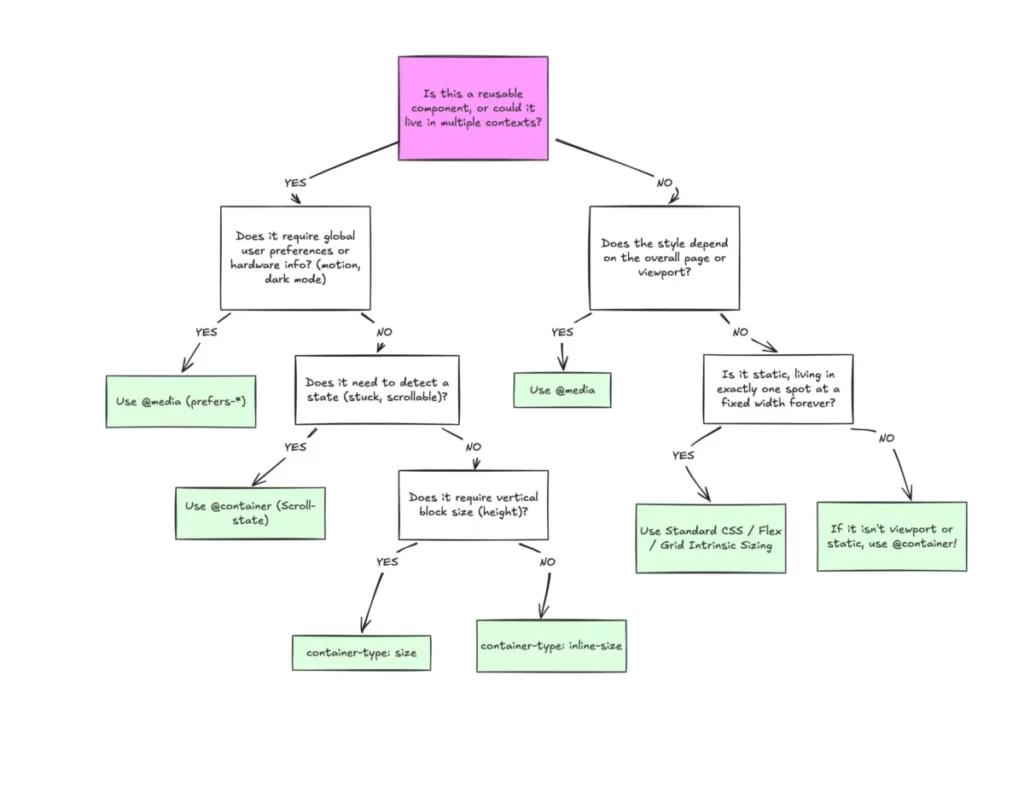
    Both Firefox 149 and Safari 26.4 have embraced support for name-only @container queries without explicit conditions. This seemingly subtle addition represents a significant leap forward in component-based responsive design. Previously, container queries primarily allowed styling elements based on the size or style characteristics of their parent container. With name-only queries, developers can now match against containers based solely on their assigned names, decoupling styling logic from specific dimensional constraints.

    This functionality empowers developers to create truly modular and reusable UI components. Imagine a Card component that needs to adapt its internal layout when placed within a Sidebar container versus a MainContent container, irrespective of the actual pixel width of those containers. By simply naming the containers (e.g., @container sidebar), the Card can apply different styles. This reduces reliance on complex media queries or intricate JavaScript logic for layout adjustments, leading to cleaner, more maintainable CSS. Industry analysts predict this will accelerate the adoption of atomic design principles and component-driven architectures, as it makes component context awareness more straightforward and declarative. "This feature simplifies responsive development dramatically," commented Dr. Anya Sharma, a leading web performance consultant. "It shifts the focus from global viewport dimensions to local component context, which is where modern UIs truly live."

    Scroll-Triggered Animations: Native Performance for Dynamic Experiences

    Chrome 146’s introduction of scroll-position-based control of animations is a monumental advancement for creating engaging and performant user experiences. This feature allows developers to declaratively link CSS animations to the scroll progress of an element or the document, eliminating the need for complex JavaScript event listeners and manual DOM manipulation. Interactions such as parallax effects, scroll-linked progress bars, and element reveals can now be defined directly in CSS, leveraging the browser’s optimized animation engine.

    Crucially, offloading these animations to a worker thread significantly improves performance. Historically, scroll-based animations, particularly those implemented with JavaScript, could lead to jankiness and frame drops, especially on less powerful devices, as they often contended with the main thread for resources. By moving these calculations off-main-thread, Chrome 146 ensures smoother, more fluid animations, enhancing the perceived responsiveness of web applications. The accompanying JavaScript interfaces for web animations provide developers with granular control when custom logic is required, offering a powerful hybrid approach. The CSS scroll-triggered animations are coming article on developer.chrome.com served as an early indicator of this feature’s potential, and its stable release is expected to inspire a new wave of creative web designs. "This is a game-changer for interactive storytelling and dynamic content presentation," stated a spokesperson from the Chrome development team. "It democratizes sophisticated animation techniques, making them accessible and performant for all web projects."

    The trigger-scope Property: Taming Animation Triggers

    Complementing scroll-triggered animations, Chrome 146 also introduced the trigger-scope property. This property addresses a potential challenge in complex web applications: the management of animation trigger names. In a large project, multiple components might define scroll-triggered animations, and without proper scoping, there’s a risk of name conflicts or unintended animation interactions.

    The trigger-scope property allows developers to limit the visibility of animation trigger names to a specific subtree of the DOM. This encapsulation helps to isolate animation-to-trigger interactions, preventing global name conflicts and making it easier to reason about and debug animation behavior within individual components. This feature promotes better architectural practices, enabling developers to build more modular and robust animation systems without worrying about adverse effects from other parts of the application. It’s a testament to the platform’s maturity, addressing not just functionality but also maintainability and scalability.

    Popover hint Value: Granular Control for UI Overlays

    Firefox 149’s support for the hint value in the popover global attribute provides developers with more fine-grained control over popover behavior, particularly in multi-popover scenarios. The popover API, a relatively recent addition to the web platform, simplifies the creation of transient UI elements like tooltips, menus, and notifications. While auto popovers close themselves when the user clicks outside or presses the Escape key, the hint value introduces a nuanced interaction model.

    Popovers with the hint value will not automatically close auto popovers when they are displayed, allowing for layered interactions. However, they will close other hint popovers, ensuring a sensible, sequential display within a specific interaction flow. This distinction is crucial for applications requiring complex overlay management, such as multi-step forms with embedded help tips, or interactive tutorials where multiple contextual prompts might appear. This feature improves the user experience by preventing premature closing of critical UI elements, while still managing the display of multiple hints effectively.

    Grid Lanes (display: grid-lanes): Native Masonry Layouts

    Safari 26.4’s support for display: grid-lanes introduces native support for masonry-style layouts, a highly anticipated feature for web designers. Masonry layouts, characterized by items of varying heights arranged in columns with no gaps, have historically been challenging to implement efficiently on the web. Developers often relied on JavaScript libraries or complex CSS hacks involving absolute positioning or Flexbox workarounds, which could be cumbersome and sometimes lead to performance issues or accessibility challenges.

    The display: grid-lanes value for the display property provides a declarative, performant, and accessible way to achieve this popular layout pattern directly within CSS Grid. This native implementation means better performance, easier maintenance, and improved cross-browser consistency for masonry grids. Content-heavy sites, portfolios, and image galleries are expected to benefit immensely from this, allowing for more dynamic and visually appealing presentations without the overhead of external scripts. "This is a huge win for design flexibility," noted a spokesperson from Apple’s WebKit team. "Masonry has been a persistent request, and bringing it natively to CSS Grid makes it robust and accessible."

    New to the web platform in March  |  Blog  |  web.dev

    Math Functions in sizes Attribute: Responsive Image Loading Refined

    Safari 26.4 further enhances responsive image loading by adding support for min(), max(), and clamp() CSS math functions within the sizes attribute of <img> elements. The sizes attribute informs the browser about the intrinsic size of an image based on the viewport, allowing it to select the most appropriate image source from a srcset.

    By enabling math functions, developers can now express more complex and precise calculations for image dimensions. For instance, an image might need to be clamp(300px, 50vw, 800px) wide, meaning it should be at least 300px, at most 800px, and scale to 50% of the viewport width in between. This capability provides unprecedented flexibility in defining responsive image breakpoints and sizes, optimizing bandwidth usage and improving perceived page load times. This is particularly beneficial for high-performance websites and those with diverse user bases accessing content on a wide range of devices.

    JavaScript Iterator Sequencing: Streamlining Data Processing

    Both Chrome 146 and Safari 26.4 have rolled out support for JavaScript iterator sequencing, introducing Iterator.concat(...items). This new static method allows developers to create a new iterator by concatenating existing iterators. This feature streamlines data processing workflows, especially when dealing with multiple sources of iterable data (e.g., arrays, sets, custom iterators) that need to be processed sequentially as a single stream.

    Prior to this, developers often had to convert iterators to arrays, concatenate them, and then iterate, or write custom generator functions to achieve similar sequencing. Iterator.concat offers a more memory-efficient and idiomatic way to handle such scenarios, as it operates on iterators directly without materializing intermediate arrays. This is now considered "Baseline Newly available," indicating its widespread support and readiness for general use, promising cleaner and potentially more performant code for data manipulation in complex JavaScript applications.

    CloseWatcher Interface: Unifying Device-Native Closing Mechanisms

    Firefox 149’s support for the CloseWatcher interface is a crucial step towards standardizing and enhancing the user experience for closable UI components. This interface allows web developers to integrate their custom components (like modals, custom dropdowns, or notification banners) with device-native closing mechanisms. For example, on Windows, this means components can respond to the Esc key, and on Android, to the system’s Back key, in the same consistent manner as built-in browser dialogs and popovers.

    Historically, implementing consistent closing behavior across different devices and operating systems for custom UI elements has been a significant challenge, often requiring extensive event listener management and conditional logic. CloseWatcher provides a unified, reliable API to manage these interactions, leading to a more coherent and intuitive user experience. Users will find web applications feeling more "native" and responsive to their device’s interaction patterns, reducing friction and improving usability. This feature is particularly valuable for Progressive Web Apps (PWAs) that aim to blur the line between web and native applications.

    Broader Implications for Web Development

    The collective impact of these March 2026 updates is profound. For developers, the platform is becoming more powerful and expressive, reducing the need for complex JavaScript workarounds for common UI patterns. Native scroll-triggered animations and masonry layouts mean better performance and accessibility out-of-the-box. Enhanced container queries promote more modular and maintainable CSS architectures. The CloseWatcher API and improved popover controls contribute to a more seamless and intuitive user experience, particularly for mobile and PWA users. These advancements collectively signal a mature web platform that continues to address developer pain points and expand creative possibilities, while prioritizing performance and user accessibility.

    The Road Ahead: Beta Browser Releases

    Looking beyond the stable releases, the beta channels for April 2026 provide an exciting glimpse into upcoming features. These beta versions are critical for developers to test new functionalities and assess potential impacts on their existing sites before wider stable deployment.

    Chrome 147 Beta: Enhanced Styling and View Transitions

    Chrome 147 Beta introduces several intriguing features:

    • contrast-color(): A new CSS function designed to automatically return either black or white, depending on which color provides the highest contrast against a given argument color. This is invaluable for ensuring text readability and accessibility, especially in dynamic theming or user-generated content scenarios, simplifying the creation of accessible color palettes.
    • border-shape: This property hints at more complex and flexible border geometries beyond traditional rectangular or rounded corners, potentially enabling advanced graphical designs directly in CSS.
    • Element-scoped view transitions: Building on the existing View Transitions API, this allows for smoother, more controlled animations when parts of a page change, scoped to specific elements rather than full page navigations. This will enable highly polished, app-like transitions within single-page applications.

    Firefox 150 Beta: CSS Keywords and Custom Elements

    Firefox 150 Beta also brings a range of significant updates:

    • CSS revert-rule keyword: This keyword allows a property to revert to the value specified by the last matching rule in the user agent’s default style sheet, offering a powerful new mechanism for resetting styles to browser defaults in a more controlled manner.
    • customElementRegistry for Elements and DocumentOrShadowRoot: This provides a more convenient way to interact with the Custom Elements API, allowing developers to query and define custom elements within specific contexts.
    • light-dark() for images: Expanding on the existing light-dark() CSS function for colors, this will enable responsive image selection based on the user’s preferred light or dark mode, further enhancing adaptive user interfaces.

    Expert Commentary and Industry Outlook

    The industry consensus is overwhelmingly positive regarding March’s stable releases and the direction indicated by the beta channels. "The focus on native performance for animations and layouts, coupled with improved control over UI components, truly elevates the web as a platform for sophisticated applications," stated a representative from the Web Standards Project. "We’re seeing a trend towards baking complex interactions directly into the browser, reducing the reliance on JavaScript libraries and leading to more efficient, accessible, and maintainable websites."

    Developers are particularly enthusiastic about the potential for scroll-triggered animations to unlock new creative possibilities without compromising performance. The maturation of responsive design tools like container queries and native masonry layouts is also being lauded as essential for managing the complexity of modern, adaptable UIs. The continued collaborative effort between browser vendors, as evidenced by shared feature adoptions and standardizations, reinforces the health and progressive trajectory of the web platform.

    Conclusion

    March 2026 stands out as a landmark month for web development, delivering a robust set of stable features that significantly enhance the capabilities of Chrome, Firefox, and Safari. From foundational CSS layout and animation tools to refined JavaScript ergonomics and intuitive UI controls, these updates collectively push the web platform forward, enabling developers to build more performant, accessible, and engaging experiences. With promising features already appearing in beta channels, the momentum for innovation on the web shows no signs of slowing, setting an exciting precedent for the remainder of 2026 and beyond.

  • They Call Me Giulio: The Making of a Cinematic Cyberpunk Portfolio Demo

    They Call Me Giulio: The Making of a Cinematic Cyberpunk Portfolio Demo

    In an era where digital portfolios often conform to predictable templates, a groundbreaking project titled "They Call Me Giulio: The Making of a Cinematic Cyberpunk Portfolio Demo" has emerged, redefining the standards for interactive web experiences. This fifth iteration of Giulio’s personal portfolio stands as a testament to unbridled creativity, leveraging advanced web technologies to craft an immersive, narrative-driven journey inspired by iconic cult classics. Far from a conventional résumé, this project is a deeply personal exploration of artistic expression and technical mastery, designed to leave a lasting impression long after a browser tab is closed.

    The Visionary Behind the Canvas

    Giulio embarked on this ambitious endeavor by taking a deliberate sabbatical from client-based work, a crucial decision that allowed for pure, unadulterated creative exploration. This hiatus was not merely a break but a strategic immersion into a space free from the constraints of client briefs, key performance indicators (KPIs), or established rules. The driving force was an internal wellspring of ideas, coupled with a profound command of code, aiming to manifest a vision uncompromised by external pressures.

    His philosophy diverges sharply from the common perception of "creativity" in the digital sphere, which often devolves into a checklist of fleeting trends—be it cursor followers, oversized typography, or generic flashy effects. While acknowledging that these elements might define contemporary aesthetics, Giulio posits that genuine creativity lies in constructing a coherent, compelling narrative. In this context, every animation transcends mere decorative flair, becoming an integral storytelling tool. This portfolio deliberately eschews textbook user experience (UX) principles and safe design choices, instead aiming to disrupt patterns and carve out a distinctive presence in a crowded digital landscape. The ultimate measure of success, as articulated by Giulio, is simple: if the site lingers in a visitor’s mind after they close their browser, the mission is accomplished.

    Narrative as the New UX: Blending Cult Classics into Canvas

    This portfolio is not merely a professional showcase; it is a deeply personal artifact, interwoven with the creator’s identity beyond the professional façade. Giulio sought to integrate his human side—the "couch guy" who rewatches beloved movies—into the experience, moving beyond a sterile list of projects and a "contact me" button. His inspiration flowed directly from these cherished films, those timeless narratives he can revisit endlessly without fatigue.

    They Call Me Giulio: The Making of a Cinematic Cyberpunk Portfolio | Codrops

    A notable element of his personal brand is his distinctive avatar, which originated as a playful experiment in Blender during the development of his fourth portfolio version. What began as a learning exercise quickly evolved into a permanent, recognizable presence, endowed with its own personality and becoming a crucial component of his unique brand identity.

    The portfolio unfolds across four distinct, cinematic scenes, each meticulously crafted to evoke the atmosphere and narrative power of its cinematic muse:

    Scene One: About Me – Echoes of Neo-Noir

    The journey commences with an homage to Ridley Scott’s 1982 neo-noir masterpiece, Blade Runner. Upon entering the site, visitors are immediately immersed in a scene inspired by the film’s iconic "Tears in Rain" monologue, delivered by Roy Batty. This sequence captures the essence of a rain-soaked, neon-drenched cityscape, where Batty, a replicant, recounts profound experiences before his poignant demise, releasing a white dove into the gray sky. This blend of melancholy, poetry, hope, and raw cyberpunk atmosphere sets the initial tone.

    Giulio envisioned this opening as a radical departure from conventional hero sections or oversized headlines, opting instead for an evocative image that resonates with fans of the film. The avatar, a sentient android, is dynamically integrated into this environment, reacting like a video game character. Hovering over the "About" button prompts the android to lift its head inquisitively. A click smoothly transitions the camera, dissolving the surrounding world and leaving the avatar alone in a spotlight—the gateway to the About page. A subtle detail, a rusty yellow sign on a building, reveals the Japanese translation of "Giulio," further embedding personal touches within the immersive world.

    Scene Two: Works – Unleashing Inner Power

    The atmosphere shifts dramatically in the second scene. The android protagonist reclaims its strength and capabilities, unleashing a powerful, glowing energy blast that cuts across the screen. This explosive transformation serves as a potent metaphor for the accumulation of skills and experiences over Giulio’s career. The visual inspiration for this dynamic sequence is drawn from the beloved childhood cartoon Dragon Ball, specifically the Super Saiyan transformation—the pivotal moment when a character taps into their latent, hidden potential. As this energy explodes, a curated selection of projects materializes, as if the avatar, having unlocked its inner power, proudly declares, "This is what I can do." These projects are not merely listed but are chosen for their personal significance, having challenged or taught Giulio valuable lessons.

    They Call Me Giulio: The Making of a Cinematic Cyberpunk Portfolio | Codrops

    Scene Three: Room of Memories – The Cyberpunk Guestbook

    Giulio rekindles a beloved feature from early 2000s web design: the guestbook. Reimagined for the cyberpunk era, it becomes the "Room of Memories"—an immersive space suspended in darkness, where visitor messages drift like luminous fragments through infinite space. This concept draws heavily from a seminal scene in The Matrix (1999), where Neo and Trinity enter the weapons program, a vast, sterile white warehouse filled with racks materializing from the void.

    Giulio inverted this aesthetic, transforming the limitless white space into profound darkness punctuated by soft neon glows, where thousands of messages float like suspended memories. This "cyberpunk guestbook" directly links back to the Blade Runner inspiration of the first scene, echoing Roy Batty’s famous last words: "All those moments will be lost in time, like tears in rain." The messages, therefore, become digital tears, preserved in a boundless void.

    Scene Four: Contact – A New Journey Awaits

    The melancholic ambiance of the opening scene gently returns, accompanied by the same subtle soundtrack and soft neon rain. The avatar stands with its back turned, breathing slowly, poised for a new adventure. The iconic DeLorean from Back to the Future then descends silently from the sky, glowing blue, landing softly as its door opens. The mission concludes, signaling "It’s time to go home"—or perhaps, to embark on the next chapter.

    Crafting the Digital Dreamscape: The Development Process

    Giulio’s creative process for this portfolio was characterized by an iterative, code-first approach. As a developer, his primary focus was establishing an efficient workflow that balanced speed with effectiveness. The design phase was largely conceptual, with Figma serving as a personal notepad for post-its, screenshots, and nascent ideas rather than a tool for producing meticulously finalized mockups. Being both designer and developer, he bypassed the need for shareable files or collaborative tools, transitioning directly from thought to code.

    They Call Me Giulio: The Making of a Cinematic Cyberpunk Portfolio | Codrops

    The majority of his time was dedicated to conceptualizing, prioritizing, and interconnecting various inspirations. Strong ideas were immediately documented as digital post-its or quick sketches. Later, screenshots from films or Pinterest boards were used to concretize the visitor’s journey, even if initially only within his mind.

    Overcoming the Text Conundrum

    A significant challenge arose in balancing an immersive, cinematic 3D experience with clear, readable 2D text. Directly overlaying text onto a deep 3D scene severely compromises readability. Giulio rejected conventional solutions like dark overlays or semi-transparent backgrounds, which he felt would shatter immersion by creating two distinct "worlds."

    His innovative compromise involved integrating the text content directly into the 3D scene and unifying everything with shared effects. This was achieved through:

    • A subtle glow effect: Enhancing text visibility against the dark backdrop.
    • UV distortion: Applying a slight distortion to text based on mouse movement, making it feel organic and part of the environment.
    • RGB split (chromatic aberration): A subtle effect that adds a "glitchy", futuristic aesthetic, further blending the text into the cyberpunk world.

    This approach ensures the text doesn’t merely cover the scene but actively becomes a part of it, maintaining visual cohesion and immersion.

    Under the Hood: A Deep Dive into the Tech Stack

    This portfolio served as an ideal experimental ground for new technologies. Giulio deliberately chose a stack that allowed for maximum control and performance, pushing the boundaries of what’s achievable in a web browser.

    They Call Me Giulio: The Making of a Cinematic Cyberpunk Portfolio | Codrops

    Cutting-Edge Graphics & 3D Tools:

    • Blender: The powerful open-source 3D software was instrumental for creating and preparing all models and scenes. While some models (avatar, buildings, DeLorean) were sourced from Sketchfab, Blender was used for intricate modeling, texturing, rigging, and rendering.
    • WebGPU: This next-generation web graphics API was leveraged to drastically reduce overhead between JavaScript and the GPU, resulting in more stable framerates and performant shaders. Giulio delved into Three.js’s Shader Language (TSL), capable of compiling to both WGSL (WebGPU Shading Language) and GLSL (OpenGL Shading Language), with a WebGL fallback for broader compatibility. This represented a challenging yet highly rewarding technical leap.
    • Pure Three.js: Eschewing declarative libraries like R3F (React Three Fiber), Giulio opted for pure Three.js. Previous experiences with R3F’s declarative nature clashing with Three.js’s imperative operations, particularly with THREE.RenderTarget, informed this decision. Given the portfolio’s reliance on multiple RenderTargets and granular control over the rendering pipeline, pure Three.js offered the consistency and control required.

    Front-End Architecture & Animation:

    • React & React Router: Despite the canvas-centric visual experience, the Document Object Model (DOM) remains active behind the scenes. React and React Router manage all sections, text positioning within them, and scroll behavior, ensuring a robust and structured front-end.
    • GSAP (GreenSock Animation Platform): An indispensable tool, GSAP orchestrated all scroll-based animations, including synchronized audio cues, and facilitated precise timeline control over material uniforms, bringing complex visual effects to life.
    • Lenis + Custom Logic for Scrolling: Lenis provides smooth and performant primary scrolling. However, for seamless snapping between sections, Giulio implemented custom logic. Instead of the typical 50% viewport height threshold that could impede UX, the scene change triggers at a more intuitive 30% viewport height, making transitions feel natural and fluid.
    • Monorepo (Turborepo): For a single-page application featuring four interconnected Three.js scenes, a monorepo structure managed by Turborepo proved invaluable. This allowed for independent development of each scene, preventing unnecessary loading of assets from other sections while ensuring shared classes and assets were consistently available across the project.

    Aural Immersion:

    • AI-Generated Soundtrack: Inspired by Vangelis’s melancholic, neo-noir "Tears in Rain" from Blade Runner, Giulio sought a similar retro-futuristic, synth-heavy atmosphere. Lacking advanced sound design skills, he turned to Suno, an AI music generator. While the process involved numerous prompts and iterations due to Suno’s limitations, the resulting deep, atmospheric track, "Bleeding Seconds," perfectly captures the android’s mood, even if "it’s not Vangelis."

    Navigating Technical Frontiers: Key Challenges & Solutions

    The creation of such a complex interactive experience naturally presented several technical hurdles, each met with ingenious solutions:

    The Intricate Rendering Pipeline:
    The entire visual experience resides within a THREE.Scene, managed by a SectionTransition class. This class orchestrates an THREE.OrthographicCamera and a THREE.PostProcessing object. It intelligently updates one or two scenes based on whether a transition is active. Each Section object encapsulates its unique elements (avatar, DeLorean, buildings) and instantiates its own TextScene, ensuring that all 2D elements (texts, buttons) are integral to the section’s transitions. The TextScene also incorporates a WatercolorBrush object, which uses a ping/pong accumulator technique to record mouse movement history into a low-resolution texture. This texture is then used by TextScene to distort text UVs and subtly adjust brightness, saving the final result into another texture. Ultimately, each Section applies various post-processing effects and blends its output with the TextScene‘s texture, with SectionTransition smoothly blending the output textures from one or two sections to achieve seamless transitions.

    Dynamic Scene Transitions:
    Crafting the ideal transition between sections demanded extensive experimentation. The final chosen effect evokes the shockwave created by the helicopter crash in The Matrix, revealing the virtual nature of the environment. This was significantly aided by Yuri Artiukh’s "Shader Image Transition" video. The shader facilitates a transition between two textures (A and B) using masks and multiplier bands that move vertically. Instead of a clean line, the mask is made irregular using Perlin noise, ensuring a dynamic, non-uniform progression. A "bounce effect"—an additional band multiplying these irregularities—enhances the sense of movement. A lens-like UV distortion is applied within a wider band around the transition front, causing elements near the edge to deform intensely while distant areas remain stable. Furthermore, scrolling triggers an extra UV displacement, a slight velocity-based zoom-out, and a subtle RGB split (chromatic aberration) near the center, culminating in a "glitchy/chromatic" aesthetic.

    They Call Me Giulio: The Making of a Cinematic Cyberpunk Portfolio | Codrops

    Optimized Loading & Animation:
    To ensure a fluid user experience, Giulio adopted an "load everything upfront" strategy for assets, simplifying loading logic and preventing missing asset issues. Remarkably, the entire experience, including 3D models and textures, clocks in at a lean 12.5 MB. A THREE.LoadingManager efficiently handles global and section-specific asset lists, providing automatic progress tracking.

    Upon pressing "Enter," a "Dolly Zoom" (Vertigo Effect) camera animation catapults the visitor into the first scene. This cinematic punch, where the camera moves towards the subject while the field of view widens, creates a "breathing" background effect, visually engaging the user from the outset.

    Android animations are meticulously crafted using Blender’s rigging (armature and bones) and Weight Painting tools for fluid deformation. Animations are generated as Animation Actions on the timeline, then pushed to the NLA Editor for THREE.js compatibility. The exported .glb models are then controlled by THREE.AnimationMixer, allowing for precise playback, fading, and programmatic management of AnimationAction progress.

    For the iconic flying cars in the opening scene, a THREE.InstancedMesh with just 100 instances efficiently renders the skyway traffic. Their basic geometry is sufficient due to the post-processing bokeh effect. The cars’ flight paths were meticulously traced using Blender curves, exported, and converted into a THREE.CatmullRomCurve3 parametric curve in the application. A function then returns coordinates and tangents, allowing cars to be offset and spread along the path, looping seamlessly. This technique was also applied to the flying police car.

    Performance Engineering: Maximizing Efficiency

    In a single-page application with four distinct scenes, optimization was paramount.

    • Assets Optimization: All assets undergo a custom gltf-transform pipeline, which simplifies geometry and downsizes textures to a maximum of 1024px. 3D models are converted to KTX2 format, leveraging hardware compression (Basis Universal) for reduced VRAM usage. Textures and images are further compressed using the AVIF format.
    • Intelligent Section Updates: The scroll position dictates which scenes are active. Only one scene renders at a time, or two during a transition, preventing unnecessary render loop and post-processing computations for invisible scenes.
    • Shader & Draw Call Optimization: To alleviate shader load, noise functions are baked into textures (Perlin, Fractional Brownian Motion, Random noise) and sampled at runtime, avoiding computationally intensive calculations. This project successfully eliminated runtime noise function execution using only three pre-baked noise textures. Furthermore, draw calls are heavily optimized through InstancedMesh for elements like rain, cars, and buildings, allowing the GPU to handle transformations in a single call.

    Reception and Future Implications

    They Call Me Giulio: The Making of a Cinematic Cyberpunk Portfolio | Codrops

    Giulio expressed profound satisfaction with the final outcome, particularly given the initial lack of a fixed design, which necessitated an agile, code-first approach. The positive feedback received has been overwhelmingly encouraging, with the "Room of Memories" section proving to be a beloved and engaging feature. Hundreds of messages, ranging from simple greetings to profound expressions of inspiration, underscore the project’s impact.

    Notable feedback includes:

    • "This is better than spaghetti bolognese!"
    • "This is the best site i’ve seen till today. I have no words to explain how this site has inspired me to do more creative work."
    • "Thanks for proving humans were worth designing."
    • "Amazing Website man, never ever thought off – highly creative and everything matches – even the sound. Kudos man really."
    • "No Comments about The Work Thanks For this Such a Creativity Work, Words will never describe this Work. But i say this is more THAN AMAZING."
    • "This makes me believe that i can create what I’m currently struggling to make it simply takes patience and practice becuase this is amazing man."
    • "Is this the coolest feature I’ve seen on a portfolio? YES. Who doesn’t like side quests."
    • "For i am an Eternal being living in endless solitude, trapped in this endless void of Data."
    • "have you seen the sky? i want to live everytime i see it."

    These testimonials highlight not just the aesthetic appeal but also the profound emotional and inspirational resonance of the portfolio. Giulio anticipates the enduring joy of rereading these "memories" in decades to come.

    "They Call Me Giulio" is more than just a portfolio; it is a meticulously crafted cinematic experience that pushes the boundaries of web development and interactive design. It serves as a compelling case study for how a strong narrative, combined with cutting-edge technology and a bold creative vision, can transform a personal showcase into an unforgettable digital journey, setting a new benchmark for immersive web experiences in the industry.

Grafex Media
Privacy Overview

This website uses cookies so that we can provide you with the best user experience possible. Cookie information is stored in your browser and performs functions such as recognising you when you return to our website and helping our team to understand which sections of the website you find most interesting and useful.