
Tag: modernizing

  • Modernizing Enterprise UX: Navigating the Complexities of Legacy Systems for Sustainable Impact

    Modernizing Enterprise UX: Navigating the Complexities of Legacy Systems for Sustainable Impact

    The contemporary enterprise landscape is increasingly defined by the silent yet pervasive challenge of legacy systems. These deeply entrenched technological infrastructures, often operating for a decade or more, underpin critical daily operations despite being slow, unreliable, and severely outdated. While the drive for digital transformation and enhanced user experience (UX) gains momentum, many organizations grapple with the daunting task of improving systems that are effectively "black boxes"—essential yet poorly understood. This article, informed by practical guidelines from Vitaly Friedman’s "Measuring UX Impact" course, delves into strategies for driving significant UX improvements within organizations burdened by such legacy systems and their associated broken processes.

    The Enduring Presence and Cost of Legacy Infrastructure

    How To Improve UX In Legacy Systems — Smashing Magazine

    Legacy systems are not merely old software; they represent a complex amalgamation of historical investment, specialized customization, and often, undocumented knowledge. Many were developed externally by suppliers, frequently without the benefit of rigorous usability testing, and have become indispensable to core business functions. This deep integration is precisely why they persist: replacing them outright often presents an insurmountable financial and operational hurdle. Industry data consistently shows that enterprises allocate a substantial portion—typically 40% to 60%—of their IT budgets to simply managing, maintaining, and fine-tuning these aging systems. This substantial allocation represents not only a direct cost but also a significant opportunity cost, diverting resources that could otherwise be invested in innovation and new product development.

    Consider the operational impact: a system designed for an earlier era often struggles with modern data volumes, processing speeds, and user expectations. The individuals who initially conceived and built these systems may have long since departed, leaving behind fragmented documentation, inconsistent design choices, and design artifacts trapped in discontinued software versions. For instance, in healthcare, Electronic Medical Record (EMR) systems, while critical, are notorious for their complex, often unintuitive interfaces that can lead to physician burnout and errors. Similarly, financial institutions often rely on decades-old mainframe systems for core banking functions, whose underlying complexities make even minor UX updates a monumental undertaking. The sheer scale of replacing such systems across thousands of branches or user terminals, as seen with older cash register technologies, renders a complete overhaul remarkably expensive and disruptive.

    The User Experience Paradox: Modern Interfaces Clashing with Antiquated Backends

    How To Improve UX In Legacy Systems — Smashing Magazine

    The most visible manifestation of the legacy system challenge is the "Frankenstein" effect. Organizations often attempt to integrate modern, sleek user interfaces with these antiquated back-end systems. The result is a patchwork experience: visually appealing front-ends that abruptly transition into painfully slow, barely usable fragments when critical data processing, validation, or error messaging occurs. This inconsistency shatters user trust and significantly degrades the overall product experience.

    A single point of friction within a complex user flow—perhaps a sluggish database query, an obscure error message, or an unresponsive layout within a legacy module—can undermine all the meticulous design work applied to the rest of the application. Users, particularly those in corporate environments who rely on these systems daily, perceive the entire product as broken, irrespective of the enormous effort invested in modernizing other parts. This creates a deeply frustrating experience, impacting productivity, increasing training costs, and potentially leading to employee dissatisfaction and turnover. A CIO might lament, "We’ve invested heavily in digital transformation, but our core operational systems remain a drag on efficiency and user morale, creating a perception gap between our brand image and the reality of our internal tools."

    A Strategic UX Roadmap for Legacy Transformation

    How To Improve UX In Legacy Systems — Smashing Magazine

    Given the criticality and inherent complexities, simply "ripping out and replacing" a legacy system is rarely a feasible or advisable strategy. Such "big-bang" redesigns are not only expensive and time-consuming but also carry immense risks, potentially disrupting core business operations. Instead, a phased, strategic approach is essential, one that respects the existing institutional knowledge embedded within these systems and the deeply ingrained habits of their users.

    Phase 1: Comprehensive Discovery and Assessment

    The initial step in any legacy UX improvement initiative is a thorough understanding of the existing ecosystem. This phase is about illuminating the "black box" as much as possible, even if its internal workings remain opaque.

    How To Improve UX In Legacy Systems — Smashing Magazine
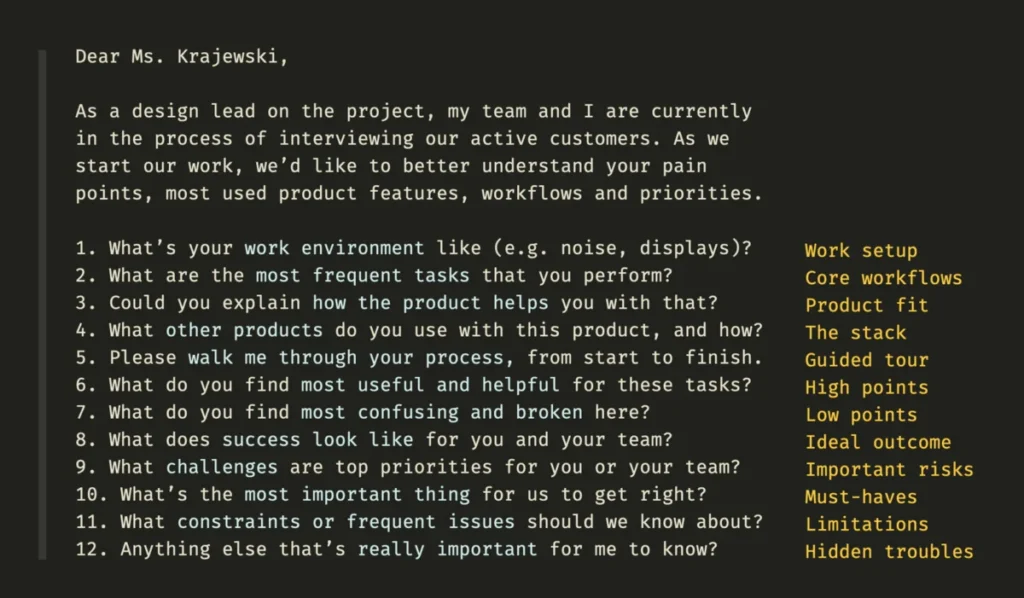
    • Stakeholder Interviews: Engage key stakeholders—business owners, department heads, IT leads—to understand their priorities, challenges, and perceived value of the legacy system. This helps capture invaluable institutional knowledge about the system’s purpose and its critical role in various business practices.
    • User Research and Ethnographic Studies: Critically, involve the heavy users of the system. Observe them in their natural work environment, noting their actual workflows, pain points, workarounds, and the frequency with which they use specific features. Usability testing on the existing legacy system, no matter how rudimentary, can reveal profound insights into user struggles and task completion difficulties. A long-term user might express, "It’s slow and clunky, but I know where everything is, and I’ve developed my own ways to get things done. I worry a new system will disrupt my entire day."
    • Technical Audit and Dependency Mapping: Work closely with IT to uncover the system’s architecture, data flows, and, crucially, its dependencies on other systems—which may themselves be older legacy components. Documenting these interconnections helps visualize the intricate web of relationships and identify potential ripple effects of any changes. A visual board mapping current workflows and dependencies, involving both technical and business teams, becomes an invaluable tool.
    • Feature and Priority Mapping: Not everything needs to be migrated or redesigned. Through discovery, identify critical features, frequently used workflows, and high-impact areas that are most ripe for UX improvement. A prioritization matrix, balancing user impact with technical feasibility and business urgency, is essential.

    Phase 2: Defining the Migration Strategy

    Once a comprehensive understanding is established, organizations must select an appropriate migration strategy. This choice dictates the scope, timeline, and ultimate UX impact. The goal is not just to migrate a system, but to transition workflows, habits, and ways of working.

    • Rehosting (Lift-and-Shift): Moving the application to a new cloud infrastructure without significant code changes. While offering minimal immediate UX improvements, it can lay the groundwork for future enhancements by improving performance and scalability.
    • Re-platforming: Modifying the application to optimize it for a new cloud platform, potentially involving minor code changes. This offers slightly more opportunity for UX tweaks to leverage new platform capabilities.
    • Refactoring: Restructuring and optimizing the existing code without altering its external behavior. This primarily improves maintainability and performance, which can indirectly enhance UX through faster load times and fewer errors.
    • Replacing: Discarding the old system entirely and building a new one from scratch. This is the most radical approach, offering the greatest potential for UX transformation, but also carrying the highest risk and cost. It is often implemented incrementally, replacing modules over time.
    • Retaining: Keeping the legacy system as is but building modern user interfaces or APIs around it to provide a more contemporary experience. This can be a cost-effective way to improve UX for specific interactions without touching the core legacy code.
    • Retiring: Decommissioning systems that are no longer needed, streamlining the IT landscape.

    The decision hinges on factors like business criticality, technical debt, budget, timeline, and the desired level of UX transformation. Incremental strategies, such as the "Strangler Fig" pattern where new functionality gradually replaces old, are often preferred to mitigate risk and allow for continuous user feedback.

    How To Improve UX In Legacy Systems — Smashing Magazine

    Phase 3: Incremental Implementation and Continuous Feedback

    The implementation phase should prioritize iterative development and constant engagement with users.

    • Pilot Projects: Initiate small, controlled pilot programs with a select group of users. This builds confidence, validates assumptions, and allows for real-world testing in a low-risk environment. A successful pilot can become a powerful internal case study, securing further buy-in.
    • Agile Development and Small Releases: Break down the transformation into manageable, testable chunks. Deploying small, iterative improvements allows for quick feedback loops and adaptation.
    • A/B Testing: Where applicable, test new UX elements or workflows against the existing legacy ones to gather empirical data on user preference and performance improvements.
    • User Training and Support: Anticipate the need for comprehensive training and ongoing support. Even well-designed changes can face resistance if users are not adequately prepared and supported.
    • Monitoring UX Metrics: Continuously track key performance indicators (KPIs) related to user experience, such as task completion time, error rates, user satisfaction scores, and productivity gains. This objective data is crucial for demonstrating the tangible impact of the UX work.

    Navigating Stakeholder Dynamics and Building Trust

    How To Improve UX In Legacy Systems — Smashing Magazine

    Transforming legacy systems is as much a people challenge as it is a technical one. Stakeholders and long-term users, despite acknowledging the system’s flaws, often harbor skepticism, doubts, and fears about change. They are deeply attached to existing workflows and institutional knowledge.

    • Strong Relationships and Shared Ownership: Building strong, trusting relationships with key stakeholders and heavy users from the outset is paramount. Involve them in discovery, design, and testing. Share ownership of the problem and the solution.
    • Transparent Communication: Regularly report progress, challenges, and successes. Address concerns proactively and transparently. Stakeholders will invariably focus on edge cases, exceptions, and tiny tasks, and they will question decisions. Be prepared to explain the rationale, demonstrate prototypes, and reiterate the benefits.
    • Managing Expectations: It is crucial to set realistic expectations. The new system will not run flawlessly from day one, and there will be a learning curve. Acknowledge the complexity and the journey ahead.

    The Strategic Imperative and Long-Term Value

    Revamping a legacy system is undeniably a tough challenge, often fraught with technical hurdles and organizational resistance. However, few projects within an enterprise can yield such profound and far-reaching impact. Beyond mere aesthetics, improved UX in legacy systems directly translates to:

    How To Improve UX In Legacy Systems — Smashing Magazine
    • Increased Efficiency and Productivity: Streamlined workflows and reduced error rates empower employees to accomplish tasks more quickly and accurately.
    • Reduced Operational Costs: Fewer support tickets, less manual intervention to correct errors, and optimized processes can significantly lower operational expenses.
    • Enhanced Employee Satisfaction and Retention: Providing modern, intuitive tools improves morale, reduces frustration, and makes an organization a more attractive place to work.
    • Greater Business Agility: Modernized systems are more adaptable to changing business requirements, market demands, and regulatory shifts, fostering greater organizational agility.
    • Competitive Advantage: Organizations that successfully modernize their core systems can outmaneuver competitors burdened by antiquated, inefficient technologies.

    In essence, a successful legacy UX transformation is a critical enabler of digital transformation, unlocking new levels of organizational performance and employee empowerment. While the journey is arduous, the teams that navigate it successfully are often remembered, respected, and rewarded for years to come, having delivered foundational improvements that drive sustainable business value. For those embarking on this journey, resources like "Measure UX & Design Impact" offer practical guidance on how to track and visualize the incredible impact of UX work on business outcomes, turning challenges into strategic triumphs.

Grafex Media
Privacy Overview

This website uses cookies so that we can provide you with the best user experience possible. Cookie information is stored in your browser and performs functions such as recognising you when you return to our website and helping our team to understand which sections of the website you find most interesting and useful.