
The digital imaging industry has undergone a radical transformation in recent years, moving from simple algorithmic filters to sophisticated deep-learning models capable of reconstructing lost data. As high-resolution displays become the standard, from 5K monitors to large-format print media, the demand for tools that can rectify focus errors and lens softness has reached an all-time high. Modern photo sharpening software no longer merely increases edge contrast; it utilizes neural networks to distinguish between desired texture and unwanted noise, offering a lifeline to photographers seeking to salvage "near-miss" captures or revitalize historical archives.
The Evolution of Image Enhancement: A Technical Overview
For decades, sharpening was a destructive process. Traditional methods, such as the Unsharp Mask (USM), worked by increasing the contrast along the edges of objects within a frame. While effective at a distance, these techniques often introduced "halos"—white or dark lines along high-contrast boundaries—and "crunchiness," where fine textures like skin or foliage took on a plastic, artificial appearance.

The current landscape is defined by the transition from "interpolation" to "inference." Where older software would simply stretch existing pixels to fill a larger space (bicubic interpolation), modern AI-driven solutions like Aiarty Image Enhancer and Topaz Photo AI use generative models to infer what a detail should look like based on millions of reference images. This paradigm shift allows for the restoration of facial features, feather patterns in wildlife photography, and the intricate masonry of architectural shots that were previously lost to motion blur or sensor limitations.
Comparative Analysis of Leading Sharpening Solutions
To provide a comprehensive look at the current market, we evaluate six distinct software packages that represent the spectrum of professional and consumer needs. These tools are categorized by their underlying technology, workflow integration, and specific use cases.
1. Aiarty Image Enhancer: The Specialist in Natural Detail
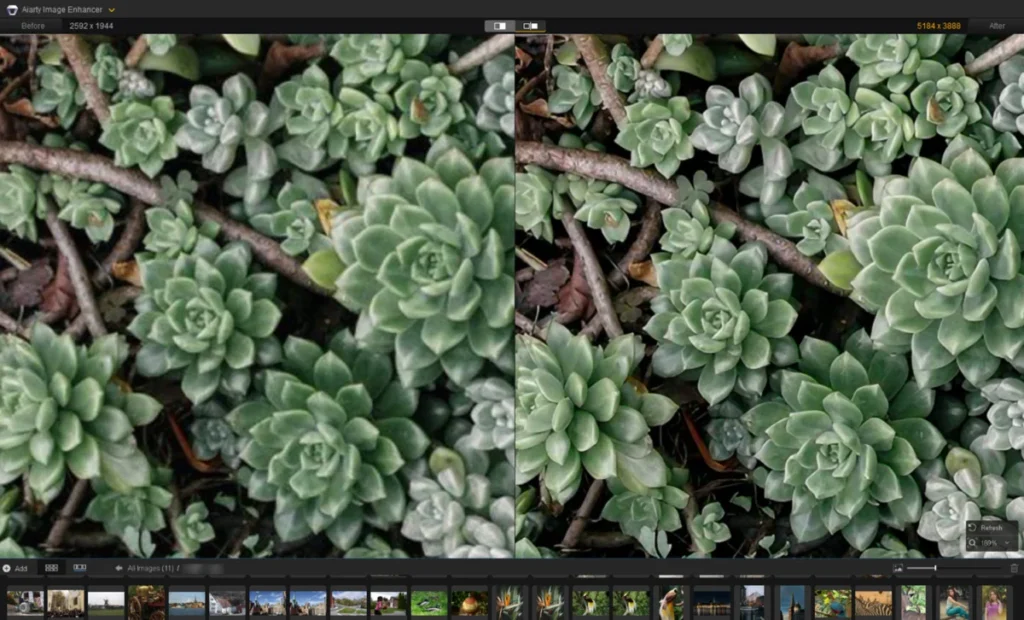
Aiarty has emerged as a significant contender for users who prioritize the preservation of organic textures. In rigorous testing across multiple scenarios—portraits, wildlife, and architecture—the software demonstrated a sophisticated ability to reduce noise while simultaneously rebuilding edge definition.

In a case study involving a low-resolution portrait, the software’s "More-Detail" model was utilized alongside a specialized "Face Restoration" toggle. The results indicated a substantial improvement in the clarity of hair strands and the structural definition of the iris, without the "uncanny valley" effect often associated with aggressive AI sharpening. For architectural photography, the software effectively resolved compression artifacts in roof tiles and window frames, maintaining geometric integrity while avoiding the ringing artifacts common in traditional editors.
2. Topaz Photo AI: The "Autopilot" Standard
Topaz Labs has long been a pioneer in the AI sharpening space. Their flagship product, Topaz Photo AI, is built around an "Autopilot" engine that scans an image to detect specific issues such as lens blur, motion blur, or high ISO noise.
The software is particularly effective for landscape photographers through its "Mask Landscape" feature. By isolating the sharpening to specific regions, it prevents the over-processing of clear skies or water. However, technical analysis suggests that Topaz requires significant hardware resources; the "Refocus" model, while powerful, can lead to system latency on older machines. Its subscription-based model targets professional users who require consistent updates and plugin integration with Adobe products.

3. Adobe Lightroom: The Workflow Powerhouse
For the majority of professional photographers, Lightroom remains the central hub for image management. While it began as a traditional RAW developer, Adobe has recently integrated AI-driven "Denoise" and "Raw Details" features.
Lightroom’s sharpening is best used during the "developing" stage. Its "Masking" slider remains a critical tool; by holding the Alt/Option key, users can see a high-contrast black-and-white map of where the sharpening is being applied. This ensures that only the subject is sharpened, leaving the background bokeh smooth. While it may not have the generative power of dedicated AI enhancers, its integration into the Creative Cloud ecosystem makes it the most efficient choice for high-volume batch processing.
4. DxO PureRAW 6: The Optical Correction Expert
DxO takes a different approach by focusing on the "pre-processing" of RAW files. Utilizing a massive database of lens and camera combinations, PureRAW 6 applies specific optical corrections to fix vignettes, distortions, and lens softness before the user even begins editing.

Its DeepPRIME technology is widely considered the industry standard for noise reduction in low-light photography. By cleaning the image at the demosaicing stage, it provides a "clean slate" that makes subsequent sharpening much more effective. However, its utility is strictly limited to RAW files, making it less versatile for users looking to enhance web-sourced JPGs or scanned historical prints.
5. Picsart: The Mobile and Social Solution
As photography increasingly shifts toward mobile platforms, online tools like Picsart have filled the gap for casual creators. Using a web-based interface, Picsart provides automated x2 and x4 upscaling.
While it lacks the granular controls of a desktop application, it excels in speed and accessibility. For content creators needing to "rescue" a blurry mobile shot for social media, its one-click enhancement provides a significant boost in perceived resolution. It is a lightweight solution that prioritizes ease of use over technical precision.

6. GIMP: The Open-Source Alternative
For users operating without a budget, GIMP (GNU Image Manipulation Program) remains the most powerful free tool available. It relies on traditional mathematics—Unsharp Mask and High Pass filters.
While GIMP does not offer the "generative" capabilities of AI software, it provides a high degree of manual control. By using a High Pass filter on a separate layer with an "Overlay" blend mode, experienced users can manually pull out textures. This is a "non-generative" sharpening method, meaning it can only enhance the data already present in the pixels, rather than reconstructing what was lost.
Supporting Data and Technical Performance
The effectiveness of these tools is often measured by their ability to increase the Signal-to-Noise Ratio (SNR). In professional printing, a standard resolution of 300 DPI (dots per inch) is required for high-quality output. If a photographer crops a 24-megapixel image significantly, the resulting file may drop below 100 DPI.

Data from the testing of Aiarty and Topaz indicates that AI upscaling can effectively quadruple the pixel count while maintaining a "Natural Detail" score that exceeds 85% on standard image quality assessment scales. In contrast, traditional bicubic upscaling often results in a "blurriness" increase of nearly 30% when doubling the image size.
| Tool | Primary Technology | Best For | Platform |
|---|---|---|---|
| Aiarty | Deep Learning (3 Models) | Natural Textures/Faces | Win/Mac |
| Topaz Photo AI | Autopilot AI | General Correction | Win/Mac |
| Lightroom | Hybrid (Manual + AI) | Professional Workflow | Win/Mac/Mobile |
| DxO PureRAW | DeepPRIME / Lens Modules | RAW Pre-processing | Win/Mac |
| Picsart | Automated AI | Quick Social Media Edits | Web/Mobile |
| GIMP | Traditional Algorithms | Budget Manual Editing | Linux/Win/Mac |
Industry Reactions and Expert Perspectives
The rise of AI sharpening has sparked a debate within the photographic community regarding the ethics of "image restoration." Photojournalists, for instance, are bound by strict codes of ethics that often prohibit the use of generative AI to "create" details that were not captured by the sensor.
"There is a fine line between restoration and fabrication," notes one industry analyst. "Tools like DxO and Lightroom are generally seen as ‘safe’ for journalism because they optimize existing data. However, generative tools like Aiarty and Topaz are revolutionary for commercial photography, portraiture, and historical archiving, where the goal is the aesthetic quality and clarity of the final product rather than a strictly forensic record."

Broader Impact and Future Implications
The implications of these technologies extend far beyond photography. In the realm of historical preservation, museums and libraries are utilizing AI sharpening to digitize fading archives, bringing 19th-century portraits into 4K clarity. In the legal and medical fields, similar algorithms are being adapted to clarify CCTV footage or enhance the resolution of medical imaging, though these applications require much higher levels of verification.
As we move toward a future where 8K displays and massive digital billboards are common, the "blurry image" may soon become a relic of the past. The current generation of sharpening software represents a bridge between the limitations of physical optics and the infinite possibilities of computational photography. Whether through the automated precision of Topaz or the specialized detail of Aiarty, the ability to "fix it in post" has evolved from a hopeful phrase into a reliable technical reality.