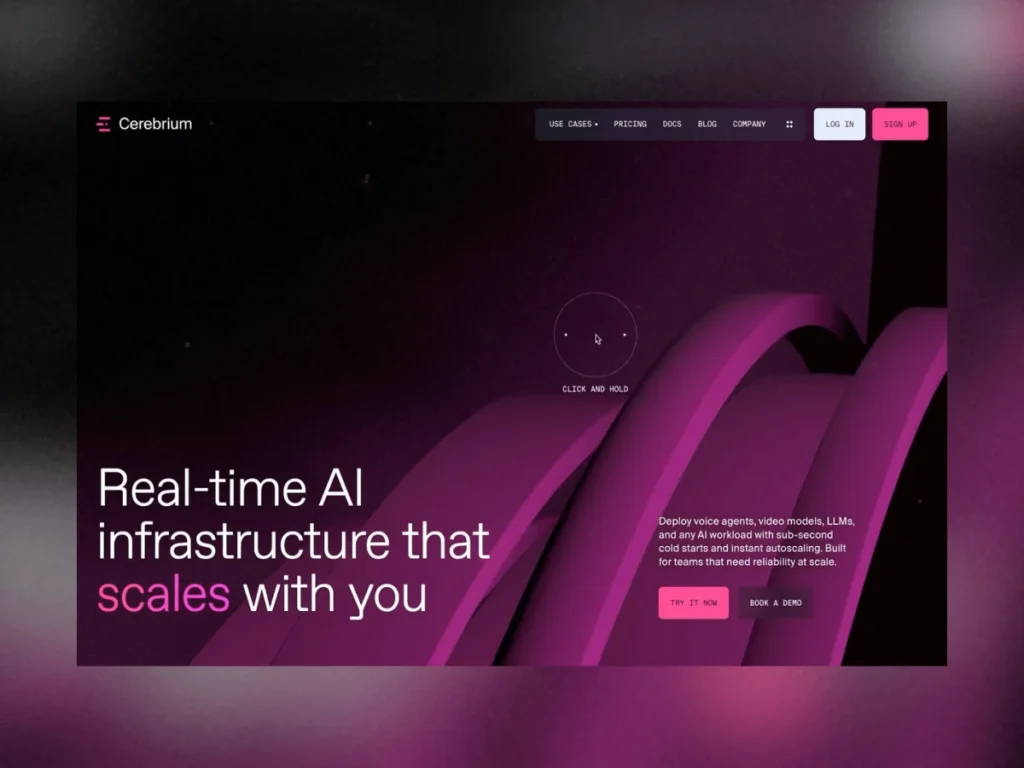

In a significant stride for technical communication and web-based interactivity, Cerebrium, a leader in serverless AI infrastructure, has unveiled a groundbreaking interactive demonstration designed to demystify its complex offerings. Developed in collaboration with the creative agency KOKI-KIKO, this project aimed not merely to explain serverless AI through static diagrams or dense text, but to allow users to "feel" its principles: speed, precision, modularity, and scalability. This ambitious undertaking transcended conventional design paradigms, where design wasn’t just a supportive element but the very essence of the narrative, illustrating how cutting-edge web graphics can transform abstract technological concepts into tangible, immersive experiences.
The Vision: Making the Abstract Tangible
The core challenge for Cerebrium was articulating the nuances of serverless infrastructure for artificial intelligence in a way that resonated beyond technical specifications. The traditional methods, often involving intricate diagrams or lengthy explanations, frequently fall short in conveying the dynamic and agile nature of such systems. Recognizing this gap, Cerebrium sought an innovative solution that would embody their product’s characteristics. The decision to pursue an interactive 3D demonstration was born from this desire to create a visceral understanding, where every user interaction would directly reflect the product’s core tenets: fast execution, precise control, modular architecture, and inherent scalability. This approach positioned design at the forefront, turning it into the primary storytelling mechanism rather than a mere visual aid.
"We wanted users to intuitively grasp how Cerebrium operates," stated Kim Levan, Strategy & PO for the project, reflecting on the initial goals. "It’s one thing to read about ‘serverless scalability,’ but it’s entirely another to experience it visually, to see data flow, components assemble, and systems react in real-time. This demo was designed to bridge that cognitive gap, translating our technical prowess into an engaging user journey." Louis Paquet, Creative Direction & Design, further emphasized, "From the outset, we understood that the interface itself had to embody the product. The fluidity, responsiveness, and interconnectedness seen in the demo are direct reflections of Cerebrium’s underlying technology."
Navigating the Technical Frontier: WebGPU’s Early Promise and Production Realities
The journey to bring this vision to life was not without its significant technical hurdles, particularly concerning the choice of rendering technology. Mathis Biabiany, the lead WebGL developer on the project, embarked on the ambitious task of building the initial rendering layer using Three.js’s then-new WebGPURenderer in conjunction with TSL (Three.js Shading Language). At the time of development, Three.js r183.2 represented the cutting edge, and the prospect of leveraging WebGPU—the successor to WebGL—was exciting.

Initial Ambition with WebGPU and TSL
Biabiany expressed considerable enthusiasm for TSL, describing it as "a joy to work with." TSL offered a paradigm shift from traditional shader development, allowing developers to describe complex GPU operations, materials, and post-processing effects as composable JavaScript node graphs. This approach promised a cleaner architecture and automatic shader generation tailored to the specific rendering backend (WebGPU or WebGL), eliminating the need to maintain multiple GLSL files. For Biabiany, it was also a unique opportunity to deploy a real-world client project using WebGPU, pushing the boundaries of what was possible in web graphics. The theoretical advantages of WebGPU, such as lower-level hardware access, explicit control over GPU resources, and improved parallelism, suggested a future of more performant and sophisticated web experiences.
The Unforeseen Bottleneck
However, as the project scaled in complexity, the promise of WebGPU met the realities of a production timeline. The Cerebrium demo was not a singular, isolated 3D scene; it comprised multiple distinct environments, each with its own materials, particle systems, intricate lighting setups, and post-processing pipelines. A critical requirement was seamless page transitions without disruptive loading screens, which necessitated rapid initialization. The team soon discovered a significant performance bottleneck: the initialization phase. During the initial load, Three.js had to traverse every TSL node graph, generate the corresponding shaders, and compile the GPU pipelines. On the project’s reference machines, this process could take nearly twenty seconds, a completely unacceptable duration for a responsive web experience.
The Strategic Pivot to WebGL
This discovery necessitated a difficult but strategic pivot. Facing an imminent shipping deadline, the team could not justify a twenty-second wait before the first frame rendered. Consequently, the decision was made to migrate the entire rendering layer back to WebGLRenderer. "It was a tough call," Biabiany admitted, "as WebGPU and TSL offered a much more modular way of building visual effects. But WebGL gave us startup times that were predictable enough to ship. Ultimately, production readiness trumped bleeding-edge innovation in this scenario." This pragmatic decision underscores the perpetual tension between adopting nascent technologies and ensuring a robust, performant user experience for launch.
Industry Context: WebGPU’s Evolution
The challenges faced by the Cerebrium team highlight a common phase in the adoption cycle of new technologies. While WebGPU offers significant advancements over WebGL, its ecosystem and tooling were still maturing during the project’s development. Subsequent versions of Three.js have, in fact, dramatically improved shader compilation performance, with benchmarks showing roughly a threefold speed increase, largely thanks to contributions like those from Renaud Rohlinger, who focused on better node-type caching. This rapid evolution demonstrates the community’s commitment to refining WebGPU and its associated libraries, promising a future where such performance bottlenecks become less prevalent. However, for projects operating on tight deadlines, the stability and optimization of established technologies like WebGL often remain the safer bet.
Rebuilding for Performance: The WebGL Implementation
The migration from WebGPU/TSL to WebGL required a meticulous re-engineering of the rendering pipeline. While the overall rendering logic remained conceptually similar, the implementation demanded a more explicit and granular approach.
The Explicit Architecture
The elegant TSL Node Materials were replaced with traditional Three.js materials, extended and customized through the onBeforeCompile() hook. This function allowed the injection of custom GLSL code directly into Three.js’s standard shader programs, providing the necessary flexibility to replicate complex visual effects. Particle simulations, which previously leveraged TSL’s compute shaders, were rebuilt using a ping-pong GPGPU (General-Purpose computing on Graphics Processing Units) system, relying on floating-point textures to store and update particle states. Similarly, the node-based post-processing graph was meticulously reconstructed using Three.js’s EffectComposer alongside several custom GLSL passes, each carefully crafted to achieve specific visual enhancements like bloom, depth of field, and color grading.

Recalibrating the Visuals
One profound lesson learned during this migration was the subtle but significant impact of different shader implementations. "Two shaders implementing exactly the same idea rarely produce identical images," Biabiany observed. This meant that every visual element—from bloom intensity and fog density to gradients and material colors—had to be painstakingly recalibrated. The team undertook an exhaustive process of fine-tuning to recover the original artistic direction, ensuring that the final WebGL rendering matched the intended aesthetic established during the WebGPU prototyping phase. This extensive recalibration underscores the artistic precision required in high-fidelity web graphics and the nuanced differences between rendering pipelines.
Crafting the Immersive Experience: 3D and Visual Pipeline
Beyond the fundamental rendering technology, the Cerebrium demo incorporated several sophisticated 3D and visual techniques to create its immersive environment. The collaborative effort between 3D artist Célia Lopez and WebGL developer Mathis Biabiany was crucial in bringing these elements to life.
Dynamic Lighting Recreation
For scenes featuring animated objects, traditional baked lighting was not an option, as it would not react dynamically to movement. Célia Lopez was tasked with recreating every light source directly within Three.js. To ensure precision, Lopez exported simple helper cubes from Cinema 4D. These cubes served as placeholders, preserving the exact position and orientation of each light, which greatly simplified the process of replicating the complex lighting setups in the Three.js engine. "Sometimes the simplest debugging tools end up saving the most time," Lopez noted, highlighting the value of practical solutions in complex workflows. This meticulous approach ensured that the dynamic interplay of light and shadow contributed effectively to the overall visual narrative.
The Illusion of Motion: Animated Networks
One of the most captivating effects in the Cerebrium demo is the animated network of glowing paths, which beautifully illustrates data flow and connectivity. Mathis Biabiany revealed an ingenious trick: "Interestingly, nothing actually moves. The paths themselves are completely static meshes—the illusion of motion comes entirely from the shader." Each path was carefully UV-unwrapped such that the Y-axis ran continuously along its length. The shader then applied a narrow opacity mask that traveled along this UV axis, creating the appearance of a pulse moving through the network. The width and falloff of this mask were meticulously controlled to convey different types of energy flow, from sharp signals to softer, ambient trails.
To prevent a sterile, synchronized animation, each path received slightly randomized parameters, including uOffset, uDelay, uSpeed, and uDuration. This subtle randomness introduced an organic quality, making the entire system feel more natural and alive. Furthermore, the visibility of each path was dynamically linked to its distance from the camera, progressively revealing the network as the user navigated the scene. During development, an inspector panel exposed nearly every parameter—uFresnelPower, uFresnelStrength, uFresnelNoiseScale, uFresnelNoiseSpeed, uFresnelNoiseAmount, uHexGridScale, uHexGridColor, uHexGridThreshold, uPulseSpeed, uPulseFalloff, uPulseWidth, uPulseColor, uPulseDelay, uPulseDuration, uPulseOffset—allowing for precise tuning. The challenge was striking a balance where the lines appeared bright enough to emit light without being completely washed out by the bloom effect.
Unified Aesthetics: Shared Environment and HDRI
To reinforce Cerebrium’s distinctive purple brand atmosphere, a custom purple HDRI (High Dynamic Range Image) from Poly Haven was utilized as the environment map. This served a dual purpose: it added subtle, realistic reflections to objects within the scenes and, crucially, helped unify the overall color palette across all environments. "Sometimes, lighting consistency is what makes completely different environments feel like they belong to the same product," Célia Lopez explained. This strategic use of a shared environmental lighting solution ensured visual cohesion, creating a seamless brand experience as users transitioned between different conceptual spaces within the demo.

Precision Performance Optimization
Despite their visually lightweight appearance, the scenes contained surprisingly complex geometry. Maintaining perfectly smooth curves in the network paths, especially around rounded segments, required highly subdivided meshes. This posed a significant challenge for performance. Célia Lopez employed a standard optimization practice: running a Draco compression pass on 3D models before delivery. Draco, a Google open-source library, is highly effective at compressing 3D meshes for web delivery, significantly reducing file sizes and improving load times. Lopez often relied on tools like David Ronai’s 3D Optimizer or the Babylon.js Sandbox optimization tool.
However, a problem arose when exporting the entire scene: automatic geometry simplification, while reducing polygon count, introduced visible faceting along the curved paths, compromising the website’s polished aesthetic. To circumvent this, Lopez devised an ingenious solution: "Instead of lowering the geometry quality, I realized I could split the model into two separate parts and optimize each mesh independently, without compromising the smoothness of the curves." The scene was divided into two distinct models: one containing helper objects, light paths, and part of the network, and the second containing the remaining path geometry. This split was strategically placed to be visually imperceptible, allowing for more efficient asset streaming and management while preserving the high quality of the geometry. This demonstrates a sophisticated understanding of both artistic integrity and technical optimization.
Seamless Narratives: Baked Camera Animation
To ensure precise control over the user’s visual journey, every camera movement within the demo was baked directly from Cinema 4D. This approach provided the development team with complete mastery over timing, framing, easing, and synchronization with other interactive elements. It also eliminated potential interpolation differences that could arise if camera animations were implemented purely in code across different applications. Baking the camera paths guaranteed a consistent and cinematic narrative flow, enhancing the storytelling aspect of the interactive experience.
Interactive Security: A Tangible Shield
One of the most innovative interactive elements is found in the section dedicated to security. Instead of a generic lock icon, the team aimed to create an interaction that allowed users to feel the infrastructure’s protection. Mathis Biabiany designed a central object enveloped by an almost invisible spherical shield.
Beyond Icons: Experiential Security
The shield’s appearance is primarily driven by a classic Fresnel effect, a rendering technique where surfaces facing the camera remain subtle, while those viewed at grazing angles become significantly brighter. This creates a shimmering, ethereal quality. A layer of animated procedural noise subtly modulates the Fresnel intensity, preventing the shield from appearing static and reinforcing its dynamic, energetic nature. Overlaid on this is a hexagonal grid, projected onto the sphere and additively blended with the Fresnel effect. Combined with bloom post-processing, this gives the impression that the shield is generating its own protective energy.
The Raycaster Interaction
The interaction doesn’t stop at passive observation. A raycaster continuously tracks the mouse position on the sphere, writing this data into a temporary texture. The shader then samples this texture as a dynamic mask, locally illuminating nearby hexagons around the mouse cursor before gradually fading them over time. "Instead of reacting instantly and disappearing immediately, the shield briefly remembers every interaction," Biabiany explained. This subtle persistence creates a powerful illusion: the force field appears to absorb, diffuse, and dissipate energy across its surface, making the concept of "protection" feel active and responsive rather than a static state. This ingenious design transforms an abstract security feature into a captivating and memorable user interaction.

The Collaborative Force Behind Innovation
The successful execution of the Cerebrium interactive demo is a testament to the power of multidisciplinary collaboration. The project was spearheaded by the agency KOKI-KIKO, which provided strategic oversight and creative direction.
Agency Partnership and Multidisciplinary Team
Kim Levan served as Strategy & PO, ensuring the project aligned with Cerebrium’s business objectives and user needs. Louis Paquet led the Creative Direction & Design, shaping the aesthetic and interactive narrative. The complex 3D assets were meticulously crafted by Célia Lopez. On the development front, Deven Caron and Pier-Luc Cossette handled general development tasks, while Mathis Biabiany specialized in the intricate WebGL implementation. This diverse team, encompassing strategic thinkers, creative designers, 3D artists, and highly specialized developers, worked in close synergy, demonstrating how diverse skill sets are essential for pushing the boundaries of interactive web experiences. Their ability to adapt, innovate, and overcome significant technical challenges collectively ensured the project’s success.
Implications for Web Development and AI Communication
The Cerebrium interactive demo serves as a compelling case study with significant implications for both web development and the broader field of communicating complex technological concepts.
Bridging the Gap: Effective Communication of Complexity
This project exemplifies how sophisticated design and interactive web technologies can effectively bridge the gap between abstract technical infrastructure and user comprehension. In an era where AI and serverless computing are rapidly evolving, making these powerful but often opaque technologies accessible is paramount. Cerebrium’s demo sets a new standard for product demonstrations, proving that immersive, interactive experiences can convey product value more effectively than traditional static content. This approach could influence how other tech companies present their complex offerings, moving towards more experiential marketing and educational tools.
Web Graphics Maturity: Balancing Innovation and Stability
The journey from WebGPU to WebGL in this project highlights the ongoing maturity curve of cutting-edge web graphics APIs. While WebGPU promises a future of enhanced performance and control, its early adoption often comes with integration challenges and performance considerations that may not be suitable for immediate production deployment. The strategic pivot demonstrates the importance of balancing technological innovation with the practical demands of shipping a robust, performant product. As WebGPU continues to evolve and its tooling ecosystem matures, such initial hurdles will likely diminish, paving the way for its widespread adoption. This project acts as a valuable historical marker in the ongoing evolution of web graphics.

User Experience Imperatives: Speed and Seamlessness
The critical decision to revert to WebGL due to a 20-second load time underscores the immutable importance of initial load performance and seamless user experience in modern web applications. Even the most visually stunning or technologically advanced experience will fail to engage users if it begins with a significant delay. This reinforces the principle that performance is not merely a technical metric but a fundamental aspect of user engagement and retention. The Cerebrium team’s commitment to prioritizing fast startup times, even at the cost of sacrificing a bleeding-edge rendering pipeline, speaks volumes about contemporary UX best practices.
The Power of Creative Problem-Solving
Finally, the Cerebrium project is a testament to creative problem-solving and adaptability within development. From devising a shader-based animation for static meshes to splitting complex 3D models for optimization, and transforming abstract security concepts into tangible interactions, the team consistently found innovative solutions to formidable challenges. This spirit of ingenuity is critical in a rapidly evolving technological landscape, where developers and designers must constantly adapt their tools and techniques to meet ambitious creative visions.
In conclusion, the Cerebrium interactive demo, developed by KOKI-KIKO, represents a significant achievement in interactive web design and technical communication. By prioritizing a design-driven narrative and demonstrating remarkable adaptability in overcoming technical challenges, the project successfully transformed the complex concept of serverless AI infrastructure into a fast, precise, modular, and scalable interactive experience. It not only showcases Cerebrium’s capabilities but also offers valuable insights into the current state of web graphics, the importance of user experience, and the enduring power of collaborative innovation in the digital realm. This project sets a new benchmark for how complex technology can be made truly tangible and engaging for a broad audience.