
The integration of three-dimensional graphics into standard user interface and web design workflows has historically represented a significant friction point for digital product teams. Traditionally, designers relying on tools like Figma must constantly switch contexts—exporting vector assets, opening complex modeling and rendering applications such as Blender, Cinema 4D, or 3ds Max, generating static preview images, and importing them back into their layouts. This iterative bottleneck often slows down rapid prototyping, particularly during early-stage product design phases where aesthetic adjustments occur frequently. Addressing this persistent workflow inefficiency, a developer and designer has introduced "Depth," a specialized Figma plugin built with Three.js that brings a native 3D rendering engine directly inside the collaborative design environment.
Origins and The Prototyping Phase
The genesis of Depth stemmed from a real-world product development constraint encountered while building a modern product website heavily reliant on 3D visualizations. During the design cycle, the creator faced a dual challenge: collaborating with an internal visualization team that managed cross-company design requests, and participating in high-stakes bi-weekly leadership reviews. Because aesthetic directions shifted dynamically between these intervals, waiting for external rendering pipelines to process arbitrary 3D models proved excessively cumbersome.
The developer recognized that early design reviews do not necessarily require production-ready lighting or final material compilation. Instead, stakeholders primarily need sufficient form, structural volume, and basic lighting parameters to evaluate whether a visual asset succeeds within a specific layout context. Consequently, Depth was conceived as a lightweight, in-app utility designed to bypass external software silos. The core concept allowed users to import arbitrary 3D models, manipulate cameras, adjust localized lighting, and instantly render images directly onto the Figma canvas.

Engineering Architecture and Technical Implementation
To evaluate the feasibility of this workflow, the creator initially developed a narrow proof-of-concept (MVP). This early iteration focused on fundamental interactions: loading a 3D model, adjusting camera vectors, altering lighting angles, and outputting the rendered frame back into Figma. Primary performance metrics monitored during this phase included UI responsiveness inside the plugin window and the viability of packing comprehensive 3D controls into a compact interface familiar to regular Figma users.
Upon verifying that acceptable performance and rendering fidelity could be achieved natively, development expanded to include advanced features and polished user experience design. Structurally, Depth divides its operations into two distinct architectural components within the Figma plugin ecosystem.
- The Rendering Engine: Powered by Three.js, this component manages the underlying 3D mesh data, camera parameters, material properties, and scene lighting within an isolated plugin window.
- The Document Controller: A secondary bridge script reads and updates the active Figma document in real time.
When a user designates a target frame, the controller transmits it as a PNG into the 3D scene. Upon completion of the rendering process, the resulting image is returned to the Figma canvas as a standard, manipulable image layer. Furthermore, the tool incorporates a 2x export multiplier option, which doubles the PNG’s pixel dimensions while preserving the layer’s designated layout scale. This mechanism ensures high-resolution clarity on high-density displays without altering the underlying compositional grid.
User Interface and Performance Optimizations

Borrowing design patterns familiar to both web designers and traditional 3D artists, Depth positions its primary inspector panel on the right side of the interface, mirroring Figma’s native UI paradigms. Meanwhile, viewport navigation, camera controls, and timeline mechanics draw inspiration from industry-standard applications like Cinema 4D and 3ds Max.
To maintain high frame rates and prevent interface lag during active camera manipulation, Depth dynamically reduces rendering complexity on the fly, optimizing performance while the user adjusts framing. Once camera movement ceases, the engine automatically restores high-fidelity shadows, anti-aliasing, and clean edge definition for the final export. Additionally, the renderer addresses advanced material properties—such as transparency and translucency—by capturing the surrounding scene environment within the export calculation, ensuring that refractive and reflective surfaces interact convincingly with background elements.
The Interactive Showcase Website
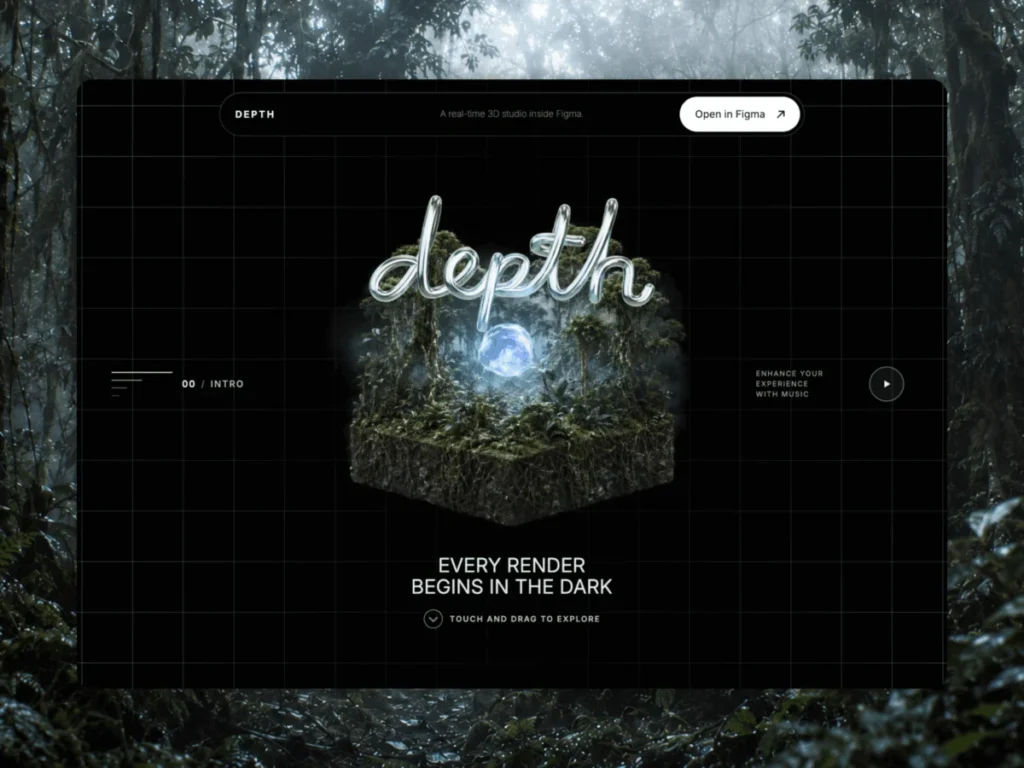
To demonstrate the capabilities of the plugin effectively, the creator built an interactive promotional website hosted at depth.fyi. The web experience is structurally organized to mirror the logical progression of creating a 3D render: transitioning from a bare geometric form, to material application, environmental lighting, and finally integration into a commercial product catalog.
Developing the website’s cinematic opening scene presented technical challenges regarding real-time browser performance and visual fidelity. Initial attempts to render a fully interactive 3D model in the browser hero section yielded suboptimal results; although the scene functioned correctly, the lighting and textures failed to achieve the desired cinematic quality, resulting in the appearance of a standard interactive 3D experiment rather than a polished brand presentation.

To resolve this limitation, the developer adopted a hybrid technical approach. By generating two keyframes and utilizing advanced video generation and interpolation tools (specifically Seedance 2.0), the team produced a seamless 360-degree rotation sequence consisting of 240 distinct frames. This sequence is mapped directly to the horizontal movement of the visitor’s mouse pointer, allowing users to manually scrub through the rotational axis simply by moving across the page. This method guaranteed absolute control over surface detail, lighting atmosphere, and composition.
Surrounding this central media sequence, real-time 3D layers provide subtle depth and immediate spatial response, while the handwritten typography of the "DEPTH" title anchors the composition. To optimize page performance, the site implements a progressive loading strategy, painting a static poster frame initially while asynchronously initializing landscape and portrait media variants before loading heavier animation assets.
Material Transitions and Environmental Lighting
In the subsequent sections of the web experience—categorized as Form, Material, and Environment—the application demonstrates how surface attributes can be manipulated dynamically. When visitors select alternative material finishes, the new texture propagates across the object over a controlled two-second transition.
Behind the scenes, this transition executes entirely within a single, opaque Three.js material shader. The system smoothly interpolates color values, roughness maps, metallic responses, surface micro-details, and reflection coefficients prior to the final lighting pass. Because Three.js maintains the integrity of a single solid mesh throughout the transition, object boundaries and volumetric depth remain completely stable as users rotate the view. Mid-stream user inputs are handled gracefully; selecting a new material reverses or overrides ongoing transitions instantly, preventing visual stuttering.

The environmental lighting chapter addresses the common pitfall of cluttered visual spaces. To achieve realistic photographic reflections without placing distracting horizons, clouds, or photographic backdrops directly behind the object—which would risk transforming the clean page into a conventional, cluttered 3D viewport—the creator decoupled the lighting source from the visible scenery. An invisible HDRI (High Dynamic Range Image) provides ambient environmental light and hyper-realistic reflections, while the visible mountainous terrain is rendered separately as a sparse field of illuminated points. This dotted point-cloud aesthetic preserves the minimalist visual language of the web interface while communicating structural topography.
Broader Industry Implications and Future Outlook
The release of Depth and its accompanying interactive web showcase highlights a broader, ongoing convergence between traditional web design platforms and advanced computer graphics pipelines. As web applications demand richer, more immersive visual content, the barrier between UI/UX design tools and 3D production suites continues to blur.
By eliminating the tedious round-trip workflow of exporting models to external software just to test compositional layouts, plugins like Depth empower product designers to iterate more rapidly and make informed aesthetic decisions earlier in the development lifecycle. Observers note that such workflow innovations point toward a future where collaborative design environments are inherently spatial, bridging the gap between flat interface layouts and multidimensional digital media.
Designers and developers interested in evaluating the software can explore the interactive documentation and case study directly at depth.fyi, or install the plugin via the Figma Community platform to integrate real-time 3D rendering into their current design systems.