
In the modern digital landscape, user interface (UI) design rests on the subtle interplay between visual cues and cognitive expectations. Among the most common patterns in web architecture is the "accordion"—a vertically stacked list of headers that, when triggered, reveal or conceal associated content. While seemingly simple, recent research from the Nielsen Norman Group (NN/g) has highlighted a significant disparity in how users perceive different icons, ultimately revealing that the choice of a UI symbol can fundamentally alter user navigation patterns and task success rates.
The Anatomy of Accordion Interaction
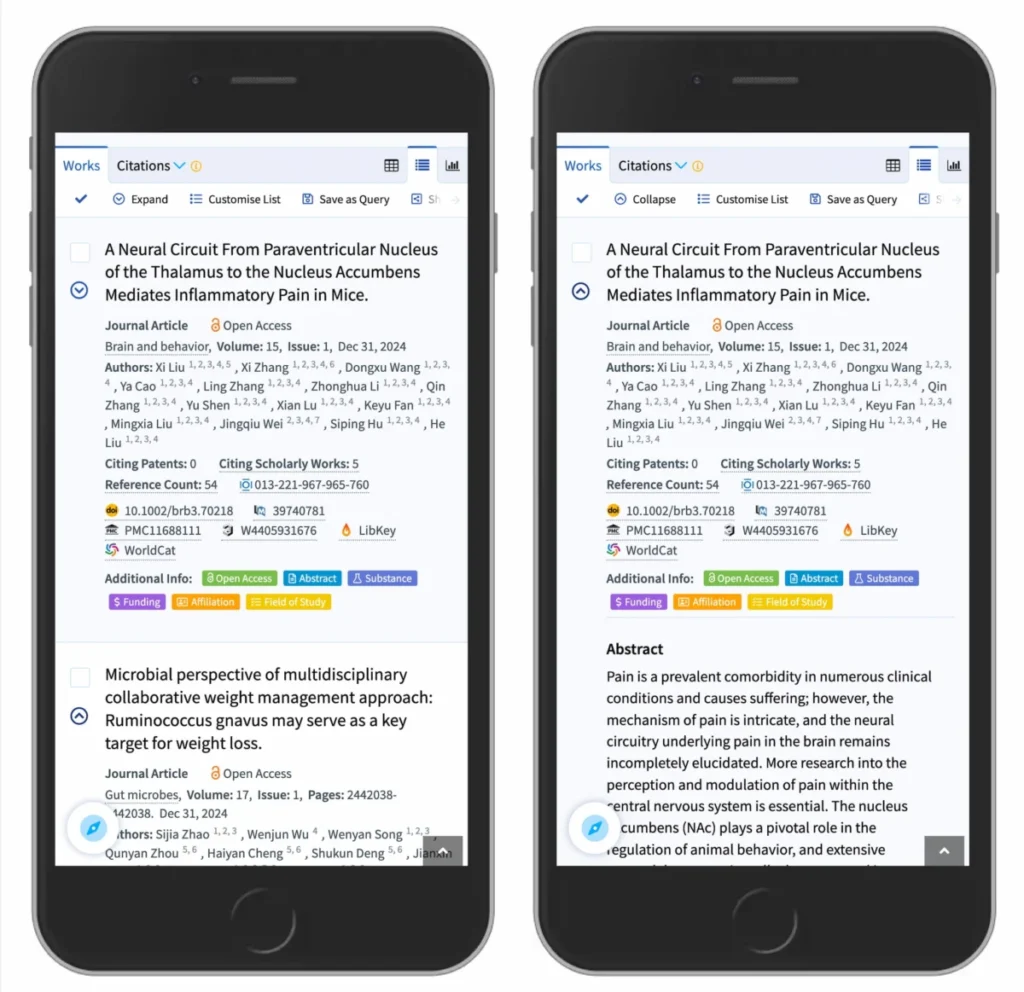
The fundamental challenge in designing an accordion is setting clear expectations. Users must distinguish between an interactive element that triggers a menu expansion and one that redirects them to a new destination. Empirical data suggests that when an interface lacks an icon, the vast majority of users anticipate that clicking the text label will initiate a page load. This expectation remains consistent regardless of the surrounding design; if the interactive element is not visually signaled as a container for secondary content, the default assumption is that the link leads elsewhere.

The complication arises when designers introduce non-standard icons. Custom symbols, while aesthetically unique, often fail to communicate functionality, leading to "click frustration" where users interact with elements expecting one outcome only to be met with another. The NN/g study suggests that users are equally likely to click on the text label or the icon, meaning the visual signifier carries the burden of defining the behavior for the entire hit area.
The Case Against Split Menus
A persistent trend in e-commerce and large-scale enterprise portals is the "split menu" pattern. In this configuration, the text label is linked to a category page, while a secondary icon is tasked with opening the accordion. While intended to provide maximum utility, this design is frequently identified by usability experts as a primary source of user error.
By forcing a single interactive element to handle two distinct, conflicting actions, developers inadvertently create a high-friction environment. If a user clicks slightly off-center on the text label, they are redirected to a new page, disrupting their browsing flow. If they click the icon, they trigger the expansion. This inconsistency is particularly problematic on mobile devices with smaller touch targets, where the margin for error is significantly reduced.

Industry leaders, such as the logistics giant DHL, have moved toward more streamlined, single-action architectures. In these models, the primary category header acts solely as a trigger for the accordion. Within the expanded menu, specific links—often labeled as "Overview"—are provided to guide the user to the relevant category page. This approach aligns with the core principle of predictability: a single tap leads to a single, anticipated outcome.
Comparative Icon Efficacy: A Chronology of Research
Historically, the evolution of accordion design has seen a shift from rudimentary symbols to more standardized iconography. Throughout the early 2000s, the "plus/minus" (+/-) convention was the industry standard for indicating states of expansion. However, as web content became increasingly complex—incorporating multi-level navigation and deeply nested data—the plus symbol began to suffer from "symbol overload."
A plus sign might represent an "add to cart" function, a "zoom in" feature, or a "save for later" action depending on the context. In a multi-level menu, the simultaneous use of multiple plus signs to denote various levels of expansion can create a cluttered, confusing visual hierarchy. Similarly, arrows pointing right or down have been tested extensively. While they are generally understood, they are often over-leveraged to signify scrolling, pagination, or directional movement, which can conflict with their role as state-change indicators for accordions.

The NN/g findings advocate for a return to the "caret" (the simple triangle or chevron). Data indicates that the caret is the most reliable symbol for state transition. Unlike the plus sign, the caret is semantically tied to the concept of a "disclosure" or "reveal" in most modern operating systems and design libraries. By using a caret pointing down by default and rotating it to point upward or sideways upon activation, designers provide an unambiguous signal that the element has undergone a state change.
Data-Driven Design Implications
The implications of these findings extend beyond mere aesthetics; they impact conversion rates and site engagement. If a user expects to navigate to a new page but is instead presented with an expanded list of links, the resulting "cognitive load" can lead to bounce rates in critical navigation paths.
Analysis of user behavior confirms that when a caret is used, participants in usability testing exhibit a higher tendency to click the icon specifically, rather than the text. This is a positive outcome for accessibility and interaction design, as it clearly demarcates the "trigger" from the "content."

Furthermore, the research underscores a fundamental rule: if an element is a hyperlink to a destination, the most effective design is not a complex icon, but rather the standard convention of an underlined text label. While critics may argue that underlining is "outdated," its role as a universal signal for navigability remains unmatched in web history.
Standardizing for Future Usability
As the web continues to evolve toward mobile-first and responsive design, the need for standardization becomes even more acute. The "simple is better" mantra holds significant weight. By removing unnecessary arrows and avoiding the cognitive dissonance of split-button architectures, designers can ensure that their navigation systems are intuitive for a global user base.
The consensus among modern UX professionals is as follows:

- Use a caret to indicate expansion/collapse, as it provides the least amount of conflicting semantic meaning.
- Avoid split menus to prevent accidental navigation and user frustration.
- Use standard underlines for direct links to ensure that users know exactly where they are going before they click.
- Consistency is paramount. Once a specific icon is chosen to represent the accordion state, it should be applied universally across the entire interface.
The Broader Impact on Digital Accessibility
While these design choices are often discussed in the context of user experience, they have profound implications for digital accessibility. For users relying on screen readers or other assistive technologies, complex and inconsistent menu patterns can render a site entirely unnavigable. A standard, predictable pattern using clear signifiers like the caret allows for better programmatic labeling (such as ARIA attributes), ensuring that the state of an accordion is clearly communicated to all users, regardless of their method of interaction.
The move toward these standardized patterns is not merely a stylistic preference; it is a commitment to the fundamental principles of the web. By focusing on the user’s mental model rather than decorative flair, organizations can build interfaces that are not only more functional but also more inclusive. As we look toward future developments in interface design, the lessons learned from these studies serve as a reminder that the most effective digital experiences are those that disappear into the background, allowing users to achieve their goals with the least amount of friction.