
The evolution of digital imaging has reached a critical juncture where the limitations of physical hardware—such as lens diffraction, sensor noise, and motion blur—can increasingly be mitigated through sophisticated post-processing software. In the contemporary landscape of professional photography, archival restoration, and digital content creation, "soft" images are no longer considered discarded assets. Instead, they represent a baseline for enhancement. To sharpen a blurry image effectively, the modern workflow requires a delicate balance: restoring natural details and edge contrast while avoiding the "crunchy," over-processed artifacts and halos that characterized early digital sharpening attempts.
The Technical Evolution of Image Clarification
Historically, sharpening was a destructive process based on simple mathematical algorithms like the Unsharp Mask (USM). These tools functioned by increasing the contrast of high-frequency edges, essentially "tricking" the human eye into perceiving more detail. However, this method frequently introduced "ringing" artifacts and exacerbated digital noise.

The current generation of sharpening tools has shifted toward deep-learning models and neural networks. Rather than merely manipulating existing pixels, modern AI-driven software analyzes patterns within the image and uses trained datasets to reconstruct missing information. This transition from "pixel manipulation" to "detail reconstruction" allows for the recovery of textures in hair, plumage, and architectural materials that were previously lost to focus errors or low-resolution sensors.
Top-Tier Professional Solutions: An In-Depth Analysis
The selection of a sharpening tool depends heavily on the specific requirements of the project, the original file format, and the desired output. Below is a comprehensive evaluation of the six leading software solutions currently dominating the market.
1. Aiarty Image Enhancer: The Deep-Learning Specialist
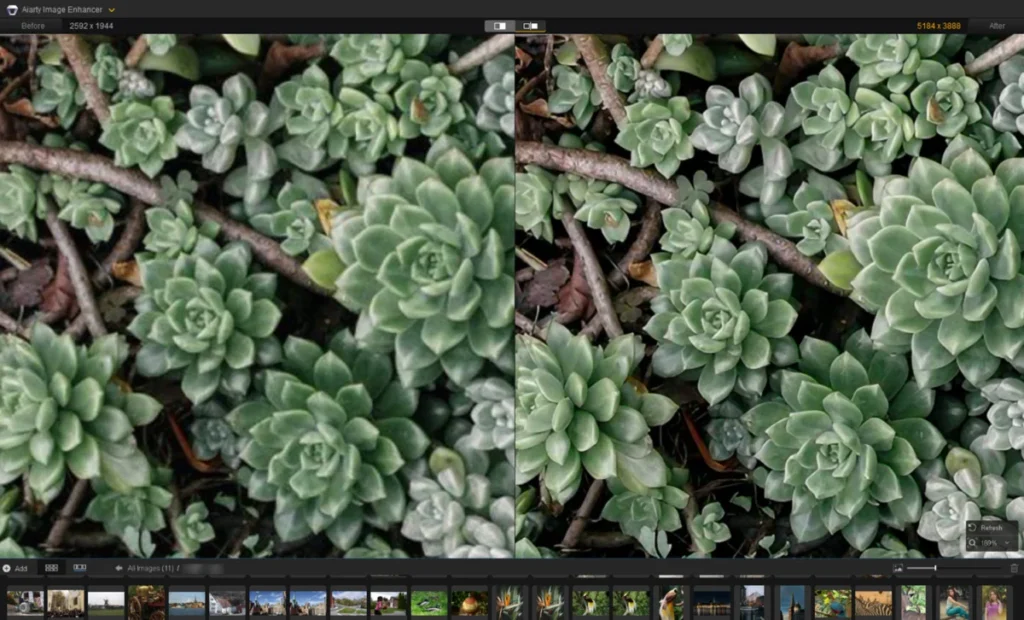
Aiarty Image Enhancer has emerged as a robust contender in the field of AI-driven restoration, specifically targeting the removal of softness and the restoration of fine textures. Unlike traditional editors, it utilizes specialized models such as "More-Detail" and "Real-Photo" to address specific visual deficiencies.

In practical applications, Aiarty excels in portrait restoration. For low-resolution archives or poorly scanned historical photos where facial features appear "mushy," the software’s Face Restoration feature uses AI inference to redefine structural boundaries and clarify individual hair strands. For wildlife photography, the "Real-Photo" model is particularly effective at sharpening plumage and dark pupils without introducing the plastic-like smoothing often associated with aggressive noise reduction.
Technical Specifications:
- Models: More-Detail, Real-Photo, and specialized upscaling models.
- Key Features: Batch processing, upscaling to 8K/16K, and manual strength sliders (typically optimized between 0.75 and 0.95).
- Pricing: $99 for a lifetime license; annual and trial options available.
2. Topaz Photo AI: The Autopilot Industry Leader
Topaz Labs was among the first to successfully commercialize AI sharpening. Its flagship product, Topaz Photo AI, integrates sharpening, denoising, and upscaling into a single "Autopilot" workflow. The software automatically detects the subject and suggests specific modules—Standard, High Fidelity, or Refocus—based on the type of blur detected (motion vs. lens softness).

The "Refocus" model is particularly noteworthy for its ability to correct mild missed focus, though it requires significant computational power. For landscape photographers, the software allows for selective masking, ensuring that sharpening is applied to the castle or mountain peak without introducing artifacts into the sky or water.
Technical Specifications:
- Workflow: Automated AI detection with manual overrides.
- Performance: Highly GPU-dependent; requires modern hardware for optimal speed.
- Pricing: Subscription-based or standalone purchase (approx. $199).
3. Adobe Lightroom: The Ecosystem Standard
For the majority of professional photographers, sharpening is a component of the broader "developing" process within Adobe Lightroom. Lightroom’s "Detail" panel remains the industry standard for RAW file processing. Its strength lies in its masking capabilities; by holding the Alt/Option key while adjusting the masking slider, users can visualize exactly which edges are being sharpened, preventing the amplification of noise in flat areas like backgrounds.

While Lightroom has recently introduced AI-powered Denoise features, its sharpening remains largely traditional. It is best suited for "output sharpening"—preparing a well-shot image for print or web—rather than "rescue sharpening" for severely blurred photos.
4. DxO PureRAW: The Optical Correction Specialist
DxO PureRAW takes a unique approach by focusing on the beginning of the workflow. It uses a massive database of camera and lens profiles to correct specific optical flaws. Because it knows the exact distortion and softness characteristics of a specific lens at a specific focal length, it can apply "Lens Sharpness" corrections that are far more accurate than generic tools.
Powered by the DeepPRIME neural network, DxO PureRAW is primarily a batch processor for RAW files. It is designed to provide a "clean base" for further editing, making it an essential tool for sports and wildlife photographers working at high ISO settings.

5. Picsart: The Consumer and Social Media Solution
For casual users and content creators who require immediate results without the complexity of RAW processing, Picsart offers a powerful online and mobile-based sharpening tool. It is an automated solution that excels at fixing low-resolution mobile shots or compressed web images. While it lacks the granular control of Aiarty or Lightroom, its ability to upscale images by 2x or 4x while smoothing out jagged lines makes it ideal for social media assets.
6. GIMP: The Open-Source Manual Alternative
The GNU Image Manipulation Program (GIMP) remains the premier free alternative to commercial software. While it does not currently offer the deep-learning models found in Aiarty or Topaz, it provides professional-grade manual tools like the High Pass Filter and Unsharp Mask. These tools require a higher level of user expertise, as the user must manually isolate edge details onto separate layers and apply blend modes (such as Overlay or Vivid Light) to enhance perceived sharpness.
Comparative Chronology: The Development of Sharpening Technology
The journey of sharpening technology reflects the broader history of digital photography:

- 1990s – Early 2000s: Introduction of the Unsharp Mask and Sharpen filters in early Photoshop versions. These were purely mathematical and often led to "halo" artifacts.
- 2010 – 2015: Rise of specialized deconvolution algorithms capable of correcting specific motion paths (e.g., camera shake).
- 2018 – 2021: The "AI Revolution." Companies like Topaz and DxO release neural network-based tools that begin to "reconstruct" rather than just "enhance."
- 2023 – Present: Integration of generative AI. Current software like Aiarty and Topaz Photo AI can now distinguish between different textures (skin, fabric, stone) and apply different sharpening logic to each within the same frame.
Supporting Data and Market Trends
The demand for high-quality sharpening software is driven by three primary market factors:
- The Rise of High-Resolution Displays: As 4K and 8K monitors become standard, the "softness" of older digital photos becomes more apparent, necessitating upscaling and sharpening tools.
- Legacy Archiving: Government and private institutions are increasingly using AI sharpening to digitize historical archives, where original negatives may be degraded.
- Print Requirements: Large-format printing (billboards, gallery prints) requires a level of detail that even high-end cameras sometimes fail to produce without software assistance.
According to industry analysis, the AI-powered image editing market is expected to grow at a CAGR of over 15% through 2030, with "image restoration and enhancement" being the fastest-growing sub-sector.
Official Responses and Ethical Implications
The rapid advancement of these tools has sparked a debate within the photographic community. Organizations like the National Press Photographers Association (NPPA) have expressed caution regarding "generative" sharpening in photojournalism. While "restorative" sharpening (fixing a lens flaw) is generally accepted, "generative" sharpening (AI adding textures that weren’t there) can cross the line into digital manipulation, potentially compromising the integrity of news images.

In contrast, the commercial and portrait photography sectors have embraced these tools as essential time-savers. A task that previously took hours of manual "dodge and burn" can now be accomplished in seconds using AI face restoration models.
Broader Impact and Final Implications
The ability to fix blurry images has democratized high-quality photography. It allows photographers to take risks—shooting in lower light or with slower shutter speeds—knowing that software can potentially rescue a "near miss." Furthermore, it provides a second life to historical documents and family memories that were previously considered lost to time.
For the professional, the choice of software is a strategic one. Aiarty and Topaz offer the most advanced AI rescue capabilities; Lightroom and DxO provide the most stable professional workflows for RAW files; and GIMP and Picsart ensure that high-quality sharpening remains accessible to everyone regardless of budget. As AI models continue to evolve, the distinction between a "blurry" photo and a "sharp" one will increasingly depend not on the camera used, but on the software applied.