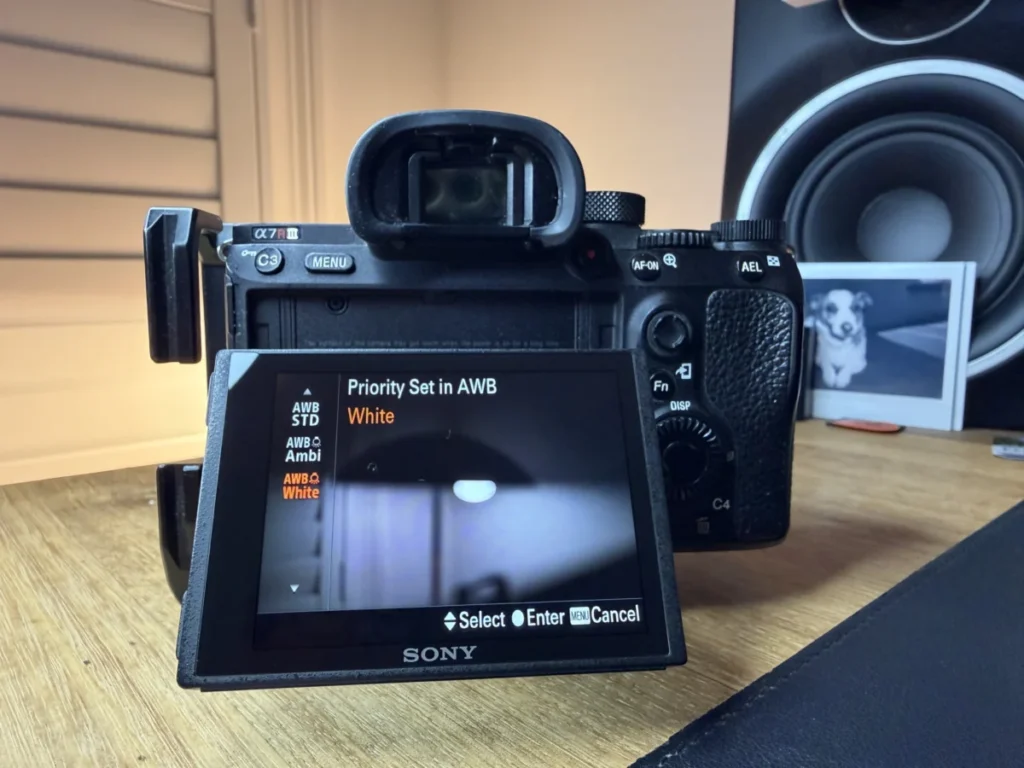

White balance serves as a fundamental pillar of digital imaging, dictating how colors are interpreted and rendered by a camera’s sensor. While the human visual system possesses a remarkable ability to adapt to varying light sources—ensuring that a white object appears white whether viewed under the warm glow of a candle or the cool light of an overcast sky—digital sensors are inherently literal. They record light exactly as it strikes the photosites, often resulting in unwanted color casts that can skew the realism of a photograph. Mastering white balance is therefore essential for any photographer seeking to achieve color fidelity or intentional artistic expression.

The Physics of Color Temperature and the Kelvin Scale
To understand white balance, one must first understand the physics of light. Every light source emits a specific "color temperature," a concept derived from the physics of blackbody radiation. When a theoretical blackbody is heated, it glows at different colors depending on its temperature. This temperature is measured in Kelvin (K).
The Kelvin scale in photography operates in a manner that often feels counterintuitive to beginners. Light sources with lower Kelvin values, such as a match flame or a sunrise (approximately 1,000K to 2,500K), emit "warm" light characterized by oranges and yellows. Conversely, light sources with high Kelvin values, such as a clear blue sky or deep shade (7,000K to 10,000K), emit "cool" light characterized by blue hues. Standard daylight is generally measured at approximately 5,500K to 5,600K and is considered the neutral benchmark for most photographic applications.

The primary goal of white balance is to neutralize these color temperatures. If a scene is illuminated by warm tungsten light (3,200K), the camera must add blue tones to "balance" the image back to a neutral state. If the scene is shot in heavy shade (9,000K), the camera or software must add amber tones to compensate for the excessive blue.
The Evolution of Color Correction: From Film to AI
The history of white balance reflects the broader evolution of photographic technology. In the era of film, color correction was a physical process. Photographers were required to choose specific film stocks—typically "Daylight Balanced" or "Tungsten Balanced"—to match their lighting conditions. If a photographer needed to shoot daylight film under indoor lighting, they had to use physical glass filters (such as an 80A blue filter) over the lens to correct the color before the light reached the emulsion.

The transition to digital sensors replaced physical filters with sophisticated mathematical algorithms. Modern digital cameras use a process called "interpolation" to calculate color. In the early 2000s, Auto White Balance (AWB) was often unreliable, frequently struggling with mixed lighting or monochromatic subjects. However, by 2026, the integration of Artificial Intelligence (AI) and Machine Learning (ML) has fundamentally altered this landscape.
Current-generation mirrorless cameras now utilize "Scene-Aware" AWB. These systems do not merely average the colors in a frame to find a neutral point; they use neural networks to identify specific elements within the scene. For example, a modern Sony, Canon, or Nikon system can recognize human skin tones, greenery, and sky, applying different white balance weights to each area to ensure that skin looks natural even if the background is illuminated by a different light source.

In-Camera Methodology: Presets and Custom Calibration
Photographers generally have three primary methods for managing white balance during the acquisition phase: Auto White Balance, Presets, and Custom Calibration.
- Auto White Balance (AWB): While once avoided by professionals, modern AI-driven AWB is now highly effective. Many cameras offer "Ambience Priority" (which retains some of the natural warmth of the light) or "White Priority" (which aggressively neutralizes all casts).
- Presets: These are pre-programmed Kelvin values designed for specific environments. Common presets include:
- Tungsten/Incandescent (approx. 3200K): Used for indoor lighting.
- Fluorescent (approx. 4000K): Corrects the green tint common in office lighting.
- Daylight (approx. 5200K-5600K): Used for bright sun.
- Cloudy/Shade (6000K-8000K): Adds warmth to counter cool outdoor light.
- Flash (approx. 5400K): Calibrated to match the output of electronic strobes.
- Custom White Balance and Gray Cards: For mission-critical work, such as product or medical photography, professionals use gray cards. By photographing a neutral 18% gray card under the specific lighting of the shoot, the photographer can tell the camera exactly what "neutral" looks like. The camera then calculates the precise Kelvin offset required for 100% accuracy.
Post-Processing and the Power of RAW Data
The choice of file format—JPEG versus RAW—is the single most significant factor in a photographer’s ability to manage white balance after the fact. When a camera saves a JPEG, the white balance settings are "baked" into the pixels. While minor adjustments can be made later, significant corrections often lead to "posterization" or color banding, as the original data has been discarded.

In contrast, a RAW file preserves the original sensor data. The white balance setting used in-camera is merely a piece of metadata—an instruction rather than a permanent change. In software such as Adobe Lightroom, Capture One, or DxO PhotoLab, a photographer can change the white balance of a RAW file with zero loss in image quality.
In 2026, post-processing tools have become even more powerful. AI-assisted "Match Color" tools allow photographers to sample a known neutral tone from one image and instantly sync that exact color profile across thousands of images from a shoot. This is particularly transformative for wedding and event photographers who move between varying light sources throughout a single day.

Creative Applications: Using "Incorrect" White Balance
While technical accuracy is the standard for commercial work, photography is also an art form. Intentionally "mismanaging" white balance can be a powerful tool for emotional storytelling.
- Warmth for Nostalgia: By setting a white balance that is slightly higher (warmer) than the light source, photographers can imbue an image with a sense of comfort, nostalgia, or intimacy. This is common in lifestyle and portrait photography.
- Cool Hues for Drama: Conversely, a lower (cooler) Kelvin setting can make a scene feel clinical, somber, or futuristic. This technique is frequently used in architectural and cinematic street photography.
- Golden Hour Enhancement: During sunset, a "Daylight" white balance setting will preserve the beautiful oranges of the sun. If a photographer uses "Auto," the camera may try to "fix" the sunset by turning the sky a dull gray, effectively destroying the atmosphere of the moment.
Industry Implications and Standards
The importance of white balance extends beyond aesthetics into specialized industries. In e-commerce and fashion photography, color accuracy is a legal and logistical necessity. Inaccurate white balance leads to higher product return rates when customers receive items that do not match the color seen on their screens.

In the film and video industry, the stakes are even higher. Unlike still photography, where white balance can be easily synced, video requires "locked" white balance. If a camera is left on AWB while a subject moves from sun to shade, the color will visibly "drift" or shift mid-shot, which is jarring for the audience. Professional cinematographers always set a manual Kelvin value to ensure consistency across the entire production.
Summary of Best Practices for 2026
To achieve the best results in the current technological era, photographers should adhere to a structured workflow:

- Shoot in RAW: This provides the ultimate safety net for color correction.
- Leverage AI AWB for Speed: For fast-moving environments (journalism, sports), trust modern AI-driven auto settings, which are now 95% accurate in most conditions.
- Use Manual Calibration for Consistency: For studio work or video, use a gray card or a specific Kelvin value to prevent frame-to-frame fluctuations.
- Monitor Calibration: Ensure that the screen used for editing is calibrated with a spectrophotometer. Even a perfectly white-balanced photo will look "wrong" on a poorly calibrated monitor.
As digital imaging continues to advance, the line between automated correction and creative intent will blur. However, the fundamental physics of light remains unchanged. Whether through the lens of a 1950s film camera or a 2026 AI-driven mirrorless system, the ability to control white balance remains the hallmark of a technically proficient and artistically aware photographer.