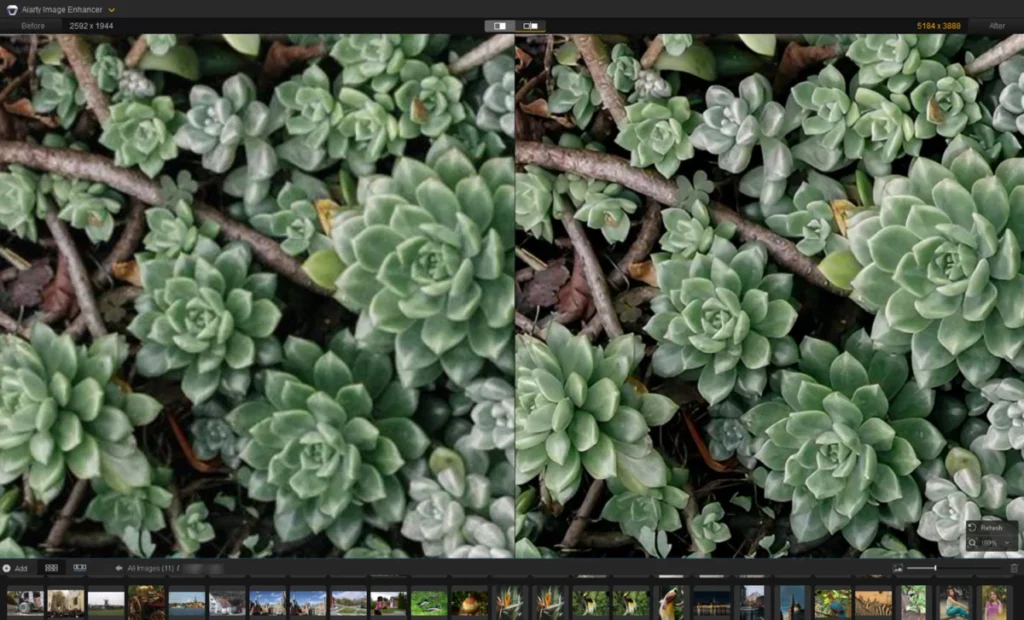

The landscape of digital imaging has undergone a seismic shift as the industry moves away from traditional pixel manipulation toward advanced deep-learning algorithms. In the contemporary photography market, the demand for high-fidelity image restoration has never been greater, driven by the proliferation of high-resolution displays and the need to repurpose archival content. Soft photos, characterized by a lack of edge contrast and a loss of fine detail, often occur due to lens diffraction, slight motion blur, or sensor limitations. To address these issues, a new generation of photo sharpening software has emerged, promising to restore natural textures without the artificial "crunchy" look associated with legacy tools.

The Evolution of Image Sharpening Technology
To understand the current state of the market, one must look at the chronology of sharpening techniques. For decades, photographers relied on the "Unsharp Mask" (USM) and "High Pass" filters. These tools do not actually restore detail; instead, they increase the contrast of edges to trick the human eye into perceiving more sharpness. While effective for minor adjustments, these methods often introduced "halos" and increased digital noise.
The mid-2010s marked the transition to "Deconvolution" sharpening, which attempted to mathematically reverse the blurring process caused by specific lenses. However, the true revolution began around 2019 with the integration of Convolutional Neural Networks (CNNs). Modern software now uses generative models trained on millions of high-quality images to "predict" and reconstruct missing data, effectively deblurring images in ways that were previously considered impossible.

Comprehensive Market Analysis of Leading Solutions
Technical evaluations of the current software market reveal six primary contenders that balance automation, manual control, and output quality. These tools cater to various segments of the market, from professional photojournalists to casual social media content creators.
1. Aiarty Image Enhancer: Precision through Deep Learning
Aiarty Image Enhancer has positioned itself as a specialist in "natural detail" restoration. Unlike many AI tools that can leave skin looking like plastic or feathers looking like brushstrokes, Aiarty utilizes three distinct AI models—More-Detail, Real-Photo, and a dedicated Face Restoration feature.

In controlled tests, the "More-Detail" model demonstrated a superior ability to identify architectural lines and textile textures. The software allows for a high degree of granularity, with strength sliders typically optimized between 0.75 and 0.95. For professionals, the software’s ability to upscale images to 8K and 16K resolutions using deep-learning inference—rather than simple bicubic interpolation—makes it a vital tool for large-format printing. Its perpetual license model ($99 for a lifetime) stands in contrast to the industry’s trend toward recurring subscriptions.
2. Topaz Photo AI: The Autopilot Approach
Topaz Labs has been a pioneer in the AI sharpening space. Their flagship product, Topaz Photo AI, features an "Autopilot" function that analyzes an image upon import to suggest specific modules for denoising and sharpening.

Technical data suggests that Topaz’s "Standard" model is highly effective for general softness, while its "Refocus" model is designed for more aggressive motion blur. However, industry feedback indicates that these models are computationally expensive, requiring modern GPUs for efficient processing. Topaz operates on a subscription-based model, appealing to users who want the latest algorithm updates as soon as they are trained.
3. Adobe Lightroom: The Integrated Ecosystem
For the majority of professional photographers, sharpening is a single step within a broader RAW development workflow. Adobe Lightroom remains the industry standard due to its non-destructive editing environment and cataloging capabilities.

Lightroom’s sharpening tools are found in the "Detail" panel. A critical feature for professionals is the "Masking" slider; by holding the Alt/Option key, users can see exactly where the sharpening is being applied, ensuring that noise in out-of-focus backgrounds is not inadvertently enhanced. Recently, Adobe integrated an AI-powered "Denoise" feature, which prepares the image for more aggressive manual sharpening, bridging the gap between traditional manual control and modern AI automation.
4. DxO PureRAW 6: The Optical Specialist
DxO takes a unique approach by focusing on the "front end" of the image pipeline. Their software, PureRAW 6, is powered by the DeepPRIME engine and a massive database of lens and camera profiles.

The software’s primary function is to correct lens-specific softness and chromatic aberration before the image is even opened in a traditional editor. By analyzing the specific optical flaws of a lens—such as softness at the corners of a frame—DxO can apply non-uniform sharpening that results in a perfectly balanced image. This tool is specifically targeted at RAW shooters who require the cleanest possible "digital negative."
5. Picsart: Accessibility and Mobile Integration
As photography moves increasingly toward mobile platforms, online tools like Picsart have gained significant market share. These tools are designed for speed and social media readiness.

Picsart utilizes automated cloud-based AI to sharpen and upscale images by 2x or 4x. While it lacks the manual parameter controls found in Aiarty or Lightroom, it provides an essential service for casual users looking to rescue low-resolution mobile shots or compressed web images. Its credit-based subscription model reflects the "SaaS" (Software as a Service) trend prevalent in the consumer app market.
6. GIMP: The Open-Source Alternative
GIMP (GNU Image Manipulation Program) represents the enduring value of traditional manual editing. As a free, open-source tool, it is widely used in academic and budget-conscious environments.

GIMP relies on the Unsharp Mask and High Pass filter techniques. While these do not "generate" new details like AI models, they offer a level of transparency and control that some purists prefer. Professional retouchers often use GIMP to manually paint in sharpness on specific layers, ensuring that the final output remains strictly faithful to the original captured photons without algorithmic intervention.
Comparative Data and Pricing Structures
The choice of software often hinges on the balance between initial cost and long-term utility. The following data summarizes the current market offerings:

- Aiarty Image Enhancer: $99 (Lifetime). Focus: AI Upscaling/Detail.
- Topaz Photo AI: ~$199/year or monthly subscription. Focus: Full Automation.
- Adobe Lightroom: $11.99/month (Photography Plan). Focus: Workflow/Cataloging.
- DxO PureRAW 6: $139.99 (Version-based). Focus: Lens Corrections/RAW.
- Picsart: ~$15/month. Focus: Social Media/Mobile.
- GIMP: Free (Open Source). Focus: Manual Editing.
Industry Implications and the Ethics of AI Restoration
The rise of these tools has sparked a debate within the photographic community regarding the definition of a "photograph." As AI models become more adept at reconstructing faces and textures that were not clearly captured by the sensor, the line between photography and digital illustration begins to blur.
Industry analysts suggest that the "AI arms race" between developers like Topaz, Adobe, and the creators of Aiarty will continue to drive down processing times while increasing the realism of the output. For photojournalists, the focus remains on "restoration"—returning the image to what the eye actually saw. For commercial and portrait photographers, the focus is often on "enhancement"—creating a level of clarity that exceeds the limitations of the physical hardware used.

Conclusion and Future Outlook
The evaluation of these six tools demonstrates that there is no "one-size-fits-all" solution for blurry images. The selection process must be dictated by the specific scenario:
- For archival restoration and face clarity: Aiarty and Topaz offer the most advanced reconstruction.
- For high-volume professional shooting: Lightroom and DxO provide the most efficient workflow integration.
- For casual use and quick fixes: Picsart and GIMP remain the most accessible options.
As sensor resolutions continue to climb and lenses become sharper, the role of software will shift from "fixing" errors to "optimizing" output for different media, from smartphone screens to massive gallery prints. The current generation of sharpening software represents a pinnacle of digital engineering, turning once-discarded "missed shots" into professional-grade assets.