
The digital cinematography landscape has been revolutionized by the proliferation of action cameras, drones, and high-end smartphones, allowing creators to capture perspectives once reserved for big-budget productions. However, the compact nature of these devices introduces a persistent technical challenge known as aliasing. As filmmakers increasingly integrate footage from devices like the GoPro HERO series, DJI Osmo Action, and various consumer drones into professional workflows, the need for sophisticated post-production techniques to mitigate digital artifacts has become paramount. Recent developments in software plugins, specifically the FXAA tool for Adobe After Effects, have provided editors with a streamlined method to resolve these issues without compromising the underlying integrity of the image.
The Technical Foundation of Aliasing and Sampling Errors
To understand the solution, one must first analyze the mechanical and mathematical origins of the problem. Aliasing is a distortion artifact that manifests as jagged, "stair-stepped" edges along high-contrast lines or fine patterns. In the context of digital video, this is primarily the result of a sampling error. According to the Nyquist-Shannon sampling theorem, to accurately represent a signal (in this case, the light hitting a sensor), the sampling frequency must be at least twice the highest frequency present in the signal.
Action cameras and smartphones often feature physically small sensors with high pixel densities. Due to the limited surface area, these sensors frequently struggle to capture enough spatial detail to resolve fine, high-frequency information, such as the distant ripples on a body of water or the fine mesh of a building’s architecture. When the sensor’s resolution is insufficient to capture these details, the software "guesses" the placement of pixels, resulting in the shimmering or jagged artifacts synonymous with aliasing.

The Role of Internal Camera Processing
The severity of aliasing in action camera footage is often exacerbated by the manufacturer’s internal image processing. To make footage appear "crisp" to the average consumer, many action cameras apply aggressive digital sharpening by default. This process involves increasing the contrast along the edges of objects within the frame. While this creates an illusion of higher resolution, it also locks in aliasing artifacts, making them significantly harder to remove in post-production.
Furthermore, these cameras typically utilize heavy H.264 or H.265 compression to manage large file sizes on microSD cards. Compression artifacts can merge with aliasing to create a "noisy" or "crunchy" aesthetic that distinguishes budget footage from professional cinema camera output. In many entry-level or mid-range models, users have limited control over these sharpening parameters, forcing them to rely on software-based corrections during the editing phase.
A Chronology of Correction Methods: From Gaussian Blur to FXAA
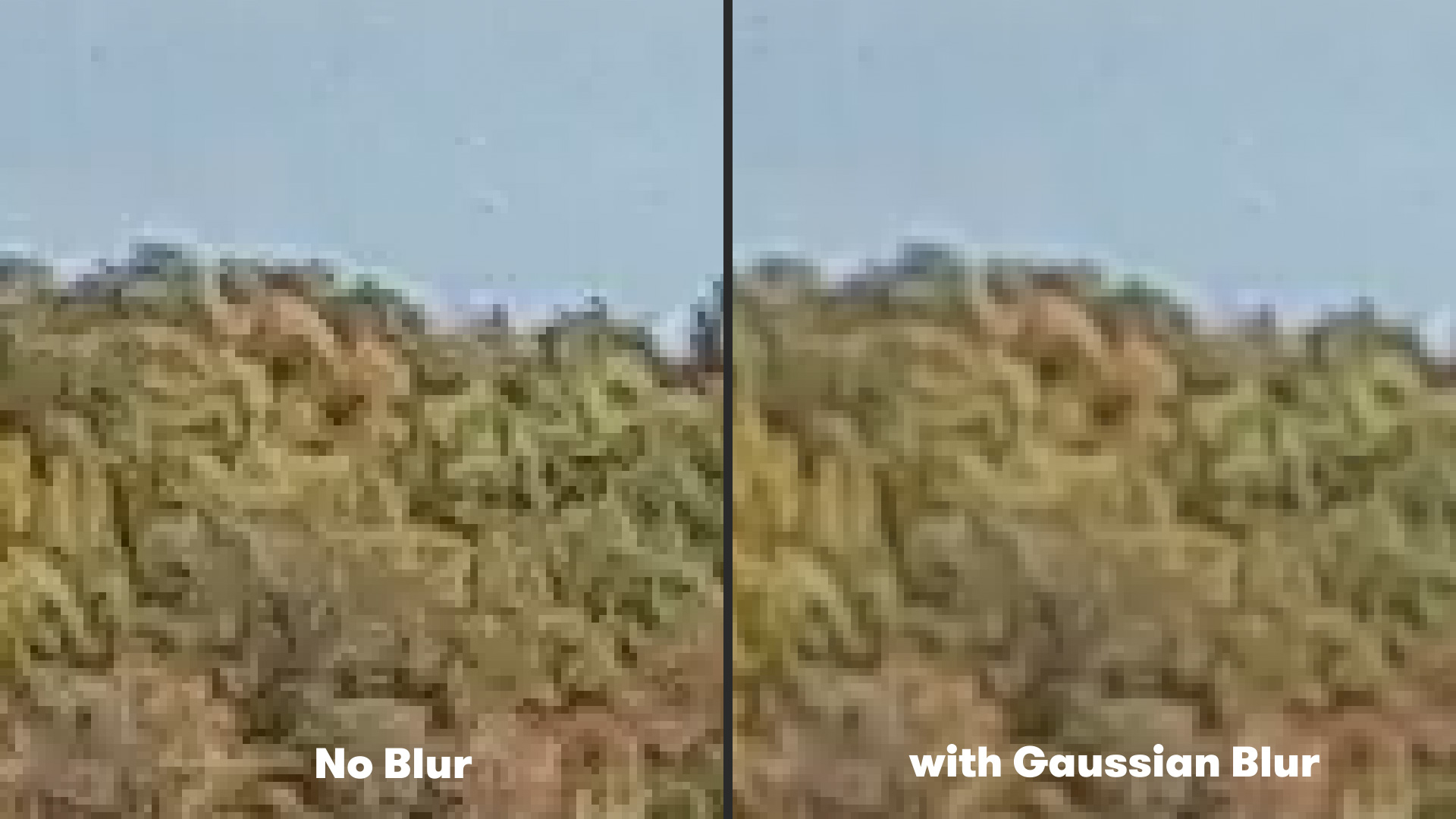
Historically, the industry-standard approach to mitigating aliasing involved the application of a global blur. By using tools such as Gaussian Blur in Adobe After Effects or Premiere Pro, editors could soften the entire image to hide the jagged edges.
The typical workflow for this legacy method involved:
- Importing the aliased footage into a composition.
- Navigating to the "Effect" menu, selecting "Blur & Sharpen," and applying "Gaussian Blur."
- Setting the blurriness value to a low increment, usually between 1.0 and 2.0.
While effective at reducing "flicker" and harsh edges, this method is fundamentally flawed for professional use. Because Gaussian Blur is a non-discriminatory filter, it softens the entire frame equally. This results in the loss of desirable fine details, such as skin texture or distant landscapes, effectively reducing the perceived resolution of the 4K or 5K footage the camera was intended to capture.
The Emergence of Fast Approximate Anti-Aliasing (FXAA)
The limitations of global blurring led to the adaptation of technologies originally developed for the video game industry. Fast Approximate Anti-Aliasing, or FXAA, was initially created by Timothy Lottes at NVIDIA as a high-performance, post-processing anti-aliasing solution for real-time 3D rendering. Unlike traditional multi-sample anti-aliasing (MSAA), which requires significant computational power by sampling geometry, FXAA operates as a screen-space filter.
In the realm of video editing, the FXAA plugin—developed by Plugin Everything—utilizes an edge-detection algorithm to analyze the pixels within a frame. Instead of blurring the entire image, the algorithm identifies high-contrast boundaries where aliasing is most likely to occur. It then applies a localized smoothing effect only to those specific pixels. This selective approach allows the footage to retain its overall sharpness while smoothing out the "stair-step" artifacts on diagonal lines and moving water.
Step-by-Step Implementation in Professional Workflows
For editors working within the Adobe Creative Cloud ecosystem, the integration of FXAA into an After Effects workflow is designed for efficiency. The process is significantly faster than manual rotoscoping or complex masking.
- Plugin Installation: The FXAA plugin must be downloaded and installed into the After Effects "Plug-ins" folder.
- Application: Once the footage is placed in a composition, the user navigates to Effect > Plugin Everything > FXAA.
- Immediate Smoothing: Upon application, the algorithm automatically detects edges and applies the smoothing pass.
- Stacking for Precision: For particularly problematic footage—such as drone shots with high-frequency metallic structures—editors can apply multiple instances of the FXAA effect. Each subsequent layer of the plugin further refines the edge smoothing, allowing for a customized balance between artifact reduction and detail retention.
Comparative Data and Performance Analysis
The primary advantage of using FXAA over traditional methods is render speed. Because FXAA does not require complex sub-pixel sampling or temporal analysis (which looks at previous and future frames), it places a minimal load on the GPU and CPU. In comparative testing, a 4K sequence treated with FXAA typically renders in a fraction of the time required for more intensive de-noising or advanced anti-aliasing suites.
Furthermore, when analyzed through a waveform monitor or a zoomed-in pixel grid, FXAA-treated footage shows a significant reduction in "specular highlights" and "edge ringing." These are the bright, distracting flickers that occur when aliased edges move across the sensor’s grid, a common issue in high-speed action shots such as car chases or surfing videos.
Industry Implications and Expert Perspectives
The shift toward using specialized anti-aliasing plugins reflects a broader trend in the film industry: the "de-sharpening" movement. Professional colorists often note that digital footage from consumer cameras looks "too digital." By using tools like FXAA, editors are essentially reversing the aggressive digital processing performed by the camera’s internal hardware to achieve a more "organic" or "filmic" look.
While manufacturers like GoPro have introduced "ProTune" settings to allow users to lower internal sharpening, many filmmakers argue that these settings do not go far enough. The ability to control edge-smoothness in post-production grants the editor creative autonomy over the final aesthetic, ensuring that action camera "B-roll" can be seamlessly intercut with "A-roll" from high-end cinema cameras like the ARRI Alexa or RED V-Raptor.
Broader Impact on Content Creation
The accessibility of free, high-quality tools like the FXAA plugin democratizes professional-grade post-production. Independent creators, YouTubers, and documentary filmmakers often rely on action cameras for their portability and durability. Previously, the "cheap" look of aliased footage was a hallmark of amateur production. With the implementation of selective anti-aliasing, these creators can now produce content that meets the broadcast standards of major streaming platforms and television networks.
Furthermore, this technology is increasingly relevant as the industry moves toward 8K resolution and beyond. As resolutions increase, the artifacts of aliasing become smaller but more numerous, requiring even more precise edge-detection algorithms to maintain image clarity.
Conclusion and Future Outlook
As camera technology continues to evolve, the battle against digital artifacts remains a central theme in cinematography. While future sensor designs may eventually eliminate aliasing at the hardware level through advanced optical low-pass filters or higher sampling rates, software solutions like FXAA remain the most viable fix for the millions of devices currently in the field.
For the modern video editor, mastering these "quick-tip" techniques is essential for elevating the quality of raw footage. By moving away from destructive methods like Gaussian Blur and embracing algorithmic solutions, the post-production community is better equipped to handle the unique challenges posed by the next generation of compact imaging technology. The integration of such tools ensures that the focus remains on the story and the action, rather than the technical limitations of the equipment used to capture it.