
A groundbreaking interactive web experience, "ZERO," has emerged as a testament to advanced web graphics and narrative design, challenging traditional educational pathways through an immersive 3D journey. Developed over four months with a focus on performance and innovative interaction, the project transforms over a gigabyte of raw assets into a lean, 10MB site that achieves a smooth 60 frames per second (fps) even on mid-range mobile devices, setting a new benchmark for accessible high-fidelity web content.
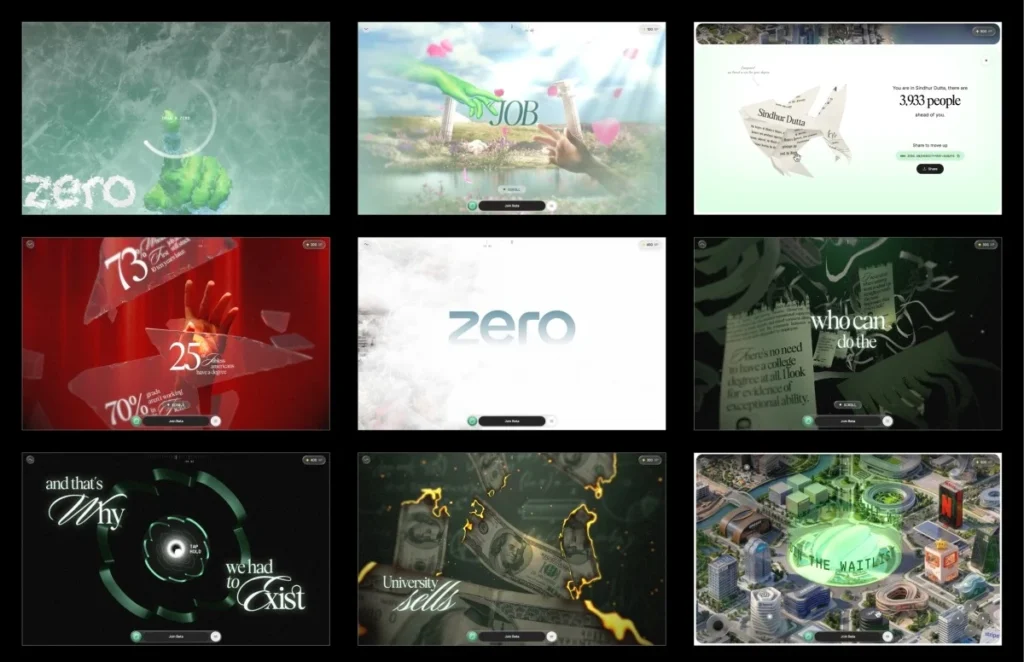
The user’s initial encounter with the ZERO experience immediately signals its departure from conventional web design. Upon arrival, the site presents a locked screen, devoid of standard navigation. The sole prompt invites the user to "draw a zero." This seemingly simple gesture acts as a dynamic gateway; as the circle is completed, a striking frost effect emanates from the stroke, gradually melting away to reveal the immersive narrative. This unique interaction, lauded by the development team for its ability to immediately captivate visitors, provides a brief yet impactful reward for engagement. The underlying technical sophistication of this gesture check is remarkably efficient, relying on three key metrics: total signed angle to confirm a full turn, roundness to differentiate it from a mere scribble, and closure to ensure the loop is complete. Only when these parameters are met does the frost shader activate, initiating the visual reveal.
Unveiling a Defiant Narrative Through Interactive Stages
Following the initial unlock, the experience unfolds as a single, continuous scroll, transitioning seamlessly from the loading screen to an intricate, interactive city map. The narrative, conceived by Atul Khola’s team, is structured across six distinct stages, punctuated by five interactive "gates" that either pause the flow or redirect the user’s journey. These gates demand specific interactions, such as drawing the initial zero, a press-and-hold to shatter virtual glass, or another hold gesture to launch through a symbolic tunnel.
The story itself is a powerful critique of the traditional academic trajectory. It commences by depicting the conventional promise of higher education: diligent study leading to good grades and a prestigious career. This promise is dramatically subverted at the first gate, where the metaphorical glass shatters, revealing stark unemployment statistics scattered among the fragments. Stage three further deconstructs the value of a degree, illustrating it as "just another piece of paper" through animations of burning money and shredding certificates, culminating in a transition into a tunnel shaped like the ZERO logo. The journey then ascends above the clouds in stage four, unveiling a cityscape constructed from the headquarters of real-world companies, symbolizing the corporate landscape. The final stage, stage five, empowers the user by granting control over an interactive map, allowing free exploration of this symbolic city. This narrative arc, from disillusionment to empowerment, underpins the "defiant" nature of the ZERO project, offering an alternative perspective on career development and learning.

Architectural Innovations: The Single Scroll Value Paradigm
A cornerstone of ZERO’s technical architecture is its deliberate avoidance of the browser’s native scroll functionality. Unlike many interactive sites that leverage tools like ScrollTrigger or oversized DOM elements, ZERO employs a virtual scroll value. Wheel and touch inputs update this value, which then smoothly eases towards its target. Critically, every animation, asset loading sequence, shader timing, text display, and overlay within the experience is driven by this singular virtual scroll value. This unified control mechanism ensures precise synchronization and a consistent user experience across the entire journey.
The project is segmented into nine self-contained modules, with the initial loader also serving as the first interactive gate. Each segment is defined with optional lifecycle hooks: scrollVh dictates its virtual scroll allocation, enter(ctx) handles asynchronous Three.js object construction, scrub(ctx, p) manages local progress-based animations, update(ctx, t, dt) runs every frame for idle motions, and teardown(ctx) disposes resources for the next segment. This modular approach significantly streamlined codebase maintenance and debugging. A notable benefit is that jumping to any stage during development or testing replays the lifecycle of all preceding segments, ensuring the experience is always initialized as if a user had naturally scrolled through it, preventing unexpected state issues.
Mastering 3D Web Performance: A Rigorous Asset Pipeline
The development team reported that a significant portion of the four-month timeline was dedicated to the meticulous preparation of 3D assets. The initial source files, delivered as production-ready Blender scenes, contained uncompressed geometry, high-resolution 8K textures, and baked animations, collectively exceeding one gigabyte of data. This presented a formidable challenge for web deployment, where file size and load times are paramount for performance and accessibility. The first month of development focused almost entirely on strategizing the optimal format for each asset.
All geometry within ZERO is delivered with DRACO compression, utilizing self-hosted decoders. The decision to bundle Draco and KTX2/Basis transcoders within the public/vendor/ directory, rather than relying on external Content Delivery Networks (CDNs), proved crucial. The team learned from experience that relying on external CDN performance for decoders could lead to asset decoding failures even if the assets themselves were hosted locally. This strategic independence ensures pipeline robustness and reliability.

Texture optimization had the most profound impact on overall performance. The developers highlighted that while a PNG image might appear small on disk, it fully decompresses into GPU memory. A standard 2048×2048 texture, regardless of its original file size, consumes approximately 16MB of VRAM. To counteract this, ZERO adopted KTX2 with ETC1S compression. This format maintains compression on the GPU, drastically reducing memory footprint and accelerating upload times.
The Compression Previewer: A Bespoke Optimization Tool
A significant hurdle with KTX2, particularly with lossy ETC1S compression, is the difficulty of local previewing. Fine-tuning compression settings can be an arduous process of trial and error, as a single global setting might either waste memory or visibly degrade critical textures. To address this, the team developed an internal dashboard featuring a custom converter and previewer. This tool displayed compressed and uncompressed images and videos side-by-side, enabling precise, asset-specific adjustments to ETC1S settings. This granular control allowed for heavier compression on less critical elements, preservation of quality for "hero" assets, and selective disabling of mipmaps, contributing substantially to the final build’s efficiency. The team emphasized this simple yet impactful tool as a seldom-discussed but vital step in advanced WebGL workflows.
Further optimization involved consolidating related textures into shared atlases. For instance, all hand textures were combined into a single 4×4 atlas, with individual meshes referencing their specific sections via UV offsets and scaling. This technique was systematically applied across the project, reducing over fifty individual images into a dozen atlases for elements like text sprites, certificates, paper shreds, clouds, coins, and glass shards. Gradient backgrounds were often replaced with concise GLSL code. These comprehensive efforts reduced early build sizes from 35-40MB to under 10MB for the final experience, with the interactive world map intelligently isolated into its own loading group to prevent it from blocking the initial narrative.
Combating Stutter: Intelligent Texture Uploads and Adaptive Quality
Beyond reducing download sizes, the team tackled the subtle but impactful issue of texture uploads to the GPU. Even compressed textures require main-thread GPU upload, which can block rendering for tens of milliseconds, leading to noticeable frame drops. To prevent these "stutters," particularly when textures are first needed during scrolling, ZERO implemented a three-pronged strategy:

- Lazy Loading with Prioritization: Textures are only loaded when they are anticipated to be needed, often during the idle periods of preceding stages.
- Idle-Time Upload Queue: A
requestIdleCallbackmechanism is used to upload queued textures only when the browser has idle time, ensuring that the main thread remains unblocked during active rendering. The system checks ifdeadline.timeRemaining()exceeds 5ms, forcing GPU uploads of textures from the queue. If the queue is not empty,requestIdleCallbackis re-invoked with a timeout to ensure eventual processing. - Synchronous Flushing at Key Moments: Before critical rendering moments, such as post-loader transitions or gate interactions, the upload queue is synchronously flushed. This guarantees that all necessary textures are already on the GPU before they appear on screen, eliminating first-time upload hitches during user interaction.
To ensure a consistently smooth experience across a wide range of devices, ZERO incorporates an adaptive quality manager. The renderer continuously monitors its performance by tracking frame times in a rolling buffer. If the average frame time exceeds 22ms (indicating less than ~45fps), the system dynamically downgrades to a lower quality tier. Conversely, if performance improves and stabilizes below 12ms (above ~83fps), it scales back up. A cooldown mechanism prevents rapid, disruptive switching between quality levels. These quality tiers primarily affect visual polish—adjusting pixel ratio, blur samples, geometry detail, and text resolution—without altering the core narrative. Targeted optimizations, such as temporarily lowering pixel ratio and disabling blur/frost during the glass shatter interaction, further mask performance costs within specific gestures. Extensive profiling on budget Android devices during the final development month was critical in identifying and resolving performance bottlenecks, including a notorious 157ms frame spike.
Crafting Immersive Visuals: A Deep Dive into Shaders
The visual richness of ZERO is largely attributed to its sophisticated post-processing chain and custom shaders, many of which saw initial versions generated with AI assistance before rigorous human refinement. The post-processing pipeline consists of a sequential application of passes: the 3D scene, procedural background, the frost/melt effect, depth-of-field (tier-gated), grain and tone mapping, and finally, lazily initialized passes for text, glass, and shatter effects. These lazy passes are pre-warmed during idle times to prevent shader-compile stalls on their first active frame.
- The Frost Unlock: This signature effect is built using a ping-pong buffer with four passes (horizontal, vertical, and two diagonals). Each pass expands the drawn stroke by propagating the brightest neighboring pixels, creating an octagonal growth pattern modulated by a frost texture for a natural, crystalline appearance. Upon stroke completion, its centroid triggers a radial melt effect.
- Lighting the Hands Without Lights: To achieve realistic, pre-baked lighting on skinned meshes without the high cost of real-time illumination, the team blended between two texture slots. The incoming slot is updated for each keyframe, with smooth crossfading to create dynamic lighting transitions. Premultiplying alpha before blending prevented dark halos around transparent edges, and storing both lighting textures in a single atlas optimized GPU memory.
- Burning Money: This effect uses a noise-driven distance field to simulate the dissolution of bills over time. A glowing HDR ember rim appears just before the burn reaches an area, followed by a charred surface. Early fragment discards based on the burn threshold optimize performance by avoiding expensive FBM calculations for already "burnt" areas.
- Shredding Certificates: Each vertex in the certificate geometry stores a strip index. As a shred front progresses, each strip separates and falls independently with its own rotation, creating a realistic tearing effect. Lighting normals are analytically generated from the animation’s wave function, eliminating the need for separate normal maps.
- The Tunnel: The tunnel, shaped by extruding the ZERO logo’s cross-section, features a brightness pulse that travels through it. This effect leverages the geometry’s world-space Z coordinate, ensuring seamless repetition of tunnel sections.
- Text that Pulls into Focus: Narrative text employs a seven-tap hexagonal blur, with the blur radius controlled by the reveal progress. This allows text to gradually sharpen into view, enhancing readability and visual flow. The blur pass is conditionally enabled, skipping rendering when no text is visible to save GPU cycles.
A critical lesson learned during shader development involved precision issues on mobile GPUs. Several shaders required explicit highp float declarations, as many mobile chipsets (e.g., Adreno, Mali) treat mediump as a true 16-bit float, leading to unexpected visual bugs like identical certificate strip movements or banding in the burn effect. This underscored the importance of early and consistent testing on actual mobile devices.
Interaction Design: Precision and Impact
The interaction design for ZERO was developed from scratch, given that the source material primarily consisted of images and videos. Most interactive gates utilize a configurable press-and-hold system. A shared configuration defines prompt appearance and hold duration, while each gate implements its unique visuals via a set of hooks that respond to hold progress and completion.

During the hold sequence, the entire frame subtly shifts to a dark red hue. When the glass shatters, this color snaps back in approximately 200ms, creating the visceral impression that the shards are actively breaking away the darkness. A longer 400ms transition was found to be less impactful. Crucially, the shatter sound is synchronized with the first rendered frame of the animation, rather than a fixed timer. This prevents audio-visual desynchronization on slower devices, where a timer-based approach might cause the sound to play before the visual effect is fully visible.
The Payoff: An Interactive World to Explore
The culmination of the ZERO narrative is a final launch sequence that transports the user into an expansive open sky. As stage four progresses, clouds dramatically part, revealing the symbolic city below, with the distinctive ZERO tower at its epicenter. A halo appearing above the tower serves as the ultimate gate, signaling the transition into stage five: the interactive map.
In this final stage, control is handed entirely to the user. They can pan, zoom, and freely explore the meticulously crafted city. Each marker within the city reveals a card detailing a specific role, scenario, and relevant tools, accompanied by a "Join Beta" button. The persistent join bar also transforms into a waitlist signup. After guiding the user through a thought-provoking narrative, the experience concludes by empowering them to independently explore its implications, solidifying the project’s core message of self-directed discovery.
Lessons Learned and the Evolving Role of AI in Development
The ZERO project has provided invaluable insights into the intricacies of high-performance web development. A key takeaway emphasized by the development team is the critical importance of asset preparation and GPU upload strategies, which deserve as much attention as the rendering process itself. Tools such as the custom compression previewer, the reliance on self-hosted decoders, the intelligent upload queue, and the adaptive quality manager, while not the most glamorous aspects of the pipeline, were instrumental in achieving the remarkable feat of delivering a sub-10MB experience from over a gigabyte of source assets, running smoothly even on budget mobile phones.

Regarding the role of Artificial Intelligence, the team confirmed its utility as a powerful accelerant in the development process. AI proved adept at generating initial code versions, including the prototype that secured the project. However, the true work, the developers stressed, began after AI’s contribution. The subsequent stages—refining interactions, enhancing visuals, meticulous performance profiling, and making the hundreds of nuanced decisions that only become apparent through rigorous testing on real devices—remained firmly within the domain of human expertise and engineering judgment. AI, in this context, serves as an invaluable tool for rapid iteration and prototyping, but the ultimate success of a polished, interactive experience continues to hinge on careful human iteration and discerning engineering. The ZERO project stands as a compelling case study for the future of interactive web design, demonstrating how a fusion of innovative technology, meticulous optimization, and thoughtful design can deliver profound and performant digital narratives.