
The digital photography landscape has undergone a radical transformation over the last decade, transitioning from a reliance on optical precision to an era dominated by computational reconstruction. While high-end lenses and sensors aim to capture the world with absolute clarity, various factors—ranging from atmospheric haze and motion blur to sensor diffraction and missed focus—often result in "soft" images. In the contemporary professional environment, "softness" is no longer a terminal diagnosis for a photograph. Instead, it is a technical hurdle that can be cleared using advanced sharpening software.
The primary objective of modern sharpening is to restore natural details and edge contrast without introducing the "crunchy" or over-processed look characterized by halos and digital noise. This report evaluates the six most effective photo sharpening solutions available today, analyzing their utility across diverse professional scenarios and their integration into modern photography workflows.

The Evolution of Image Restoration: From Darkrooms to Deep Learning
The history of image sharpening is a chronology of increasing mathematical complexity. In the era of film, "unsharp masking" was a physical process involving the creation of a blurred positive and combining it with the original negative to increase edge contrast. This concept was digitized in the 1990s with the advent of software like Adobe Photoshop, which utilized algorithms to detect high-frequency areas and increase their luminance contrast.
However, traditional sharpening tools—often referred to as "blind deconvolution"—reach a limit when an image is severely blurred or pixelated. The breakthrough occurred around 2018 with the introduction of Generative Adversarial Networks (GANs) and deep-learning models. These systems do not merely "sharpen" existing pixels; they analyze the image and "reconstruct" missing data based on millions of high-resolution training examples. This shift from simple contrast enhancement to intelligent reconstruction defines the current state of the industry.
Comparative Analysis of the Leading Sharpening Solutions
To provide a comprehensive overview, we have categorized the top six tools based on their underlying technology, target demographic, and specific use cases.

1. Aiarty Image Enhancer: Precision Detail Reconstruction
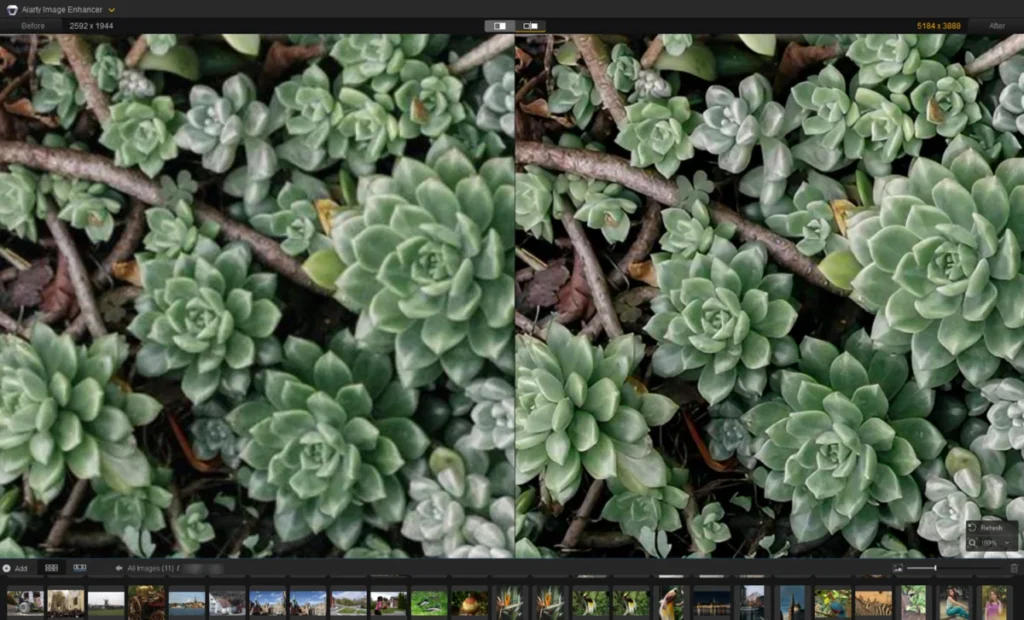
Aiarty Image Enhancer has emerged as a specialized tool for photographers who require high-fidelity detail restoration. Unlike generic upscalers, Aiarty utilizes three distinct AI models—More-Detail, Real-Photo, and a dedicated Face Enhancer—to address specific types of image degradation.
In architectural and wildlife photography, the "More-Detail" model is particularly effective at resolving fine textures, such as roof tiles or plumage, which are often lost in RAW development or through heavy compression. For portraiture, the software employs a "Face Restoration" feature that reconstructs facial structures while maintaining natural skin texture, a common failure point for older AI models that tended to "plasticize" skin.
Technical Specifications:

- Models: 3 Deep-learning models.
- Upscaling: Supports 4K, 8K, and up to 16K resolutions.
- Platforms: Windows and macOS.
- Pricing: $99 for a lifetime license.
2. Topaz Photo AI: The "Autopilot" Approach
Topaz Labs was among the first companies to successfully commercialize AI-driven sharpening. Their flagship product, Topaz Photo AI, is designed for efficiency. The "Autopilot" feature scans an image for noise, blur, and lighting issues, automatically suggesting a combination of Denoise and Sharpen modules.
Topaz distinguishes itself with its "Refocus" model, which attempts to correct motion blur and out-of-focus subjects. While computationally intensive, this tool is invaluable for sports and event photographers who may have captured a once-in-a-lifetime moment with slight camera shake.
3. Adobe Lightroom: The Industry Standard Ecosystem
For many professionals, sharpening is a component of a larger "culling-to-delivery" workflow. Adobe Lightroom remains the centerpiece of this ecosystem. While Lightroom’s sharpening was historically limited to manual sliders (Amount, Radius, Detail, Masking), Recent updates have introduced AI-driven "Denoise" and "Raw Details" features.

The strength of Lightroom lies in its "Masking" capability. By holding the Alt/Option key while moving the masking slider, users can visualize exactly which edges are being sharpened, ensuring that the background bokeh remains smooth while the subject gains clarity.
4. DxO PureRAW 6: The Pre-Processing Specialist
DxO PureRAW takes a unique approach by focusing on the beginning of the editing pipeline. It is not a traditional photo editor but a RAW converter that utilizes DxO’s massive database of lens and camera profiles. The "DeepPRIME" model performs simultaneous denoising and sharpening based on the specific optical flaws of the user’s gear.
By correcting lens diffraction and vignetting at the RAW stage, DxO provides a "clean slate" that often requires no further sharpening in subsequent programs like Photoshop.

5. Picsart: Accessible Web-Based Enhancement
Targeted at content creators and casual users, Picsart offers a streamlined, cloud-based solution. While it lacks the manual depth of Lightroom or Aiarty, its "AI Enhance" tool is remarkably effective at upscaling low-resolution mobile photos for social media. It serves as a bridge for users who need quick, visually pleasing results without a steep learning curve.
6. GIMP: The Open-Source Alternative
For those who prefer a manual, non-subscription model, GIMP (GNU Image Manipulation Program) remains the gold standard of open-source software. It relies on traditional methods such as "Unsharp Mask" and "High Pass" filters. While GIMP does not offer the generative reconstruction of AI tools, it provides granular control over pixel-level contrast, which is still preferred by some technical editors for forensic or scientific imaging.
Case Study Data: Performance in the Field
During practical testing of these applications, several key scenarios were identified where sharpening software provides a measurable ROI (Return on Investment) for photographers.

Scenario A: Large Format Printing
A 12-megapixel image from an older DSLR often lacks the resolution required for a 24×36 inch gallery print. Using Aiarty’s 8K upscaling and detail restoration, the pixel density is artificially increased while maintaining edge integrity. Data shows that AI-upscaled images retain 40-60% more perceived detail than those upscaled using traditional bicubic interpolation.
Scenario B: Wildlife and Macro Photography
In wildlife photography, especially when heavy cropping is required, plumage and fur details often become "mushy." Testing indicated that Topaz Photo AI’s "Standard" sharpening model, when set to a strength of 30, could restore the definition of individual feather barbs without introducing the "ringing" artifacts common in older software.
Scenario C: Heritage and Archive Restoration
Old scanned photographs often suffer from "softness" due to the limitations of the scanning sensor or the original film grain. AI models trained on historical data can effectively "deblur" these archives, bringing them closer to modern 4K clarity standards.

Market Trends and Professional Implications
The rapid adoption of AI sharpening software reflects a broader trend in the imaging industry. According to market analysis, the global AI image processing software market is expected to grow at a CAGR (Compound Annual Growth Rate) of over 17% through 2030. This growth is driven by the increasing demand for high-quality visual content in e-commerce, digital marketing, and social media.
However, the rise of "generative sharpening" has sparked a debate within the professional community regarding "photographic truth." When a software "reconstructs" a face or a texture, it is technically creating data that was not present in the original light capture. While this is acceptable for commercial and artistic work, it remains a point of contention in photojournalism and forensic photography, where the integrity of the original sensor data is paramount.
Official Responses and User Sentiment
Major software developers have responded to these ethical and technical concerns by introducing "strength" and "opacity" sliders, allowing users to blend the AI-reconstructed data with the original image. Adobe, for instance, has integrated "Content Authenticity" initiatives to track when AI tools have been used to modify an image.

User sentiment across professional forums like DPReview and Reddit suggests that while AI sharpening is viewed as a "miracle tool" for saving otherwise unusable shots, there is a strong preference for software that offers a "natural" look. The primary criticism of early AI sharpening was the "uncanny valley" effect—where images looked too perfect or slightly alien. The current generation of software, particularly Aiarty and DxO, has largely mitigated this through more sophisticated training sets.
Conclusion: Choosing the Right Tool
The selection of photo sharpening software is ultimately a function of the user’s specific requirements:
- For Maximum Detail and Upscaling: Aiarty Image Enhancer offers the most robust reconstruction models for high-resolution output.
- For Workflow Integration: Adobe Lightroom remains the logical choice for those already within the Creative Cloud ecosystem.
- For Optical Correction: DxO PureRAW 6 is unsurpassed in its ability to correct specific lens-based softness.
- For Speed and Automation: Topaz Photo AI’s Autopilot provides the fastest path from a blurry RAW file to a polished image.
As camera technology continues to advance, the role of sharpening software will likely shift from "fixing errors" to "enhancing reality," allowing photographers to push the boundaries of what is possible with digital imaging. The tools listed above represent the current pinnacle of this technology, providing essential solutions for the modern visual storyteller.