
The digital photography landscape has undergone a seismic shift in recent years, moving from simple pixel manipulation to sophisticated computational reconstruction. For professional photographers and hobbyists alike, the "soft" image—one characterized by a lack of edge contrast and a loss of fine detail—has long been a primary source of frustration. Whether caused by camera shake, missed focus, or lens limitations, blurriness was once considered an irreversible defect. However, the emergence of deep-learning algorithms has transformed the way the industry approaches image restoration, allowing for the recovery of details that were previously thought lost.

Modern sharpening software no longer relies solely on traditional methods like "Unsharp Masking," which merely increases the contrast of existing edges to trick the eye. Instead, today’s leading tools utilize neural networks trained on millions of high-resolution images to synthesize and restore textures. This report evaluates the six most effective photo sharpening solutions currently available, analyzing their technical capabilities, target demographics, and the broader implications of AI-driven image enhancement.
The Evolution of Image Sharpening: A Technical Chronology
To understand the current state of photo sharpening software, it is essential to trace the technological trajectory of digital image processing.

- The 1990s: Mathematical Kernels: Early digital editors, including the initial versions of GIMP and Photoshop, utilized basic mathematical kernels. Tools like "Sharpen" and "Sharpen More" applied simple filters that increased local contrast but often resulted in heavy grain and "halos" around high-contrast edges.
- The 2000s: Advanced Manual Control: The introduction of the Unsharp Mask (USM) and High Pass filters allowed photographers to isolate specific frequency ranges for sharpening. This era required significant user expertise to balance "Amount," "Radius," and "Threshold" settings.
- The 2010s: RAW Processing and Lens Profiles: The rise of Adobe Lightroom and DxO OpticsPro introduced the concept of lens-specific corrections. By utilizing databases of lens and camera combinations, software could compensate for known optical softness at specific apertures and focal lengths.
- The 2020s: The Deep Learning Revolution: The current era is defined by generative and reconstructive AI. Software such as Topaz Photo AI and Aiarty Image Enhancer use convolutional neural networks (CNNs) to "understand" what a face, a bird feather, or a brick texture should look like, effectively rebuilding the image from the ground up.
Comprehensive Analysis of Top Sharpening Solutions
1. Aiarty Image Enhancer: Precision and Natural Detail
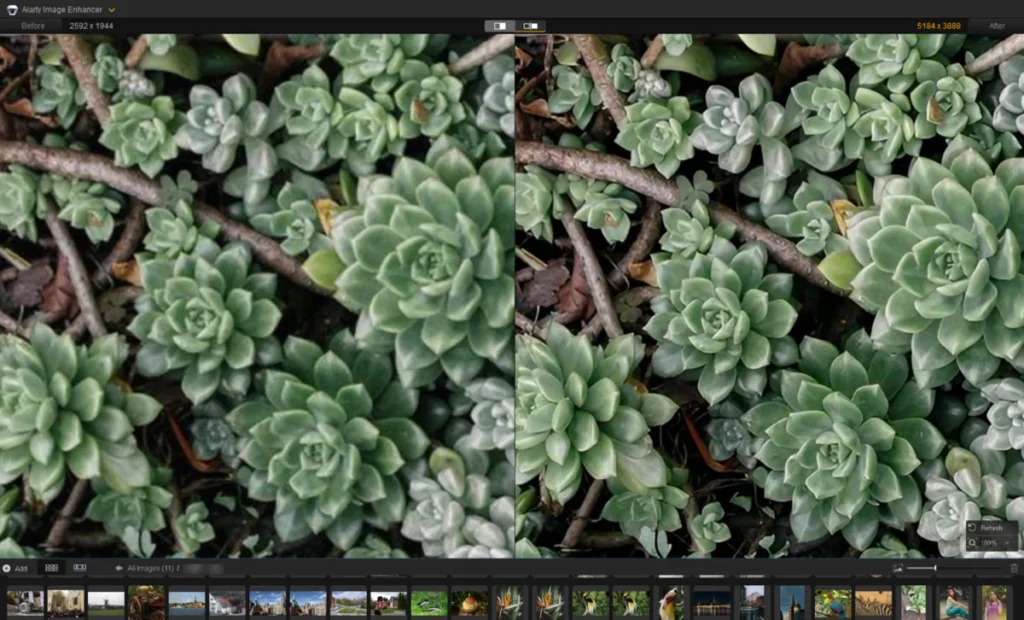
Aiarty Image Enhancer has positioned itself as a specialist in "natural" reconstruction, specifically targeting the "plasticky" look often associated with aggressive AI sharpening. During rigorous testing across multiple scenarios—including architectural photography and portraiture—Aiarty’s "More-Detail" model demonstrated a superior ability to resolve fine lines without introducing ringing artifacts.
A notable feature is its "Face Restoration" toggle, which specifically targets the complexities of human skin and hair. In a case study involving a low-resolution archival portrait, the software successfully separated individual hair strands and defined the iris of the eye, tasks that traditional sharpening tools fail to execute. The software supports upscaling to 8K and 16K resolutions, making it a critical tool for large-format printing where pixel density is paramount.

2. Topaz Photo AI: The Autopilot Standard
Topaz Labs was a pioneer in the AI sharpening space, and their flagship product, Topaz Photo AI, remains a benchmark for automation. Its "Autopilot" feature analyzes an image upon import to detect specific defects, such as motion blur or high-ISO noise, and recommends a customized stack of enhancement modules.
The software offers distinct models for different types of blur: "Standard" for general softness, "High Fidelity" for high-quality originals, and "Refocus" for images with significant focal errors. While the "Refocus" model is computationally intensive, it provides a level of clarity that was previously impossible in post-production. However, industry analysts note that Topaz’s subscription-based model and high system requirements may be a barrier for casual users.

3. Adobe Lightroom: The Integrated Workflow
For the majority of professional photographers, Adobe Lightroom remains the center of the editing ecosystem. While Lightroom’s traditional sharpening tools are manual, Adobe has recently integrated "Denoise AI," which utilizes deep learning to clean images before sharpening.
Lightroom’s strength lies in its "Masking" slider. By holding the Option/Alt key, users can see a black-and-white map of where sharpening is being applied, allowing them to protect smooth areas like skies while sharpening the subject. While it may not offer the generative reconstruction of Aiarty or Topaz, its integration into a total workflow—from culling to RAW development—makes it indispensable.

4. DxO PureRAW 6: The Optical Specialist
DxO PureRAW 6 operates differently than its competitors. It is designed to be used at the very beginning of the editing process, acting as a "pre-processor" for RAW files. Its DeepPRIME technology is widely regarded as the industry leader in simultaneous noise reduction and sharpening.
By utilizing "Lens Softness" corrections based on DxO’s extensive laboratory testing of thousands of lens-camera combinations, PureRAW 6 can extract a level of detail from RAW data that other converters miss. It is particularly effective for wildlife and sports photographers who often work with high ISO settings and long telephoto lenses.

5. Picsart: Accessible AI for the Web
Targeting content creators and social media managers, Picsart offers a cloud-based solution for sharpening. While it lacks the deep RAW support of DxO or Lightroom, its "AI Enhance" tool provides a one-click solution for cleaning up compressed JPGs. It is an ideal tool for users who need to "rescue" images taken on older mobile devices or downloaded from low-resolution web sources.
6. GIMP: The Open-Source Alternative
GIMP remains the premier choice for users seeking a powerful, free tool. While it does not currently feature built-in deep-learning models, it offers the most robust set of traditional sharpening tools. By using a "High Pass" filter on a separate layer with an "Overlay" blend mode, skilled users can achieve professional-grade results that rival paid software, provided they have the technical knowledge to manage the process manually.

Comparative Market Data and Pricing
The following table outlines the current market positioning and financial requirements for these tools as of mid-2024:
| Software | Model Type | Primary Strength | Pricing Structure |
|---|---|---|---|
| Aiarty Image Enhancer | Deep Learning | Natural detail & 16K upscaling | $99 Lifetime License |
| Topaz Photo AI | Autopilot AI | Fully automated defect correction | $199 (Annual updates) |
| Adobe Lightroom | Hybrid (Manual/AI) | Comprehensive RAW workflow | $9.99/mo (Subscription) |
| DxO PureRAW 6 | DeepPRIME | Optical & lens-specific clarity | $139.99 One-time purchase |
| Picsart | Web-based AI | Ease of use & social media integration | $15/mo (Credit-based) |
| GIMP | Traditional Filters | Manual control & extensibility | Free (Open Source) |
Industry Implications and Broader Impact
The advancement of photo sharpening software extends far beyond the realm of artistic photography. In the field of historical archiving, these tools are being used to restore clarity to damaged or poorly scanned glass-plate negatives from the 19th century, allowing historians to read previously illegible text in the background of images.

In forensic science, the ability to deblur images from surveillance footage has significant implications for law enforcement, though the "generative" nature of AI sharpening has sparked a debate in the legal community regarding the admissibility of AI-enhanced evidence. Critics argue that because AI "guesses" missing details based on training data, the resulting image may not be a 100% accurate representation of reality.
Furthermore, the commercial printing industry has seen a reduction in costs and lead times. Previously, a low-resolution image provided by a client would have been unusable for large-scale billboards. Now, with tools like Aiarty and Topaz, these images can be upscaled and sharpened with minimal loss of quality, bridging the gap between amateur capture and professional output.

Conclusion
The "6 Best Photo Sharpening Software" list reflects a diverse market catering to varied needs. For those seeking the highest level of detail and a permanent license, Aiarty Image Enhancer and DxO PureRAW 6 represent the pinnacle of current technology. For professionals requiring a streamlined, automated workflow, Topaz Photo AI and Adobe Lightroom remain the dominant forces.
As AI models continue to evolve, the boundary between "taking" a photo and "reconstructing" a photo will continue to blur. However, for the photographer facing a once-in-a-lifetime shot that suffered from a slight technical error, these tools provide a digital safety net that was unimaginable only a decade ago. The future of photography is no longer just about the light that hits the sensor, but the intelligence of the software that interprets it.