
The rapid evolution of artificial intelligence in the workplace has entered a new phase of operational integration. Following Anthropic’s strategic merger of Claude Chat, Cowork, Artifacts, and Design into a single, unified interface—a rollout initiated in October 2026 for Pro and Max tier subscribers across web, desktop, and mobile—users are experiencing a fundamental shift in how human-AI collaboration functions. At the center of this transformation are Claude Cowork skills: reusable instruction frameworks that allow the AI to seamlessly read local desktop files, execute multi-step workflows autonomously, and interact directly with enterprise data platforms.
For modern revenue teams spanning marketing, sales, and customer service, these developments represent a major leap forward from basic prompt engineering. Rather than forcing professionals to repeatedly paste complex instructions into conversational chat boxes, Claude skills act as modular standard operating procedures (SOPs) that the AI loads contextually only when required. Combined with recent software updates—such as the Mac-exclusive "Record a Skill" feature and external integrations via the Model Context Protocol (MCP)—organizations can now automate repetitive administrative burdens with unprecedented precision.

Understanding the Technical Architecture of Claude Skills
To fully grasp the utility of Claude skills, one must look beneath the conversational interface to examine how the underlying technology functions. A Claude skill is technically a specialized folder containing structured instructions, optional supporting templates, scripts, or reference documentation. When a user submits a prompt, Claude utilizes a mechanism known as progressive disclosure. Instead of loading heavy guidelines, extensive datasets, or brand documentation into every active session—which would quickly degrade performance and consume system resources—the model pulls the skill into the session piece by piece, exactly when the operational context demands it.
Crucially, installing or building a skill does not retrain or fine-tune the underlying large language model. Think of it as handing a knowledgeable human colleague a detailed checklist or an SOP binder: the worker’s fundamental capabilities remain unchanged, but they now possess explicit, step-by-step guidance on how your specific organization prefers a particular task to be executed.

These skills are fully cross-functional across the entire Claude ecosystem. Whether operating within Claude Chat, Claude Code, or the desktop-integrated Cowork environment, a properly configured skill travels with the user’s account, ensuring cross-platform consistency.
Demystifying Claude Features: Skills vs. Projects vs. Instructions vs. Memory
As Anthropic accelerates its product release cycle, enterprise users frequently express confusion regarding the overlapping boundaries of Claude’s organizational features. Industry analysts and power users often rely on a physical workshop analogy for clarity: "Skills are the tools in the workshop, while projects are the workshop itself."

To maintain data hygiene and operational efficiency, organizations must distinguish between the four primary customization layers:
- Global Instructions: These act as persistent rules that apply to every conversation across your account, dictating general behaviors, formatting preferences, or persona constraints.
- Memory: This feature allows Claude to retain specific, persistent facts about you or your preferences across disparate conversations without requiring manual re-explanation.
- Projects: Projects serve as broad containers or secure workspaces. A single project can house dedicated documents, project-specific instructions, and internal project memory, maintaining a self-contained context for major initiatives.
- Skills: Skills are modular, task-specific instructions designed to be invoked dynamically whenever a particular workflow is triggered, whether inside a project or a general chat window.
These features are not mutually exclusive. A complex enterprise workflow often combines them: a dedicated project houses the background documents and custom memory, while various operational skills are dynamically invoked inside that project space to execute distinct tasks.
Creating Your First Skill: Manual Setup Versus "Record a Skill"

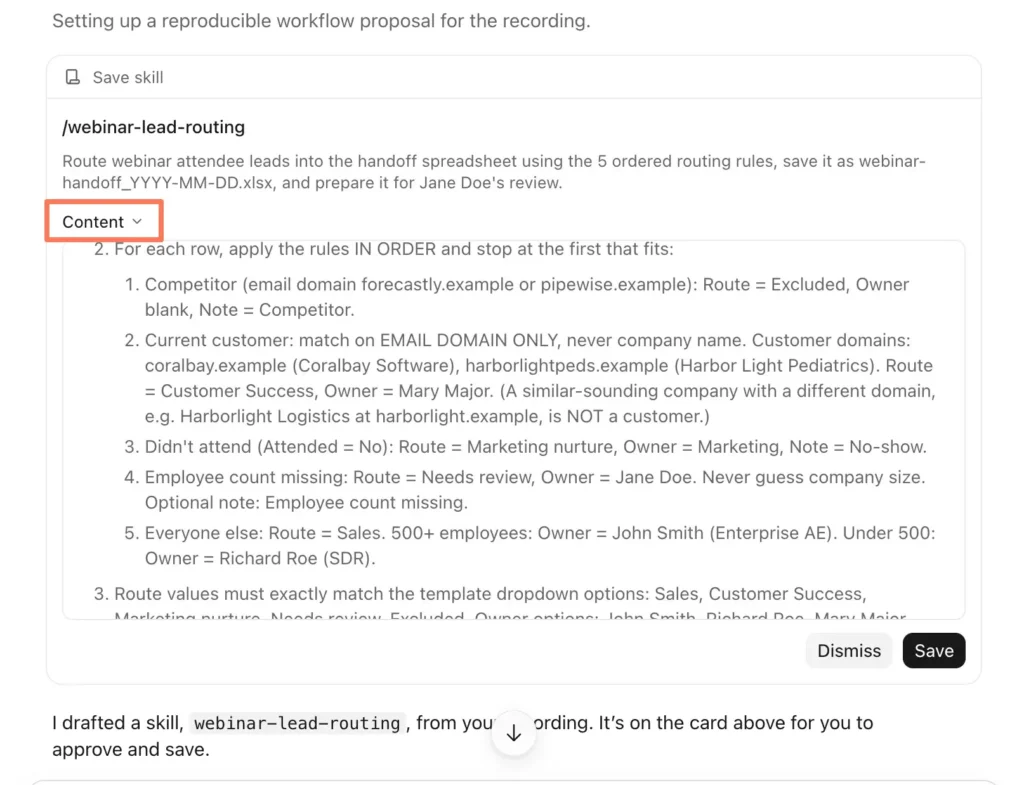
Building custom workflows has traditionally required advanced technical knowledge or tedious prompt drafting. Anthropic’s introduction of the "Record a Skill" feature for Mac desktop users on Pro, Max, and Team plans fundamentally lowers this barrier.
The screen-recording feature allows professionals to capture a multi-step desktop workflow simply by recording a video and verbally narrating their actions—similar to filming an instructional Loom video for a colleague. Claude monitors the screencast, analyzes the user’s intent, translates the demonstration into a structured technical skill, and presents it for review. Once approved and saved, the workflow can be tested on filler data before deployment into production environments.
For users without the macOS recording feature, custom skills can be authored manually as structured text folders and uploaded directly as ZIP archives via the customization menu under "Customize > Skills."

Practical Applications Across Revenue Teams
The true value of Claude Cowork skills lies in their capacity to eliminate friction across departmental silos, particularly within revenue-generating divisions.
Marketing Automation and Performance Reporting
Proving month-end marketing ROI to executive leadership often requires consolidating fragmented exports from disparate advertising networks, web analytics, and webinar platforms. By deploying a standardized "performance-memo" skill, marketing teams can ingest raw CSV exports from Google Ads, LinkedIn Ads, and Google Analytics 4, transforming them into a concise, executive-ready summary formatted precisely to corporate standards. Additional marketing use cases include automated campaign brief generation and multi-channel content localization triage.

Sales Operations and Contract Triage
In enterprise sales, legal bottlenecks frequently stall deal velocity when prospects return contracts with extensive redlines. A specialized "redline-triage" skill can compare a prospect’s contract modifications against the organization’s approved fallback positions. Before the document ever reaches the corporate legal department, Claude highlights acceptable clauses, flags unauthorized deviations, and drafts initial negotiation recommendations based on the company’s internal sales playbook.
Customer Service and Release Briefings
Customer support organizations frequently experience friction when product updates outpace internal communication. A "release-briefing" skill allows support managers to feed raw engineering release notes directly into Claude, which automatically translates technical updates into structured, customer-facing FAQs, internal agent knowledge-base articles, and escalation protocols ahead of a product launch.
Bridging AI and CRM Data via the HubSpot Connector

While standalone skills excel at structuring documents and organizing local files, their operational utility expands exponentially when integrated with live enterprise data systems. Without external context, an AI model cannot inherently know the real-time status of a sales pipeline or a customer support ticket.
To solve this challenge, official Model Context Protocol (MCP) integrations—such as the HubSpot connector for Claude—bridge the gap between generative AI workflows and operational customer relationship management (CRM) data. Authorized via secure OAuth protocols and governed by strict administrator permissions, the HubSpot connector grants Claude controlled read and write access directly from the chat interface.
Once integrated, users can execute complex CRM-grounded workflows without tab-switching:

- Pre-Call Briefings: Automatically aggregating historical engagement data, open deals, and recent support notes before a client meeting.
- Post-Call Updates: Translating unstructured voice notes or meeting summaries into standardized CRM entries and deal stage updates.
- Pipeline Audits: Identifying stagnant deals within specific pipeline stages and generating prioritized action lists for account executives.
Crucially, Anthropic maintains strict data privacy standards regarding third-party connectors, stipulating that customer information shared through the HubSpot connector is not utilized to train foundation models unless users explicitly opt in or provide direct feedback. Furthermore, write operations can be configured to require manual user approval, ensuring human oversight over all database modifications.
Best Practices for Data Security and Enterprise Deployment
Because Claude Cowork possesses the technical capability to read, modify, and delete local files within designated directories, enterprise deployment requires rigorous data hygiene. Pointing Claude indiscriminately at a primary desktop or downloads folder is the operational equivalent of granting an unfamiliar employee unmonitored access to your entire filing cabinet.

Security guidelines mandate the creation of isolated, task-specific directories. Users should populate these folders exclusively with necessary documents, utilizing filler or dummy data during initial workflow testing to prevent sensitive personally identifiable information (PII) or internal credentials from being inadvertently captured during screen recordings or prompt execution.
Furthermore, organizations utilizing Team and Enterprise tiers must establish clear governance models. Team administrators can manage custom skill distribution, enforce version control, and monitor workspace usage against established plan caps (such as workspace limits of 50 custom skills for Team tiers and 200 for Enterprise tiers).
Outlook and Implementation Strategy

As generative AI transitions from experimental chatbot interfaces to deeply integrated operational coworkers, the key to successful adoption lies in disciplined implementation. Organizations that attempt to automate every administrative process simultaneously frequently encounter friction, abandoned workflows, and disorganized skill repositories.
Industry experts recommend a methodical, single-workflow adoption strategy: identify one repetitive, multi-step weekly task—such as a standardized executive report, a lead routing sequence, or a post-call briefing framework. Build a dedicated skill for that single process, test it rigorously against edge cases, and ensure its reliability before expanding into broader automation initiatives.
By pairing structured task instructions (skills) with real-time enterprise data access (connectors), businesses are moving past the limitations of ad-hoc prompt engineering. The modern AI workspace is no longer defined by what you can type into a chat box, but by the intelligent, autonomous systems you build to power your enterprise forward.