
Modern web development relies heavily on component-driven architectures, single-page application (SPA) paradigms, and complex build pipelines. Frameworks such as React and Next.js have transformed how developers build lightning-fast web applications, using techniques like code-splitting to break down monolithic scripts into smaller, more efficient JavaScript bundles known as "chunks." However, this architectural advancement has introduced a persistent operational challenge that frequently frustrates both users and engineering teams: the dreaded ChunkLoadError.
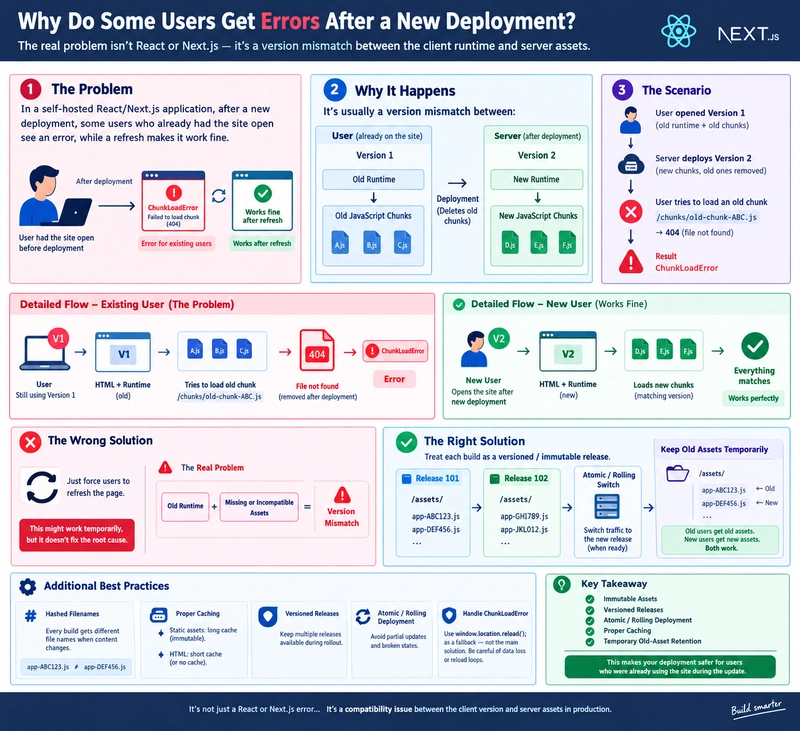
When a production application undergoes a fresh deployment, newly arriving visitors interact with the site seamlessly. Conversely, users who maintain active browser tabs often encounter sudden runtime failures, manifesting as errors like Failed to load chunk, Failed to fetch dynamically imported module, or Loading chunk failed. When these affected users refresh their browsers, the application immediately resumes normal functionality. Consequently, many development teams hastily conclude that forcing a manual browser refresh serves as a sufficient remedy.
Industry experts and senior software architects emphasize that a page refresh merely acts as a band-aid, masking a deeper architectural flaw. The root cause of this phenomenon is not a transient network drop or a bug within the React library itself; rather, it is a critical version mismatch between the client-side runtime active in a user’s browser and the newly updated assets hosted on the server infrastructure. Examining this issue requires a comprehensive look at modern frontend build pipelines, continuous integration workflows, HTTP caching policies, and the intersection of client-side routing with server-side deployment strategies.
The Mechanics of Modern Frontend Code Splitting
To understand why version mismatches occur, one must first examine how modern bundlers such as Webpack, Vite, and Turbopack compile code. Traditional web applications often shipped a single, massive JavaScript file containing every component, utility, and dependency required across the entire platform. As applications grew in scope and complexity, this approach severely degraded initial page load times, forcing browsers to download megabytes of unnecessary code before rendering the interface.
To solve this performance bottleneck, modern build tools implement code-splitting. Instead of generating a monolithic payload, the compiler dissects the application into an initial runtime bundle and numerous isolated asynchronous chunks. For example, a typical enterprise dashboard might be split into distinct files:
main-ABC123.js(Core application framework and routing)dashboard-XYZ456.js(Analytics and widgets)profile-111.js(User account management)
Using dynamic import declarations—such as const Dashboard = lazy(() => import("./Dashboard"))—the browser defers downloading the dashboard chunk until the user actively navigates to that specific route. This optimization drastically reduces the Time to Interactive (TTI) metric. However, it also creates an absolute dependency on the server remaining a reliable, consistent repository of those specific file names.
Chronology of a Deployment Failure
The failure sequence unfolds across a precise timeline that highlights the friction between continuous deployment practices and persistent client sessions.
- Initial State (Version 1): A user navigates to
https://example.com. The server is currently serving Version 1 of the application. The browser requests and successfully downloads the HTML document alongside the corresponding runtime and initial asset manifests (app-ABC123.js,dashboard-XYZ456.js). - The Active Session: The user keeps the browser tab open while working on other tasks or reading data on the page. The application remains fully functional within the memory of that specific browser session.
- The Production Deployment (Version 2): The engineering team pushes a new feature or bug fix to the main branch. The CI/CD pipeline triggers a fresh build, generating Version 2. This new build alters the source code, resulting in entirely new content hashes for the output assets (
app-DEF789.js,dashboard-QWE321.js). - The Trigger Event: The deployment script pushes these new files to the production server or content delivery network (CDN). If the deployment script utilizes a naive clean-and-replace strategy, it overwrites or deletes the legacy files—including
dashboard-XYZ456.js. - The Runtime Collision: Hours after the deployment, the user finally clicks a navigation link pointing to the dashboard. The old runtime executing inside the user’s browser attempts to fetch the file it recognizes:
GET /assets/dashboard-XYZ456.js. - The HTTP 404 Response: Because the deployment pipeline deleted the old file, the server responds with a
404 Not Foundstatus code. Unable to parse a valid JavaScript module from an error page, the browser throws aChunkLoadError.
Evaluating Mitigation Strategies: Beyond the Forced Refresh
While implementing automatic error boundaries that intercept ChunkLoadError and trigger a programmatic window.location.reload() can restore functionality, this tactic carries notable risks. If a user is actively inputting data into a complex multi-step form when the error occurs, an unprompted page reload destroys their unsaved local state, resulting in a frustrating user experience. Furthermore, if a deployment is fundamentally flawed or stuck in a loop, automatic reloads can trap the browser in an infinite refresh cycle.

Industry standards dictate that robust production environments must decouple deployments from asset destruction through mature architectural patterns.
1. Immutable Assets and Content Hashing
Production build systems append a cryptographic hash of the file contents directly to the filename (e.g., app-a82f91.js). Because the file contents are guaranteed not to change under that specific hash, these assets are designated as immutable. Servers and CDNs can safely cache immutable assets for extended durations (e.g., Cache-Control: public, max-age=31536000, immutable). When a new build occurs, a new file with a distinct hash is generated, allowing old and new assets to coexist peacefully on the server without naming collisions.
2. Versioned Releases and Directory Structures
Rather than deploying files directly into a single shared root directory, sophisticated deployment systems organize builds into discrete, isolated release directories:
/releases/
  release-101/ (Previous build assets)
  release-102/ (Active build assets)
  release-103/ (Incoming build assets)
A symbolic link or routing pointer (current -> release-102) directs traffic to the active build. When a new release is validated, the pointer switches atomically to release-103. The files belonging to release-102 remain intact on disk, ensuring that users running legacy sessions can continue to fetch their required chunks until their sessions naturally expire or close.
3. Atomic and Rolling Deployments
Infrastructure orchestration tools facilitate atomic switches, minimizing the window of vulnerability during traffic transitions. In multi-instance environments, rolling deployments update backend servers sequentially (e.g., Server 1 receives Version 2 while Servers 2 and 3 continue running Version 1). Combined with health checks and intelligent load balancing, this prevents sweeping outages and ensures backward compatibility during transition windows.
4. Differentiating HTML and Asset Caching Policies
A common misconfiguration involves applying identical caching headers to HTML documents and JavaScript chunks. While hashed JavaScript assets benefit from aggressive, long-term caching, HTML entry points must never be cached indefinitely. Because the HTML document acts as the pointer referencing the latest hashed script bundles, it must revalidate frequently. Ensuring short cache lifetimes or immediate invalidation for HTML documents guarantees that new visitors immediately receive references to the correct, up-to-date runtime assets.
Broader Implications and Enterprise Impact
The operational implications of managing ChunkLoadError extend far beyond simple error logging. For high-traffic e-commerce platforms, financial applications, and Software-as-a-Service (SaaS) providers, unhandled deployment errors directly impact revenue, user retention, and system reliability metrics.
When organizations transition from treating deployments as simple file-copy operations to viewing them as managed, version-controlled releases, system stability increases exponentially. Engineers tasked with scaling modern web applications must recognize that client-server synchronization does not terminate the moment a build finishes compiling in the CI/CD pipeline. True deployment resilience requires accounting for the asynchronous reality of distributed web traffic, ensuring that server infrastructure respects the lifecycle of active client sessions.
Ultimately, solving the version mismatch problem elevates a team’s engineering maturity. By moving past the oversimplified advice of forcing users to refresh their browsers, developers can implement sophisticated release pipelines, proper cache segmentation, and graceful degradation strategies. In doing so, organizations eliminate unnecessary application failures and deliver a seamless, uninterrupted digital experience for every user, regardless of when a deployment occurs.