Tag: advanced

  • Advanced Techniques for Precision Color Correction in Digital Post-Production Mastering the Lumetri Hue vs Saturation Curve for Pristine Visuals

    Advanced Techniques for Precision Color Correction in Digital Post-Production Mastering the Lumetri Hue vs Saturation Curve for Pristine Visuals

    In the contemporary landscape of digital cinematography and high-end video production, the pursuit of visual perfection often hinges on the minute details of color fidelity. One of the most persistent challenges faced by editors and colorists is the presence of unwanted color casts—specifically yellow and orange tints—that can compromise the perceived quality of white elements within a frame. These chromatic aberrations frequently arise from improper white balance settings during the acquisition phase or as a result of complex lighting environments where mixed color temperatures coexist. While traditional global adjustments can sometimes mitigate these issues, they often lack the surgical precision required to maintain a naturalistic aesthetic. The solution lies in the advanced application of the Hue vs. Saturation curve within professional grading suites like Adobe Premiere Pro’s Lumetri Color panel, a technique that allows for the isolation and suppression of specific color frequencies without degrading the integrity of the surrounding image.

    The Technical Evolution of Color Correction

    The science of color grading has undergone a radical transformation over the last two decades. In the era of celluloid film, color correction was a photochemical process involving timed lights and chemical baths, limiting the ability of a creator to target specific hues. The transition to the Digital Intermediate (DI) process in the early 2000s, followed by the democratization of Non-Linear Editing (NLE) software, shifted this power to the desktop.

    Quick Tip: Remove Yellow from Footage for Cleaner Whites

    Adobe introduced the Lumetri Color engine in 2015, integrating technology from their high-end dedicated grading software, SpeedGrade, directly into Premiere Pro. This integration represented a pivotal moment for independent filmmakers and corporate video editors, providing them with a 32-bit floating-point color pipeline that could handle high-dynamic-range (HDR) footage with professional-grade precision. Within this engine, the Curves tab—specifically the Hue vs. Saturation curve—serves as a primary tool for "corrective grading," the essential first step before "creative grading" or "look-making" begins.

    The Chronology of Color Accuracy: Identifying the Source of the Tint

    To understand why yellow and orange tints occur, one must look at the chronology of a typical video shoot. Digital sensors are calibrated to interpret "white" based on a specific color temperature measured in Kelvin. Daylight is generally rated around 5600K, while tungsten indoor lighting sits near 3200K.

    1. The Acquisition Phase: If a camera is set to a Daylight white balance while filming under indoor incandescent lights, the resulting footage will appear excessively orange. Conversely, if a camera’s auto-white balance (AWB) fails to adjust rapidly to changing clouds or artificial light flickering, a subtle yellow "wash" may settle over the highlights.
    2. The Observation Phase: During post-production, the editor identifies that "true whites"—such as snow, white clothing, or studio backgrounds—exhibit a "muddy" or "warm" quality.
    3. The Diagnostic Phase: Using technical tools like the Vectorscope in Premiere Pro, the editor can see the color information "pulling" toward the yellow and red axes, confirming that the whites are not neutral.

    A Systematic Methodology for Removing Yellow Casts

    The process of removing these unwanted tints requires a strategic approach to the Lumetri Color panel. While the "White Balance Selector" (the eyedropper tool) is the most common first attempt at a fix, it often introduces a counter-tint of blue or magenta that can make skin tones look sickly or unnatural. The Hue vs. Saturation curve offers a superior alternative by targeting only the problematic wavelengths.

    Quick Tip: Remove Yellow from Footage for Cleaner Whites

    To execute this technique, the editor must first apply the Lumetri Color effect to the desired clip on the timeline. Navigating to the Curves section, the editor finds the Hue vs. Saturation graph, which is represented by a horizontal rainbow spectrum. The methodology involves creating a "gate" or a "range" to isolate the yellow frequencies.

    By placing three distinct control points on the curve—one in the orange sector, one in the yellow, and one in the green—the editor effectively creates an anchor system. The orange and green points act as boundaries, ensuring that the colors outside this range remain untouched. The central yellow point is then manipulated; by dragging this point downward toward the bottom of the graph, the editor reduces the saturation of only the yellow hues. Depending on the severity of the cast, the point may be lowered slightly to maintain some warmth or pulled to the baseline to completely desaturate the yellow channel, resulting in a clean, neutral white.

    Supporting Data: Why Curves Outperform Global Sliders

    Data-driven analysis of digital signals reveals why curve-based correction is the preferred industry standard. When an editor uses the "Temperature" slider to fix a yellow cast, they are applying a mathematical offset to every pixel in the frame. In an 8-bit video file, which contains only 256 levels of brightness per channel, aggressive global sliding can lead to "banding" or "posterization," where the smooth gradients of a sky or a wall break into visible blocks of color.

    Quick Tip: Remove Yellow from Footage for Cleaner Whites

    In contrast, targeted saturation reduction via curves preserves the luminance (brightness) of the pixels while only altering their chromaticity. According to technical benchmarks in color science, maintaining the luminance-to-chroma ratio is critical for "visual transparency"—the feeling that the image has not been manipulated. Furthermore, for footage shot in 10-bit or Log formats (such as S-Log3 or V-Log), the Hue vs. Saturation curve allows the editor to utilize the full breadth of the color space, ensuring that even after the yellow is removed, the highlights retain their detail and do not "clip" into a flat, digital white.

    Industry Perspectives and Professional Reactions

    Professional colorists often describe the removal of yellow tints as "cleaning the plate." In interviews with industry experts, the consensus is that "dirty" whites are the most common indicator of amateur production. "The human eye is incredibly sensitive to white," notes a veteran colorist for commercial broadcast. "We know what white should look like. If a white shirt has a 5% yellow bias, the viewer’s brain subconsciously flags the image as ‘off.’ By desaturating the yellows specifically, you satisfy the viewer’s biological expectation for neutral highlights without destroying the warmth of the talent’s skin."

    Reactions from the cinematography community emphasize that this technique is particularly vital in the "prosumer" era. With the rise of high-quality mirrorless cameras, more content is being produced in uncontrolled lighting environments—coffee shops, offices, and street exteriors—where yellow-tinted sodium vapor lamps or warm interior LEDs are prevalent. The ability to "save" this footage in post-production using Lumetri curves has been hailed as a significant productivity gain for fast-turnaround news and documentary workflows.

    Quick Tip: Remove Yellow from Footage for Cleaner Whites

    Broader Impact and the Future of Color Grading

    The implications of these refined color correction techniques extend beyond mere aesthetics. In the realm of e-commerce and product videography, color accuracy is a legal and commercial necessity. If a product’s white packaging appears yellow in a promotional video, it can lead to consumer mistrust or increased return rates. Precise control over the Hue vs. Saturation curve ensures that brand identities are maintained across all viewing platforms, from mobile screens to high-definition televisions.

    Looking toward the future, the integration of Artificial Intelligence (AI) and Machine Learning (ML) into NLEs is beginning to automate some of these processes. Adobe’s "Auto Color" feature already uses the Lumetri engine to suggest initial corrections. However, experts argue that the human eye will remain the ultimate arbiter of color balance. The "surgical" manual method of curve manipulation remains a foundational skill for any serious editor, providing a level of intentionality that AI cannot yet replicate.

    As video content continues to dominate global communication, the demand for high-fidelity visuals will only increase. Mastering the nuances of the Lumetri Color panel is no longer an optional skill for specialists; it is a core competency for anyone looking to produce professional, broadcast-ready content. By understanding the relationship between light temperature, sensor interpretation, and digital manipulation, editors can transform problematic footage into pristine cinematic experiences, ensuring that their whites are always clean and their visual storytelling remains uncompromised.

  • Blackmagic Design Revolutionizes Post-Production with DaVinci Resolve 21 Featuring Dedicated Photo Page and Advanced AI Toolset

    Blackmagic Design Revolutionizes Post-Production with DaVinci Resolve 21 Featuring Dedicated Photo Page and Advanced AI Toolset

    In the strategic window leading up to the NAB 2026 convention in Las Vegas, Blackmagic Design has officially unveiled DaVinci Resolve 21, marking one of the most significant architectural shifts in the software’s history. While the platform has long been recognized as the industry standard for color grading and a formidable competitor in non-linear editing, the latest iteration expands its ecosystem into the realm of professional still photography. The introduction of a dedicated Photo page, alongside a massive infusion of artificial intelligence tools and enhanced immersive video capabilities, signals Blackmagic Design’s intent to provide a truly unified creative environment for hybrid creators who move fluidly between motion and still imagery.

    The release of version 21 follows a consistent pattern of aggressive innovation from the Australian-based company. Over the last decade, DaVinci Resolve has evolved from a high-end color correction tool requiring specialized hardware into a comprehensive post-production suite encompassing editing, visual effects (Fusion), audio post-production (Fairlight), and now, professional photo management and retouching. By integrating these disparate disciplines into a single application, Blackmagic Design continues to challenge the subscription-heavy models of its competitors, offering the update as a free download for existing Studio license holders.

    The Convergence of Stills and Motion: The New Photo Page

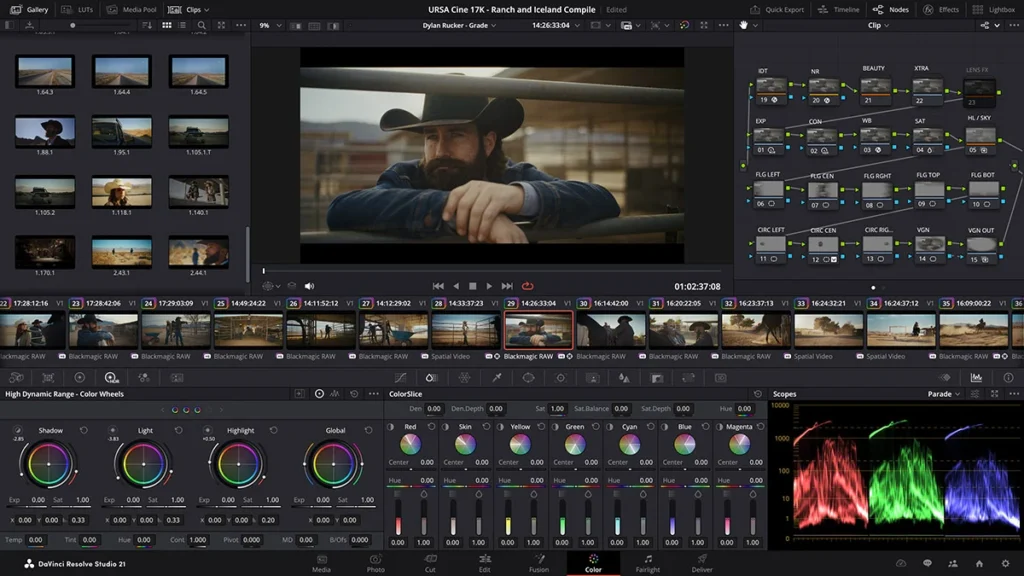
    The headline feature of DaVinci Resolve 21 is undoubtedly the Photo page. For years, cinematographers and photographers have shared similar color science needs, yet they have been forced to oscillate between different software ecosystems to manage their workflows. The Photo page aims to eliminate this friction by allowing users to import, organize, and develop still photographs within the same interface used for high-end film production.

    This new workspace provides dedicated tools for reframing and cropping images while maintaining the original source resolution and aspect ratio, ensuring that high-megapixel RAW files are handled with precision. Once imported, these images can be passed to the existing Color page, where the software’s legendary node-based grading system can be applied to still frames. This allows photographers to utilize sophisticated tools like the HDR grading palette, Color Warper, and the AI-driven Magic Mask—features that often exceed the capabilities of traditional photo editing software.

    Furthermore, the Photo page introduces professional tethering support for Sony and Canon cameras. This functionality allows photographers to capture images directly into the DaVinci Resolve environment. During a live shoot, users can remotely adjust critical camera parameters such as ISO, shutter speed, aperture, and white balance. The inclusion of a live view monitor and the ability to save and apply capture presets ensures that the look of a shoot can be established and maintained in real-time, bridging the gap between the set and the grading suite. To assist in high-volume workflows, a new LightBox view has been implemented, providing a bird’s-eye view of an entire album with color grades applied, facilitating visual consistency across a project.

    Advanced Artificial Intelligence and the DaVinci Neural Engine

    Artificial intelligence remains at the forefront of the DaVinci Resolve 21 update, powered by an enhanced version of the DaVinci Neural Engine. The new toolset focuses on solving complex optical and aesthetic challenges that previously required hours of manual labor or expensive third-party plugins.

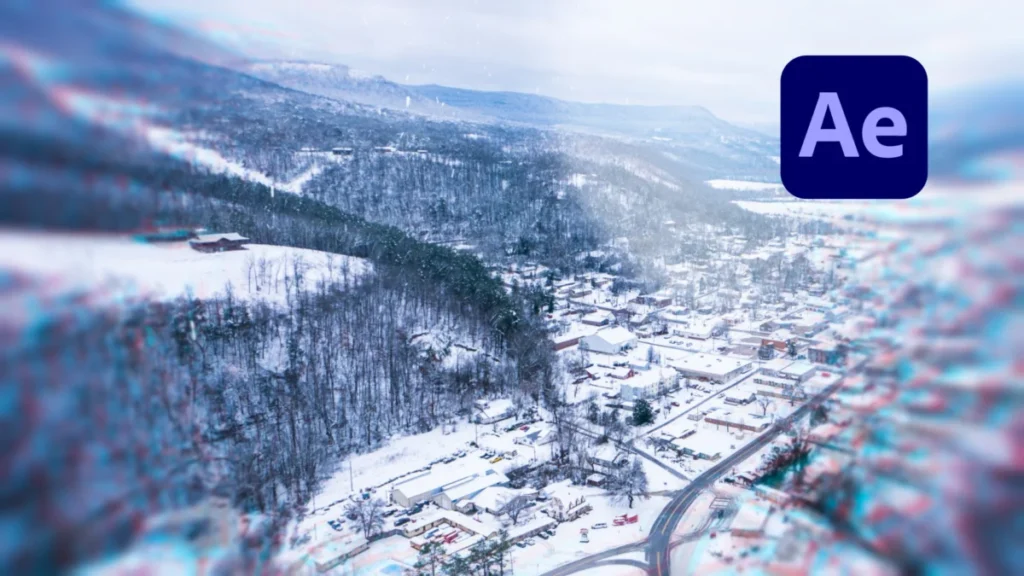
    One of the most technically impressive additions is AI CineFocus. This tool allows editors to redefine the focal point of a shot after it has been filmed. By analyzing the depth map of a scene, AI CineFocus can simulate changes in aperture and focal range, effectively altering the depth of field. This tool is particularly powerful for narrative storytelling, as it allows for the addition of keyframed rack focus effects in post-production, directing the viewer’s eye with surgical precision.

    Complementing this is AI UltraSharpen, designed to salvage footage that may suffer from slight focus errors or to enhance the clarity of upscaled low-resolution media. In tandem with AI Motion Deblur, which removes artifacts such as streaks and softness from fast-moving subjects, these tools provide a safety net for production mishaps. The Motion Deblur tool is especially useful for high-action sports or wildlife cinematography, where it can clean up freeze-frame effects and slow-motion sequences that would otherwise be unusable due to shutter speed limitations.

    The software also pushes the boundaries of digital makeup and character aging. The AI Face Age Transformer enables editors to modify the perceived age of a subject by analyzing facial geometry and adjusting features such as wrinkles and skin fullness via a simple slider. For more structural changes, the AI Face Reshaper allows for the subtle repositioning of facial features on moving subjects, while the AI Blemish Removal tool automates the process of retouching skin imperfections like acne and pores, significantly reducing the workload for beauty work in commercials and high-end fashion content.

    Streamlining the Editorial Workflow

    Beyond creative effects, Blackmagic Design has leveraged AI to tackle the administrative bottlenecks of the editing process. The new AI Slate ID tool uses computer vision to automatically detect clapperboard details, extracting scene, take, and shot information directly into the project’s metadata. This automation significantly reduces the time required for media management during the "dailies" phase of a production.

    DaVinci Resolve 21 adds Photo page, AI focus tools and free upgrades

    In a move that will likely transform documentary and unscripted workflows, AI IntelliSearch allows users to search their entire media pool using natural language. By analyzing the visual and auditory content of clips, the system can identify specific people, objects, or even keywords within dialogue. This means an editor can instantly locate every instance of a specific actor’s face or every time a certain topic is mentioned in an interview, bypassing the need for manual logging.

    Immersive Media and Spatial Video Support

    As the industry pivots toward spatial computing and virtual reality, DaVinci Resolve 21 introduces what Blackmagic calls its most comprehensive immersive toolset to date. The software now supports a wide array of formats tailored for delivery to platforms like Meta Quest and YouTube VR.

    A key addition is the spherical Panomap rotation, which offers a more intuitive way to orient immersive media using standard pitch, tilt, pan, yaw, and roll adjustments. This makes the process of leveling horizons and centering points of interest in a 360-degree environment far more accessible. Furthermore, the Fusion page now supports ILPD (Image Layer Position Data) retargeting, providing advanced handling for stereoscopic media and complex 3D compositing, which is essential for creating high-quality content for the burgeoning VR market.

    Audio and Motion Graphics Integration

    The integration between the various "pages" of Resolve has also been strengthened. The new Fairlight Animator modifier creates a direct link between the Fusion visual effects engine and Fairlight’s professional audio tools. This allows for automated animation driven by audio analysis; for example, the movement of a character’s lips or eyes can be dynamically synchronized to a voice track or a musical score.

    For narrative editors, the IntelliScript feature now supports industry-standard formats like Final Draft and plain text screenplays. Upon importing a script, Resolve compares the text against transcribed audio from the footage and can automatically generate a "radio cut" or a rough assembly of a scene, drastically accelerating the first-pass editing process. Additionally, the Fusion page receives a significant boost with the inclusion of the Krokodove toolset, adding over 70 new graphics and nodes for advanced motion design and procedural animations.

    Industry Impact and Market Positioning

    The announcement of DaVinci Resolve 21 has sent ripples through the post-production industry. Analysts suggest that the addition of the Photo page is a direct shot at Adobe’s dominance with the Creative Cloud. By offering a high-end photo editing solution within a video-centric application, Blackmagic is appealing to the "multihyphenate" creator who is increasingly common in today’s digital landscape.

    "Blackmagic is effectively removing the walls between different creative disciplines," says industry analyst Mark Sullivan. "By offering these tools without a subscription fee, they are not only fostering loyalty but are also making high-end post-production accessible to a much broader demographic. The AI features aren’t just gimmicks; they are functional tools that solve real-world problems that used to require a specialist."

    The decision to keep the software free for the standard version and a one-time payment for the Studio version remains a cornerstone of Blackmagic’s business strategy. In an era where "subscription fatigue" is a common complaint among professionals, Blackmagic’s model continues to garner significant praise and market share.

    Availability and Future Outlook

    The public beta of DaVinci Resolve 21 is available immediately for download from the Blackmagic Design website. As with all beta releases, the company advises caution, recommending that users do not migrate active, critical projects to the new version until the software reaches its stable, final release.

    As NAB 2026 approaches, the industry expects more hardware announcements from Blackmagic Design that will likely complement the new features in version 21. Whether it be new consoles for the Photo page or specialized processors for the DaVinci Neural Engine, the company has once again positioned itself at the vanguard of the digital revolution, proving that the future of post-production is not just about moving images, but about the total convergence of all visual media.

  • Reeflex Pro Camera V3 Introduces Advanced Exposure Bracketing and Focus Stacking Features to iPhone Photography

    Reeflex Pro Camera V3 Introduces Advanced Exposure Bracketing and Focus Stacking Features to iPhone Photography

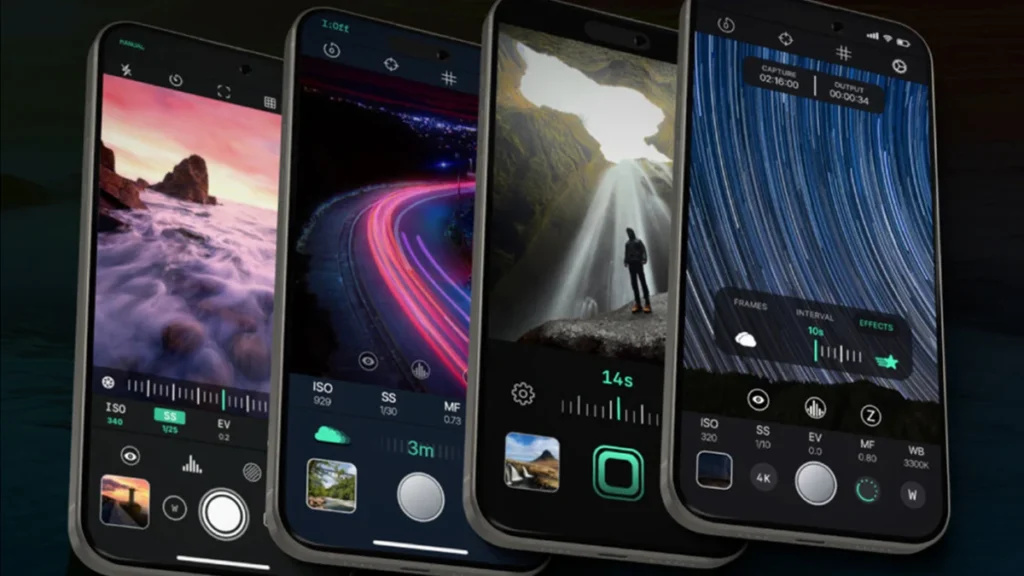
    The mobile photography landscape has witnessed a significant technological leap with the official release of Reeflex Pro Camera version 3, a comprehensive update designed to bridge the gap between smartphone convenience and professional-grade DSLR functionality. This latest iteration from the Reeflex development team introduces a suite of sophisticated tools, including automated exposure bracketing, focus stacking, and a redesigned high-speed burst mode, all housed within a completely overhauled user interface. As mobile hardware continues to evolve with larger sensors and more powerful image signal processors, third-party applications like Reeflex are increasingly leveraging this power to offer features that were previously exclusive to dedicated camera systems.

    The launch of Version 3 represents a pivotal moment for Reeflex, a company that has steadily built a reputation for prioritizing manual control and optical precision. By focusing on the specific needs of landscape, macro, and action photographers, the update addresses several long-standing limitations of the native iOS camera app. While Apple’s built-in software utilizes "Smart HDR" and deep fusion to automate image quality, Reeflex Pro Camera V3 targets the "prosumer" demographic—users who demand granular control over every aspect of the exposure triangle and the optical behavior of their device.

    A Sophisticated Redesign of the User Experience

    The most immediate change in version 3 is the redesigned user interface (UI), which has been engineered to minimize friction during the shooting process. In professional photography, the speed at which a user can adjust settings often determines whether a fleeting moment is captured or lost. Reeflex has addressed this by implementing a more ergonomic layout that places essential controls within easy reach.

    One of the standout UI enhancements is the updated histogram. In previous versions, users were often limited to a standard luminance display. Version 3 allows photographers to toggle between luminance and a full RGB histogram with a single tap. This is a critical addition for professionals who need to monitor color clipping in specific channels—such as bright reds in a sunset or deep blues in a landscape—ensuring that the data remains recoverable during the post-processing stage.

    Furthermore, the app now incorporates intuitive gesture controls. A downward swipe from the top of the viewfinder reveals a quick-access dashboard for secondary settings, including the camera flash, self-timer, and various framing guides such as the rule of thirds or the golden ratio. To assist those utilizing manual focus, Reeflex has introduced a focus loupe. This feature provides a magnified view of the focal point, allowing for pinpoint accuracy that is often difficult to achieve on a standard smartphone screen. The interface also simplifies the selection of file formats (such as RAW, ProRAW, JPEG, and HEIF) and resolutions, providing full support for the virtual lenses found on multi-camera iPhone models.

    Mastering Light through Exposure Bracketing

    Exposure bracketing is a cornerstone technique in professional landscape and architectural photography, used to overcome the dynamic range limitations of any given sensor. While modern iPhone sensors are remarkably capable, they can still struggle with high-contrast scenes, such as a dark interior with a brightly lit window.

    Reeflex Pro Camera V3 automates this process. When the shutter is triggered in bracketing mode, the app captures three distinct images in rapid succession: a "base" exposure, an underexposed frame to preserve highlight detail, and an overexposed frame to recover shadow information. Users are granted significant flexibility, with the ability to set the offset for the under and overexposed shots anywhere from 0.5 to 4.0 stops.

    At present, version 3 requires users to merge these three frames using external software like Adobe Lightroom, Photoshop, or specialized HDR tools. However, Reeflex has indicated that an integrated merging algorithm is currently in development. This feature would allow the app to generate a single high-dynamic-range (HDR) image directly on the device, further streamlining the workflow for mobile-first creators.

    Precision Focus Stacking for Macro and Landscapes

    Perhaps the most technically impressive addition to version 3 is the focus stacking tool. Focus stacking is a technique where multiple images are taken at different focal planes and then blended to create a final image with a deeper depth of field than would be optically possible in a single shot. This is particularly vital in macro photography, where the extremely close proximity to a subject results in a razor-thin area of sharpness.

    The implementation in Reeflex Pro Camera V3 is designed for precision. The user defines a "near" focus point and a "far" focus point. The app then calculates the necessary increments and captures a sequence of images—the number of which is user-definable—as it "walks" the focus through the scene. Much like the bracketing feature, these images currently require external processing to be merged into a single "ticked" file.

    The inclusion of focus stacking is a direct response to the physical limitations of smartphone optics. Because iPhones use relatively wide-angle lenses with fixed apertures, achieving a deep depth of field in close-up shots often results in optical diffraction or requires software-based "portrait mode" blurring which can look artificial. Physical focus stacking provides a genuine optical solution that preserves the integrity of the image data.

    High-Speed Performance and Burst Mode Optimizations

    Speed is a recurring theme in the V3 update. Reeflex has undergone a series of under-the-hood optimizations to reduce shutter lag to near-zero levels. In earlier iterations of third-party camera apps, the delay between pressing the button and the sensor capturing the frame was a common complaint. Version 3 feels significantly more responsive, aligning it more closely with the performance of the native Apple camera.

    To complement this speed, the app introduces a new high-speed burst mode. By holding down the shutter button, users can capture a continuous stream of images, with a real-time counter displaying the frame count on the screen. Additionally, a "Burst On Tap" feature allows users to pre-set a specific number of captures—ranging from 2 to 20—triggered by a single tap. This is an invaluable tool for sports photography or capturing unpredictable subjects like wildlife and children, where the "perfect" frame often occurs in a fraction of a second.

    Technical Evolution and Chronology

    The development of Reeflex Pro Camera V3 is part of a broader trend in the iOS ecosystem where software developers are reclaiming "pro" features that have been obscured by Apple’s push toward automation. Since its initial launch, Reeflex has followed a steady trajectory of updates:

    1. V1.x Era: Focused on manual ISO, shutter speed, and white balance controls, establishing the foundation of the app.
    2. V2.x Era: Introduced support for ProRAW and improved the integration with external lenses (such as anamorphic or macro clip-ons).
    3. V3.0 Launch: The current milestone, moving beyond simple manual controls into complex computational photography workflows like stacking and bracketing.

    This chronology mirrors the evolution of the iPhone hardware itself. With the introduction of the 48-megapixel sensor on the iPhone 14 Pro and 15 Pro series, the sheer volume of data available to developers has increased, necessitating more robust apps to manage that information effectively.

    Market Context and Implications

    The professional mobile photography market is currently dominated by a few key players, including Halide, Moment, and Obscura. Reeflex Pro Camera V3 positions itself as a direct competitor by offering a high degree of technical sophistication at a competitive price point.

    The decision to remain iOS-exclusive is a strategic one, albeit a limitation for the broader market. The consistency of Apple’s API (Application Programming Interface) for camera hardware allows developers like Reeflex to optimize their code for specific sensor behaviors and ISP (Image Signal Processor) pipelines. On Android, the fragmentation of hardware makes this level of granular control significantly more difficult to achieve across multiple manufacturers.

    Industry analysts suggest that the rise of such apps is changing the "carrying cost" of professional photography. For many journalists, social media managers, and even some commercial photographers, the ability to perform focus stacking or bracketed exposures on a device that fits in a pocket reduces the need for heavy gear bags on certain assignments.

    Official Positioning and Availability

    Reeflex has positioned V3 as a "professional’s companion." While the app is accessible to hobbyists, its full potential is realized when used in conjunction with a tripod or a stable mounting system, particularly for the bracketing and stacking features where frame alignment is paramount.

    In terms of business model, Reeflex has adopted a hybrid approach that has become common in the App Store. The app is available on the Apple App Store with two primary tiers:

    • Annual Subscription: $15 USD per year, providing access to all premium features and future updates.
    • Lifetime Purchase: $26 USD, a one-time payment for those who prefer to avoid recurring costs.

    To lower the barrier to entry, Reeflex offers a free trial period, allowing users to test the new interface and the efficacy of the manual controls before committing to a purchase.

    Final Analysis: The Future of Mobile Stills

    Reeflex Pro Camera V3 is a testament to the fact that the smartphone is no longer just a device for casual snapshots; it is a legitimate tool for the photographic arts. By implementing exposure bracketing and focus stacking, Reeflex is providing users with the mathematical and optical tools to overcome the physical constraints of small-sensor photography.

    The primary drawback remains the lack of video support. Users looking for an all-in-one solution for both cinema and stills will still need to look elsewhere or use Reeflex alongside a dedicated video app like Blackmagic Cam or Filmic Pro. Additionally, the current requirement for external merging software for HDR and focus stacks adds a step to the workflow, though the promise of in-app merging in future updates suggests that Reeflex is committed to a truly "end-to-end" mobile professional experience.

    As mobile processors continue to rival desktop performance, the line between "computational" photography and "traditional" photography continues to blur. Reeflex Pro Camera V3 sits firmly at the center of this intersection, offering a glimpse into a future where the most powerful camera is indeed the one that is always with you.

Grafex Media
Privacy Overview

This website uses cookies so that we can provide you with the best user experience possible. Cookie information is stored in your browser and performs functions such as recognising you when you return to our website and helping our team to understand which sections of the website you find most interesting and useful.