
The landscape of digital post-processing has undergone a radical transformation over the past decade, shifting from manual pixel manipulation to sophisticated neural network-based restoration. As high-resolution displays and large-format printing become the standard, the demand for tools that can effectively remediate soft focus, motion blur, and sensor noise has surged. Modern sharpening software no longer relies solely on increasing edge contrast; instead, it utilizes deep-learning algorithms to interpret image data, reconstruct missing textures, and deliver clarity that was previously considered lost. This evolution is particularly critical for professional photographers, archivists, and content creators who must maintain high output quality despite challenging shooting conditions or legacy hardware limitations.

The Technological Shift: From Edge Contrast to Generative Reconstruction
Historically, image sharpening was achieved through the "Unsharp Mask" (USM) technique—a process that dates back to darkroom photography. In the early digital era, software like Adobe Photoshop popularized this by identifying edges and increasing the contrast between adjacent pixels to create the illusion of sharpness. However, this method often introduced "halos" and "ringing artifacts" when pushed too far.
The current era is defined by AI-driven deconvolution and generative adversarial networks (GANs). These systems are trained on millions of pairs of "clean" and "blurry" images, allowing the software to predict what a sharp version of a photo should look like based on existing patterns. According to industry data, the AI image editing market is projected to grow at a compound annual growth rate (CAGR) of over 17% through 2030, reflecting the rapid adoption of these sophisticated sharpening tools across the creative sector.

Case Studies in Image Restoration and Enhancement
To understand the efficacy of modern sharpening solutions, it is necessary to examine their performance across diverse photographic scenarios. Recent tests conducted by digital imaging experts highlight several key areas where software intervention is now standard.
1. Portraiture and Facial Reconstruction
In portrait photography, the primary challenge is restoring definition to eyes, skin texture, and hair without creating a "plasticky" or artificial appearance. Tools like Aiarty Image Enhancer have introduced "Face Restoration" features that specifically target facial geometry. By applying a strength slider—typically optimized between 0.75 and 0.95—users can recover the micro-details of eyelashes and iris patterns in photos that were otherwise unusable due to missed focus or low-resolution scanning.

2. Wildlife and Macro Photography
Wildlife photographers often deal with soft images caused by long focal lengths or fast-moving subjects. In a case study involving a Turaco bird, the use of a "Real-Photo" model allowed for the reconstruction of plumage detail and eye clarity. The software differentiates between the organic textures of feathers and the background noise, a feat that traditional sharpening tools could not achieve without smearing fine details.
3. Architectural Precision and Forensic Restoration
Architectural photography requires clean lines and the elimination of compression artifacts. Testing reveals that modern enhancers can restore layered tile shapes and intersecting structural lines in architectural shots. By upscaling images by 2x or 4x using deep-learning algorithms rather than simple bicubic interpolation, the software ensures that vertical and horizontal edges remain crisp even when zoomed in at 200%.

Comparative Analysis of Leading Sharpening Solutions
The following evaluation provides a technical breakdown of the six most prominent software options currently available on the market, ranging from fully automated AI suites to manual open-source editors.
Aiarty Image Enhancer: The Multi-Model Specialist
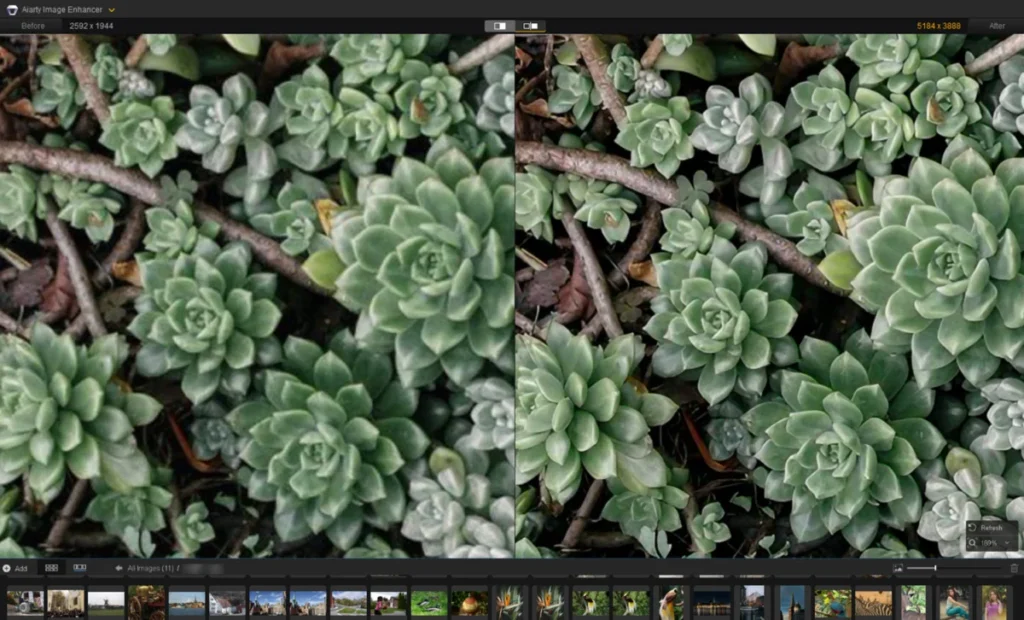
Aiarty has emerged as a significant contender for users requiring a balance between automation and control. It offers three distinct AI models: More-Detail, Real-Photo, and a specialized Face Enhancer. Unlike many subscription-based models, Aiarty offers a lifetime license ($99), making it an attractive option for long-term professional use. Its ability to upscale images to 8K and 16K resolutions while maintaining natural textures positions it as a leader in the "Natural Detail" category.

Topaz Photo AI: The Autopilot Leader
Topaz Labs has been at the forefront of AI sharpening for years. Their "Autopilot" feature scans an image to detect specific issues like motion blur or high ISO noise and automatically suggests a corrective module. While highly effective, users have noted that the "Refocus" model requires significant GPU resources. Topaz operates on a subscription or version-purchase model, catering primarily to high-end professionals who need rapid, intelligent batch processing.
Adobe Lightroom: The Ecosystem Standard
For most photographers, Lightroom is the starting point. Its "Detail" panel remains a powerful tool for manual sharpening. The recent addition of an AI-powered "Denoise" feature has significantly improved the base quality of images before sharpening is applied. Lightroom’s "Masking" slider remains a vital feature, allowing users to isolate sharpening to the subject while leaving the background untouched, thereby preventing the amplification of noise in out-of-focus areas.

DxO PureRaw 6: The RAW Pre-Processor
DxO takes a different approach by focusing on the very beginning of the workflow. PureRaw 6 uses "DeepPRIME" technology, which is built on a massive database of camera and lens profiles. It corrects for lens softness and vignetting at the RAW level. This software is essentially a batch processor that prepares files for further editing in Lightroom or Photoshop, providing what many consider to be the "cleanest" starting point in the industry.
Picsart: The Consumer and Social Media Solution
For casual users and mobile content creators, Picsart offers an accessible, web-based platform. While it lacks the deep RAW processing capabilities of DxO or Lightroom, it excels at quick fixes and 2x/4x upscaling for JPG and PNG files. Its subscription model ($15/month) includes a suite of creative tools, making it a "one-stop-shop" for social media marketing and on-the-go edits.

GIMP: The Open-Source Alternative
GIMP (GNU Image Manipulation Program) remains the gold standard for free, manual photo editing. It does not utilize generative AI models; instead, it offers traditional tools like the Unsharp Mask and High Pass filters. While it requires a steeper learning curve and more manual effort, it provides granular control over edge contrast that is still valued by purists and those working on Linux-based systems.
Industry Implications and Forensic Applications
The advancement of these tools carries implications far beyond the realm of hobbyist photography. In the field of digital forensics, the ability to "deblur" images has become a vital asset for law enforcement and historical researchers. While generative AI must be used with caution in legal contexts—as it technically "creates" data based on probability—the underlying deconvolution algorithms provide a scientifically grounded method for clarifying blurred license plates or facial features in surveillance footage.

Furthermore, the museum and archival sector has seen a surge in productivity. Digitizing old film stock or faded prints often results in soft, low-contrast files. By employing AI sharpening, institutions can restore historical records to 4K or 8K clarity, preserving cultural heritage for future generations in a format that meets modern display standards.
Market Trends and Hardware Requirements
The shift toward AI-based sharpening has also influenced the hardware market. Traditional photo editing was CPU-intensive; however, modern AI inference relies heavily on Tensor cores and high-performance GPUs. Professionals looking to utilize software like Topaz Photo AI or Aiarty Image Enhancer are increasingly investing in dedicated graphics cards and M-series silicon (for Mac users) to handle the billions of calculations required per image.

| Tool | Model Type | Target User | Pricing Structure |
|---|---|---|---|
| Aiarty | Generative AI | Professionals/Archivists | $99 Lifetime |
| Topaz Photo | Autopilot AI | High-end Professionals | Subscription/Paid Upgrades |
| Lightroom | Hybrid (Manual + AI) | General Photographers | $11.99/mo (Cloud) |
| DxO PureRaw | Optical Correction | RAW Shooters | $139.99 License |
| Picsart | Web-based AI | Content Creators | $15/mo |
| GIMP | Manual/Traditional | Open-source Enthusiasts | Free |
Conclusion: The Future of the "Perfect" Image
The "perfect" image is no longer solely a product of the moment the shutter is pressed. It is increasingly a collaborative effort between the photographer’s vision and the software’s interpretive intelligence. As AI models continue to refine their understanding of light, texture, and geometry, the "unfixable" blurry photo is becoming a thing of the past.
For the professional, the choice of software is a strategic one: Aiarty and Topaz offer the cutting edge of reconstruction; Lightroom and DxO provide the stability of a professional RAW workflow; and GIMP and Picsart ensure accessibility for all. As we move further into the 2020s, these tools will likely become even more integrated into the camera hardware itself, further blurring the line between capture and post-processing. The ultimate goal remains constant: to produce images that are not only sharp but also retain the natural soul and intent of the original scene.