
The landscape of digital photography has undergone a seismic shift as the industry moves beyond traditional edge-contrast enhancement toward advanced deep-learning reconstruction. For professional photographers and digital archivists, the challenge of "soft" images—those lacking contrast along edges or losing fine detail upon close inspection—is no longer an insurmountable hurdle. Modern software solutions now utilize artificial intelligence (AI) to restore natural details while meticulously avoiding the "crunchy," over-sharpened aesthetic that plagued earlier digital editing tools.

This transition marks a departure from basic sharpening filters to sophisticated neural networks capable of analyzing image quality problems in real-time. According to recent industry evaluations, the current market offers six primary solutions that cater to diverse needs, ranging from high-end professional RAW development to quick, mobile-based social media enhancements.
The Evolution of Image Sharpening: A Technical Chronology
The methodology for sharpening digital images has evolved through three distinct eras. Understanding this timeline is essential for photographers choosing between manual editors and automated AI systems.

- The Manual Era (1990s–2000s): Tools like GIMP and early versions of Photoshop introduced the Unsharp Mask (USM) and High Pass filters. These techniques did not "create" detail; rather, they increased the contrast of existing edges to trick the human eye into perceiving more sharpness.
- The Algorithmic Era (2010s): Developers introduced "Smart Sharpen" and deconvolution algorithms. These tools attempted to reverse the mathematical blur caused by lens optics or camera shake but remained limited by the actual data present in the pixels.
- The Generative AI Era (2020–Present): Modern software like Topaz Photo AI and Aiarty Image Enhancer utilize deep-learning models trained on millions of high-resolution images. These tools can perform "inference," essentially reconstructing missing textures—such as skin pores, plumage, or architectural masonry—that were lost during capture or compression.
Technical Analysis of Leading Sharpening Solutions
The current market is dominated by a mix of specialized AI enhancers and established post-processing suites. Each tool serves a specific segment of the imaging workflow, defined by its handling of RAW data and its computational approach.
Topaz Photo AI: The Autopilot Approach
Topaz Photo AI has positioned itself as a leader in automated restoration. Its "Autopilot" feature scans imported images to detect specific defects like motion blur, lens softness, or high-ISO noise. For architectural photography, such as capturing a castle dome, the software’s Standard model typically functions as a baseline, while the Refocus model addresses more severe optical failures.

However, the computational cost is significant. Industry tests indicate that the Refocus model requires substantial GPU resources, occasionally leading to performance bottlenecks on older hardware. The software operates on a subscription-based model, appealing to professionals who require constant updates to the latest neural models.
Aiarty Image Enhancer: Natural Detail Reconstruction
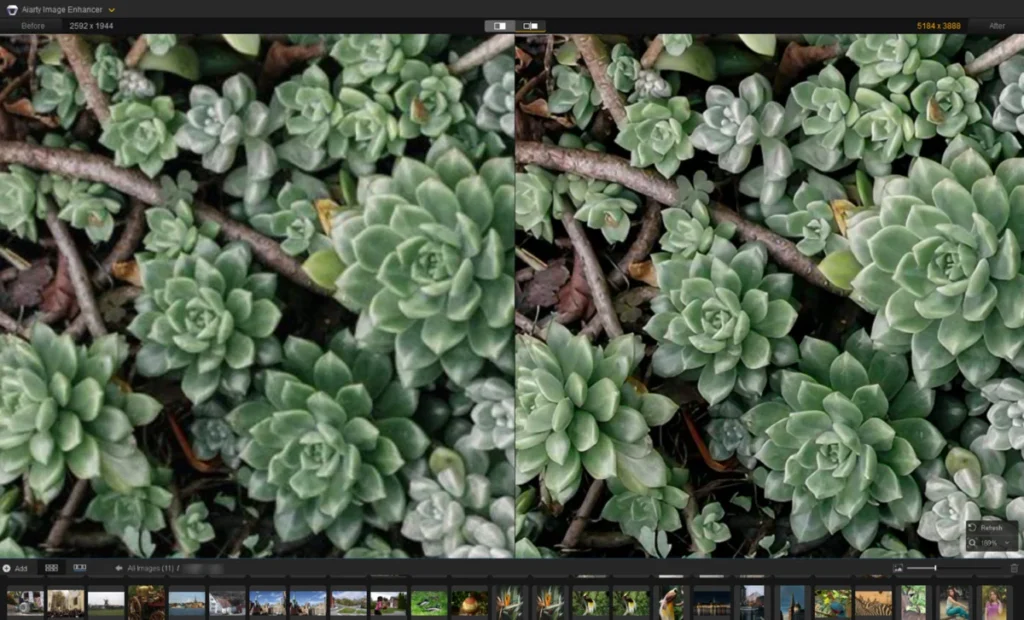
A newer entrant, Aiarty Image Enhancer, focuses on "More-Detail" models to avoid the plastic, artificial look often associated with AI upscaling. Its workflow is particularly effective for portraiture and wildlife. By enabling "Face Restoration," the software analyzes facial structures to clean boundaries and define individual hair strands without introducing "ringing" artifacts or halos.

For wildlife photographers, the software’s Real-Photo model has shown a high capacity for enhancing plumage and eye clarity. By utilizing a strength slider (typically optimized between 0.75 and 0.95), users can fine-tune the balance between detail recovery and original image integrity.
Adobe Lightroom: Integrated Workflow Sharpening
Lightroom remains the industry standard for catalog management and general developing. Its sharpening tools are located within the Detail panel, allowing photographers to apply masking—often by holding the "Alt" key to isolate the subject from the background. While Lightroom has recently introduced AI-powered Denoising, its sharpening remains largely manual, requiring a trained eye to balance amount, radius, and detail sliders.

DxO PureRAW 6: The RAW Specialist
DxO PureRAW 6 functions as a pre-processor rather than a final editor. It leverages a massive database of lens and camera modules to correct optical softness at the source. Its DeepPRIME noise reduction is widely regarded as the gold standard for high-ISO RAW files, providing a clean, sharp base before the image even enters a traditional editor.
Picsart and GIMP: Accessibility and Manual Control
For casual users and those on a budget, Picsart offers a web-based, automated solution for JPG and PNG files, though it lacks the deep RAW support found in DxO or Lightroom. Conversely, GIMP remains the premier free, open-source alternative, offering traditional USM and High Pass filters for users who prefer granular, layer-based manual control over generative AI.

Sector-Specific Case Studies and Performance Data
The efficacy of sharpening software is best measured through specific use cases where image degradation is most common.
Portraiture and Historical Archiving
In Case Study 1, involving low-resolution portrait archives, AI inference proved superior to traditional sharpening. While traditional tools merely brightened the edges of a blurry face, AI models like Aiarty’s More-Detail model were able to reconstruct the definition of the iris and the texture of the skin. This has significant implications for historical preservation, where poorly scanned photos can be restored to modern 4K clarity.

Wildlife and Macro Photography
Wildlife photography often involves heavy cropping, which inherently reduces resolution and perceived sharpness. In tests involving avian subjects, the Real-Photo model was able to restore the "fleshy" ridges around a bird’s eye and define overlapping feathers. This capability allows photographers to "rescue" shots that were slightly out of focus or taken with a lens that was soft at its maximum focal length.
Architecture and Large-Format Printing
Architectural photography requires clean, straight lines. Traditional sharpening often introduces "halos" around building edges. Advanced AI tools avoid this by upscaling the image (x2, x4, or x8) using deep-learning algorithms rather than simple bicubic interpolation. This process restores realistic tile shapes and window frame definitions, making the files suitable for 8K displays or large physical prints.

Industry Implications and Market Trends
The rapid advancement of these tools has sparked a broader conversation within the photographic community. Professional organizations have noted both the benefits and the ethical considerations of generative sharpening.
Productivity Gains: Software developers report that AI-driven workflows can reduce the time spent on image culling and restoration by up to 60%. By automating the "fix" for technical errors, photographers can focus more on the creative aspects of composition and lighting.

Ethical and Aesthetic Concerns: Some purists argue that generative reconstruction moves the medium away from "photography" and toward "digital illustration." However, for commercial, forensic, and archival sectors, the ability to extract usable data from a blurry source is viewed as a vital technological breakthrough.
Market Growth: The global AI in image processing market is projected to continue its double-digit growth through 2030. This is driven by the increasing demand for high-quality visual content on 4K and 8K platforms, where even minor blurriness becomes glaringly obvious.

Conclusion and Strategic Recommendations
The selection of photo sharpening software should be dictated by the specific requirements of the project and the user’s technical proficiency.
- For Professional RAW Workflows: A combination of DxO PureRAW for initial processing and Adobe Lightroom for final edits remains the most robust ecosystem.
- For Intensive Restoration: Topaz Photo AI and Aiarty Image Enhancer offer the most advanced generative models for fixing severe blur and upscaling for large-format prints.
- For Budget-Conscious Users: GIMP provides professional-grade manual tools at no cost, while Picsart serves as a convenient bridge for social media content creators.
As display technology continues to advance, the "softness" of an image will increasingly be seen as a technical failure rather than a stylistic choice. The six tools evaluated here represent the current pinnacle of digital restoration, offering photographers the means to ensure their work meets the rigorous standards of the high-definition era. By integrating these software solutions into a logical post-processing routine—starting with noise reduction, followed by optical correction, and ending with AI-driven detail enhancement—creatives can achieve a level of clarity that was previously impossible in the analog or early digital ages.