
The digital landscape has been captivated by the launch of "ZERO: The Engineering Behind a Defiant Interactive Narrative Demo," an ambitious web experience that not only pushes the boundaries of immersive storytelling but also sets new benchmarks for web performance and optimization. Developed over an intensive four-month period, this groundbreaking project transforms over a gigabyte of high-fidelity source assets into a lean, sub-10MB interactive site, capable of running at a smooth 60 frames per second even on budget Android devices. The initiative, spearheaded by Atul Khola’s team, challenges the conventional university degree path through a visually stunning and deeply interactive narrative, signaling a potential shift in how complex educational or marketing messages can be delivered online.
The Vision Behind ZERO: A Challenge to Conventional Education
At its core, the ZERO experience is more than just a technical showcase; it’s a narrative designed to provoke thought about the traditional trajectory of higher education. The project’s genesis lies in a powerful concept: an immersive scrolling journey that dares to question the established "study hard, get good grades, land a top job" mantra. This defiance is woven into every stage of the user’s interaction, aiming to resonate with an audience increasingly wary of student debt and the evolving demands of the modern job market.
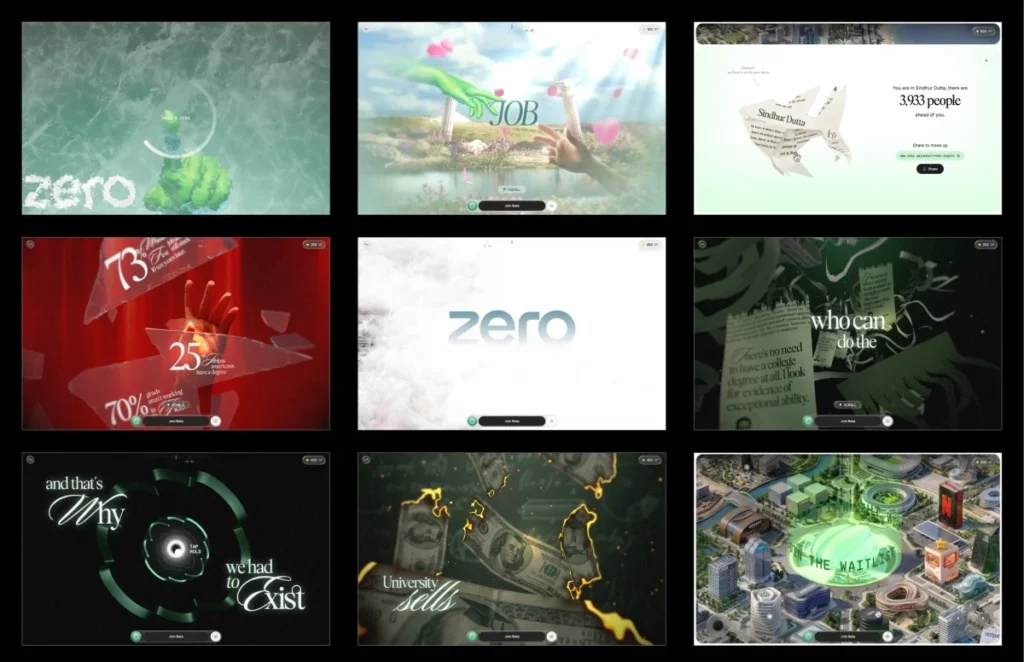
The narrative unfolds across six meticulously crafted stages, punctuated by five interactive "gates" that either pause the flow for user engagement or redirect the story’s trajectory. The journey commences with an implicit promise of the traditional degree path, a seemingly clear road to success. However, this promise dramatically shatters at the first interactive gate, a moment designed to visually and metaphorically break the illusion. Following this, the experience unveils stark real-world unemployment statistics, presented scattered across the digital shards of the broken promise.
The third stage continues this critical examination, depicting the traditional degree as just another piece of paper, with money burning and certificates shredding—a powerful visual metaphor for the perceived devaluation of conventional credentials. This somber scene transitions into an exhilarating tunnel sequence, dynamically shaped like the ZERO logo, symbolizing a passage into a new paradigm. Emerging from above the clouds in stage four, users are presented with a breathtaking cityscape, architecturally constructed from the headquarters of real-world corporations, suggesting a new kind of aspirational landscape. The narrative culminates in stage five, where control is handed entirely to the user, allowing for free exploration of an interactive city map. This final stage empowers users to navigate and discover insights independently, underscoring the project’s philosophy of self-directed exploration beyond prescribed paths.
A Journey of Innovation: The Development Timeline

The four-month development cycle for the ZERO experience was characterized by rapid prototyping, iterative refinement, and an unwavering focus on performance. The project began not with a traditional presentation, but with a compelling proof of concept (PoC) pitched by the development team. This PoC, featuring the now-iconic "draw a zero" interaction, was built in a remarkable 48 hours.
Artificial intelligence (AI) played a pivotal role in accelerating the initial phases of development. Generative AI tools were instrumental in quickly bringing the first version of the "draw a zero" frost effect to life, allowing the team to move swiftly from concept to a working prototype. This rapid generation capability significantly altered the conventional development workflow. Instead of allocating extensive time to manually building the initial iteration of an idea, the team could generate multiple versions quickly, freeing up resources to focus on critical tasks such as testing, refining, and iterating on the user experience.
Throughout the project, AI continued to be a valuable asset for rapid ideation and preliminary code generation. For instance, various iterations of effects like the burning money, different glass shatter timings, and several shader ideas were generated and explored before the optimal versions were selected. This enabled a streamlined process where the initial coding became less of a bottleneck, shifting the primary focus to qualitative evaluation, meticulous detail improvement, and ensuring that every interaction felt polished and intuitive. This human-AI collaborative model underscored the idea that while AI can provide speed and numerous starting points, the ultimate finesse and user-centric refinement still require expert human judgment and extensive iteration. The success of the initial PoC, largely driven by this agile, AI-assisted approach, was instrumental in securing the project.
Revolutionizing Web Performance: A Deep Dive into Optimization
Achieving the demanding performance targets for the ZERO experience—delivering a fluid 60fps on a wide range of devices, including budget Android phones, despite starting with over a gigabyte of source assets—required a comprehensive and multi-faceted optimization strategy. This involved fundamental architectural decisions, meticulous asset preparation, and innovative techniques for managing GPU resources.
-
Architectural Prowess: Virtual Scroll and Segmented Design: One of the most significant architectural choices was to completely bypass the browser’s native scroll mechanism. Instead of relying on
ScrollTriggeror an oversized scrolling DOM, the development team implemented a virtual scroll system. Wheel and touch inputs are captured and used to update a virtual scroll value, which then eases towards its target. This single virtual scroll value became the central driver for almost every dynamic element within the experience: asset loading, animations, shader timings, text reveals, and overlay transitions. This centralized control offered unparalleled precision and synchronization across the entire application.The experience was logically segmented into nine self-contained modules, with the initial loader also serving as the first interactive gate. Each segment was defined with its own optional lifecycle hooks (
scrollVh,enter,scrub,update,teardown), allowing for asynchronous object building, local progress scrubbing, continuous idle animations, and efficient resource disposal. This modular approach significantly enhanced codebase maintainability, especially during the later stages of development when complex interactions and optimizations were being fine-tuned. Debugging also became more efficient; jumping to any stage during development would replay the lifecycle of all preceding segments, ensuring a consistent and naturally initialized state, rather than a jarring teleportation.
-
The Art of Asset Preparation: From Gigabytes to Megabytes: A substantial portion of the four-month development period was dedicated to preparing and optimizing the 3D assets. The raw source files, originating from production Blender scenes, were colossal, featuring uncompressed geometry, 8K textures, and baked animations, collectively exceeding a gigabyte in size. The first month was critical in determining the optimal format and compression strategy for each individual asset.
All geometry was subjected to DRACO compression, a powerful open-source library for compressing 3D meshes and point clouds. Crucially, the DRACO decoders were self-hosted within the project’s
public/vendor/directory, rather than being loaded from a Content Delivery Network (CDN). This decision was a direct result of prior lessons learned, where CDN slowdowns on services likegstaticorunpkgcould cause compressed assets to fail decoding, even if the assets themselves were hosted locally. By self-hosting, the project ensured that the entire decoding pipeline remained within its control, eliminating external dependencies that could introduce performance bottlenecks or points of failure.Textures, however, presented the biggest challenge and offered the most significant impact on performance. While a PNG image might have a small file size on disk, it is fully decompressed into GPU memory, meaning a 2048×2048 texture could still occupy around 16MB of VRAM regardless of its initial compressed file size. To combat this, the team opted for KTX2 with ETC1S compression. KTX2 textures remain compressed on the GPU, drastically reducing VRAM usage and accelerating upload times.
A unique challenge with ETC1S is its lossy nature and the difficulty of local previewing. To overcome this, the team developed a custom compression previewer integrated into their internal dashboard. This tool allowed for side-by-side comparisons of compressed and uncompressed images and videos, enabling precise fine-tuning of ETC1S settings for each asset. This granular control meant heavier compression could be applied where visual degradation was imperceptible, while critical "hero" assets retained higher quality. Mipmaps, often a source of memory overhead, were also selectively disabled when not needed. This seemingly simple tool proved invaluable, profoundly impacting the final build size and quality, a step often overlooked in standard WebGL workflows.
Further optimization involved consolidating related textures into shared atlases. For example, all hand textures were packed into a single 4×4 atlas, with individual meshes referencing their respective sections via UV offsets and scaling. This technique was consistently applied across the project, reducing over fifty individual images into approximately a dozen atlases. Gradient backgrounds, traditionally handled with images, were largely replaced by a few lines of GLSL code, further reducing asset load. Through these rigorous processes, early builds of 35-40MB were trimmed down to less than 10MB, with the interactive world map specifically isolated into its own loading group to prevent it from impeding the initial user experience.
-
Mastering GPU Uploads: Eliminating Stutter: Reducing download size is only half the battle; textures still need to be uploaded to the GPU, typically on the main thread. A large texture upload can block rendering for tens of milliseconds, leading to noticeable frame drops, especially if it occurs the first time a texture is needed during a scroll. The team implemented a three-pronged strategy to mitigate this "stutter":
- Lazy Initialization: Textures were not uploaded to the GPU until they were explicitly needed.
- Idle-Time Uploads: A custom
drainUploadsfunction utilizedrequestIdleCallbackto upload queued textures during periods of browser inactivity, ensuring the main thread remained unblocked. This allowed for background uploads when the user’s device had spare processing capacity. - Synchronous Flushing at Critical Junctures: Whenever a new stage was about to render (e.g., after the loader or during gate transitions), the upload queue was synchronously flushed. This pre-emptively loaded all necessary textures to the GPU, preventing any first-time upload hitches during critical interactive moments like scrolling.
-
Adaptive Quality Management: A Responsive User Experience: To guarantee a smooth experience across a diverse range of devices, an adaptive quality manager was integrated. This system continuously monitored the renderer’s performance by tracking frame times using a rolling buffer. If the average frame time exceeded a threshold (e.g., >22ms, indicating <45fps), the quality tier would dynamically step down. Conversely, if performance improved and remained stable (e.g., <12ms, indicating >83fps), the quality would scale back up. A cooldown mechanism prevented constant, jarring switching between quality levels.

These quality tiers primarily affected visual polish rather than core functionality, adjusting parameters like pixel ratio, blur samples, coin geometry detail, and text resolution. The core narrative and interactive elements remained consistent across all tiers. Targeted optimizations were also employed; for instance, during the glass shatter interaction, the pixel ratio was temporarily lowered, and blur and frost effects were disabled, effectively hiding the performance cost within the intensity of the gesture itself. Extensive profiling on budget Android devices during the final month was crucial, meticulously identifying and resolving frame spikes, including a notorious 157ms culprit.
Crafting Immersion: The Role of Advanced Shaders
The visual splendor and fluid interactivity of the ZERO experience are largely attributable to a sophisticated post-processing chain and a suite of custom shaders, each meticulously crafted for specific effects.
-
The Post-Processing Chain: Each frame undergoes a sequence of passes:
- 3D Scene Render Pass: Renders the primary 3D elements.
- Procedural Background Pass: Generates dynamic backgrounds.
- Frosting Pass: Handles the draw-zero frost growth and melt effect.
- Lens Blur Pass: Applies depth-of-field, dynamically gated by quality tiers.
- Foreground Pass: Adds grain and the final tone mapping.
Additional passes for text, glass, and shatter effects were initialized lazily and warmed up during idle times to avoid impacting the critical loading path. This ensured that computationally intensive shaders were ready before their first visual appearance, preventing stalls.
-
The Signature Interaction: Frost Unlock and Meltdown: The "draw a zero" frost effect, the user’s initial gateway into the experience, is a testament to clever shader design. It utilizes a ping-pong buffer with four passes (horizontal, vertical, and two diagonals). Each pass propagates the brightest neighboring pixels, creating an octagonal growth pattern. This expansion is subtly modulated by a frost texture, imparting a natural, crystalline appearance to the edges. Once the zero is recognized (based on total signed angle, roundness, and closure), its centroid becomes the origin for a captivating radial melt effect, revealing the underlying content.
-
Visual Storytelling Through Custom Effects:
- Lighting the Hands Without Lights: To achieve precise, baked lighting on skinned meshes without the performance overhead of real-time illumination, the team employed a technique of blending between pre-baked lighting textures. Two texture slots were used, with the incoming slot updated for each keyframe and smoothly crossfaded, avoiding dark halos by pre-multiplying alpha before blending.
- Burning Money: This striking effect uses a noise-driven distance field to progressively dissolve each bill. A glowing, high-dynamic-range (HDR) ember rim appears just before an area burns, followed by the charred surface. Early fragment discarding was implemented to optimize performance by skipping
fbmcalculations for areas not yet reached by the burn threshold. - Shredding Certificates: Each vertex of the certificate stores a strip index. As a "shred front" moves across the certificate, each strip detaches and falls independently with its own rotation and gravity, creating the illusion of tearing paper ribbons. Lighting normals were analytically generated from the same wave function driving the animation, eliminating the need for separate normal maps.
- The Tunnel: The tunnel sequence, shaped like the ZERO logo, is generated by extruding its cross-section. A dynamic brightness pulse travels through the tunnel, using the geometry’s world-space Z coordinate to ensure a seamless effect, even as sections of the tunnel repeat.
- Text That Pulls Into Focus: Narrative text uses a seven-tap hexagonal blur. The blur radius is driven by the reveal progress, allowing text to gradually sharpen into focus rather than appearing abruptly. This blur is also conditionally enabled, skipping the pass entirely when no text is visible to conserve rendering resources.
A significant debugging challenge emerged from shader precision on mobile GPUs. Many shaders required explicit
highp floatdeclarations, asmediumpon mobile chipsets like Adreno and Mali was treated as a true 16-bit float, causing visual artifacts (e.g., identical certificate strip movements, banding in the burn effect) that were absent on desktop. This underscored the critical importance of early and continuous testing on actual mobile devices.
Intuitive Interaction Design: Guiding the User’s Journey
Given that the source material primarily consisted of static images and videos, the interaction design for each gate had to be conceived from scratch. A consistent, configurable press-and-hold system was developed, defining when prompts appeared and the duration of the hold. Each gate then implemented its unique visual feedback through a set of hooks (onHoldProgress, onHoldComplete).
For instance, during the hold sequence, the entire frame subtly shifts towards a dark red hue. When the glass shatters, this color snaps back in approximately 200ms, creating a visceral sense of the shards breaking away the oppressive darkness. A longer 400ms transition was found to be less impactful. Crucially, the shatter sound was synchronized with the first rendered frame of the animation, rather than a fixed timer. This prevents desynchronization on slower devices, where audio might otherwise play before the animation is visually ready, preserving the immersive quality of the effect.
The Payoff: An Interactive World
The journey culminates in a breathtaking final launch sequence, ascending into an open sky. As stage four progresses, the clouds majestically part, revealing the sprawling city below, with ZERO’s distinctive tower at its nexus. A halo materializes above the tower, serving as the ultimate interactive gate, before the camera smoothly settles into the fully explorable interactive map.
Stage five represents the ultimate handover of control to the user. Here, they can pan, zoom, and freely explore the intricately designed city. Each interactive marker on the map reveals a detailed card outlining specific roles, scenarios, and tools, complemented by a "Join Beta" button. The persistent join bar also transforms into a waitlist signup, seamlessly integrating user engagement. After meticulously guiding the user through a challenging narrative, the experience concludes by empowering them to explore its implications and opportunities independently, reinforcing the theme of self-directed discovery.
Broader Implications and Future Outlook

The ZERO experience represents a significant milestone in web development and immersive digital storytelling. Its success highlights several critical implications for the industry. Firstly, it firmly establishes a new standard for web performance, demonstrating that even highly complex 3D experiences with rich assets can be delivered with exceptional fluidity and a minimal footprint, even on less powerful hardware. This achievement challenges developers to rethink what’s possible within the browser environment.
Secondly, the project underscores that asset preparation and GPU upload management are not secondary concerns but are as fundamental to performance as the rendering pipeline itself. The innovative tools and techniques developed, such as the custom compression previewer, self-hosted decoders, the intelligent upload queue, and the adaptive quality manager, offer a blueprint for future high-performance web projects. These "less exciting" aspects of the pipeline are, in fact, the linchpins that transform a gigabyte of source material into a sub-10MB, 60fps experience.
Finally, the human-AI synergy demonstrated in the development process offers a compelling model for creative and technical workflows. While AI proved invaluable for rapid prototyping and generating initial code versions, accelerating the iterative process, the critical phases of refinement, artistic judgment, performance profiling, and user experience polish remained firmly in the domain of human expertise. This project serves as a powerful reminder that while AI can amplify productivity and exploration, the nuanced decision-making, meticulous attention to detail, and empathetic understanding required to build a truly polished and impactful interactive experience still depend on skilled human engineers and designers. The ZERO experience is not just a defiant narrative; it is a defiant technical achievement, signaling a new era for immersive web content.
Credits
The project acknowledges the contributions of various teams and individuals in bringing this vision to life.