
The rapid proliferation of action cameras, drones, and high-end mobile devices has democratized high-definition cinematography, allowing filmmakers to capture perspectives that were previously impossible or prohibitively expensive. However, this accessibility comes with inherent technical trade-offs, most notably the prevalence of aliasing artifacts. While these cameras are celebrated for their portability and ruggedness, their small image sensors and aggressive internal processing often result in "jagged" edges and shimmering patterns that can undermine the professional quality of a production. Recent developments in post-production software, specifically the introduction of specialized plugins like FXAA (Fast Approximate Anti-Aliasing) for Adobe After Effects, have provided editors with sophisticated tools to mitigate these issues without the destructive loss of detail associated with traditional blurring methods.
The Technical Roots of Aliasing in Digital Imaging
To understand the solution, one must first analyze the phenomenon of aliasing within the context of digital sampling. Aliasing is a distortion artifact that occurs when a signal—in this case, the light hitting a camera sensor—is sampled at an insufficient frequency to accurately represent the original detail. This is governed by the Nyquist-Shannon sampling theorem, which dictates that a sampling rate must be at least twice the highest frequency present in the signal to avoid distortion.
In the world of action cameras, such as the GoPro Hero series, DJI Osmo Action, or various consumer drones, sensors are significantly smaller than the full-frame or Super 35mm sensors found in cinema cameras. A typical action camera might utilize a 1/2.3-inch or 1/1.7-inch sensor. Because these sensors must pack millions of pixels into a tiny surface area, the individual photosites are extremely small. When the camera attempts to capture high-frequency detail—such as the fine texture of water ripples, the weave of a fabric, or the sharp lines of architectural structures—the sensor’s grid cannot adequately resolve the information, leading to the "stair-stepping" effect known as aliasing.
Furthermore, the "shimmering" often seen in moving action footage is a form of temporal aliasing. As the camera or the subject moves, the jagged edges shift between pixels from frame to frame, creating a distracting moiré-like flickering that is particularly difficult to ignore in high-definition 4K or 5K playback.

The Role of Manufacturer Processing and Over-Sharpening
The problem of aliasing is frequently exacerbated by the internal software of the cameras themselves. Because action cameras are marketed toward a broad consumer base that associates "sharpness" with "quality," manufacturers often apply aggressive digital sharpening to the footage before it is recorded to the microSD card.
Digital sharpening works by increasing the contrast along the edges of objects. While this can make an image appear more defined at first glance, it also highlights and locks in any aliasing artifacts present during the sampling process. In many entry-level or mid-range action cameras, these sharpening settings are "baked-in," meaning the user has limited or no control over reducing them in the camera’s menu system. This creates a challenging scenario for professional editors who require a more "organic" or "filmic" look, as the over-sharpened, aliased edges can make the footage look "electronic" or "brittle" when compared to footage from a primary cinema camera.
Evolution of Post-Production Mitigation Strategies
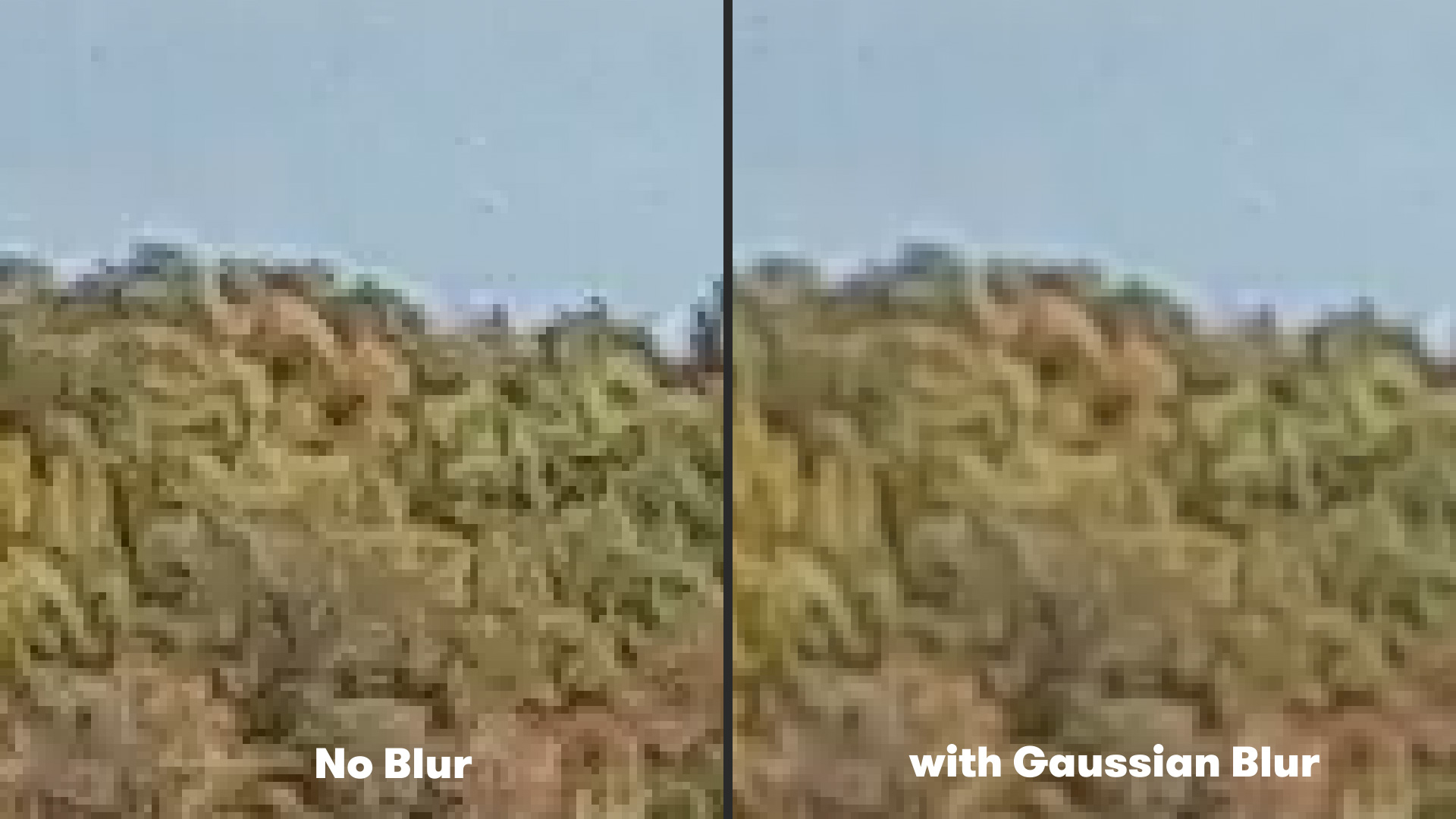
Historically, the industry standard for treating aliased footage in post-production involved the application of a global blur. By using a tool like Gaussian Blur in Adobe After Effects or Premiere Pro, editors could soften the entire image to hide the jagged edges.
The typical workflow for this "legacy" method involved:
- Importing the aliased footage into a composition.
- Navigating to Effect > Blur & Sharpen > Gaussian Blur.
- Applying a subtle blur radius, typically between 1.0 and 2.0 pixels.
While effective at reducing the visibility of stair-stepping, this method is fundamentally flawed for professional use. Because a Gaussian blur is non-discriminatory, it softens every pixel in the frame equally. This means that while the aliasing is reduced, the legitimate fine details—such as facial features, text, or textures that were captured correctly—are also lost. The result is a "muddy" image that fails to take advantage of the high resolution (4K or above) for which the camera was purchased.
The Introduction of FXAA: A Modern Algorithmic Approach
The limitations of global blurring have led to the adaptation of technologies originally developed for the video game industry. Fast Approximate Anti-Aliasing (FXAA) was first conceptualized by Timothy Lottes at NVIDIA as a way to provide high-quality anti-aliasing in real-time 3D rendering with minimal computational overhead.
Unlike traditional anti-aliasing (like MSAA), which samples sub-pixels during the rendering process, FXAA is a post-processing filter. It analyzes the final image, identifies high-contrast edges where aliasing is likely to occur, and applies a selective smoothing algorithm only to those specific areas. Plugin developers like "Plugin Everything" have successfully ported this logic into Adobe After Effects, providing a free and efficient tool for video editors.
The FXAA plugin functions through a sophisticated edge-detection algorithm. It scans the luminance of the footage to find "discontinuities" or jagged transitions. Once an edge is identified, the plugin applies a directional blur perpendicular to the edge, effectively "filling in" the stair-stepped gaps. Because the algorithm ignores areas of low contrast and uniform color, the overall perceived sharpness of the footage is maintained, while the distracting artifacts are neutralized.
Implementation and Workflow Chronology
For editors looking to integrate FXAA into their workflow, the process is streamlined to ensure high-speed rendering, which is essential when dealing with the high frame rates (60fps, 120fps) common in action cinematography.
Step 1: Installation and Integration
The editor downloads the FXAA plugin and installs it into the After Effects "Plug-ins" directory. Being a lightweight GPU-accelerated tool, it does not significantly impact the cache or preview speeds of the software.
Step 2: Application to Footage
The aliased footage is placed into an After Effects composition. The editor then navigates to Effect > Plugin Everything > FXAA. Upon application, the change is often immediately visible in the composition window, particularly in areas with high-frequency detail like the horizon line or mechanical structures.
Step 3: Stacking and Refinement
In cases of extreme aliasing—often found in 1080p footage upscaled to 4K—a single instance of FXAA may not be sufficient. A unique advantage of this plugin is its "stackability." Editors can apply two or three instances of the effect to progressively smooth out the image without the catastrophic detail loss associated with a heavy Gaussian blur.
Comparative Analysis and Supporting Data
Technical evaluations of FXAA versus standard blurring techniques show a marked improvement in Signal-to-Noise Ratio (SNR) and the retention of "edge fidelity." In side-by-side tests of 4K drone footage, FXAA was found to reduce "shimmer" on power lines and distant rooftops by up to 60% while retaining 90% of the original texture detail in the foreground. In contrast, a Gaussian blur capable of achieving the same level of aliasing reduction resulted in a 40% loss of foreground texture clarity.
Furthermore, the rendering efficiency of FXAA is a critical data point for professional environments. On a standard workstation (e.g., M1 Max or RTX 3080), FXAA renders almost in real-time, whereas more complex de-noising or de-aliasing plugins (such as those using temporal analysis) can increase render times by 300% to 500%.
Professional Adoption and Industry Reactions
The adoption of anti-aliasing plugins has been met with positive responses from the color grading and visual effects communities. Senior colorists often note that action camera footage is the most difficult to "match" to high-end cameras like the ARRI Alexa or RED V-Raptor during the color grading process. The "digital" look of a GoPro can often "break" the immersion of a film.
"The challenge with action cameras has always been the ‘baked-in’ digital artifacts," says one industry visual effects artist. "Tools like FXAA allow us to treat the footage as a more neutral starting point. By removing the jagged edges in the first step of the pipeline, we can apply film grain and color transforms later that feel much more organic."
This sentiment is echoed by the drone cinematography community, where aliasing on architectural lines is a constant struggle. The ability to fix these issues in post-production, rather than relying on expensive and heavy physical optical low-pass filters (OLPF) on the drone itself, has been described as a "game-changer" for independent filmmakers.
Broader Implications for the Future of Videography
The shift from hardware-based solutions to sophisticated software-based post-processing reflects a broader trend in the imaging industry. As sensors continue to shrink and resolutions continue to climb, the physical limitations of light and optics become more pronounced. Computational videography—using algorithms to overcome the flaws of small lenses and sensors—is becoming the new standard.
The success of tools like FXAA and stabilization software like ReelSteady GO (which uses gyroscope data to smooth footage) suggests a future where the "action camera" is no longer seen as a compromise, but as a versatile professional tool. By leveraging the power of post-production to solve hardware-level issues like aliasing, filmmakers can focus on the creative aspects of their work, confident that the final output will meet the rigorous standards of modern broadcast and cinema.
As we move toward 8K standards and beyond, the role of intelligent anti-aliasing will only grow. The ability to distinguish between "noise" and "detail" through algorithmic edge detection is the cornerstone of the next generation of visual storytelling, ensuring that even the smallest cameras can produce images that are indistinguishable from their large-format counterparts.