
Adobe After Effects has long been the industry standard for motion graphics and visual effects, yet its relationship with audio remains a point of complexity for many digital artists. While primarily designed as a visual compositing engine, the software’s audio capabilities are essential for creating cohesive, professional-grade multimedia content. The integration of sound is not merely an afterthought in the production pipeline; rather, it is a fundamental component that dictates the rhythm, impact, and emotional resonance of visual storytelling. In a contemporary media landscape where "audio-reactive" visuals and high-impact social media content dominate, understanding the nuances of the After Effects audio toolset has become a prerequisite for professional motion designers.
The Foundational Role of Audio in Visual Compositing
The paradox of After Effects is that while it is not a Digital Audio Workstation (DAW) like Adobe Audition or a Non-Linear Editor (NLE) like Premiere Pro, it requires precise audio handling to facilitate frame-accurate synchronization. Industry data suggests that viewers perceive video quality as higher when the accompanying audio is clear and well-timed, regardless of the actual visual resolution. In the context of motion graphics, sound effects (SFX) and musical cues act as the "heartbeat" of an animation, providing the temporal structure upon which keyframes are built.
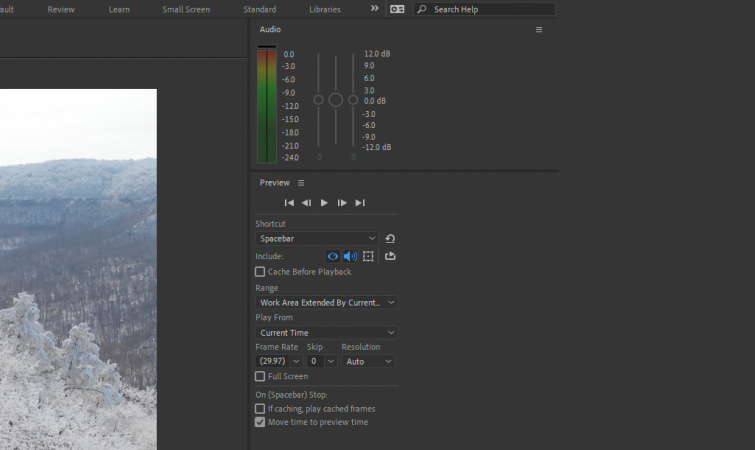
To manage this, After Effects provides a specialized set of interface elements designed to monitor and adjust sound. The most critical of these is the Audio panel, accessed via the Window menu. This panel functions as a visual VU meter, allowing users to observe decibel levels in real-time during playback. It serves a dual purpose: it prevents digital clipping—which occurs when audio levels exceed 0dB—and allows for the adjustment of the preview volume. It is important to note that adjustments made within this panel primarily affect the monitoring environment and do not necessarily alter the final output unless specific gain effects are applied to the layers themselves.

Complementing the Audio panel is the Preview panel. This interface is the nerve center for how After Effects handles the playback of both visual and auditory data. Within this panel, users must ensure the speaker icon is toggled on to enable sound during RAM previews. The settings here allow for the configuration of frame rates and skip behaviors, which can significantly impact how audio is perceived during the design process.
Technical Shortcuts and Workflow Optimization
Efficiency in After Effects is often measured by a designer’s mastery of keyboard shortcuts. Because the software must render frames into RAM before playback is fluid, traditional "scrubbing" (dragging the playhead to hear audio) is not as intuitive as it is in Premiere Pro. To compensate, Adobe has integrated specific commands to facilitate audio monitoring.
The standard "Spacebar" command initiates a preview of the composition, but for more intensive projects, the "0" key on the numeric keypad triggers a RAM Preview. This process caches the frames and audio into the system’s memory, ensuring that the playback is synchronized at the intended frame rate. For instances where a designer only needs to hear the timing of a music track or voiceover without the overhead of rendering complex visual layers, the "." (period) key on the numeric keypad initiates an "Audio Only" preview.
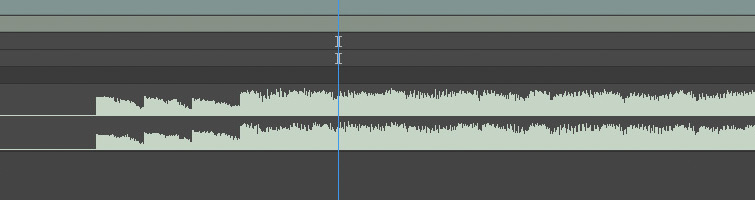
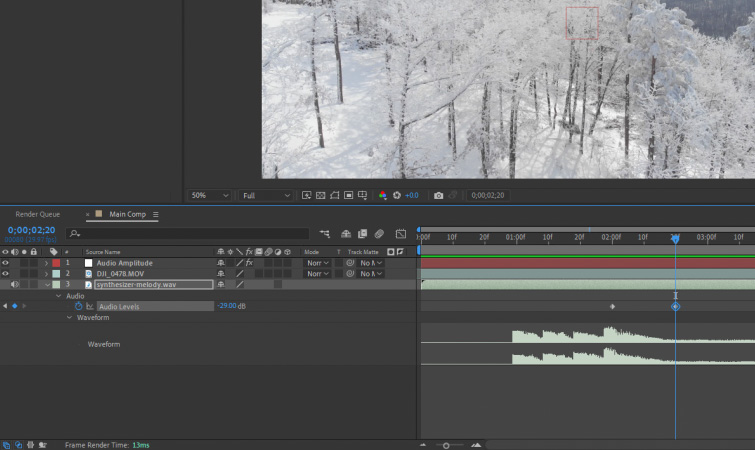
One of the most vital shortcuts for precision editing is the "LL" command. By selecting an audio layer and quickly pressing the "L" key twice, the software expands the layer to reveal the Waveform. This visual representation of sound waves is the most accurate way to align visual transitions with specific beats or phonetic markers in a voiceover.
The Synchronization Paradigm: Waveform vs. Auditory Playback
A common pitfall for novice editors is attempting to time animations based solely on what they hear during real-time playback. Due to the processing power required by After Effects, there is often a slight latency or "lag" between the visual frame and the audio output, especially in complex compositions with multiple effect stacks.
Professional workflow standards dictate that for frame-accurate synchronization, editors should rely on the Waveform. By identifying the "transients"—the sharp peaks in the waveform that represent drum hits or percussive sounds—designers can place keyframes with mathematical precision. This method bypasses the unpredictability of hardware-dependent audio delay.
Furthermore, After Effects allows for the manipulation of Audio Levels directly within the timeline. By expanding the Audio properties of a layer, users can set keyframes for decibel levels, facilitating smooth fades or "ducking" (lowering the volume of background music to make room for dialogue). These adjustments are reflected visually in the waveform, providing a clear map of the audio’s volume trajectory throughout the composition.
Advanced Automation: Converting Audio to Keyframes
Perhaps the most powerful intersection of sound and vision in After Effects is the "Convert Audio to Keyframes" function. This feature bridges the gap between auditory data and visual properties, allowing sound to literally drive the animation. When a user right-clicks an audio file and selects Keyframe Assistant > Convert Audio to Keyframes, the software analyzes the amplitude of the audio and generates a new Null Object layer titled "Audio Amplitude."
This Null Object contains "Sliders" for the Left Channel, Right Channel, and Both Channels. These sliders are populated with keyframes that represent the volume of the audio at every single frame. Through the use of "Expressions"—the Javascript-based coding language of After Effects—designers can link these slider values to any visual property, such as the scale of a logo, the intensity of a glow effect, or the position of a 3D object.
This technique is the industry standard for creating "audio visualizers" and reactive motion graphics. It allows for a level of organic synchronization that would be impossible to achieve through manual keyframing, ensuring that every visual pulse is perfectly calibrated to the intensity of the soundtrack.
Internal Audio Effects and the Ecosystem Integration
While After Effects is not a primary audio editing tool, it does ship with a suite of utility effects located under the "Effect > Audio" menu. These include:
- Bass & Treble: For basic frequency adjustments.
- Reverb: To add spatial depth to sound effects.
- Stereo Mixer: To adjust the panning and balance between left and right channels.
- Delay: For creating echo effects that can add a sense of scale to a visual environment.
Despite these internal tools, the professional consensus among motion designers is a "round-trip" workflow. For complex sound design, it is recommended to export the visual edit to Adobe Premiere Pro or Adobe Audition. These programs offer more sophisticated features such as multi-track mixing, noise restoration, and advanced spectral analysis. Once the audio mix is finalized in a dedicated DAW, it is re-imported into After Effects as a single high-quality WAV or AIFF file to serve as the master track for the final render.
Industry Implications and the Future of Sound in Motion
The role of sound in motion design is expanding as the industry moves toward more immersive formats. With the rise of augmented reality (AR) and virtual reality (VR), spatial audio—sound that changes based on the viewer’s orientation—is becoming a critical consideration. While After Effects is currently a 2.5D environment, its ability to integrate with tools like Maxon C4D and various spatial audio plugins ensures it remains relevant in this evolving landscape.
Furthermore, the data-driven nature of modern marketing means that "versioning"—creating dozens of variations of a single ad for different languages or platforms—is now the norm. The ability to quickly swap audio tracks and have "audio-reactive" elements automatically adjust to the new sound signature saves production houses hundreds of man-hours.
In conclusion, while After Effects may appear to be a visual-first platform, its audio toolset is a sophisticated bridge that allows designers to create a truly multisensory experience. From the basic utility of the Audio and Preview panels to the advanced automation of Audio-to-Keyframe conversion, mastering these features is essential for any artist looking to move beyond simple animation and into the realm of professional cinematic production. By respecting the technical requirements of audio synchronization and utilizing the software’s hidden shortcuts, designers can ensure their work resonates as much with the ears as it does with the eyes.