
In the fast-paced world of digital marketing, the difference between a high-performing landing page and one that remains invisible to search engines often comes down to technical precision. Marketers frequently encounter scenarios where a product page slips in rankings, a competitor outranks them for a key term, or a client’s conversion rate remains stagnant. While traditional SEO practices often dictate a full-site crawl to identify these bottlenecks, modern diagnostic tools have shifted toward rapid, granular analysis. The SEOquake Chrome extension, developed by Semrush, has become an essential utility for SEO professionals looking to move from initial triage to actionable diagnosis in less than three minutes.

The Mechanism of Rapid SEO Auditing
SEOquake serves as a free browser-based diagnostic tool that evaluates a webpage’s technical health, on-page SEO signals, internal and external linking architecture, and core visibility metrics. By installing the extension and navigating to a target URL, users gain instant access to a suite of reports that would otherwise require deep-diving into complex analytics platforms. The tool utilizes a color-coded reporting system designed for rapid interpretation: green indicators signal healthy configurations, orange suggests warnings that require professional judgment, and red alerts indicate critical issues that likely hinder search engine indexing or user experience.

Minute One: The Triage Process via Quick View
The initial 60 seconds of a page audit are dedicated to triage. The objective is to answer a binary question: Is there an obvious technical barrier preventing this page from performing? Upon clicking the SEOquake icon, the Quick View pop-up provides five distinct tabs. For a comprehensive health check, the most critical data resides within the Page Info, Audit, and Content tabs.

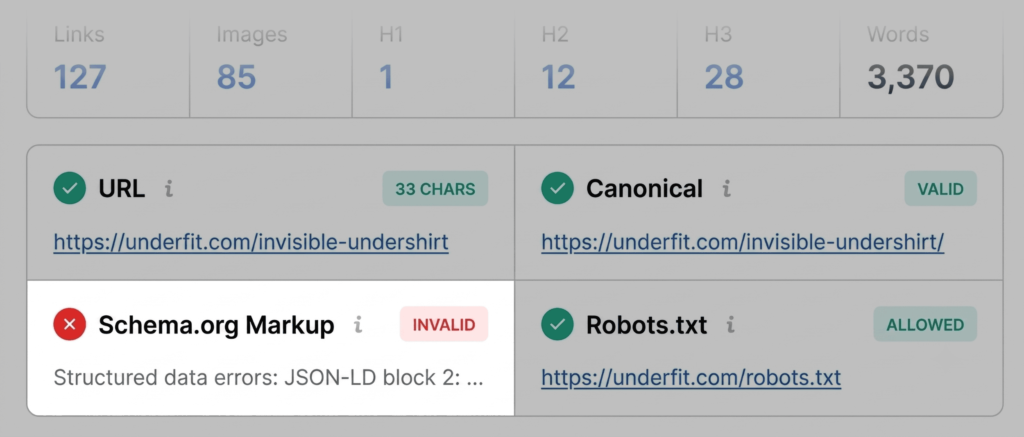
The Page Info tab provides a bird’s-eye view of fundamental SEO pillars, including title tags, meta descriptions, and canonical tags. A common pitfall identified in this stage is the presence of invalid Schema.org markup. For e-commerce sites, such as the retailer UnderFit, JSON-LD errors are particularly damaging. When structured data is parsed incorrectly, the search engine may fail to display product-specific rich results—such as star ratings, pricing, and availability—directly in the search results page. Losing these visual assets can drastically reduce click-through rates.

Minute Two and Three: Deep-Dive Diagnosis
Once the primary triage is complete, the subsequent two minutes are used to diagnose the root cause of the flags identified. By clicking the "View Full Report" button, users access a more granular dashboard divided into six panels: Summary, Diagnosis, Page Info, Internal Links, External Links, and Density.

In the Audit panel, the focus shifts to technical SEO essentials, including crawlability and indexation. An orange warning, while not an immediate site-breaker, often requires a judgment call. For instance, a warning regarding hreflang tags—common in international sites—is a red flag for localized SEO success. If the tags are missing or incorrectly implemented, search engines may struggle to serve the correct language version of the page to the appropriate audience.

Analyzing Content Structure and Keyword Strategy
The Content tab provides insight into the hierarchy of the page. Search engines and emerging AI-driven search systems prioritize pages with clear, logical structures. An H1 tag appearing mid-page, or an erratic jump from an H1 to an H4 header, can confuse crawlers regarding the primary subject matter of the page. Furthermore, the SEOquake image summary feature often reveals missing alt text across dozens of images. While not a direct penalty, the lack of alt text represents a significant missed opportunity for image SEO and digital accessibility, both of which are increasingly prioritized by search algorithms.

The Keyword Density panel allows marketers to verify whether their content aligns with their intended search intent. By reviewing the keyword cloud, an auditor can ensure that core terms—such as "undershirt," "fabric," or "v-neck"—are prominent. However, auditors must be careful not to mistake the presence of text in buttons, menus, or interactive widgets for core content, as these elements can skew density reports.

Link Health and External Authority
The final segment of the diagnosis involves link health. A high volume of broken links, whether internal or external, signals a lack of maintenance that search engines associate with low-quality or abandoned sites. The Links panel exports these findings into a CSV format, allowing teams to systematically address broken JavaScript calls or outdated external references.

This is where the Semrush integration provides the most significant value. By comparing a page’s performance against domain-level metrics, an auditor can determine if a problem is isolated to one URL or if it is symptomatic of a broader site-wide issue. If a domain has a high authority profile but an individual page is underperforming, the fix is likely at the content level. If the site-wide metrics are low, a more comprehensive technical audit is required.

Broader Implications for Search Visibility
The shift toward three-minute auditing represents a broader trend in SEO: the move toward real-time optimization. As search engines like Google and Bing integrate AI-driven generative responses, the technical "cleanliness" of a page is becoming as important as its backlink profile. Sites that fail to provide clear, error-free metadata and structured data are increasingly being overlooked in favor of more technically sound competitors.

The ability to diagnose issues on the fly ensures that marketing teams can respond to drops in traffic or conversion before they become systemic problems. Whether it is fixing a missing sitemap, correcting JSON-LD errors, or optimizing heading structures, the data provided by tools like SEOquake offers a clear roadmap. By maintaining a disciplined, three-minute diagnostic routine, businesses can ensure their digital assets remain competitive in an environment where technical agility is a primary driver of organic growth.

For those looking to transition from page-level fixes to comprehensive site management, combining these rapid audits with long-term monitoring tools is the standard best practice. While SEOquake provides the "what" and the "where," full-site audit platforms provide the "why" and the long-term strategic direction necessary for sustained online visibility. The integration of these tools into a daily workflow ensures that technical SEO is no longer a quarterly project, but a continuous, manageable process.