
In the fast-paced digital marketing landscape, the ability to rapidly diagnose webpage performance is a critical skill for SEO professionals and content managers. Whether a high-value product page has experienced a sudden drop in search rankings, a competitor has surged ahead in the SERPs, or a client page is failing to meet conversion benchmarks, identifying the root cause quickly is essential. While comprehensive site-wide crawls provide necessary depth, they are often time-consuming. SEOquake, a free Chrome extension developed by Semrush, offers a streamlined alternative that allows users to audit technical signals, on-page SEO, and linking strategies without ever navigating away from the page under review.

The Mechanism of Rapid SEO Triage
SEOquake functions as a diagnostic tool that provides an immediate, color-coded overview of a webpage’s health. The extension’s architecture is designed to prioritize efficiency, allowing users to categorize issues into critical, warning, or informative states. This visual hierarchy enables professionals to triage effectively, focusing their efforts on high-impact fixes before addressing minor discrepancies.

The tool’s utility is divided into two primary phases: the Quick View pop-up for immediate, surface-level assessment, and the Full Report for granular technical diagnosis. By leveraging these features, an auditor can move from the discovery of a problem to a potential solution in under three minutes.

Phase One: Triage via the Quick View Pop-Up
The first 60 seconds of the audit process are dedicated to identifying glaring technical oversights. Upon activating the SEOquake icon, users are presented with a five-tab interface: Page Info, Diagnosis, Internal Links, External Links, and Density.

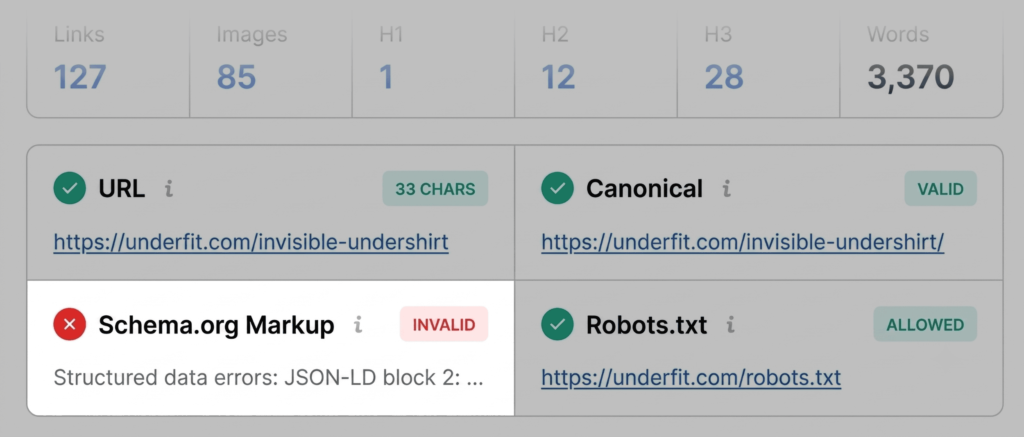
The Page Info tab serves as the foundational starting point. It provides a snapshot of the core pillars of on-page SEO: title tags, meta descriptions, headings, and canonical URLs. An experienced auditor scans these elements to ensure they align with standard SEO best practices. For instance, if the title tag exceeds character limits or the meta description is absent, the extension provides immediate feedback. During this phase, it is also common to review Schema.org markup. If the extension highlights the Schema in red, it indicates a failure in JSON-LD parsing, which can render a page ineligible for rich results—such as star ratings or pricing displays—in search engine results pages.

The Audit tab acts as the next step in the triage process, focusing on technical health. This section checks for critical indicators including site indexability, robots.txt directives, and mobile-friendliness. While green indicators suggest a healthy page, orange warnings require a strategic judgment call. For example, a warning regarding hreflang tags might be dismissed if the site does not have international versions, but it would be flagged as a priority for a multilingual e-commerce platform.

Phase Two: Deep Diagnosis via the Full Report
Once the initial triage is complete, the auditor transitions to the Full Report, which provides the necessary context to determine whether an issue is isolated to a single page or representative of a systemic site error. This report is divided into six comprehensive panels, offering a granular view of every technical signal.

When investigating technical flags, the Audit panel is the primary resource. By clicking "View Full Report," the auditor can access specific diagnostic data that clarifies why a flag was raised. In many cases, the tool offers integrated links to external resources, such as Google’s Rich Results Test. This functionality is invaluable for verifying whether structural data errors are the result of incorrect coding or a template-wide implementation failure.

Analyzing Keyword Density and Topic Coverage
Beyond technical health, the Content tab and the Keyword Density panel are essential for evaluating the relevance of the page’s copy. The Keyword Cloud feature allows auditors to visualize the most prominent terms on the page. In an ideal scenario, the most frequent keywords should align perfectly with the target topic of the page. If a product page for a specific garment shows high density for unrelated terms, it suggests a lack of focus or potential keyword stuffing that could trigger search engine penalties.

While assessing these metrics, it is vital to remember that SEOquake may index text from interactive elements, such as JavaScript-based navigation menus or image alt-text wrappers. Therefore, a slight discrepancy in density is often expected. The goal is to ensure that the primary semantic signals are strong and clearly directed at the intended audience.

Assessing Link Integrity and External Connections
The final stage of the manual audit involves reviewing the link profile. The Links panel provides a comprehensive inventory of all internal and external hyperlinks. Broken links are detrimental to both user experience and crawl budget efficiency, as they create dead ends for search engine bots.

In practice, a report identifying dozens of broken external links often points to outdated JavaScript dependencies or legacy code. By exporting this data to a CSV file, auditors can systematically verify each link. If the links are indeed broken, they must be removed or redirected. If the links are functional but flagged by the extension, it often signals a conflict with the site’s rendering process, necessitating a deeper look at the site’s front-end architecture.

Implications of Site-Level vs. Page-Level Issues
The decision-making process at the end of a three-minute audit is critical. If the data suggests that errors are restricted to a single URL, the fix can be implemented at the page level. However, if issues such as XML sitemap errors or schema template failures are detected, they point to broader site-wide problems.

When such systemic issues are identified, a page-level audit is insufficient. In these instances, professionals must transition to a full-scale site crawl. Tools like the Semrush Site Audit can process hundreds of URLs, providing the comprehensive data necessary to overhaul site architecture, fix global crawl errors, and optimize internal linking strategies.

Strategic Integration of Diagnostic Tools
The efficacy of SEOquake lies in its ability to democratize technical SEO. By reducing the time required to perform an audit, it allows marketing teams to be proactive rather than reactive. Instead of waiting for a quarterly site audit to uncover issues, teams can perform "spot checks" on new content or updated pages.

This methodology also facilitates better collaboration between SEO teams and developers. By providing specific, data-backed evidence of broken markup or missing meta-data, the auditor can present developers with a clear "to-do" list. This reduces friction and accelerates the resolution of technical debt.

Conclusion
The evolution of SEO tools has consistently trended toward greater speed and accessibility. SEOquake represents the culmination of this trend, offering a robust set of diagnostic capabilities that fit seamlessly into a browser. By following a structured, three-minute workflow—starting with rapid triage, moving into deep diagnosis, and concluding with a strategic decision on whether to scale the fix—SEO practitioners can maintain high standards of performance across their digital properties.

Ultimately, while the technical landscape continues to shift with the integration of AI-driven search and changing algorithms, the fundamental requirements for site health remain constant: clean code, clear structure, and accessible information. The SEOquake extension remains an essential component of the professional toolkit, ensuring that these pillars are not only monitored but consistently upheld in an increasingly competitive online environment.