
A groundbreaking interactive web experience, "ZERO: The Engineering Behind a Defiant Interactive Narrative Demo," has set a new benchmark for performance and immersive storytelling, transforming over a gigabyte of high-fidelity source assets into a remarkably compact website under 10MB, capable of running at a smooth 60 frames per second even on budget Android devices. Developed over four months using Three.js, GSAP, Howler, and Vite, the project captivates visitors from the outset with an innovative "draw a zero" unlock mechanism, instantly rewarding interaction and setting the tone for a narrative that boldly challenges traditional educational paradigms.
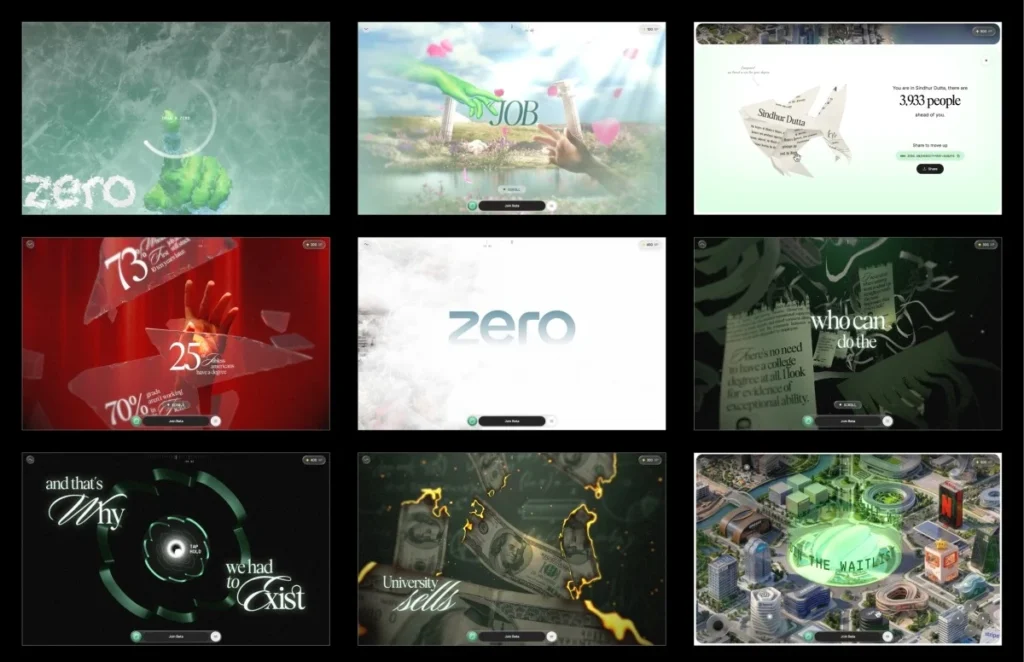
The experience begins not with a conventional "enter" button, but with an enigmatic prompt to draw a zero on a locked screen. As the user completes the gesture, a frost-like effect emanates from the stroke, gradually revealing the interactive world. This unique entry point, which measures total signed angle, roundness, and closure of the drawn path, was a deliberate design choice to immediately engage visitors with an unexpected, yet gratifying, interaction. This novel approach ensures user attention is captured within seconds, providing an immediate reward for their participation.
Genesis of a Groundbreaking Concept
The inception of this ambitious project stemmed from a compelling concept proposed by Atul Khola’s team: to create an immersive, scrolling web experience that fundamentally questions the conventional degree path. Faced with this innovative vision, the development team opted to pitch a tangible proof of concept rather than a traditional presentation. Within a mere 48 hours, they engineered a working prototype featuring the now-signature "draw a zero" interaction. This rapid development was significantly accelerated by the strategic application of artificial intelligence.
AI tools proved instrumental in quickly generating the initial versions of various effects, allowing the team to bypass the time-consuming process of building from scratch. This efficiency freed up valuable development time, which was then dedicated to meticulous refinement and iteration. The developers experimented with multiple iterations of effects, such as the "burning money" animation, different timings for the "glass shatter," and several shader concepts, before settling on the most impactful and visually appealing solutions. This agile methodology, facilitated by AI, shifted the focus from initial code generation to critical evaluation, detailed improvement, and ensuring that every interaction felt polished and responsive. This proof of concept, embodying both technical prowess and narrative strength, successfully secured the project.
The Defiant Narrative Unfolds
The "ZERO" experience is meticulously structured across six distinct scrolling stages, interconnected by five interactive gates that either pause the narrative or redirect its flow. These gates range from the initial "draw a zero" to holding down to shatter glass or launch through a tunnel, each demanding user engagement to progress.
The narrative itself is a powerful critique of the traditional academic journey. It commences with a vivid portrayal of the long-held promise of the degree path: diligent study, academic achievement, and a guaranteed placement at a top-tier company. This idyllic vision is abruptly challenged at the first interactive gate, where the promise metaphorically shatters into countless pieces. The subsequent stage reveals stark, real-world unemployment statistics scattered across the broken glass, underscoring the fragility of the initial promise.

Stage three intensifies the narrative, depicting the degree certificate as a mere piece of paper. This is visually represented through compelling effects: money burns, certificates are shredded, and the scene dramatically transitions into a tunnel shaped like the iconic ZERO logo. Emerging above the clouds in stage four, users encounter a sprawling city meticulously constructed from the headquarters of renowned real-world companies, symbolizing alternative pathways to success. The penultimate stage features a halo appearing above the central ZERO tower, acting as the final gate before the camera smoothly transitions control to the user. In the fifth and final stage, users are empowered to freely explore an interactive city map, delving deeper into the alternative educational landscape presented by ZERO. This progression from guided narrative to open exploration effectively reinforces the project’s core message.
Engineering the Seamless Experience: Architectural Foundations
One of the most pivotal architectural decisions made during development was to entirely bypass the browser’s native scroll mechanism. Instead of relying on conventional ScrollTrigger implementations or an oversized scrolling DOM, the team devised a sophisticated virtual scroll system. All wheel and touch input are channeled to update a singular virtual scroll value, which then eases towards its target. This master value, a single numeric entity, becomes the central orchestrator for every element within the experience—from dynamic asset loading and intricate animations to precise shader timings, text reveals, and overlay transitions.
To manage the complexity of this continuous experience, the project was intelligently segmented. It is divided into nine self-contained segments, with the initial loader serving a dual role as the first interactive gate. Each segment is designed with its own optional lifecycle, allowing for modular development and streamlined management:
  scrollVh: 300,            // how much virtual scroll this segment owns
  enter(ctx)         /* build this segment's Three.js objects (async) */ ,
  scrub(ctx, p)      /* p is LOCAL progress 0..1 within this segment  */ ,
  update(ctx, t, dt) /* runs every frame, scroll or not (idle motion) */ ,
  teardown(ctx)      /* dispose and hand off to the next segment      */ ,
This segmented architecture significantly enhanced codebase maintainability, particularly as the project matured. It also simplified the debugging process. When navigating to any specific stage during development, the system intelligently replays the lifecycle of all preceding segments, ensuring that the experience is always initialized precisely as if a user had naturally scrolled through the entire narrative, guaranteeing consistency and preventing unexpected state issues.
Optimizing 3D Assets for Web Performance
A substantial portion of the four-month development cycle—nearly an entire month—was dedicated to the rigorous preparation and optimization of 3D assets. The initial source files were formidable: production-grade Blender scenes featuring uncompressed geometry, high-resolution 8K textures, complex baked animations, and an overwhelming total size exceeding one gigabyte. The early phase involved critical decisions on the most efficient format for each asset to achieve optimal web delivery.
For geometry, DRACO compression was uniformly applied, leveraging self-hosted decoders. This decision to bundle Draco and KTX2/Basis transcoders within the public/vendor/ directory, rather than relying on external CDNs, proved prescient. The development team had previously encountered issues where slowdowns on external CDN services like gstatic or unpkg led to the failure of compressed asset decoding, even when the assets themselves were locally hosted. This critical lesson reinforced the principle that if a decoder resides on an external server, the entire asset pipeline effectively becomes dependent on that external infrastructure.
Texture optimization presented the greatest opportunity for performance gains. While a PNG image might have a small file size on disk, it fully decompresses into GPU memory, meaning a 2048×2048 texture invariably occupies approximately 16MB of VRAM, irrespective of its original file size. The adoption of KTX2 with ETC1S compression offered a superior solution. KTX2 textures remain compressed on the GPU, drastically reducing memory footprint and facilitating significantly faster upload times.

The Bespoke Compression Previewer
A key challenge with ETC1S, a lossy compression format, is the absence of an intuitive local preview mechanism. Fine-tuning compression settings can quickly devolve into a laborious trial-and-error process. A single global compression setting often results in either excessive memory usage or noticeable degradation of critical "hero" textures.
To overcome this, the team engineered a custom converter and previewer integrated into their internal dashboard. This invaluable tool allowed developers to display compressed and uncompressed images and videos side-by-side, enabling direct comparison of results. This capability empowered the team to meticulously fine-tune ETC1S settings for each individual asset. They could apply aggressive compression where visual impact was minimal, preserve pristine quality for high-visibility elements, and selectively disable mipmaps when unnecessary. Although a simple utility, this custom previewer had a profound impact on the final build, a step in WebGL workflows that is rarely discussed but proved essential for achieving the project’s stringent performance targets.
Further efficiency was gained through the consolidation of related textures into shared atlases. For instance, all hand textures were combined into a single 4×4 atlas, with each mesh referencing its specific section using UV offsets and scaling. This strategy was extended across the project, reducing text sprites from four separate atlases to one, and similarly consolidating certificates, paper shreds, clouds, coins, and glass shards. The overall result was a reduction from over fifty individual images to approximately a dozen optimized atlases. Furthermore, many gradient backgrounds were replaced with just a few lines of GLSL code, further trimming asset load. These comprehensive optimizations allowed the final build to ship at under 10MB, a dramatic reduction from early builds that ranged between 35 and 40MB. Critically, the interactive world map, being a more resource-intensive component, was isolated into its own loading group, ensuring it never blocked the initial, critical opening experience.
Conquering Performance Bottlenecks: Texture Uploads and Adaptive Quality
Reducing download size is only one facet of web performance; the often-overlooked challenge of GPU texture uploads can introduce significant performance stutters. Even compressed textures must be uploaded to the GPU on the main thread, a process that can block rendering for 50 milliseconds or more, resulting in noticeable frame drops. If this upload occurs when a texture is first needed during active scrolling, the "hitch" is immediately apparent to the user, leading to a sluggish perception even if benchmarks appear favorable.
To proactively mitigate this, the development team implemented a multi-pronged strategy for texture uploads:
-
Idle-Time Uploads: Textures were queued for upload and processed only during periods of browser idle time. The
requestIdleCallbackAPI was utilized to schedule these uploads, ensuring that they did not interfere with critical rendering frames.// upload queued textures only while there's idle time to spare function drainUploads(deadline) while (uploadQueue.length && deadline.timeRemaining() > 5) renderer.initTexture(uploadQueue.shift()); // forces the GPU upload now if (uploadQueue.length) requestIdleCallback(drainUploads, timeout: 2000 );This function continuously drains the upload queue as long as there’s more than 5ms of idle time remaining, preventing the main thread from being overwhelmed. If the queue is not empty, it reschedules itself for the next idle period.

- Synchronous Flushing during Transitions: Whenever a new stage was about to render—such as after the initial loader or during interactive gate transitions—the upload queue was flushed synchronously. This proactive measure ensured that all necessary textures were already resident on the GPU before they became visible on screen, completely eliminating first-time upload stutters during the critical scrolling phases of the experience.
Beyond optimized asset handling, the project incorporated an adaptive quality manager, a crucial component for ensuring a consistent 60fps experience across a diverse range of devices. Recognizing the unpredictability of user hardware, the renderer continuously monitors its own performance. It tracks frame times using a rolling buffer, dynamically adjusting the visual quality tier in real-time. If the average frame time (avgMs) consistently exceeds 22ms (indicating performance below approximately 45 frames per second), the system intelligently steps down to a lower quality tier. Conversely, if performance improves and remains stable, with avgMs dropping below 12ms (above approximately 83 frames per second), the system scales back up to a higher quality tier. A built-in cooldown mechanism prevents erratic switching between quality levels.
if (avgMs > 22 && tier > LOW  && cooldownElapsed) downgrade();   // ~<45fps
else if (avgMs < 12 && tier < HIGH && cooldownElapsed) upgrade(); // ~>83fps
Crucially, these quality tiers exclusively affect visual polish, ensuring the core interactive experience and narrative remain identical across all devices, from flagship smartphones to budget Android phones. Adjustments include pixel ratio, blur samples, the complexity of coin geometry, and text resolution. Additionally, targeted optimizations were employed; for instance, during the dramatic glass shatter interaction, the renderer temporarily lowers the pixel ratio and disables blur and frost effects, effectively masking the momentary performance cost within the visual impact of the gesture itself. The final month of development was largely dedicated to intensive profiling and optimization on a budget Android device, systematically eliminating frame spikes, including a particularly stubborn 157ms frame, until the entire experience ran flawlessly.
The Art of Visuals: Shader Engineering
The captivating visual effects central to "ZERO" are powered by a sophisticated post-processing chain, where each frame is constructed through a series of sequential passes:
- Render Pass: The primary 3D scene.
- Background Pass: Procedurally generated backgrounds.
- Frosting Pass: Manages the "draw a zero" frost and melt effects.
- Lens Blur Pass: Implements depth-of-field, dynamically gated by the adaptive quality tier.
- Foreground Pass: Applies grain and tone mapping.
- Text Pass: Composites narrative text after tone mapping.
- Glass Pass: Inserts glass effects directly after the background.
- Shatter Pass: The final pass, applying the glass break effect over everything.
Crucially, passes such as glass, text, and shatter are initialized lazily and "warmed up" during idle periods, preventing them from impacting the loader’s critical path.
// boot: the always-on spine, added in order
composer.addPass(renderPass);     // 1. the 3D scene
composer.addPass(bgPass);         // 2. procedural background
composer.addPass(frostingPass);   // 3. draw-zero frost + melt
composer.addPass(lensBlurPass);   // 4. depth-of-field, tier-gated
composer.addPass(fgPass);         // 5. grain + the one tone mapping

// later, off the loader's critical path
composer.addPass(textPass);            // type, composited after tone mapping
composer.insertPass(glassPass, 2);     // slots in right after the background
composer.addPass(shatterPass);         // the break, last over everything

// warmed during an earlier stage's idle time,
// so their first real frame is a cache hit, not a shader-compile stall
glassPass.prewarm(renderer, camera);
shatterPass.prewarm(renderer, camera);

// per frame: don't pay for the text composite when nothing's on screen
textPass.enabled = textPass.hasVisibleSprites();
Each pivotal moment in the experience leverages a custom shader meticulously crafted for its specific effect. While AI played a role in generating initial versions of many shaders, every single one underwent extensive refinement and reworking to achieve its final, polished form.
The frost unlock effect, for instance, is constructed using a ping-pong buffer with four distinct passes: horizontal, vertical, and two diagonals. Each pass systematically expands the drawn stroke by propagating the brightest neighboring pixels, resulting in an organic, octagonal growth pattern. This expansion is further modulated by the brightness of an underlying frost texture, lending a natural, crystalline appearance to the spreading edge. Upon completion of the stroke, its centroid serves as the origin point for a radial melt effect, gradually clearing the screen.
// one of four axis passes – octagonal spread; uSpreadAxis is the pass direction
float m    = texture2D(uPrevTrail, vUv).r;

float step = uSpreadStep * (0.4 + iceLuma * 1.2);      // stepped by frost luma

for (int k = 1; k <= 2; k++)
  m = max(m, texture2D(uPrevTrail, vUv + uSpreadAxis * step * float(k)).r * 0.92);
  m = max(m, texture2D(uPrevTrail, vUv - uSpreadAxis * step * float(k)).r * 0.92);


gl_FragColor.r = m;                                    // frost only ever advance
For lighting the hands without lights, a computationally expensive real-time lighting solution for a skinned mesh was deemed impractical. Instead, the team ingeniously baked the lighting directly into textures and blended between them. Two texture slots are utilized, with the incoming slot dynamically updated for each keyframe and smoothly crossfaded to create fluid lighting transitions. Alpha premultiplication was applied before blending to prevent dark halos around the transparent edges of the hands. Both lighting textures were strategically stored as regions within a single atlas, meaning that switching between them only required updating two UV offsets and a blend factor, maximizing efficiency.
// two slots crossfaded; the incoming one holds the next keyframe's texture
vec4 a = texture2D(uTextureA, vUv * uTexScaleA + uTexOffsetA);

vec4 b = texture2D(uTextureB, vUv * uTexScaleB + uTexOffsetB);

a.rgb *= a.a;  b.rgb *= b.a;              // premultiply before the blend

vec4 col = mix(a, b, uProgress);         // uProgress ramps 0–1 across the beat
The burning money effect employs a noise-driven distance field to realistically dissolve each bill over time. Just before the burn front reaches a specific area, a thin, glowing HDR ember rim materializes, followed by the charred surface. To optimize performance, fragments are discarded as early as possible if they are known not to have reached the burn threshold, minimizing the cost of the expensive FBM (Fractal Brownian Motion) calculation.

float threshold = uBurnProgress * 1.5;             // sweeps the burn front

float burn = distField * 0.5 + fbm(uv) * 0.5;

float edge = burn - threshold;

if (edge < 0.0) discard;                           // already ash

float ch = 1.0 - smoothstep(0.0, uCharWidth,  edge);

float em = 1.0 - smoothstep(0.0, uEmberWidth, edge);

vec3  col = mix(baseColor, uCharColor, ch) + uEmberColor * em;  // HDR ember rim
For shredding certificates, each vertex stores a strip index that dictates its association with a particular shred. As the shred front progresses from left to right, individual strips detach from the main sheet and fall independently, each with its own unique rotation, creating the illusion of a certificate tearing into distinct ribbons. Lighting normals are analytically generated from the same wave function that drives the animation, negating the need to store or ship separate normal maps.
float past = clamp((uShredProgress - uv.x) / 0.4, 0.0, 1.0);

float e    = past * past;                             // ease-in

pos.y -= e * (0.25 + hash(aStripIndex) * 0.25);      // gravity, per strip

pos    = rotateStrip(pos, aStripIndex, e * 3.0);     // independent tumble, ~3 rad
The tunnel effect is dynamically generated by extruding the cross-section of the ZERO logo. A vibrant brightness pulse traverses the tunnel, driven by the geometry’s world-space Z coordinate. This method ensures the effect remains perfectly seamless, even as sections of the tunnel are repeated to extend its perceived length.
float q    = fract(vTunnelZ * uPulseFreq + uPulseTime);  // vTunnelZ = world-space Z

float band = 1.0 - smoothstep(0.0, uPulseWidth, min(q, 1.0 - q));

totalEmissiveRadiance *= 1.0 + uPulseGain * band;
The narrative text features a sophisticated seven-tap hexagonal blur, comprising a central sample and six surrounding samples. The blur radius is directly controlled by the reveal progress, allowing text to gracefully sharpen as it comes into view, rather than appearing abruptly. This blur is an integral part of the deferred text pass and is entirely skipped when no text is visible, eliminating unnecessary rendering costs.
// 7-tap hexagonal blur; r comes from the reveal progress (uProgress)
float r  = blurFactor * uMaxBlur * 0.003;

vec4 sum = texture2D(uText, vUv) * 2.0;            // centre, weighted ×2

for (int i = 0; i < 6; i++)                        // six taps at 60°
  sum += texture2D(uText, vUv + hexDir[i] * r);

gl_FragColor = sum / 8.0;
A significant debugging challenge emerged from shader precision. Several shaders, particularly on mobile GPUs like Adreno and Mali, required explicit setting to highp float. These GPUs often interpret mediump as a true 16-bit float, leading to subtle yet critical bugs that were absent on desktop platforms. Such issues included all certificate strips moving identically or visible banding in the burn effect. This experience served as a stark reminder of the paramount importance of testing on actual mobile devices from the project’s inception, rather than solely at its conclusion.
Crafting Engagement: Interaction Design Principles
With the source material primarily consisting of static images and videos rather than explicit interaction specifications, the behavior of each interactive gate had to be meticulously designed from the ground up. Most of these gates leverage a unified, configurable press-and-hold system. A shared configuration defines parameters such as when the prompt appears and the duration of the hold, while each individual gate implements its unique visual feedback through a set of customizable hooks:
holdTrigger:
  showAt: 0.6, holdDuration: 1.4,
  onHoldProgress(ctx, p)  /* drive this gate's visuals with p (0..1) */ ,
  onHoldComplete(ctx)     /* fire the shatter / launch, then advance  */ ,
During a hold interaction, the entire frame subtly shifts towards a dark red hue. When the glass dramatically shatters, this color instantly snaps back within approximately 200ms, creating a visceral sensation that the breaking shards are actively dispelling the surrounding darkness. Testing revealed that a longer 400ms transition felt notably less impactful. Furthermore, the shatter sound effect is precisely synchronized with the first rendered frame of the animation, rather than a fixed timer. This crucial synchronization prevents audio desync on slower devices, where a timer-based approach might cause the sound to play before the visual effect is fully visible, undermining the overall impact.
The Grand Finale: An Interactive World Map
The narrative culminates in a spectacular final launch sequence, transporting the user into an expansive open sky. As stage four progresses, the clouds gracefully part, gradually unveiling a sprawling city below, with the iconic ZERO tower standing prominently at its heart. A luminous halo materializes above the tower, serving as the ultimate interactive gate, before the camera seamlessly transitions control to the user, settling into the highly interactive world map.

In stage five, users are granted complete autonomy. They can pan, zoom, and freely explore the intricately designed city. Each interactive marker on the map, representing a different facet of the ZERO ecosystem, reveals a detailed card containing information on roles, scenarios, and tools, alongside a prominent "Join Beta" button. The persistent join bar, visible throughout the experience, also transforms into a waitlist signup, providing a clear call to action. This strategic design choice ensures that after guiding the user through a compelling and challenging narrative, the experience concludes by empowering them to delve deeper and explore the implications for themselves, solidifying their engagement with the ZERO initiative.
Key Takeaways and Future Implications
The development of "ZERO" yielded profound lessons, foremost among them being the critical importance of asset preparation and GPU uploads, which demand as much meticulous attention as the rendering process itself. Tools such as the bespoke compression previewer, the strategic adoption of self-hosted decoders, the intelligent upload queue, and the dynamic adaptive quality manager, though not the most glamorous components of the pipeline, proved absolutely indispensable. They were the decisive factors in transforming over a gigabyte of raw source assets into a lightweight, sub-10MB interactive experience that consistently delivers 60 frames per second, even on resource-constrained mobile devices.
Regarding the role of artificial intelligence, the project offered a clear and nuanced perspective. AI performed exceptionally well at what it is designed for: rapidly generating initial code versions and prototypes, including the very proof of concept that secured the project. However, the subsequent, and arguably more critical, work remained firmly in the human domain. This involved the meticulous refinement of interactions, the artistic improvement of visuals, rigorous performance profiling, and making hundreds of granular decisions that only become apparent and critical through extensive testing on real-world devices. The "ZERO" project unequivocally demonstrates that while AI can significantly accelerate code generation, the creation of a truly polished, immersive, and impactful interactive experience still fundamentally relies on careful human iteration, discerning engineering judgment, and an unwavering commitment to detail. This project not only delivers an engaging narrative but also serves as a potent case study for the future of high-performance web development and interactive storytelling.
Credits
- [Developer/Studio Name]
- [Art Director/Creative Lead]
- [Technical Lead]
- [Sound Designer]
- [Other Key Contributors]