
The landscape of digital photography has undergone a seismic shift as the industry moves from traditional optical perfection toward computational enhancement. While high-end lenses and sensors are designed to capture maximum clarity, various factors—such as camera shake, missed focus, diffraction, and sensor noise—frequently result in "soft" images that lack the necessary bite for professional use or large-scale printing. To address these challenges, a new generation of photo sharpening software has emerged, leveraging deep-learning algorithms to go beyond simple edge-contrast adjustments and into the realm of true detail restoration.
In the current professional environment, the demand for high-resolution content is at an all-time high. With the prevalence of 4K and 8K displays, as well as the resurgence of large-format physical printing, the limitations of older digital archives and slightly imperfect captures have become more apparent. The following analysis evaluates the leading software solutions currently available, categorized by their technological approach, target demographic, and efficacy in real-world scenarios.

The Evolution of Image Sharpening: A Technological Chronology
The history of sharpening software can be divided into three distinct eras. Understanding this progression is essential for photographers choosing between traditional tools and modern AI-driven suites.
- The Manual Era (1990s–2010s): Early digital editing relied heavily on the "Unsharp Mask" (USM) and "High Pass" filters. These tools did not actually create new detail; instead, they increased the contrast along existing edges to create the illusion of sharpness. Overuse often led to "halos" and increased grain.
- The Algorithmic Era (2010s–2018): Software began to incorporate lens-specific data. Tools like DxO and Adobe Lightroom started using mathematical models to counteract known optical flaws (diffraction and lens softness), providing a more natural look than manual filters.
- The Deep-Learning Era (2019–Present): The current era is defined by Convolutional Neural Networks (CNNs). Modern software like Aiarty and Topaz Photo AI are trained on millions of image pairs (blurry vs. sharp). These programs "understand" what textures like skin, fur, or fabric should look like and can reconstruct missing information, effectively "developing" the image through inference rather than simple manipulation.
Core Scenarios for Advanced Sharpening
Modern sharpening applications are no longer "one-size-fits-all." Industry data suggests that software usage is typically driven by five primary professional needs:
- Portrait Restoration: Fixing "mushy" facial structures and restoring individual hair strands in low-resolution or poorly scanned archives.
- Wildlife and Macro Photography: Enhancing fine textures, such as plumage or insect anatomy, where the depth of field is often razor-thin.
- Architectural Precision: Defining clean lines in urban photography and removing compression artifacts from structural details like window frames and masonry.
- Print Preparation: Upscaling images for large-format physical media to ensure that pixelation and blur do not manifest on paper.
- RAW Development: Providing a clean, de-noised, and sharp base for further color grading and editing.
Comparative Analysis of the Top 6 Sharpening Solutions
1. Aiarty Image Enhancer: The High-Fidelity Specialist
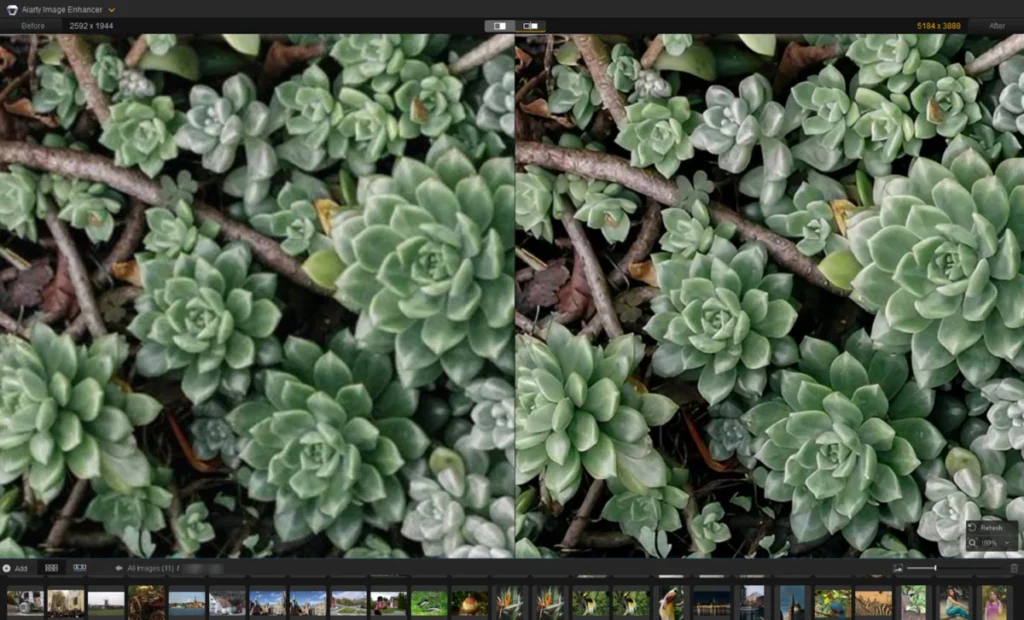
Aiarty Image Enhancer has positioned itself as a robust solution for photographers who require natural-looking detail without the "plasticky" artifacts often associated with AI. Its primary strength lies in its three-model system: the More-Detail model, the Real-Photo model, and the Face Restoration feature.

In testing scenarios involving architectural photography, Aiarty demonstrated a unique ability to restore layered tile shapes and intersecting lines without creating ringing artifacts. Its strength sliders (typically optimized between 0.75 and 0.95) allow for a nuanced approach. The software supports upscaling to 16K, utilizing deep-learning algorithms rather than standard bicubic interpolation, which ensures that enlarged images retain realistic textures.
2. Topaz Photo AI: The Autopilot Industry Leader
Topaz Labs has been a pioneer in the AI sharpening space. Their current flagship, Topaz Photo AI, features an "Autopilot" mode that analyzes the image upon import and suggests a combination of Denoise, Sharpen, and Adjust Lighting modules.
Topaz is particularly effective for "Standard" sharpening of mild blur. However, its "Refocus" model is computationally intensive and requires significant hardware resources (modern GPUs). While it offers a subscription-based model, it remains a favorite for professionals who need a fast, automated workflow that can still be overridden with manual parameters.

3. Adobe Lightroom: The Integrated Workflow Standard
For the vast majority of professional photographers, Lightroom remains the hub of the editing process. Its sharpening tools are located within the "Detail" panel. Unlike dedicated AI enhancers, Lightroom’s traditional sharpening requires a more skilled hand.
Users must balance the Amount, Radius, and Detail sliders. A key feature is the "Masking" slider; by holding the Alt/Option key, users can see exactly which parts of the image are being sharpened, allowing them to isolate subjects and keep backgrounds smooth. While Lightroom now includes an AI Denoise feature, its sharpening remains largely manual, favoring those who prefer total control over the developing process.
4. DxO PureRAW 6: The Optical Correction Powerhouse
DxO PureRAW 6 functions differently than the others by acting as a "pre-processor" for RAW files. It leverages a massive database of over 80,000 lens and camera combinations to correct for specific optical weaknesses.

Its DeepPRIME noise reduction technology is widely considered the industry gold standard for cleaning up high-ISO images before they even reach an editor like Photoshop. By enabling "Lens Sharpness" optimization, DxO provides a cleaner, sharper base that often requires no further sharpening in post-production. However, it is strictly designed for RAW files, making it less useful for those working with JPEGs or legacy scans.
5. Picsart: The Cloud-Based Creative Solution
Targeted toward content creators and social media managers, Picsart offers an online and mobile-based sharpening tool. It is an automated solution that typically applies x2 or x4 upscaling alongside sharpening.
While it lacks the deep RAW support of DxO or the manual control of Lightroom, Picsart is highly effective for quick fixes on compressed images. It is an ideal tool for the "creator economy," where speed and accessibility on mobile devices are prioritized over the forensic restoration of fine details.

6. GIMP: The Open-Source Manual Alternative
The GNU Image Manipulation Program (GIMP) remains the most powerful free alternative to commercial software. It does not utilize deep-learning models, relying instead on traditional mathematical filters like the Unsharp Mask and High Pass.
GIMP is favored by the open-source community and those on a strict budget. While it cannot "generate" missing data like Aiarty or Topaz, it offers precise control over edge contrast. Using a High Pass filter on a separate layer with an "Overlay" blend mode remains a classic and effective technique for pulling out surface textures without introducing noise.
Market Data and Supporting Context
The rise of these tools coincides with a broader trend in the imaging market. According to recent industry reports, the global AI in computer vision market is expected to grow at a CAGR of over 20% through 2030. This growth is driven by the increasing need for high-quality visual content in e-commerce, digital archiving, and professional media.

Furthermore, the shift toward mirrorless cameras with higher megapixel counts (60MP+) has ironically increased the need for sharpening software. Higher resolutions make even the slightest camera shake or lens diffraction more visible, necessitating post-capture correction to realize the sensor’s full potential.
Industry Implications and Professional Responses
The integration of AI into the sharpening workflow has sparked a debate among photographic purists. Some argue that "generative" sharpening—where the software fills in missing data—crosses the line from photography into digital illustration. However, the prevailing response from the professional community has been one of pragmatic adoption.
Archivists and museum curators have noted that AI sharpening has made it possible to restore historical documents and photographs that were previously considered "lost" to time and decay. In the commercial sector, the ability to "save" a once-in-a-lifetime shot that was slightly out of focus has saved thousands of dollars in re-shooting costs.

Conclusion and Broader Impact
The choice of sharpening software ultimately depends on the specific requirements of the project and the technical proficiency of the user. For high-end professional restoration and upscaling, dedicated AI tools like Aiarty and Topaz Photo AI offer capabilities that were unimaginable a decade ago. For those seeking an integrated workflow, Adobe Lightroom remains the standard, while DxO PureRAW provides the best possible start for RAW image processing.
As these algorithms continue to evolve, the line between hardware and software will continue to blur. The "perfect" image is no longer solely the responsibility of the lens and the sensor; it is increasingly a collaborative effort between the photographer’s eye and the computational power of their software suite. This technological democratization allows photographers at all levels to produce crisp, high-clarity images that meet the rigorous standards of the modern digital era.