
In today’s fiercely competitive digital landscape, the distinction between a compelling user experience (UX) and sustained business success has evaporated. Carrie Webster, a seasoned UX designer with experience spanning the mobile-first era, underscores this critical evolution, presenting ten data-backed UX facts that unequivocally link user experience to tangible business outcomes: revenue generation, customer retention, and long-term growth. The era where design was considered a mere "cosmetic preference" is long past; a friction-heavy interface is no longer just about "lost clicks" but signifies potentially millions in wasted engineering resources and significant erosion of business value.
The Evolution of User Experience in Business
The journey of UX from an aesthetic consideration to a strategic imperative reflects the broader maturation of the digital economy. In the early days of the internet and mobile applications, the primary focus was often on functionality and simply getting a product to market. Design was frequently an afterthought, a final polish applied before launch. However, as digital products proliferated and user expectations soared, businesses began to realize that an intuitive, efficient, and enjoyable experience was paramount. The shift was gradual but inexorable, driven by market data demonstrating direct correlations between user satisfaction and financial performance.
This transformation has repositionled the UX design role. It is no longer solely about pixels and visual aesthetics; it is deeply rooted in rigorous research and incisive analytics. Data has become the indispensable tool for bridging the perceived chasm between creative design teams and the analytical mindset of the boardroom. Facts, rather than subjective opinions, advocate for the user and, more importantly, prove that UX is a non-negotiable requirement for a healthy bottom line. This understanding helps dismantle the persistent myth that UX is merely a "visual" function, replacing it with the reality of a strategic, data-driven discipline.
Ten Data-Backed Pillars of UX Value
The following ten facts represent the current reality of the digital world, serving not as mere "design tips" but as clinical, data-backed pillars for financial growth in a saturated market. Many of these principles, while rooted in deep psychological understanding, are also fundamental best practices widely adopted by leading designers.
1. The Cost-Saving Power of Early UX Intervention: The 1:100 Rule
One of the most compelling financial arguments for robust UX investment is the "1:100 rule." Modern studies from institutions like the IBM Systems Institute and reports from Segue Technologies consistently demonstrate that fixing an error after a product has been developed and launched can be up to 100 times more expensive than addressing it during the initial design and prototyping phase. This staggering ratio highlights UX as a crucial form of "engineering insurance." By the time developers begin coding, every interaction should have been meticulously validated through user research and testing. Discovering a fundamental navigation flaw post-launch incurs not only the direct cost of the fix but also significant technical debt, wasted developer time, and substantial revenue losses as users struggle with a broken flow. This early investment minimizes costly re-engineering, prevents project delays, and ensures resources are allocated efficiently.
2. Performance as a Core UX Imperative: The Need for Speed
In the contemporary digital landscape, performance is the bedrock of user experience. A visually appealing interface holds no value if users abandon it before it fully renders. The data on user patience is unequivocal: 47% of users expect a page to load in two seconds or less. Failing to meet this expectation can be a financial catastrophe. A mere one-second delay in page load time can reduce conversions by 20% and user satisfaction by 16%. Retail businesses alone are estimated to lose $2.6 billion annually due to slow load times. The impact is even more pronounced on mobile: when load time increases from one to three seconds, the bounce rate spikes by 32%, and conversion rates typically plummet from 40% to 29% by the third second. Conversely, even a microscopic 0.1-second improvement in page load can lift retail conversions by 8.4% and travel site conversions by 10.1%. Improving the Largest Contentful Paint (LCP) – a key web vital benchmark achieved by 67% of websites as of June 2025 – by just 31% can directly drive an 8% increase in sales. Speed, therefore, is not merely a technical metric but a primary design element; if a site isn’t instantaneous, its design, effectively, ceases to exist.

3. The Millisecond Moment: First Impressions Define Engagement
User first impressions are both visceral and deeply aesthetic. Research consistently indicates that users form an opinion about a website’s visual appeal in approximately 50 milliseconds (0.05 seconds). This split-second "gut feeling" is a primal survival mechanism that dictates whether a user remains to explore the value proposition or immediately bounces. In the current market, 94% of these critical first impressions are strictly design-related. If an interface feels "off" or appears dated, users subconsciously project that perceived lack of quality onto the entire product or service. This means that even the most compelling content remains undiscovered if the design fails to earn the initial five seconds of attention required to engage with it.
4. Navigating Choice Overload: Applying Hick’s Law
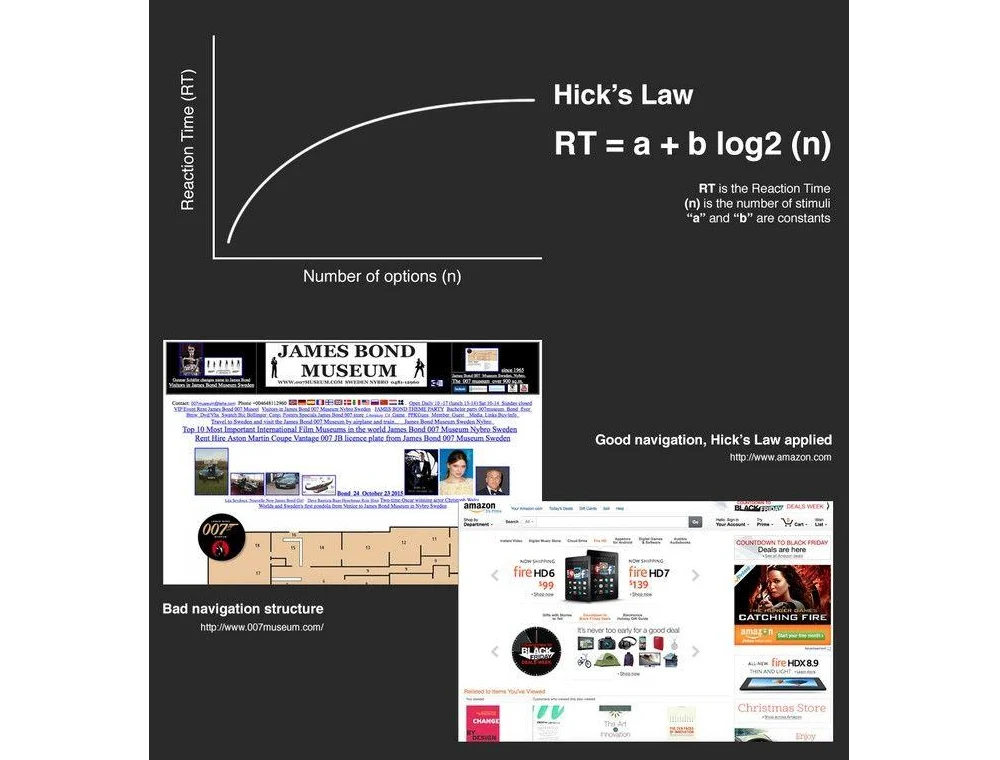
Stakeholders often operate under the misconception that "more options" equate to "more value." Psychological principles, however, prove the opposite. Hick’s Law posits that the time it takes for a user to make a decision increases proportionally with the number of options available. Every additional menu item, navigation link, or form field acts as a "tax" on the user’s cognitive processing. This phenomenon, often termed "choice paralysis" or "cognitive overload," significantly impedes conversion. Landbase reports that top-performing sites now achieve conversion rates exceeding 11%, while average performers struggle below 3%. A key differentiator for high performers is the application of personalization and optimization strategies to simplify the user experience. The implication is clear: streamlining choices, even by removing a single field from a checkout flow, can lead to immediate and measurable increases in revenue.
5. The Strategic Use of White Space for Comprehension
"White space," often misconstrued by non-designers as wasted screen real estate, is, in reality, a powerful tool for focus and clarity. Strategic application of white space can increase a user’s content comprehension by up to 20%. White space is crucial in preventing "cognitive load" from overwhelming the user. By providing the user’s eyes with natural resting points, designers subtly guide them toward the most important elements, typically calls-to-action like "Buy" or "Sign Up" buttons. In an era where average human attention spans have reportedly dropped to roughly eight seconds (even shorter than a goldfish), simplicity, facilitated by ample white space, becomes the ultimate luxury and a significant driver of engagement. For instance, in a fintech dashboard designed by Carrie Webster, adding more white space around data components reduced analyst users’ time-on-task by 25% and boosted trial-to-paid conversions, proving the direct impact of visual clarity on productivity and sales.
6. Harnessing the Goal Gradient Effect: The Psychology of Progress
One of the most surprising psychological hacks in UX is the "Goal Gradient Effect": users complete tasks faster if they perceive they have already made progress. A classic study demonstrated that a 10-stamp coffee card with two stamps pre-filled was completed significantly faster than an 8-stamp card with zero pre-fills, despite identical total expenditure. In digital design, displaying a progress bar that starts at 15% (e.g., for simply creating an account) can increase completion rates for onboarding by over 40%. This principle highlights that UX designers are not just crafting screens; they are managing users’ dopamine responses and sense of momentum, leveraging intrinsic human motivation to drive task completion.

7. Prioritizing Readability for User Engagement
Many stakeholders mistakenly believe that cramming more text "above the fold" increases value. Data, however, proves the opposite. Proper typography, specifically optimal line spacing (leading) and paragraph width, can increase content comprehension and reading speed by up to 20%. An optimal line height (generally 1.5 times the font size) reduces "visual noise," allowing the brain to process information with less cognitive effort. When users struggle to read text due to tight spacing, small fonts, or excessive weight, their "perceived effort" skyrockets, leading to higher bounce rates. Legibility is a direct conversion tool: if content is hard to read, it’s hard to engage with, and ultimately, hard to prompt a purchase. Adhering to accessibility guidelines like WCAG further ensures content is legible for diverse user groups, broadening market reach.
8. Designing for Scanners, Not Readers
This truth complements the previous point: users generally do not "read" websites; they "scan" them. On a typical web page, users read only about 20% to 28% of the available text. Modern users primarily scan content in an F-pattern or Spotted pattern, prioritizing headings, bolded text, and bullet points. Designing for traditional reading is, therefore, a tactical error. Effective UX demands designing for scanning through:
- Clear and hierarchical headings and subheadings.
- Concise paragraphs and bulleted lists.
- Strategic use of bolding and highlighting for keywords.
- Ample white space to break up text blocks.
- Visual cues and imagery that support the text.
This approach ensures that critical information is easily digestible, even for users with limited attention spans.
9. The Efficiency of Iterative User Testing: The Power of Five
Companies often waste significant budgets on massive user studies involving hundreds of participants, only to drown in irrelevant data. The reality, supported by extensive research from the Nielsen Norman Group, is that testing with just five users typically uncovers 85% of a product’s usability problems. This represents a mathematical sweet spot, where after the fifth user, the point of diminishing returns is reached – spending more money yields progressively fewer new insights. The competitive advantage lies in small, frequent, and iterative user testing activities. Testing with five people, iterating on feedback, and then testing with five more creates a cost-effective and agile pathway to building a robust and user-friendly product, a methodology Carrie Webster attests to personally.
10. Unlocking Staggering ROI: The 9,900% Advantage
Perhaps the most compelling statistic in the UX industry remains consistent: on average, every $1 invested in UX returns $100. This astounding 9,900% ROI is not magic but the cumulative result of increased conversion rates and significantly reduced customer support costs. A fully optimized UX design can improve conversion rates by up to 400%, as noted by Forrester. Furthermore, intuitive design inherently lowers the demand for customer support. When a product is self-explanatory and easy to use, the need for extensive call centers or elaborate help documentation diminishes, translating directly into operational savings and improved customer satisfaction.

Beyond Individual Metrics: The Cumulative Impact of UX Maturity
Beyond these individual statistics, the cumulative effect of a mature UX practice is profound. Firms that treat UX as a continuous improvement loop rather than a one-off project consistently outperform their peers. Data from McKinsey & Company reveals that companies with high design maturity achieve 32% higher revenue growth and 56% higher total returns to shareholders compared to less design-focused competitors. This discrepancy arises because mature UX organizations transcend mere "user delight" to prioritize "user efficiency." Shaving 30 seconds off a daily workflow for a team of 1,000 employees doesn’t just make them happier; it reclaims hundreds of thousands of dollars in annual productivity – an often-overlooked internal ROI that is as vital as consumer-facing conversion rates.
Furthermore, the "experience gap" highlighted by Bain & Company is a significant market opportunity. While 80% of companies believe they deliver a "superior experience," only 8% of their customers agree. This colossal disconnect represents fertile ground for businesses willing to analyze hard data and bridge this gap through continuous user testing, performance optimization, and genuine user-centricity. By doing so, they are not just improving a product; they are actively capturing market share that competitors are inadvertently relinquishing.
AI’s Role in Accelerating UX Excellence

The conversation around UX today is incomplete without acknowledging the transformative impact of Artificial Intelligence (AI). However, AI has not rendered these fundamental UX principles obsolete; rather, it has significantly accelerated their implementation and potential for optimization. AI tools now empower UX in several ways:
- Personalization: AI algorithms can analyze vast amounts of user data to deliver highly personalized experiences, tailoring content, recommendations, and interfaces to individual preferences, thereby reducing cognitive load and increasing relevance.
- Predictive Analytics: AI can anticipate user needs and potential pain points, allowing designers to proactively address issues before they impact the user experience.
- Automated Testing: AI-driven tools can automate various forms of usability testing, identifying potential issues faster and more efficiently than manual methods, speeding up iteration cycles.
- Generative Design: AI can assist in generating design variations, optimizing layouts, and even creating entire user flows based on established best practices and performance data.
AI transforms UX from a static map into a dynamic, living guide for users. Yet, the underlying rules of human psychology – our 50-millisecond judgments, our need for white space, our susceptibility to the goal gradient effect – remain immutable. AI serves as a powerful enhancer, allowing designers to apply these timeless truths with unprecedented precision and scale.
The Strategic Imperative for Modern Businesses
As we progress deeper into the late 2020s, the boundary between "design" and "business strategy" has effectively dissolved. The data is unequivocal: companies that prioritize and excel in design consistently outperform their competitors, achieving 1.7 times higher revenue growth. This isn’t a new phenomenon, but the irrefutable evidence presented by data-backed truths should now cement this reality for every business leader.

Implementing factual design improvements yields tangible differences that intuition alone cannot replicate. The era of subjective opinions dictating digital product development is over. The data is clear, the psychology is proven, and the return on investment is undeniable. The critical question for businesses today is not whether to invest in UX, but whether they are prepared to let data drive their design strategy, or risk being outmaneuvered by competitors who are. UX design is no longer a team hired to "make things look nice." It is the research-driven, data-backed discipline that ensures a digital product isn’t merely a cost center, but a revenue-generating machine.