
The subtle yet profound moment of hesitation at a login screen during a usability session serves as a critical indicator, frequently signaling a fundamental disconnect between a prototype and a participant’s perception of reality. When a user pauses, types credentials, and then glances up, seeking reassurance that they are "doing it right," they have already recognized the simulated nature of the application. This realization acts as an invisible filter, subtly altering subsequent interactions and fundamentally compromising the authenticity of the data gathered. For industries where trust and precision are paramount, such as financial technology (FinTech), this issue escalates from a minor inconvenience to a significant impediment to accurate product development.
The Problem of Perceived Reality in Usability Testing
Usability testing aims to replicate real-world user interactions to uncover pain points, validate design decisions, and optimize user experience. However, the efficacy of this process hinges on participants believing they are engaging with a functional, live product. When a prototype’s core interactions, particularly critical ones like authentication, are merely simulated or simplified, users shift from a mindset of genuine engagement to one of performing a task for the researcher. This cognitive shift leads to less natural behavior, reduced critical evaluation, and an inability to truly stress-test the product’s design under conditions mirroring actual usage.

Consider the common scenario: a participant encounters a login screen in a prototype. They might type "test" for a username and "password" for a password, knowing full well these are placeholders. The system accepts them without validation, seamlessly transitioning to the next screen. While seemingly benign, this interaction immediately signals to the user that the "rules" of a real application do not apply. Consequently, any feedback on navigation, feature discoverability, or information architecture gathered after this point is filtered through an awareness that the stakes are low, and the system is not truly responsive. This can lead to misleading conclusions, where design flaws go unnoticed or user frustrations are not genuinely expressed because the user is "playing along" rather than genuinely interacting.
The Sharper Edge in FinTech: Trust and Security Expectations
In the realm of financial products, this problem is acutely exacerbated. FinTech users are inherently trained to detect anomalies, scrutinize details, and demand absolute reliability. A balance that doesn’t add up, a transaction history that feels incomplete, or a field that accepts arbitrary input immediately triggers alarm bells. Financial applications handle sensitive personal and monetary data, fostering a heightened sense of caution and a lower tolerance for anything that feels "off."
When a banking prototype, for instance, bypasses genuine authentication, participants don’t merely disengage; they often halt their session to question the authenticity of the experience. They may voice concerns like, "Is this actually a real banking app?" or "Why didn’t it ask for my PIN/Face ID?" Such interruptions are not just minor deviations; they are clear indicators that the fundamental trust contract between user and application has been breached, even within a testing environment. The resulting findings from such sessions reflect how users behave in a staged demonstration, not how they would genuinely interact with a live financial product, leading to findings that are, at best, incomplete and, at worst, dangerously inaccurate.
The Strategic Fix: Anchoring Trust at the Login
The solution to this pervasive challenge is more precise than one might initially assume: identify the pivotal moment where participant trust is established and ensure that interaction is as real as possible. For virtually all secure applications, and emphatically for FinTech, that moment is the login. By simulating a robust, functional login experience, designers can immediately ground the user in a sense of reality, fostering genuine engagement and yielding more reliable usability data.
Modern prototyping tools, notably ProtoPie, are increasingly enabling designers to achieve this level of fidelity without recourse to complex coding. The objective is to construct a login flow that mirrors a shipped product, encompassing functional text inputs, masked password fields, credential validation, live error states, and even biometric authentication animations that feel indistinguishable from native operating system experiences.
Architecting Authenticity: A Step-by-Step Approach to a Realistic Login
The process begins with meticulous preparation and a focus on detail that transcends mere visual representation.
1. Importing with Precision: Scene over Flattened
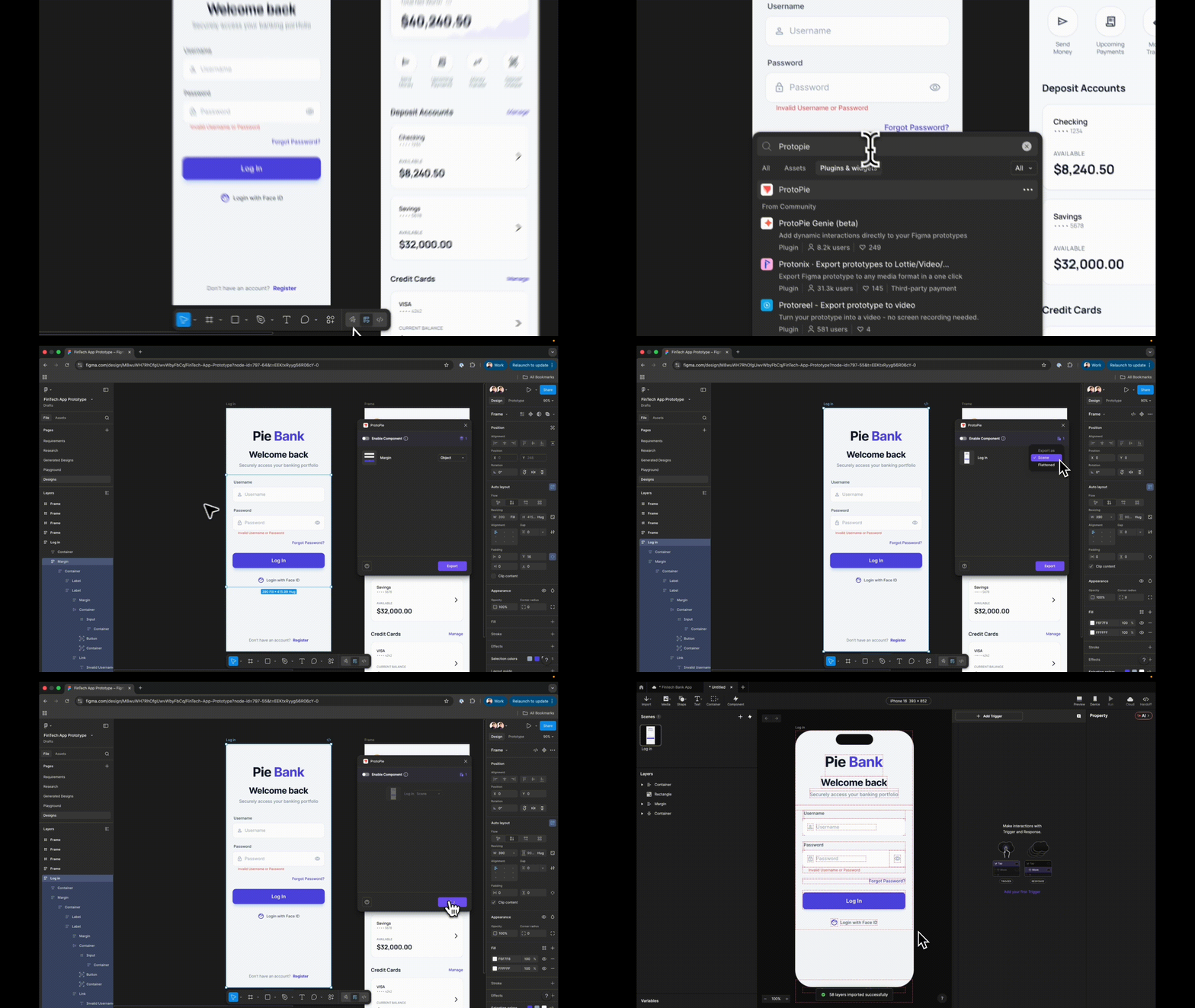
The foundational step involves importing design assets from tools like Figma. Crucially, when exporting, designers must select "Scene" rather than "Flattened." Flattened exports consolidate all elements into a single image, rendering them static. Scene export, conversely, preserves the layer hierarchy, ensuring each design element arrives in the prototyping environment as a distinct, targetable layer. This granular control is essential for building interactive components. Equally important is the disciplined renaming of every layer. Generic names like "Rectangle 14" quickly become unmanageable in formulas and conditions; descriptive names such as "Input Username" are vital for efficiency and clarity.
2. Dynamic Input Fields: Beyond Placeholders
The next critical step is to replace static text placeholders with native input layers. ProtoPie’s "Input" layer allows for actual keyboard entry, transforming a passive display into an interactive element. Users can type real text, immediately elevating the prototype’s realism. This layer is then visually styled to match the design’s aesthetics, including placeholder text, background fill, and font. The simple act of typing and seeing characters appear on screen instills a sense of authenticity.
3. Password Masking: The Security Simulation
For the password field, a single property change in the input layer can handle masking. By setting the "Type" to "Text Password," ProtoPie automatically replaces typed characters with dots or asterisks, simulating a fundamental security feature without requiring custom logic. This seemingly minor detail significantly enhances the perceived security and professionalism of the prototype.

4. Establishing Destination Scenes: Pre-emptive Navigation
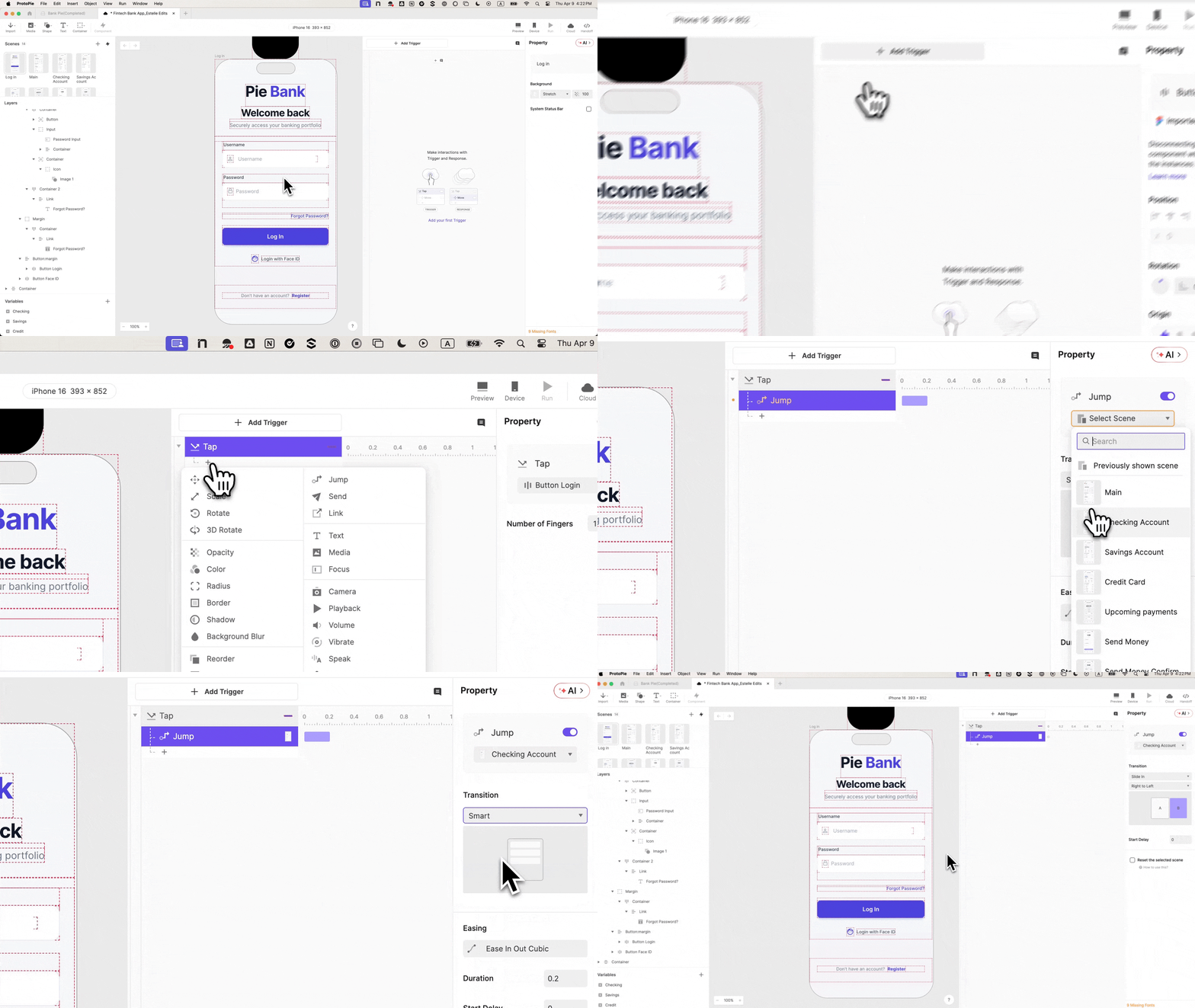
Before wiring any navigation, it is imperative to create the destination scene, even if it’s initially blank. This pre-emptive step prevents common sequencing errors and ensures a valid target for navigation responses.
5. Basic Navigation: The First Jump
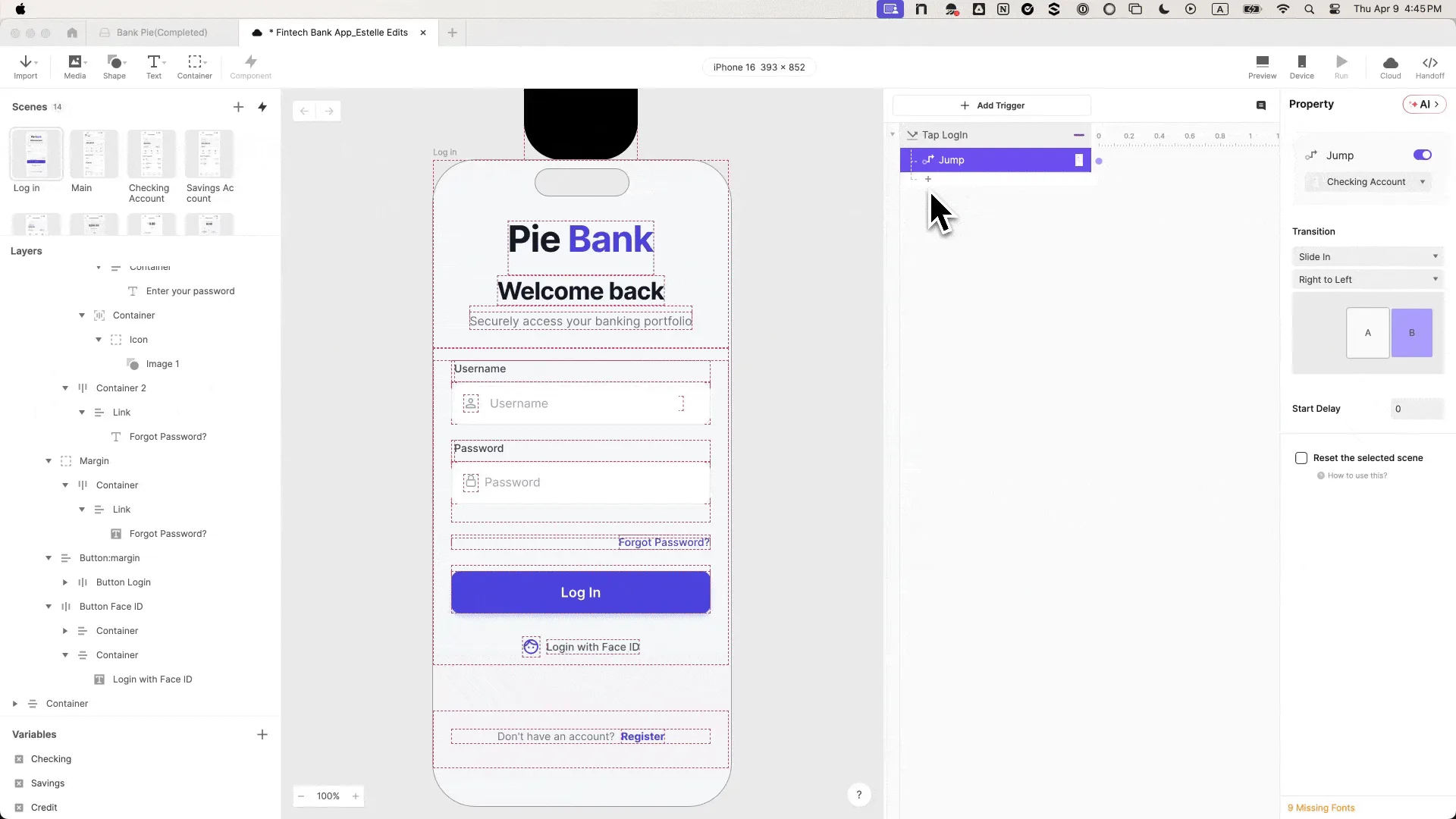
The login button is then wired to a "Tap" trigger with a "Jump" response, directing it to the dashboard scene. A suitable transition, such as "Slide in from right to left," adds to the native app feel. At this stage, the button functions, but it still allows access regardless of input, highlighting the prototype’s current "lie."
6. Variable Integration: Remembering User Input
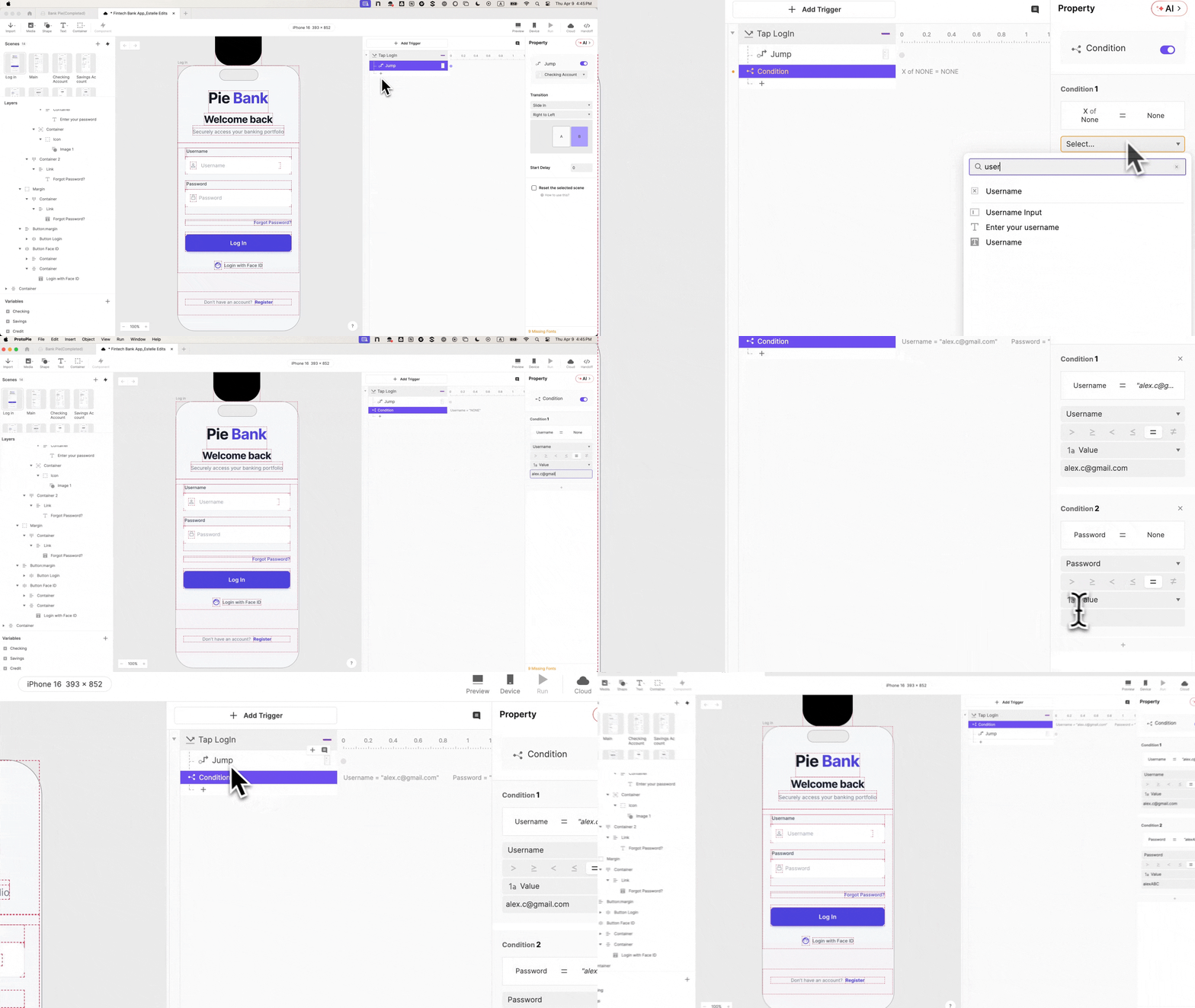
To introduce intelligence, variables are crucial. Two "Text" type variables, username and password, are created and bound to their respective input layers using formulas (e.g., input("Input Username").text). Enabling debug icons allows designers to observe live variable values, confirming successful binding as users type. This step equips the prototype with a "memory" of user input, a prerequisite for conditional logic.
7. Conditional Logic: Validating Credentials
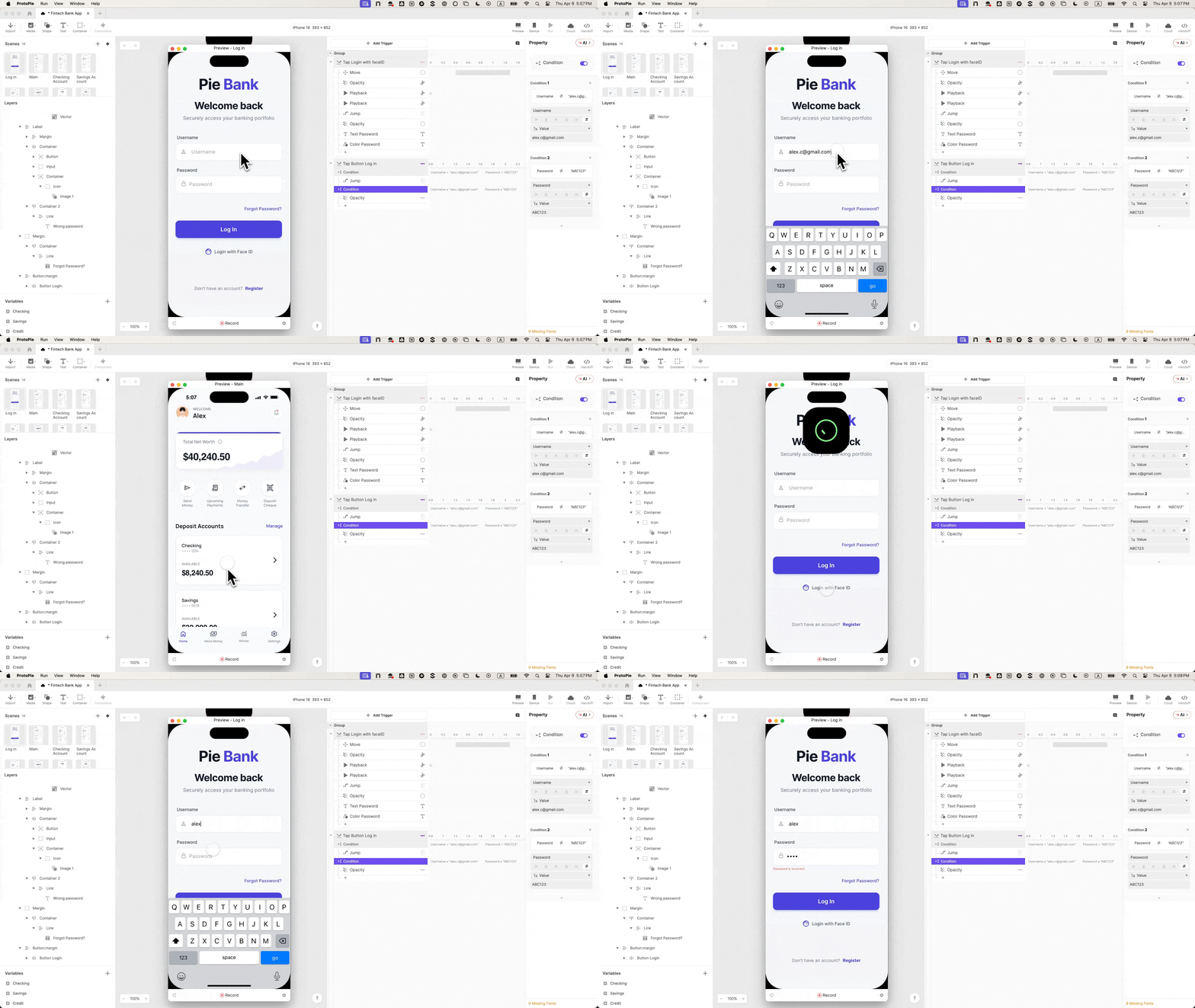
The core of realistic authentication lies in conditional logic. A "Condition" is added to the login button’s "Tap" trigger, incorporating rules that must both be true for successful login: username == "validuser" and password == "securepass". The "Jump" response is then nested within this condition. This ensures that only correct credentials allow access, forcing participants to genuinely log in and providing invaluable data on their behavior when confronted with incorrect inputs.
8. Error State Implementation: The Unskipped Interaction
A critical, yet often overlooked, aspect of realistic prototyping is the error state. An error message layer (e.g., "Error Text") is initially set to 0% opacity. A second condition, the inverse of the valid credentials condition, is then added. Inside this condition, a "Change Property" response sets the "Error Text" opacity to 100%. This means incorrect credentials trigger the error message, while correct ones lead to the dashboard. This dual outcome transforms the prototype from a demonstration into a truly testable product, revealing how users react to feedback and attempt recovery.
9. Biometric Animation: The "Is This Real?" Detail
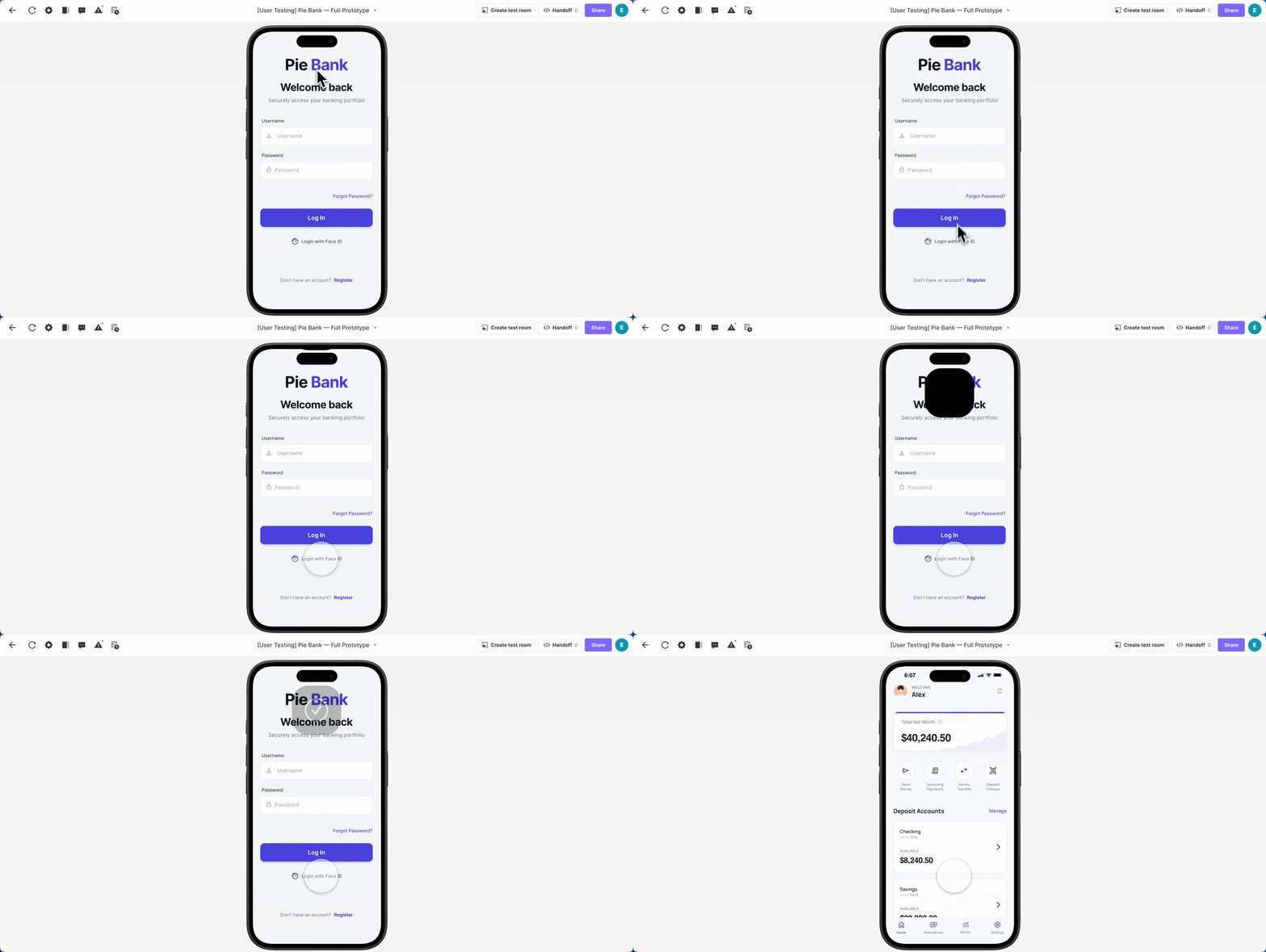
For an ultimate touch of authenticity, biometric authentication like Face ID can be integrated. A Lottie animation layer, loaded with a Face ID animation file, is positioned off-screen. A "Tap" trigger on the "Login with Face ID" button orchestrates a sequence of four responses: moving the animation into view, seeking its starting point, playing it, and finally, jumping to the dashboard.
10. Staggered Timing: Achieving Native Fluidity
The final refinement involves staggering the timing of these responses. Without delays, all actions would fire simultaneously, resulting in an abrupt jump before the animation completes. Introducing offsets (e.g., Move: 0s, Seek: 0s, Play: 0.5s, Jump: 1s) ensures a fluid, native-like experience. Additionally, enabling "Reset selected scenes" on the Jump response prevents the animation from being stuck in an incomplete state upon returning to the login screen. The result is a biometric login experience that is virtually indistinguishable from a real application, prompting testers to genuinely ask, "Is this real?"
Broader Implications for FinTech Product Development

The investment in creating such a high-fidelity login experience yields profound benefits across the entire product development lifecycle for FinTech.
Enhanced Usability Testing and Research Insights: When authentication works genuinely, the error state becomes a crucial research touchpoint. Do users understand the error message? Do they retry? Do they instinctively reach for biometric options? These are nuanced behavioral questions that a faked login cannot answer. Accurate data on user resilience, problem-solving, and preference for alternative authentication methods becomes readily available, allowing product teams to refine not just the login flow but also the overall error handling strategy. This precision translates into a higher return on investment for usability research, leading to more targeted improvements and a better final product.
Increased Stakeholder Confidence and Collaboration: In stakeholder reviews, a prototype that behaves like a shipped product speaks volumes. It conveys a level of professionalism and attention to detail that inspires confidence. Rather than needing to explain away limitations, designers can present a seamless experience that allows stakeholders to focus on the core features being showcased. This reduces ambiguity and fosters more productive discussions, accelerating decision-making.
Streamlined Handoff to Engineering: For engineering teams, the interaction panel of a high-fidelity prototype serves as invaluable documentation. It clearly outlines conditional logic, variable bindings, and precise timing, communicating design intent far more effectively than static mockups or abstract specifications. Engineers gain a concrete understanding of expected behavior, reducing misinterpretations, rework, and ultimately, development costs and timelines.
Faster Iteration Cycles and Reduced Costs: By catching usability issues and validating complex interactions earlier in the design phase, FinTech companies can significantly reduce the cost and time associated with development. The axiom that "the cost of fixing a bug increases exponentially the later it is discovered" holds true. A realistic prototype acts as an early warning system, allowing for rapid iteration and refinement before a single line of production code is written. This agility is critical in the fast-paced FinTech landscape.
Building Enduring User Trust: Ultimately, the authenticity of the login experience sets the tone for the entire application. In a sector where trust is the ultimate currency, establishing it from the very first interaction is paramount. A user who feels secure and confident in the login process is more likely to trust the application with their financial data, engage with its features, and remain a loyal customer. This foundational trust directly impacts user adoption, retention rates, and market reputation.
The Evolving Landscape of Prototyping in FinTech
The demand for high-fidelity prototyping is a reflection of broader trends in both design and technology. The rise of "no-code" and "low-code" platforms empowers designers to build increasingly complex and interactive prototypes without deep technical expertise, bridging the gap between design vision and functional simulation. As user expectations for seamless, intuitive, and secure digital experiences continue to climb, especially within the competitive FinTech arena, the ability to prototype with uncompromising realism will cease to be a luxury and become an absolute necessity.
Companies that embrace this approach will not only gather superior user insights but also build stronger, more reliable products that resonate deeply with their audience. The seemingly small detail of a truly functional login screen is, in fact, a strategic cornerstone for FinTech products aiming for genuine market success and sustained user engagement. It is where participant trust is forged, and where the signal from usability testing transforms into actionable, high-fidelity intelligence.