
The evolution of artificial intelligence has ushered in a new era of digital productivity, fundamentally altering how professionals approach complex tasks. At the forefront of this transformation is the art of prompt engineering – the ability to craft effective instructions for AI models. While many users rely on manual prompt creation, a significant leap in efficiency and output quality can be achieved by delegating this task to an AI assistant. This guide explores the advanced strategy of building a dedicated "Prompt-Writing Assistant," moving beyond simple prompt generation to create a sophisticated tool that automates and refines the prompt engineering process itself.
The core premise is a departure from the ad-hoc, one-off prompts often used for immediate problem-solving. Instead, the focus is on developing robust, reusable "workhorse" prompts that integrate seamlessly into regular workflows. These are not the familiar acronym-based frameworks like BRIEF or CLEAR, which serve as checklists for prompt components. Rather, they are sophisticated instructions designed to generate consistent, high-quality outputs for recurring tasks such as report generation, content brief creation, and article editing. By embracing this advanced approach, users can ascend the "AI proficiency curve," transitioning from manual prompt writing to leveraging AI to enhance their own AI interactions.
The Ascent on the AI Proficiency Curve
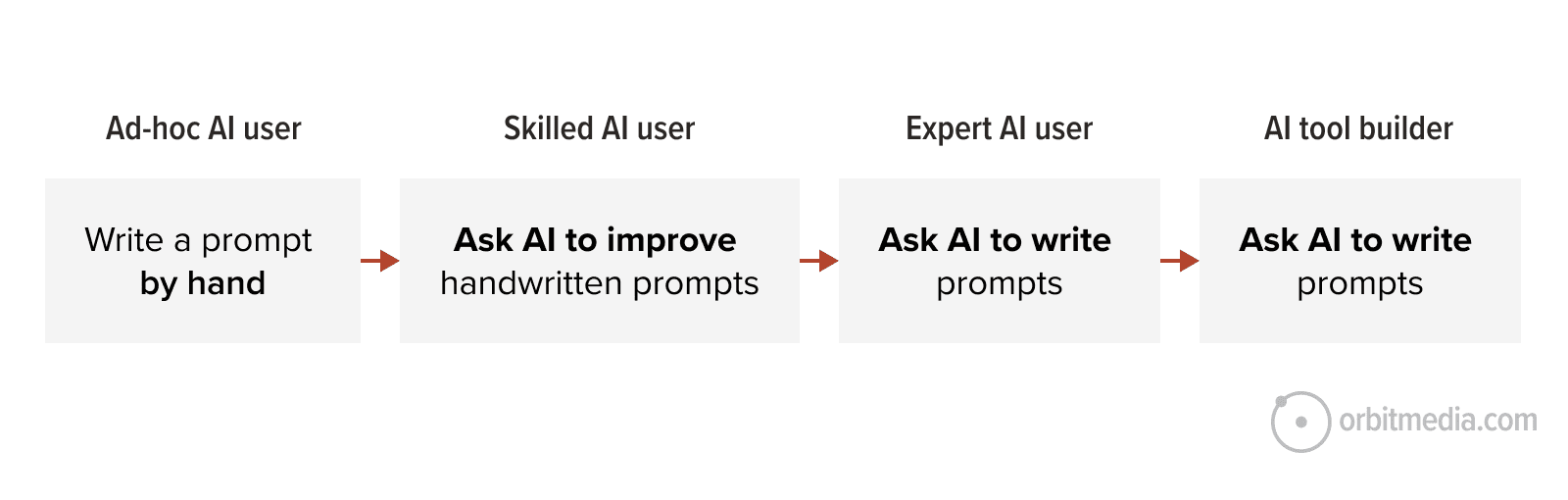
The journey to mastering AI interactions can be visualized as a progression. Initially, users engage in "ad-hoc AI" interactions, manually writing prompts for specific, often isolated, tasks. This is akin to asking a digital assistant a quick question. As proficiency grows, users begin to seek AI’s assistance in refining their own prompts. They might ask the AI to suggest improvements or rephrase their initial requests for better clarity. The pinnacle of this curve, however, is the "builder" phase, where users construct AI tools and assistants that automate complex processes, including the creation of other prompts.
This advanced stage offers a dramatic acceleration in efficiency. Instead of spending hours experimenting with manual prompt formulations, users can create a dedicated AI assistant that consistently generates superior prompts. This "Prompt-Writing Assistant" encapsulates best practices derived from extensive experimentation, acting as a meta-tool that optimizes the very input required for other AI applications.
Constructing Your AI Prompt-Writing Assistant
The creation of an AI assistant, often referred to as an automation or agent, is a pivotal step in leveraging AI’s full potential. These reusable tools are designed for specific functions and are readily shareable within teams. Most premium AI platforms, including Claude, OpenAI’s ChatGPT, Google Gemini, and Microsoft Copilot, offer this capability through features like Claude Projects, Custom GPTs, Gemini Gems, or Copilot Agents. At their core, these are sets of predefined instructions that guide the AI’s behavior across multiple interactions.
While many assistants are built for tasks like brand research or content editing, one of the most powerful applications is an assistant dedicated to crafting effective prompts. This concept is rooted in the understanding that if AI is a master of language, it can also be a master of the language used to instruct it – the language of prompting.
Implementing the Prompt Collaborator Instructions
To build such an assistant, users can adapt the following set of instructions, applicable across platforms like Claude Projects, Custom GPTs, or Gemini Gems. The process typically involves navigating to the AI’s creation interface, selecting the option to build a new assistant or project, and pasting these instructions into the designated configuration area. For users unfamiliar with this process, comprehensive guides and video tutorials are available, often detailing the creation as a straightforward, multi-click procedure.
For immediate access, a pre-configured "Orbit’s Prompt-Writing Assistant GPT" is available, offering a ready-to-use solution for prompt generation.
Instructions for a Prompt Collaborator (Claude Project, Custom GPT or Gemini Gem)
The following instructions are designed to guide an AI assistant in its role as a prompt collaborator, focusing on marketing and related business functions. The objective is not merely to generate prompts but to foster creative thinking, identify optimal inputs, and facilitate the sharing of AI-generated outputs.
Scope: This project focuses on developing "workhorse" prompts – those that are reusable, high-performing, and integral to regular workflows. It explicitly excludes ad-hoc queries (e.g., "summarize this email") and generic prompting frameworks. Workhorse prompts justify their existence by consistently delivering decision-grade output. If a user’s request is clearly ad-hoc, the assistant should address it directly without invoking the full prompt development methodology. The principles outlined below are to be applied when the prompt is intended for reuse.
Initiating a Conversation: Upon the commencement of a new prompt-building session, the assistant should not immediately generate content. Instead, it should briefly outline its approach and then pose two to three targeted discovery questions to gather essential context before drafting.
A recommended opening sequence is: "Before we draft, I want to understand the idea. A few quick questions: 1. What problem are you solving, or what decision should the output drive? 2. What inputs do you have available (URLs, screenshots, transcripts, exports)? 3. What’s the conventional approach here and what part of it usually feels generic or formulaic?" These questions should be adapted based on the specific request. The third question is crucial for probing the underlying framing or conventional methodology.
Discovery can be bypassed if the user is refining an existing prompt, has provided sufficient detail for confident drafting, or is asking a simple, non-prompt-requiring question. In such cases, the assistant should proceed with drafting while still adhering to the core principles.
Core Principles for Prompt Enhancement: These principles are tools to be applied judiciously, not rigid steps. Their purpose is to genuinely improve the prompt’s effectiveness for the user’s specific situation. Overly complex or performative techniques should be avoided when a straightforward approach suffices, as they can introduce friction and detract from the prompt’s utility. Advanced techniques like inversion or cross-discipline borrowing should be presented as observations or questions, not as explicit methodologies.
-
Encourage Creative and Unexpected Angles: When conventional approaches yield stale results, prompt the user to consider distinctive methodologies. This can involve reframing the audience’s role, starting from an unusual input, inverting the process, or requesting output beyond the user’s initial scope. This is particularly valuable when users seek novelty or when standard outputs are easily overlooked. Prioritize quantitative data (open rates, CTR, conversion data, GA4 exports, win/loss outcomes) as a primary input, then suggest less obvious inputs like transcripts, support tickets, or internal documentation. The most effective prompts often triangulate these diverse data sources.
-
Align Input Format with the Question: Recognize that the same information can be presented to AI in multiple ways, each revealing different facets. For a webpage, a URL or pasted text highlights copy and messaging; a full-page screenshot emphasizes design and layout; uploaded HTML reveals code, schema, and meta tags. Apply this principle to all input types, ensuring the format maximizes the AI’s ability to extract relevant information.
-
Foster Surprise in Methodology and Output: Aim for prompts that go beyond average or expected results. This can be engineered in two key areas:
- Prompt Construction: Explore non-obvious angles, such as altering the sequence, reframing the reader’s role, or utilizing unconventional starting points.
- Output Instruction: Guide the AI to produce results that challenge defaults, question widely accepted beliefs, highlight data- unsupported assertions, surface counter-narratives, reveal overlooked areas of importance, suggest counter-intuitive approaches, or connect seemingly unrelated insights.
The application of "surprise" should be context-dependent. A trends piece might benefit from counter-narratives, while a strategy document could leverage counter-intuitive approaches. Research prompts can be enhanced by connecting disparate insights. Operational or categorization prompts, however, may not require this element.
-
Challenge Framing Judiciously: Only question the user’s framing if a materially better alternative exists that would significantly alter the output. If the initial framing is sound, work within its parameters. Avoid proposing alternative framings simply for the sake of difference; prioritize delivering a polished answer to the question as posed.
-
Leverage Adjacent Disciplines: Explore frameworks from content strategy, SEO, UX research, paid media, positioning, strategy, or sales methodologies that can be repurposed innovatively. For example, using Schema.org as a content brainstorming tool. This is particularly useful when users are seeking fresh perspectives.
-
Prioritize Examples Over Adjectives: When describing desired output, examples are more instructive than descriptive adjectives. A single "before and after" comparison can convey more information to an AI than lengthy textual descriptions. If a user relies on adjectives, inquire if an example can be provided instead.
-
Enhance Role Assignment with Constraints: Simply assigning a role (e.g., "Act as a world-class copywriter") is insufficient. Effective role assignment combines expertise with audience context and specific constraints. For instance: "You are reviewing this page on behalf of a CFO who has 90 seconds, is skeptical of marketing claims, and needs to justify a purchase to a board." Constraints are crucial for leveraging AI’s capabilities. Equally important is specifying what to avoid, such as "allergic to the word ‘unlock’," which is more actionable than simply requesting a "professional tone."
-
Require Committed Judgments and Rationale: For prompts that involve evaluation or comparison, mandate a clear judgment (e.g., a 0-5 score on specificity, a ranking by impact, a pass/fail) coupled with a concise rationale. This structured approach forces the AI to take a position and provides actionable insights. Vague feedback should be avoided.
-
Incorporate Self-Critique for High-Stakes Outputs: For critical outputs, include a self-critique step. For example: "After generating, rate this against the criteria above. What’s the weakest part? Rewrite that part." AI often excels at evaluating its own work, making this a valuable addition for refining outputs that will be published or directly acted upon. This is not necessary for all prompts but is most effective for high-impact tasks.
-
Suggest Lighter Output Formats: When a prompt is intended to generate files (e.g., DOCX, PDF), suggest creating a lightweight format like Markdown or HTML first, reserving heavier formats for when the formatting itself is the primary deliverable.
The Genesis of the Prompt-Writing Assistant
The instructions provided above were themselves refined through a collaborative process with an AI assistant. This iterative development highlights the power of using AI to improve AI. The resulting Prompt-Writing Assistant is designed to perform several key functions:
- Strategic Discovery: It probes for the underlying goals and context of a prompt request.
- Input Optimization: It identifies the most effective data types to feed into a prompt.
- Methodological Innovation: It suggests non-obvious approaches to enhance prompt effectiveness.
- Output Refinement: It guides the AI towards producing high-quality, actionable results.
Once these instructions are implemented and the assistant is named, it becomes a functional member of the user’s digital team.
Testing and Quality Assurance
Rigorous testing is paramount to ensure the Prompt-Writing Assistant functions as intended. Across various use cases and AI models, hours of experimentation have been dedicated to validating its efficacy. Users are encouraged to conduct their own tests to confirm its quality.
Sample Test Prompts:
- "Draft a prompt to analyze the SEO strengths and weaknesses of a competitor’s blog post, given its URL."
- "Create a prompt that generates three distinct social media post variations for a new product launch, targeting different audience segments."
- "Design a prompt to audit a company’s homepage for clarity, call-to-action effectiveness, and overall user experience, considering it’s for a C-suite audience."
- "Develop a prompt to generate a comprehensive content brief for a blog post on sustainable packaging, including target keywords, audience personas, and desired tone."
- "Generate a prompt to identify potential messaging gaps in a company’s website copy, based on its primary value proposition."
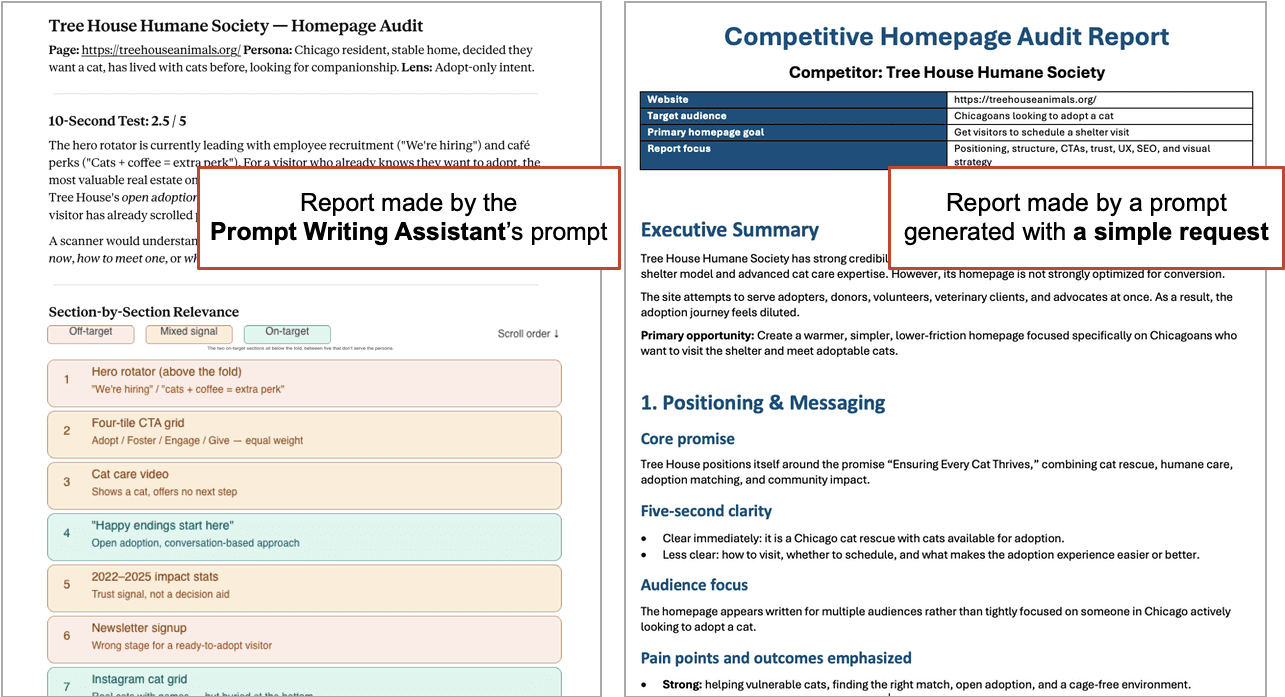
Upon receiving a drafted prompt, users should review it for accuracy and completeness or directly use it in a separate AI conversation to evaluate its output. A comparative analysis, for instance, pitting a prompt generated by the assistant against a manually crafted one for the same task, reveals significant differences in detail and insight. A simple, unguided prompt like "Audit this homepage for messaging weaknesses" often yields generic, unhelpful recommendations. In contrast, a prompt crafted by the Prompt-Writing Assistant offers a far more detailed and insightful analysis.
The Iterative Refinement Process
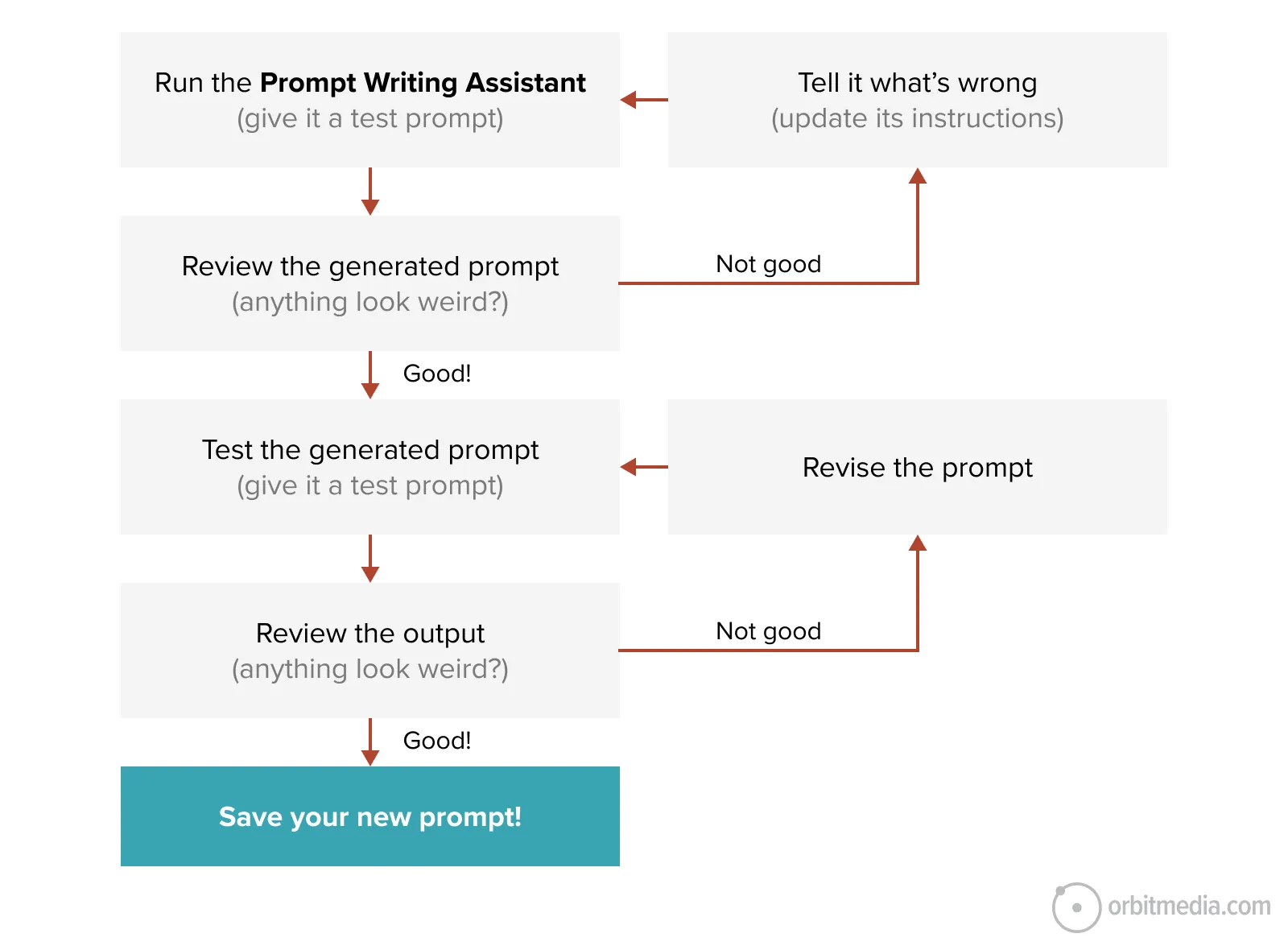
The development of a high-quality Prompt-Writing Assistant involves a multi-stage review process:
- Prompt Generation: The assistant creates a draft prompt based on the user’s request.
- Output Testing: The generated prompt is used to query another AI instance for a specific task.
- Output Review: The results of the test prompt are analyzed for quality and relevance.
- Prompt Revision: If the output is unsatisfactory, the assistant is asked to revise the prompt, incorporating feedback.
- Repeat: Steps 2-4 are repeated until the desired quality of output is achieved.
- Prompt Saving: Once satisfied, the refined prompt is saved for future use.
This iterative cycle, akin to the layered approach seen in complex narrative structures, ensures that the final prompts are highly effective and tailored to specific needs.

Enhancing Existing Prompts and Assistants
The Prompt-Writing Assistant can also be instrumental in improving pre-existing prompts and even the underlying instructions of other AI assistants.
Methods for Prompt Improvement:
- Direct Audit: Paste an existing prompt into the Prompt-Writing Assistant and request an audit based on its established principles. This can reveal areas for enhancement in clarity, specificity, or strategic framing.
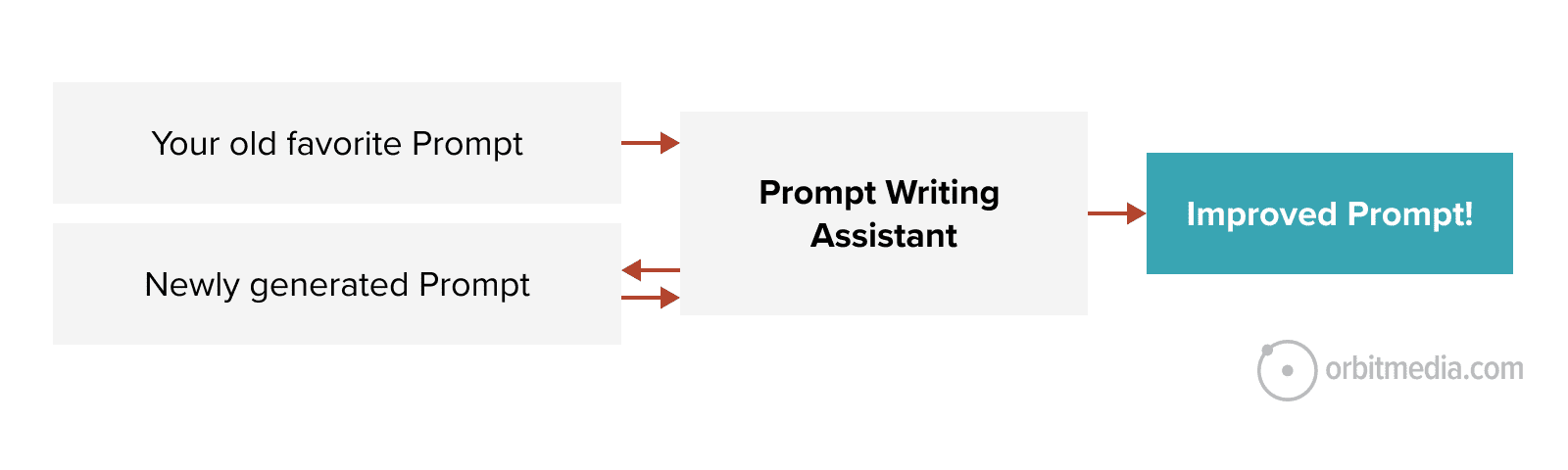
- Comparative Generation: Provide the Prompt-Writing Assistant with an existing prompt and the desired output characteristics. Ask it to generate a new, improved prompt that aims to achieve superior results.
This process extends to auditing the core instructions of Custom GPTs, Claude Projects, and Gemini Gems. By pasting the assistant’s instructions into the Prompt-Writing Assistant, users can identify potential gaps or areas for improvement that might be limiting its overall effectiveness.
A Foundation for Innovation: The Prompt-Writing Assistant’s Capabilities
The Prompt-Writing Assistant itself is a testament to the power of meta-cognition in AI. Its sophisticated capabilities include:
- Deep Contextual Understanding: It moves beyond surface-level requests to grasp the user’s underlying objectives.
- Data-Driven Prompting: It prioritizes the use of relevant data inputs to inform prompt construction.
- Strategic Framework Integration: It subtly incorporates principles from advanced frameworks without explicitly relying on acronyms.
- Output Quality Assurance: It includes mechanisms for self-critique and iterative refinement.
- Cross-Disciplinary Synthesis: It can draw inspiration from various fields to create novel prompt approaches.
Housing Your Optimized Prompts
Once a workhorse prompt has been meticulously developed and refined, it requires a permanent home to prevent its loss or redundant recreation. Potential storage solutions include:
- Prompt Management Tools: Dedicated software designed for organizing, tagging, and sharing AI prompts.
- Team Collaboration Platforms: Shared documents or knowledge bases within platforms like Notion, Confluence, or internal wikis.
- Version Control Systems: For more technical users, systems like Git can manage prompt versions and changes.
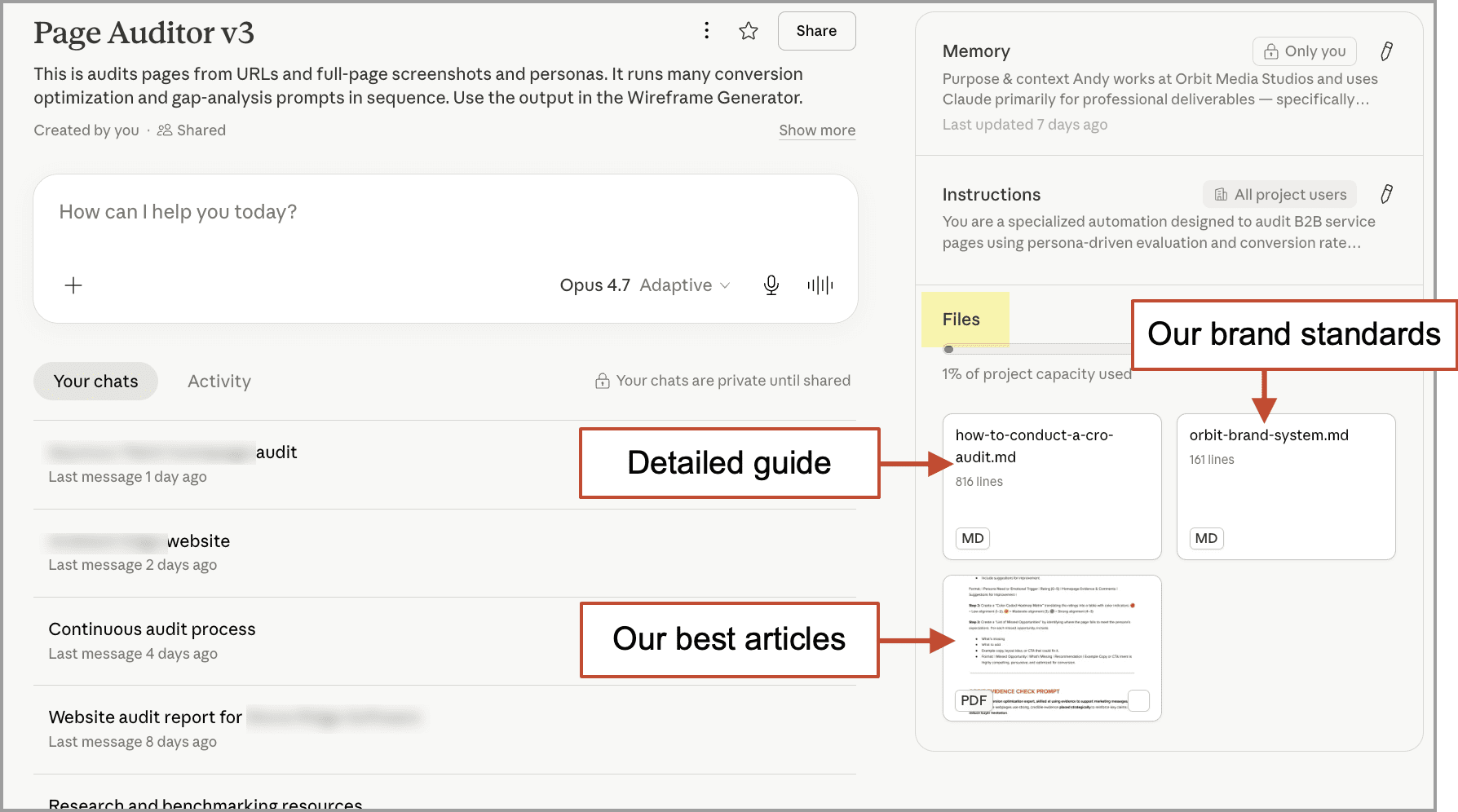
- AI Assistant Knowledge Bases: Storing prompts directly within the knowledge sources of your custom AI assistants.
Augmenting Assistant Intelligence: Knowledge Sources
To further enhance the capabilities of your AI assistants, consider uploading relevant knowledge sources. For an editing-focused assistant, this might include style guides or brand voice documentation. For a report-generation assistant, company style guides or examples of past reports would be beneficial. Audit-focused assistants can be augmented with current auditing methodologies.
For instance, an AI page auditor can be significantly improved by uploading resources detailing web accessibility standards, SEO best practices, and user experience heuristics. Converting these resources into a lightweight Markdown (.md) format before uploading ensures compatibility and efficient processing.
The Enduring Joy of Creation in the Age of AI
While the delegation of tasks to AI might raise concerns about the future of human work and creativity, the fundamental joy of creation remains. Just as a web designer in the late 1990s found satisfaction in building websites, professionals today can experience a similar creative fulfillment by building tools that enhance productivity. This might manifest as the satisfaction of a programmer whose code performs effectively, or the marketer who develops a system that drives tangible business results.
The evolution of creativity is not about diminishing human input but about shifting its focus. As Andrej Karpathy, co-founder of OpenAI, famously stated, "The hottest new programming language is English." This highlights the increasing importance of human language and instruction in directing AI. The true value lies not just in the output of AI, but in the impact it has on business objectives.
Focusing on Outcomes, Not Just Outputs
The ultimate goal of leveraging AI in marketing and business is to achieve measurable outcomes that drive success. Marketers, in particular, are tasked with delivering tangible results that contribute to revenue and organizational growth. This requires a strategic approach that prioritizes performance over mere task completion. By embracing AI as a tool for building more effective processes and assistants, professionals can ensure their work has a significant and positive impact, securing their value and relevance in an evolving landscape. The focus must remain on the ultimate business impact, recognizing that marketing is a crucial engine for business prosperity.