
In the fast-paced world of digital marketing, the ability to rapidly diagnose underperforming web pages is a critical skill for SEO professionals and business owners alike. Whether a high-value product page has experienced a sudden dip in search rankings, a competitor has overtaken a primary keyword, or a landing page is failing to convert visitors, the need for immediate, actionable data is paramount. Traditional, comprehensive site crawls—while essential for overall health—are often too time-consuming when the objective is to triage a single problematic URL.

The SEOquake Chrome extension, developed by Semrush, provides a streamlined solution for this challenge. By enabling real-time audits of technical signals, on-page SEO factors, linking strategies, and core metrics without the need to navigate away from the page, it serves as an indispensable tool for immediate performance assessment. This guide outlines a structured, three-minute workflow designed to transition from initial triage to definitive diagnosis, ensuring that SEO professionals can prioritize fixes based on objective, color-coded data.

The Mechanism of Rapid SEO Triage
The effectiveness of the SEOquake extension lies in its ability to condense complex technical data into an intuitive interface. Upon installation, users can access the extension by clicking the icon on any active webpage. The tool organizes findings into a color-coded system: green indicates optimal performance, orange signals warnings that require professional judgment, and red identifies critical errors that likely demand immediate attention. This visual hierarchy allows auditors to ignore minor anomalies and focus on the structural, technical, and content-related issues that directly influence search engine visibility.

Minute One: The Quick View Pop-Up
The first 60 seconds of the audit are dedicated to triage via the Quick View pop-up. This interface serves as a high-level health check, focusing on five primary tabs: Page Info, Audit, Content, Links, and Social. For a standard page evaluation, focusing on the Page Info, Audit, and Content tabs provides the most immediate ROI.

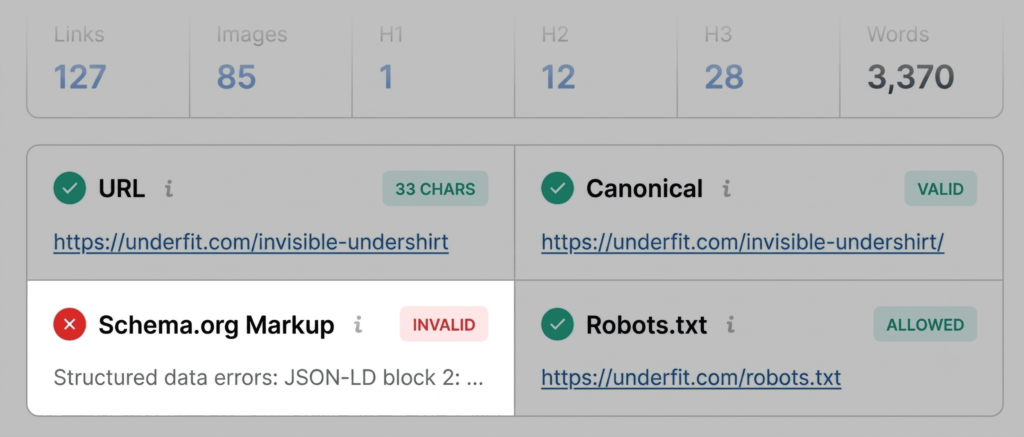
The Page Info tab acts as a baseline, providing a snapshot of the URL’s core SEO elements. During this phase, an auditor should prioritize five specific metrics: the Title Tag, Meta Description, Meta Keywords (where applicable), Canonical URL, and the presence of Schema.org structured data. A common issue often identified here is invalid JSON-LD schema, which can disqualify a product page from displaying rich snippets—such as price, availability, or star ratings—directly in search results. Identifying these errors early prevents the loss of significant click-through rate (CTR) potential.

Minute Two: Technical and Content Analysis
Moving into the second minute, the focus shifts to the Audit and Content tabs. The Audit tab is where technical SEO essentials are evaluated, including indexation status, mobile-friendliness, and sitemap accessibility. While a "green" status across these categories suggests no immediate emergency, "orange" warnings serve as a prompt for deeper investigation. For instance, if a site utilizes multiple languages, the absence of proper hreflang tags will be flagged; while not always a "blocker" in the strict sense, it is a significant barrier to effective international SEO.

The Content tab is equally vital, particularly in the current digital landscape where AI-driven search systems prioritize clear, logical structure. An effective page should maintain a consistent heading hierarchy, starting with a single H1 tag followed by a logical progression of H2s, H3s, and H4s. A common, yet easily rectifiable, issue is a fragmented heading structure, such as jumping from an H1 directly to an H4. Furthermore, the Content tab identifies missing alt text across images. Given that images are primary drivers of conversion on product pages, ensuring that every asset is properly described is not just an SEO best practice—it is an accessibility and sales imperative.

Minutes Three: The Full Report Diagnosis
The final minute is reserved for transitioning from the Quick View pop-up to the Full Report, which offers a granular investigation into the flags identified during the initial triage. By clicking "View Full Report," the auditor gains access to six comprehensive panels, including specific sections for technical audits, keyword density, and link health.

In the Audit panel, the ability to jump directly to flagged sections is essential for time management. For example, if the initial triage identified an issue with XML sitemaps, the auditor can navigate to the Technical Compliance section to confirm whether the sitemap is discoverable by crawlers. Furthermore, if Schema markup was flagged as invalid, the "Test in Rich Results" button provides a direct link to Google’s own validation tool, confirming the specific nature of the JSON-LD errors and providing a path for developer intervention.

Keyword Density and Link Health
The Keyword Density panel serves as a diagnostic tool for topic coverage. While the "keyword stuffing" strategies of the early 2000s are long obsolete, understanding the prominence of key terms remains relevant. The Keyword Cloud feature allows an auditor to verify that the page is being interpreted by search engines as intended. If a product page for a "v-neck undershirt" shows keywords like "shipping" or "account" as its most prominent terms, it indicates that the primary product copy is being overshadowed by site navigation elements, necessitating a rewrite of the main content headers.

Finally, the Links panel addresses the technical architecture of the page. Broken internal and external links are detrimental to user experience and crawl budget efficiency. By utilizing the CSV export feature within this panel, auditors can generate a report of all broken links to share with a web development team, ensuring that the cleanup process is both accurate and trackable.

Strategic Implications and Moving Forward
The data gathered through this three-minute workflow allows for a data-driven decision regarding the scope of the fix. If the identified issues—such as missing schema or broken links—are isolated to a single page, a manual update is the appropriate response. However, if these issues are systemic, they suggest a template-level failure or a misconfiguration of the site’s Content Management System (CMS).

In such cases, the information gathered from SEOquake provides the necessary documentation to initiate a broader site-wide audit using more comprehensive tools like Semrush’s Site Audit feature. This tool allows for the scanning of hundreds of URLs simultaneously, identifying patterns in technical failures that a page-by-page analysis might miss.

Ultimately, SEO is a practice defined by the tension between content quality and technical precision. By leveraging tools like the SEOquake extension to perform rapid, structured audits, marketers can ensure that their technical foundations remain as robust as their content. This proactive approach to maintenance is not merely about fixing errors; it is about creating a frictionless environment where both search engine crawlers and human visitors can engage with a brand’s digital assets with maximum efficiency. As search algorithms continue to evolve toward greater complexity, the ability to quickly triage and address performance gaps will remain a hallmark of effective search engine optimization.