
In the high-stakes world of digital marketing, the difference between a top-ranking search result and an invisible page often comes down to technical precision. SEO professionals and site owners frequently face the challenge of diagnosing underperforming pages—such as product pages that have slipped in search rankings or client sites that fail to convert—without the luxury of waiting hours for a comprehensive site crawl. To bridge this gap, the SEOquake Chrome extension, developed by Semrush, provides an immediate, browser-based diagnostic tool that allows users to audit technical signals, on-page SEO, and linking strategies in real-time.

The necessity for such rapid assessment tools has grown in tandem with the increasing complexity of search engine algorithms. As Google and other search providers prioritize core web vitals, structured data, and content relevance, the ability to pinpoint a technical error—such as an invalid JSON-LD schema or a missing meta tag—in under three minutes has become a competitive advantage.

Understanding the SEOquake Framework
SEOquake operates as a bridge between the browser and the complex backend data of a website. By integrating directly into the Chrome interface, the extension eliminates the need to navigate between external dashboards. The tool provides two primary methods for analysis: the Quick View pop-up for immediate, top-level triage and the Full Report for granular, data-driven investigation.

The efficacy of these reports lies in their color-coded diagnostic system. Green indicators denote healthy performance, orange flags signal areas requiring a professional judgment call, and red markers highlight critical errors that demand immediate remediation. This visual hierarchy allows auditors to ignore non-essential noise and focus their attention on the metrics that directly impact search engine visibility and user experience.

Phase One: The Triage Process (Minute One)
The first sixty seconds of an audit are dedicated to identifying glaring technical failures. By accessing the Quick View pop-up, an auditor can evaluate five distinct tabs: Page Info, Audit, Content, Links, and Social.

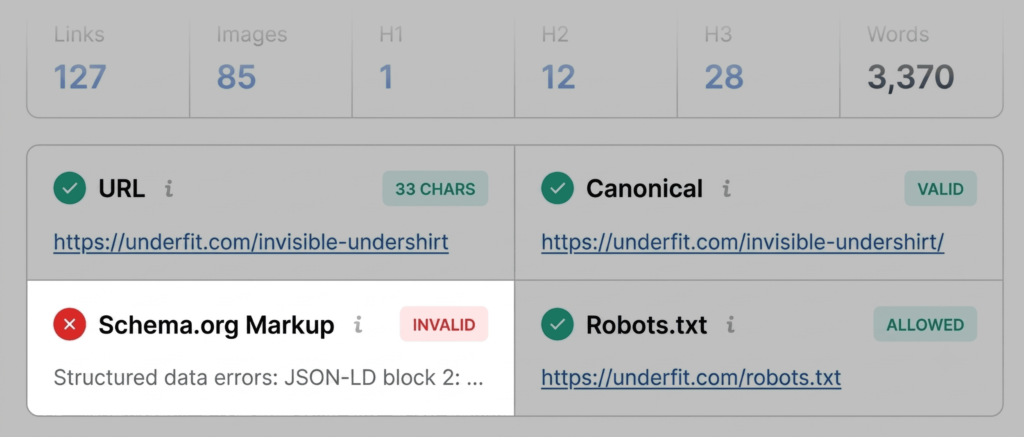
The Page Info tab serves as the foundational pillar, providing an instant snapshot of essential on-page elements. During a standard triage, an auditor prioritizes the title tag, meta description, H1 tags, and URL structure. For instance, if a product page shows a red flag on Schema.org markup, it indicates that search engines may fail to parse structured data. For an e-commerce site, this is a critical failure, as it effectively disqualifies the page from displaying rich results—such as price, stock availability, or star ratings—directly in the search engine results page (SERP).

Phase Two: Technical and Structural Diagnosis (Minutes Two and Three)
Once the triage is complete, the subsequent two minutes are used to move from identifying "that" there is an issue to understanding "why" the issue exists. This transition involves opening the Full Report, which provides deeper visibility into technical infrastructure.

The Audit panel is particularly robust, checking for indexation blockers, mobile compliance, and sitemap accessibility. A frequent, often overlooked, technical issue involves XML sitemaps that exist but are not properly linked. While a search engine might eventually discover these files, an unlinked sitemap creates a barrier to efficient crawling, potentially delaying the indexing of new or updated product content.

Furthermore, the Content tab allows auditors to scrutinize heading structures. A common error found in automated audits is an illogical heading hierarchy—such as jumping from an H1 to an H4. While this does not strictly violate a hard-coded algorithmic rule, it complicates how AI search systems and screen readers interpret the content’s hierarchy. Additionally, image alt text analysis remains a vital component of this phase; a high volume of images missing descriptive text diminishes both SEO reach and accessibility for visually impaired shoppers.

Supporting Data and Industry Implications
Recent industry data suggests that pages with properly implemented schema markup experience a significantly higher click-through rate (CTR) than those without. Furthermore, the correlation between technical "health"—defined by minimal crawl errors and optimized loading speeds—and consistent organic traffic growth remains a cornerstone of search optimization.

When an audit reveals recurring issues like broken internal links or invalid JSON-LD code, the implications extend beyond a single page. If these errors appear across multiple product templates, they suggest a broader configuration issue within the site’s content management system (CMS). This realization forces a strategic pivot: the auditor must decide whether to perform a page-level manual fix or initiate a site-wide technical audit.

The Role of Domain Context
The Semrush panel within the extension provides the essential context required for this strategic decision. By reviewing domain-level metrics, such as traffic analytics and backlink profiles, an auditor can gauge the severity of an issue. A page that is technically weak but sits on a high-authority, well-trafficked domain can often be salvaged with targeted, page-level optimizations. Conversely, if a domain shows poor overall health, the technical errors identified in the audit are likely symptoms of systemic infrastructure problems that require a full-site crawl using advanced tools like Semrush Site Audit.

Strategic Conclusion
The utility of a three-minute audit lies in its ability to facilitate fast, iterative improvements. In an environment where search trends evolve rapidly, the ability to quickly diagnose and pivot is vital. By leveraging tools like SEOquake to maintain a consistent state of technical hygiene, digital marketers can ensure their content is always optimized for the latest search requirements.

Ultimately, whether the goal is to resolve a specific schema error or to verify the keyword density of a landing page, the integration of real-time diagnostic tools into the standard workflow is no longer optional. It is the baseline requirement for maintaining visibility in a crowded digital marketplace. By systematically moving through triage and diagnosis, professionals can transform data into actionable insights, ensuring that every page on a site has the best possible opportunity to rank and convert.