
In the fast-paced world of digital marketing, the ability to rapidly diagnose underperforming web pages is a critical skill for SEO professionals and content strategists. When a product page experiences a decline in search rankings, a competitor outranks a high-value asset, or a client site suffers from a low conversion rate, time is the most valuable currency. Traditional site audits often require extensive crawls that can take hours or even days to process; however, modern browser-based tools have evolved to offer immediate, actionable insights without the need for comprehensive site-wide analysis.

The SEOquake Chrome extension, developed by Semrush, serves as a powerful utility for immediate on-page diagnostics. By integrating technical signals, on-page SEO metrics, and linking data directly into the browser, the tool enables a streamlined, three-minute workflow that transitions from initial triage to specific diagnosis. This approach allows users to identify critical issues—such as broken schema, missing meta tags, or poor content structure—the moment they land on a page.

The Anatomy of a Three-Minute Audit
A professional SEO audit generally follows a hierarchical structure, moving from high-level "red flag" detection to granular technical analysis. The SEOquake workflow is designed to facilitate this by dividing the audit process into two distinct phases: Triage and Diagnosis.

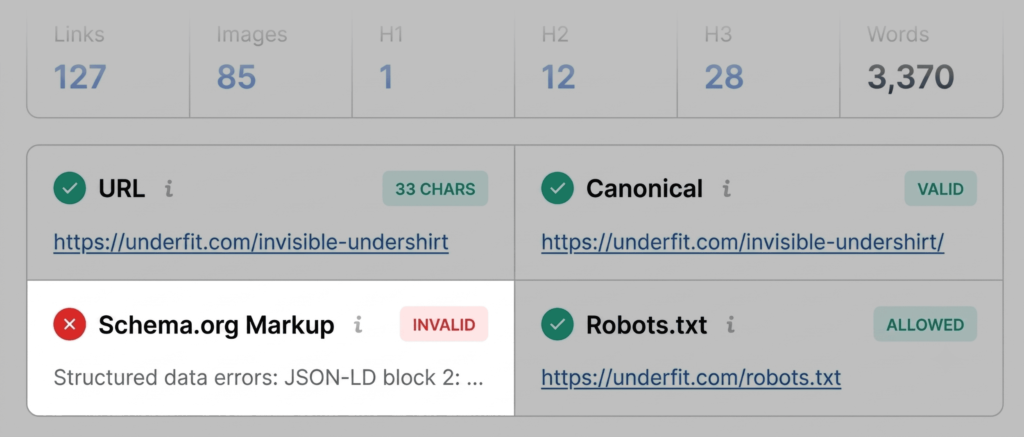
During the first 60 seconds, or the Triage phase, the objective is to determine if the page is fundamentally flawed. This is accomplished using the Quick View pop-up, which acts as a diagnostic dashboard. By focusing on the "Page Info," "Audit," and "Content" tabs, an auditor can identify glaring technical gaps. For instance, color-coded indicators (green, orange, and red) provide an immediate visual cue regarding the severity of an issue. Green indicates alignment with best practices, while red signals an immediate priority that could be preventing search engines from correctly parsing or indexing the page.

Technical and Content Diagnostics
The technical audit component focuses on the foundational elements of search visibility. Common technical pitfalls that are frequently surfaced by this tool include incorrect meta tags, structural issues with heading tags (H1-H6), and missing alt attributes on images.

In the case of product pages, structured data (Schema.org) is paramount. If a tool flags JSON-LD errors, it is a significant concern; invalid product schema can render a page ineligible for rich results in search, effectively stripping the listing of price, availability, and user rating information. This loss of rich snippet data is a known factor in reduced click-through rates (CTR) and lower overall search visibility.

The Content tab provides further insight into how search engines and AI-driven systems interpret the page. A common issue identified here is a non-linear heading structure. When a page jumps from an H1 to an H4 without intervening H2s or H3s, it not only confuses search crawlers but also hampers user accessibility and navigation. Furthermore, the audit of image alt text remains a crucial step, as images are essential for conversion on e-commerce platforms. Missing alt text not only reduces accessibility but also limits the potential for the page to appear in image search results, which can be a vital source of organic traffic for visual-heavy industries.

Advanced Diagnosis and Site-Wide Implications
Once the initial triage is complete, the subsequent two minutes are dedicated to the Full Report. This deeper dive allows the auditor to investigate the "why" behind the flags raised during the initial scan. The Full Report features six panels, including detailed sections on technical audit findings, keyword density, and internal/external link health.

In the Audit panel, users can access specific technical compliance reports covering crawlability, indexation, and mobile compliance. When an issue is flagged, the tool often provides "info tips" or links to diagnostic resources, such as Google’s Rich Results Test. This is where the transition from page-level fixes to site-wide strategy occurs. For example, if the tool reveals that a sitemap is present but not clearly linked, or if there are consistent JSON-LD errors across multiple product templates, it suggests a site-wide configuration error rather than an isolated page issue.

The Keyword Density panel offers another layer of context. While keyword stuffing is no longer an effective strategy, analyzing the "keyword cloud" is an excellent way to determine if a page is optimized for its intended topic. If the most prominent terms in the cloud do not align with the product’s core value proposition, it serves as a signal that the content strategy may be misaligned with user intent.

The Role of Backlink and Domain Authority
Beyond the page itself, understanding the domain’s broader health is essential. The Semrush panel within the extension provides a high-level view of domain-level metrics, such as traffic volume and the general backlink profile. This context is vital for determining the level of effort required for a fix. A page on a high-authority domain that is struggling to rank is almost certainly suffering from technical or content-quality issues, whereas a page on a new or low-authority domain may simply lack the necessary off-page signals to compete.

For practitioners looking for more detailed engagement data—such as bounce rates, average visit duration, and traffic channel distribution—connecting a professional Semrush account to the extension unlocks a deeper level of intelligence. This data allows for a more nuanced assessment: if a page has high traffic but a high bounce rate, the issue is likely a mismatch between user expectation and on-page content, rather than a technical SEO failure.

Broader Implications and Strategic Response
The efficiency of this three-minute audit workflow represents a significant shift in how SEO maintenance is conducted. Rather than relying on sporadic, massive site audits, marketers can now adopt a "continuous monitoring" mindset. By auditing pages as they are encountered or as performance dips are noticed, organizations can maintain a cleaner technical environment.

However, the automation of these tasks does not remove the need for human judgment. An "orange" warning in an audit tool requires a decision: is the fix worth the engineering resources? In many cases, the answer depends on the business value of the page. A high-converting product page with a minor heading hierarchy issue may take a backseat to a major indexation problem on a primary landing page.

Ultimately, the goal of using diagnostic tools like SEOquake is to create a prioritized "fix list." By categorizing issues into those that require immediate intervention versus those that can be addressed during routine maintenance, teams can optimize their output and ensure that their technical SEO efforts align with broader business objectives. As search algorithms continue to prioritize user experience and technical integrity, the ability to rapidly identify and remediate these issues will remain a cornerstone of successful digital strategy.