
White balance remains one of the most critical yet frequently misunderstood pillars of digital imaging, serving as the primary mechanism for ensuring that colors are rendered accurately under varying luminous conditions. In the field of photography, white balance is defined as the process of neutralizing color casts to ensure that objects which appear white in person are rendered white in the final image. This technical adjustment compensates for the inherent "color temperature" of light sources, ranging from the warm, amber hues of a candle flame to the cool, blue tones of a deep-shaded forest. As digital imaging technology enters a new era defined by artificial intelligence and sophisticated neural processing, the methodology for achieving perfect color balance has evolved from manual calibration to intelligent, scene-aware automation.

The Physics of Color Temperature and the Kelvin Scale
To understand white balance, one must first grasp the concept of color temperature, which is measured on the Kelvin (K) scale. This scale is based on the principle of black-body radiation; as an object is heated, it glows with different colors at specific temperatures. In a seemingly counterintuitive twist of terminology, "warm" light—such as that from a sunset or a tungsten bulb—occupies the lower end of the Kelvin scale (approximately 2,000K to 3,500K). Conversely, "cool" light—such as a cloudy sky or heavy shade—is found at the higher end of the scale (6,500K to 10,000K).
Standard daylight is generally pegged at 5,000K to 5,500K, serving as the neutral midpoint for most photographic applications. The human visual system is remarkably adept at "chromatic adaptation," a biological process where the brain automatically adjusts to light sources to keep colors looking consistent. A white piece of paper looks white to a human whether it is under a yellow lamp or a blue sky. However, digital sensors are literal; they record the light exactly as it hits the photodiode. Without white balance correction, an image taken under indoor incandescent lighting will appear excessively orange, while a photo taken in the shade will possess a sickly blue tint.

The Chronological Evolution of Color Correction
The history of managing color temperature has transitioned through several distinct technological epochs. In the era of film photography, photographers were required to choose specific film stocks—typically "daylight-balanced" or "tungsten-balanced"—or use physical glass filters over their lenses to correct for color shifts. This was a rigid system that offered little room for error.
The advent of the Digital Single-Lens Reflex (DSLR) camera in the early 2000s introduced Auto White Balance (AWB) and digital presets. While revolutionary, these early systems relied on simple "gray world" algorithms, which assumed that the average of all colors in a scene should be a neutral gray. This often led to "color failure" in scenes dominated by a single hue, such as a lush green forest or a vibrant red wall.

By the early 2020s, the shift toward mirrorless camera systems allowed for "Live Preview" white balance. For the first time, photographers could see the effect of their color temperature settings in the Electronic Viewfinder (EVF) before the shutter was even pressed. This eliminated much of the guesswork associated with "chimping," the practice of checking the rear LCD screen after every shot to verify settings.
The 2026 Paradigm Shift: AI and Scene-Aware Processing
As of 2026, the integration of Artificial Intelligence (AI) has fundamentally altered the white balance workflow. Modern mirrorless bodies from industry leaders such as Canon, Nikon, and Sony now utilize dedicated Neural Processing Units (NPUs) to analyze scenes in real-time. Unlike older systems that merely averaged pixels, AI-driven white balance can identify specific subjects within the frame—such as human skin, foliage, or sky—and apply targeted corrections.

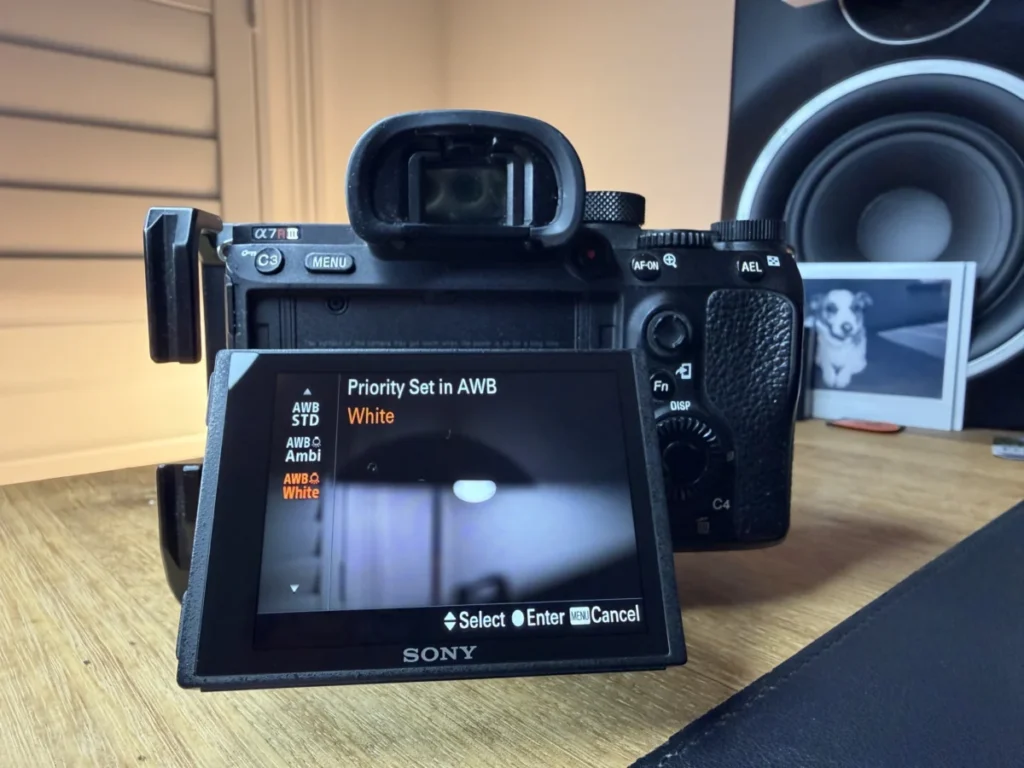
For instance, Sony’s latest AI algorithms can distinguish between the warmth of a sunset (which a photographer likely wants to preserve) and the yellow cast of a streetlamp (which a photographer likely wants to neutralize). This "Ambience Priority" versus "White Priority" logic allows the camera to make aesthetic judgments that were previously the sole domain of the human editor. Furthermore, AI-assisted post-processing in software like Adobe Lightroom and Capture One now features "Match Color" tools that sample skin tones across thousands of images, allowing for instantaneous batch correction that maintains consistent color across an entire wedding or commercial shoot.
Strategic Methodologies: In-Camera vs. Post-Processing
Despite the rise of AI, professional photographers generally adhere to two primary workflows for managing white balance: in-camera calibration and post-capture adjustment.

In-Camera Calibration
This method is essential for photographers shooting in JPEG format or for videographers who need consistent footage straight out of the camera.
- Presets: Standard settings like "Tungsten," "Fluorescent," "Cloudy," and "Flash" provide a quick approximation of common lighting environments.
- Custom Kelvin Entry: Experienced photographers often dial in a specific Kelvin number to ensure absolute consistency across multiple cameras.
- Gray Card Calibration: The most accurate manual method involves photographing a neutral 18% gray card under the current lighting conditions. The camera then uses this data point to calibrate all subsequent shots, ensuring 100% color fidelity.
Post-Capture Adjustment
For those shooting in RAW format, white balance is technically metadata rather than "baked-in" data. This provides the ultimate safety net. A RAW file contains the full spectrum of light captured by the sensor, allowing a photographer to change the white balance in software after the fact without any loss in image quality. This is particularly vital in "mixed lighting" scenarios, such as a ballroom where daylight streams through windows while warm chandeliers glow from above.

Data-Driven Insights: The Impact of Color Accuracy in Professional Sectors
The importance of white balance extends beyond aesthetics into the realm of commercial necessity. In product photography and e-commerce, color accuracy is a metric of business success. According to industry data from 2024, nearly 22% of online clothing returns are attributed to "color mismatch" between the website image and the physical product. Precise white balance calibration using spectrophotometers and color-checking charts is now a standard requirement for high-end retail photography to mitigate these losses.
In the real estate sector, accurate white balance is used to make spaces feel inviting. AI tools are now used to selectively "cool down" the blue light coming from windows while "warming up" the interior lights, creating a balanced, high-dynamic-range look that appeals to potential buyers. In portraiture, the focus shifts to "memory colors"—the specific tones of human skin that viewers expect to see. AI skin-tone protection ensures that even if the overall white balance is adjusted for mood, the subject’s complexion remains natural and healthy.

Creative Deviation: The "Incorrect" White Balance
While the primary goal of white balance is accuracy, professional photographers often use "incorrect" settings for creative impact. Journalistic standards typically demand neutrality, but fine art and narrative photography leverage color to evoke emotion.
- Cool Hues (Blue): Lowering the color temperature below the neutral point can evoke feelings of isolation, sadness, or a futuristic, "high-tech" atmosphere. It is frequently used in night photography to enhance the "blue hour" effect.
- Warm Hues (Orange/Yellow): Pushing the white balance toward the warmer end of the spectrum creates a sense of nostalgia, comfort, and intimacy. This is a staple in lifestyle and "golden hour" photography.
Industry Response and Future Outlook
The photography industry has responded to these technological shifts with a renewed focus on "computational photography." Manufacturers are no longer just competing on megapixel counts; they are competing on the "intelligence" of their color science. Professional organizations, such as the American Society of Media Photographers (ASMP), have integrated AI-color management into their certification programs, acknowledging that the role of the photographer is shifting from a technical operator to a creative director.

Looking toward the future, the industry expects "Auto White Balance" to become virtually flawless, leaving the human element to focus entirely on the emotional "tint" of an image. As sensors become more sensitive and processors more capable, the "mixed lighting" problem—long the bane of photographers—will likely be solved by per-pixel white balance, where a single image can have different color temperature adjustments applied to different zones of the frame automatically.
Conclusion
White balance is the bridge between the raw physics of light and the nuanced perception of the human eye. Whether through the manual use of a gray card or the sophisticated application of 2026-era AI, mastering this element is non-negotiable for any serious image-maker. By neutralizing unwanted color casts, photographers ensure their work is grounded in reality; by selectively manipulating those same colors, they elevate their work into the realm of art. As technology continues to simplify the technical hurdles of color correction, the power of white balance remains a fundamental tool for storytelling in the digital age.