
In the high-stakes world of digital search, a single underperforming product page can represent a significant loss in potential revenue. Whether it is a page that has slipped in search rankings, a competitor’s content outperforming your own, or a high-traffic landing page that simply refuses to convert, the need for rapid diagnostic tools has never been more critical. Traditional site-wide crawls are essential for long-term health, but they are often too time-consuming when an immediate, surgical fix is required for a specific URL.

SEO professionals and site owners are increasingly turning to browser-based diagnostic tools to bridge the gap between initial observation and technical resolution. SEOquake, a free Chrome extension developed by Semrush, has emerged as a primary instrument for this purpose, allowing users to audit technical signals, on-page SEO, link architecture, and core performance metrics without ever navigating away from the page in question.

The Anatomy of an SEOquake Audit
The utility of SEOquake lies in its ability to condense complex technical data into an actionable, color-coded interface. By utilizing a standardized visual system—where green indicates compliance, yellow signals potential warnings, and red identifies critical errors—users can triage page issues in under sixty seconds.

The diagnostic process is split into two distinct phases: the Quick View triage and the Full Report analysis. The Quick View pop-up provides an immediate high-level overview across five tabs: Page Info, Diagnosis, Internal Links, External Links, and Density. By focusing on the Page Info, Audit, and Content tabs, an auditor can identify structural deficiencies—such as malformed metadata, broken Schema markup, or missing alt text—within the first minute of engagement.

Triage: The First Sixty Seconds
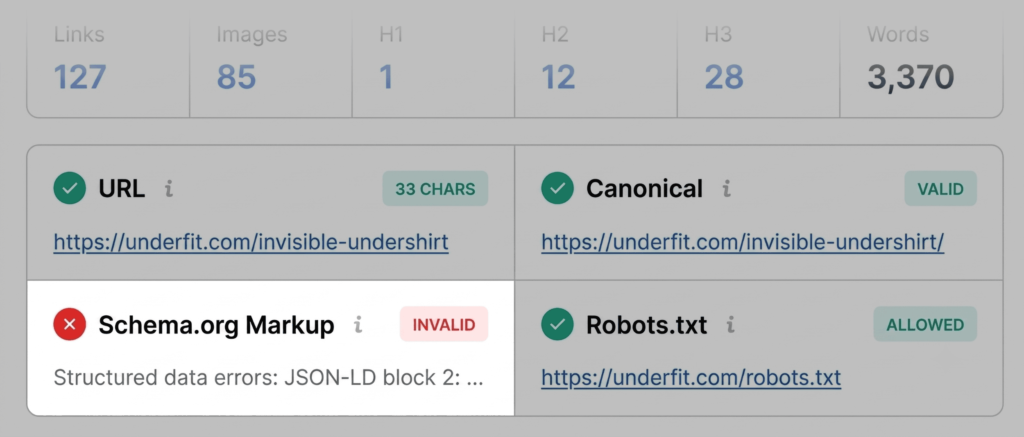
The "Page Info" tab serves as the primary dashboard for core SEO elements. During a standard triage, the priority is to identify deviations from established search engine best practices. For instance, if the Schema.org markup is flagged in red, it signifies that JSON-LD errors may be preventing search engines from correctly parsing the page’s structured data. For e-commerce entities, this is a critical failure, as it effectively disqualifies the page from displaying rich results—such as real-time pricing, stock availability, and user ratings—in search engine results pages (SERPs).

Moving to the "Audit" tab, the focus shifts to technical infrastructure. This section checks for canonical tags, robots.txt directives, and mobile responsiveness. While "orange" warnings in this section are common, they require an analytical judgment call; for example, a missing hreflang tag might be a minor oversight on a single-language site but a catastrophic error for a multi-regional e-commerce operation. Finally, the "Content" tab examines heading hierarchy. A logical structure—where H1 tags follow a clear path to H2, H3, and H4—is not just an SEO requirement; it is a fundamental accessibility standard. When heading levels jump, or when images lack descriptive alt text, the page becomes less interpretable for both assistive technologies and search engine crawlers.

Diagnosis: Deep-Diving with the Full Report
After the initial triage, the second and third minutes of the process are dedicated to the Full Report. Clicking "View Full Report" opens a comprehensive set of panels that offer granular data on every element identified during the triage.

In the "Audit" panel, the user can verify the severity of the flags discovered earlier. For example, if the XML sitemap is flagged, the report will provide specific details on whether the file is inaccessible or simply unlinked. By utilizing the "Test in Rich Results" feature directly from the extension, users can trigger Google’s own diagnostic tools to confirm whether the detected markup issues are indeed impacting search eligibility. This iterative process allows a developer or marketer to move from observation to validation in seconds.

The Role of Keyword Density and Link Health
Beyond technical infrastructure, the Full Report provides a window into content strategy through the Keyword Density panel. This feature maps the frequency of terms in visible content, providing a "Keyword Cloud" that visualizes the topical focus of the page. While keyword density as a ranking factor has evolved significantly, it remains a vital diagnostic tool for content relevance. If a product page for a high-end v-neck undershirt shows "zoom" or "widget" as its most frequent terms, it suggests that the page content is being diluted by interactive elements or image labels, potentially confusing the search engine’s semantic understanding of the page’s purpose.

Simultaneously, the "Links" panel offers a comprehensive look at the site’s internal and external connectivity. A high volume of broken external links can signal to search engines that a page is neglected or that it contains outdated information. By exporting these links to a CSV file, auditors can quickly isolate broken URLs, prioritize them by traffic potential, and initiate a cleanup project that improves both user experience and crawl efficiency.

Contextualizing Performance with Domain Metrics
The final piece of the diagnostic puzzle is the Semrush integration. While page-level fixes address symptoms, the Semrush panel provides the context necessary to determine if those symptoms are isolated or systemic. By viewing domain-level metrics such as organic traffic trends, referring domains, and overall site authority, an auditor can determine if a low-performing page is the result of a specific technical error or a broader decline in domain trust.

For instance, a page that fails to rank despite perfect on-page optimization might be suffering from a lack of domain-wide authority or an aggressive competitor backlink profile. Conversely, if a domain has high traffic and strong authority, but a specific product page is underperforming, the issue is almost certainly confined to the page’s specific technical configuration or content quality.

Broader Implications for Search Strategy
The ability to perform these audits rapidly has profound implications for modern search engine optimization. As Google continues to integrate AI-driven search experiences—such as AI Overviews—the importance of structured, clean, and accessible data increases. When pages are optimized using the diagnostic rigors described above, they become more "machine-readable," increasing the likelihood that they will be cited as authoritative sources in generative search responses.

Furthermore, the shift toward mobile-first indexing and core web vitals means that technical debt can accumulate quickly. A site that ignores these minor flags for months often faces a "compounding interest" effect, where technical issues become increasingly difficult and costly to resolve. By adopting a three-minute, audit-centric workflow, teams can catch these issues in their infancy, ensuring that the site remains performant and competitive.

Ultimately, the goal of using a tool like SEOquake is not to automate SEO, but to provide the data required for informed human decision-making. By moving the audit process from a periodic, massive undertaking to a continuous, micro-diagnostic habit, organizations can maintain a high standard of technical health across their entire digital ecosystem. This proactive stance is the difference between a site that constantly struggles to recover from algorithmic shifts and one that remains consistently visible in an increasingly crowded search landscape.