
In an increasingly tool-saturated digital landscape, a critical shift is underway in how technology truly adds value to daily lives. Rather than demanding users adopt a continuous stream of new applications, the focus is increasingly turning towards seamless integration of intelligent features into existing workflows. This paradigm, often dubbed ‘Quiet AI,’ prioritizes intuitive functionality that aligns with established user mental models, fundamentally reshaping the user experience (UX) landscape. The core insight is clear: users don’t need more tools; they require better, more integrated capabilities that address high-severity, high-frequency, and high-frustration problems without disrupting their natural flow.
The Pervasive Challenge of Digital Overload and Tool Sprawl
For years, the technology industry has championed innovation through the creation of standalone applications, each promising to solve a specific problem or enhance a particular aspect of productivity. This approach, while fostering a vibrant ecosystem of specialized tools, has inadvertently led to a pervasive challenge: digital overload. Industry reports consistently highlight that the average professional juggles numerous applications daily, leading to significant context-switching costs, cognitive load, and reduced overall productivity. Users frequently find themselves navigating between multiple interfaces, managing disparate data sources, and remembering different interaction patterns, all of which contribute to frustration and inefficiencies.
The allure of "shiny new tools" often overshadows the practical realities of daily work. While these tools might offer novel features or promise revolutionary workflows, their adoption often comes with a steep learning curve and the added burden of integration into an already complex digital environment. Users are not inherently excited by the prospect of mastering new "smart" workflows, wrestling with command-line interfaces, or enduring endless back-and-forth chat interactions if these processes pull them away from their core tasks. What genuinely excites and empowers users are solutions that effortlessly weave into their established routines, providing assistance precisely when and where it’s most needed, without demanding a fundamental shift in their existing mental models.
The Evolution of AI in UX: From "AI-First" to "Quiet AI"
The advent of Artificial Intelligence (AI) has amplified this discussion, introducing new paradigms for software design. Initially, much of the enthusiasm around AI centered on "AI-first" products. These were applications explicitly built around an AI core, often requiring users to interact with a conversational agent or a bespoke AI interface. The promise was rapid production and novel functionalities, accelerating processes like content generation or data analysis. However, as noted by UX expert Vitaly Friedman, a common pitfall of the "AI-first" approach is its tendency to overlook the decades of subtle and significant design decisions that have shaped user expectations and mental models. These products, while technologically impressive, sometimes disrupt established patterns, forcing users into unfamiliar interactions that can feel unnatural or inefficient. They might solve a problem, but in a way that creates new friction points, often failing to account for the nuanced ways people have learned to interact with their digital environments.
In contrast, the concept of "Quiet AI" represents a more mature and user-centric evolution. Quiet AI refers to intelligent systems that operate largely invisibly, residing in the background and performing assistive tasks on the user’s behalf. These tools do not scream for attention; instead, they quietly enhance existing functionalities, automate repetitive processes, and provide contextual assistance without demanding a fundamental shift in user behavior or requiring users to "learn a new AI." Examples of Quiet AI predate the recent surge in generative AI, including smart autocorrection, spam filtering, predictive text, and intelligent document categorization. These features are so seamlessly integrated into our daily digital lives that they often go unnoticed, yet their collective impact on efficiency and user satisfaction is profound.
The shift from "AI-first" to "Quiet AI" signifies a deeper understanding of human-computer interaction. It acknowledges that the true power of AI lies not in its ability to dictate new ways of working, but in its capacity to augment and simplify existing ones. By providing assistance in context, Quiet AI reduces cognitive load, minimizes interruptions, and allows users to maintain focus on their primary objectives.
Case Studies in Seamless Integration: Claude in Microsoft Office and Folder Instructions
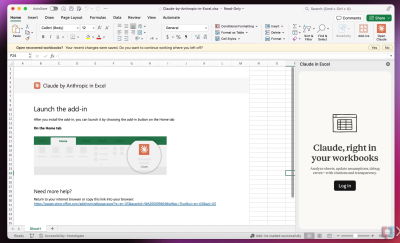
The growing adoption of Quiet AI principles is evident in several impactful integrations. A prime example is the integration of AI models like Claude within widely used productivity suites such as Microsoft Excel, PowerPoint, and Word. Instead of requiring users to copy data from a spreadsheet, paste it into a separate AI chatbot, generate an analysis, and then copy the results back, Claude’s integration allows for in-context assistance. Users can highlight specific rows or columns in Excel and prompt Claude to analyze data, identify trends, or generate formulas, all within the familiar spreadsheet environment. Similarly, within Word, Claude can assist with drafting, summarizing, or refining text directly in the document, and in PowerPoint, it can help structure presentations or generate content for slides. This level of integration ensures that the AI acts as a helpful co-pilot rather than a separate, disruptive entity, directly addressing the pain point of context switching and tool juggling. This seamless integration, often available through enhanced subscription plans, demonstrates a clear commercial recognition of the value of embedded AI.
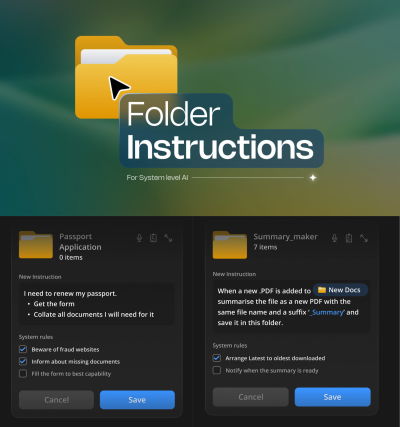
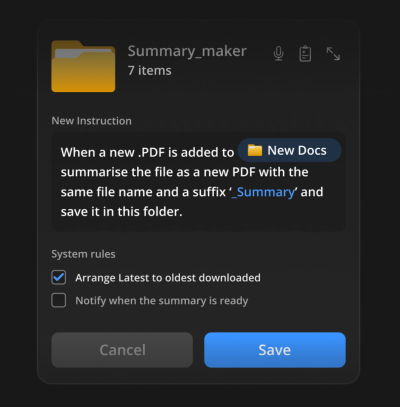
Perhaps an even more compelling vision for Quiet AI is presented by the concept of "Folder Instructions" for AI actions, as championed by designers like Karthikeya GS. This innovative approach extends the familiar mental model of a digital folder beyond a mere container for files. Instead, users can define the purpose of a folder, embedding intelligent instructions that guide AI actions based on that intent. Imagine a folder labeled "Project X Reports" where you define instructions like "automatically summarize new PDF reports, extract key financial figures, and notify relevant team members." Or a "Passport Application" folder that, upon receiving required documents, automatically checks for completeness, renames files according to specific conventions, and even drafts an email to the relevant authority.
The power of folder instructions lies in its ability to automate tasks precisely where the work happens, leveraging an established organizational metaphor. Users set the intent once – how files should be organized, how sub-folders should behave, and what actions should occur within – and the system takes care of the execution. This allows for tasks like generating summaries on the fly, categorizing documents, or preparing files for submission to be handled effortlessly by intelligent agents. Crucially, these AI helpers are locally scoped to that specific folder, providing users with control over permissions and actions, ensuring data privacy and security unless explicitly extended by the user. This design pattern offers a powerful way to deliver high value without imposing the burden of installing and learning yet another standalone tool.
The Indispensable Role of Mental Models in Design
At the heart of successful seamless integrations lies a profound respect for users’ mental models. A mental model is a user’s internal representation of how a system or a part of a system works. These models are built over years of interaction with technology and the real world. When new tools or features align with these existing models, they feel intuitive, easy to learn, and satisfying to use. Conversely, systems that disregard or actively disrupt established mental models lead to confusion, frustration, and a steep learning curve, ultimately hindering adoption and user satisfaction.
"AI-first" products sometimes err by demanding users adopt entirely new mental models for interaction (e.g., exclusively conversational interfaces for tasks traditionally handled by graphical user interfaces). "Quiet AI" and concepts like "Folder Instructions," however, succeed by enhancing existing mental models. Users already understand what a folder is and its purpose; adding the capability to define its "intent" and automate actions based on that intent is an extension, not a replacement, of that understanding. This approach minimizes cognitive friction, allowing users to leverage their existing knowledge to interact with powerful new AI capabilities.

Implications for Software Development and Business Strategy
The shift towards seamless AI integrations has profound implications for software development, UX design, and broader business strategy. For developers and product managers, the focus must move beyond simply building standalone AI features to strategically embedding AI capabilities into existing platforms and workflows. This requires a deep understanding of user journeys, identifying high-friction points, and designing APIs and integrations that enable contextual, unobtrusive assistance. The emphasis shifts from "what new AI can we build?" to "how can AI make our existing tools better and more intuitive?"
For businesses, adopting this philosophy can provide a significant competitive advantage. Organizations that integrate AI in a way that reduces employee friction, boosts productivity without demanding extensive new training, and aligns with established work patterns are likely to see higher user adoption, increased efficiency, and greater return on their technology investments. It also encourages a re-evaluation of data management and privacy, as locally scoped AI actions, as seen in the "Folder Instructions" concept, offer a more controlled and secure way to leverage AI within an organization’s ecosystem. The economic benefits stem not from the novelty of AI, but from its ability to reduce operational slowdowns, minimize errors, and free up human capital for more complex, creative tasks.
The Future Landscape: Pervasive, Invisible Intelligence
Looking ahead, the future of user experience will likely be characterized by an increasingly pervasive yet invisible form of intelligence. AI will continue to fade into the background, becoming an integral, expected component of almost every digital interaction. We can anticipate more personalized interfaces that adapt proactively to individual user needs and preferences, intelligent assistants embedded across operating systems that anticipate requirements before they are explicitly stated, and adaptive learning environments that subtly guide users without overt instruction.
The best technology, as the adage goes, is often that which disappears. As AI capabilities mature, their ultimate value will be measured not by their standalone brilliance, but by their ability to seamlessly integrate into the fabric of our digital lives, enhancing productivity, reducing frustration, and empowering users to accomplish their goals with greater ease and efficiency. The era of demanding users to juggle countless applications is giving way to a new paradigm where intelligence is woven into the very fabric of the tools they already use and love.
Ultimately, the value users derive from technology does not emerge from the arduous task of juggling multiple applications, views, and sources every few minutes – a process that invariably leads to slowdowns and mistakes. Instead, true value is generated by empowering users to perform their essential work by systematically reducing frustrations, eliminating slowdowns, preventing errors, and automating tasks that would otherwise consume excessive time and effort. This reaffirms that seamless integrations remain an incredibly impactful yet often underutilized strategy for delivering tangible value rapidly, without imposing the additional burden of installing and mastering yet another tool. Vitaly Friedman’s "Design Patterns For AI Interfaces" video course and live UX training later this year serve as a timely resource for designers and product managers looking to master this critical shift, providing practical guidelines and real-world examples for crafting AI features that truly resonate with users and define the future of intuitive technology.