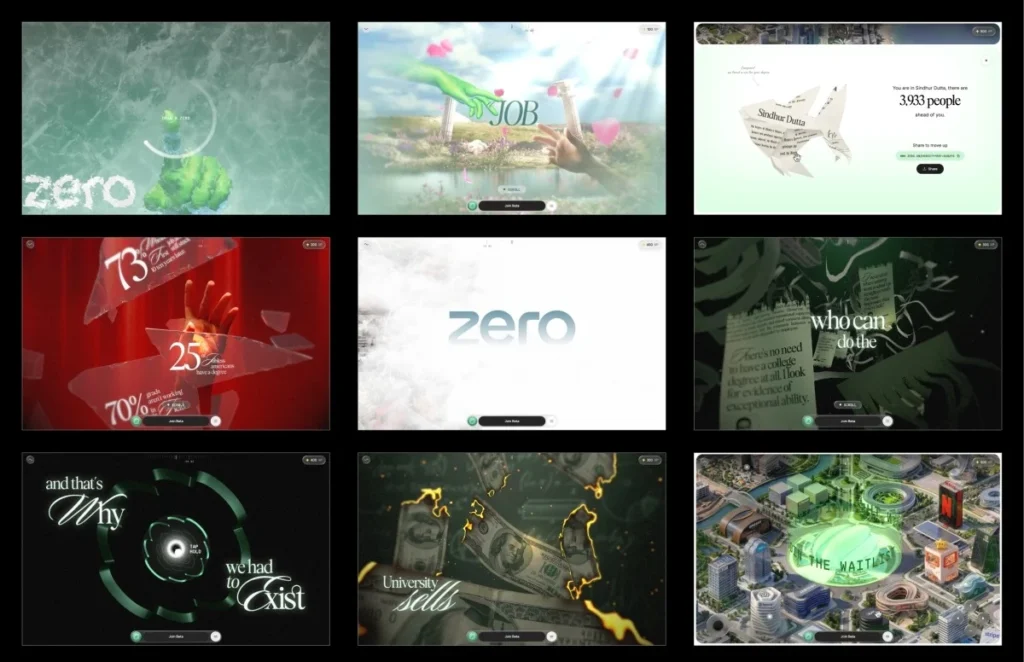

A groundbreaking interactive web experience, developed for the innovative educational platform Zero University, has set a new benchmark for immersive digital storytelling and web performance. Titled "ZERO: The Engineering Behind a Defiant Interactive Narrative Demo," the project delivers a compelling narrative challenging traditional degree paths through a highly optimized 3D environment, running seamlessly across a spectrum of devices. This technical deep dive explores the innovative design, development strategies, and performance optimizations that transformed over a gigabyte of source assets into a sub-10MB, 60fps web experience.
The Genesis of "ZERO": A New Approach to Education and Web Design
The "ZERO" project originated from Zero University’s vision to disrupt conventional higher education, advocating for alternative learning pathways and skill-based development. The institution sought an online presence that not only conveyed this philosophy but embodied it through an innovative, engaging user experience. The concept, spearheaded by Atul Khola’s team, envisioned an immersive scrolling journey that would visually and interactively dismantle the perceived promises of a traditional degree.
"Our goal with Zero University is to empower individuals to forge their own paths, unburdened by outdated academic structures," stated Dr. Anya Sharma, Head of Innovation at Zero University. "This interactive narrative was designed to be more than just a website; it’s a visceral representation of that philosophy, inviting users to question the status quo from the moment they arrive."
The development team, tasked with bringing this ambitious concept to life, began with a proof of concept. Within 48 hours, they delivered a working prototype featuring the core "draw a zero" interaction, a novel gatekeeping mechanism. This initial prototype, rapidly assembled with the assistance of artificial intelligence tools for quick iteration, proved instrumental in securing the project. The subsequent four-month development cycle focused on rigorous refinement, optimizing every interaction and visual element to perfection.
Revolutionizing User Onboarding: The "Draw a Zero" Interaction
Upon arrival at the "ZERO" site, visitors are met with a locked screen, devoid of conventional navigation. The only prompt is to draw a zero. This unique interaction serves as the gateway to the experience, immediately captivating attention and rewarding engagement. As the user completes the circular stroke, a frost effect dynamically spreads from the drawn path, gradually revealing the underlying narrative.
This seemingly simple gesture is powered by a sophisticated yet efficient algorithm. The system measures three critical parameters: the total signed angle, indicating a full turn; the roundness, determined by the standard deviation of radii; and closure, ensuring the stroke’s endpoints meet within a defined tolerance. Only when these criteria are met does the system accept the input, triggering the frost shader.
The gesture check code, a testament to its elegance, concisely validates the user’s input:

// accept the stroke as a "zero" only if it truly closes a round loop
const wound = totalSignedAngle(points, center); // ~2π for a full turn
const radiusCV = std(radii) / mean(radii); // low = round, not a scribble
const closed = dist(points[0], points.at(-1)) < meanRadius;

if (wound > 5.76 && radiusCV < 0.35 && closed) unlock();
This immediate, interactive reward fosters a sense of agency and discovery, setting a high bar for user engagement from the outset.
Crafting the Narrative: Six Stages, Five Gates, One Defiant Message
The "ZERO" experience unfolds as a single, continuous scroll across six distinct stages, interspersed with five interactive gates that pause or redirect the flow. Each gate, requiring specific user actions like drawing a zero, holding to shatter glass, or launching through a tunnel, reinforces the narrative’s interactive nature.
The story arc is meticulously crafted to challenge the conventional educational journey:
- Stage One: Opens with the idealized promise of the traditional degree path – diligent study leading to a top job.
- Gate One: This promise shatters, literally, as the user interacts to break a glass barrier.
- Stage Two: Reveals stark unemployment statistics scattered across the fractured glass, contrasting with the earlier promise.
- Stage Three: Depicts the degree as a mere piece of paper, with money burning and certificates shredding, before transitioning into a tunnel shaped like the ZERO logo. This stage metaphorically represents the perceived devaluation of traditional credentials.
- Stage Four: Emerges above the clouds into a futuristic cityscape built from the headquarters of real-world companies, symbolizing alternative pathways to success.
- Stage Five: The camera settles, handing control to the user via an interactive city map, allowing free exploration and discovery.
This narrative progression, punctuated by impactful visual metaphors and user-driven interactions, aims to provoke reflection on the value of traditional academic routes versus skill-based, real-world application.
The Technical Backbone: Architecture for Seamless Immersion
Achieving a continuous, fluid experience while managing complex 3D scenes required a departure from standard web development practices. The team consciously avoided reliance on the browser’s native scroll or large DOM structures. Instead, a custom virtual scroll system was implemented, where wheel and touch inputs update a single virtual scroll value. This value, easing towards its target, then drives every aspect of the experience—from asset loading and animations to shader timings, text reveals, and UI overlays.
The architecture is built upon self-contained segments, each representing a stage or interaction with its own optional lifecycle hooks:
  scrollVh: 300,            // how much virtual scroll this segment owns
  enter(ctx)         /* build this segment's Three.js objects (async) */ ,
  scrub(ctx, p)      /* p is LOCAL progress 0..1 within this segment  */ ,
  update(ctx, t, dt) /* runs every frame, scroll or not (idle motion) */ ,
  teardown(ctx)      /* dispose and hand off to the next segment      */ ,
This modular approach, splitting the project into nine segments (including the loader as the first gate), significantly enhanced maintainability and debugging efficiency. Developers could jump to any stage, and the system would replay the lifecycles of preceding segments, ensuring consistent initialization.
The core technical stack leveraged Three.js for 3D rendering, GSAP for robust animation control, Howler for spatial audio, and Vite for a fast development build process. This combination provided the necessary tools for creating a high-performance, graphically rich experience.

Mastering 3D Assets for Web Performance
One of the most significant challenges and triumphs of the "ZERO" project was optimizing its 3D assets. The source files, originating from production Blender scenes, comprised uncompressed geometry, 8K textures, baked animations, and a staggering gigabyte of data. The initial month of development was largely dedicated to strategizing the most efficient format for each asset.
All geometry was shipped with DRACO compression, utilizing self-hosted decoders. A crucial lesson learned was to bundle Draco and KTX2/Basis transcoders within the project’s public/vendor/ directory rather than relying on CDNs. Previous experiences with CDN slowdowns caused decoding failures, highlighting the importance of full control over the asset pipeline.
Texture optimization presented an even greater impact on performance. While a PNG might be small on disk, it decompresses fully in GPU memory, with a 2048×2048 texture consuming around 16MB of VRAM regardless of its file size. The solution lay in KTX2 with ETC1S compression, which keeps textures compressed on the GPU, drastically reducing memory footprint and accelerating upload times.
The Compression Previewer: A Custom Tool for Quality Control
A common hurdle with lossy formats like ETC1S is the difficulty of local previewing, leading to trial-and-error in finding optimal compression settings. To address this, the team developed an internal dashboard featuring a custom converter and previewer. This tool displayed compressed and uncompressed images and videos side-by-side, allowing fine-tuning of ETC1S settings for individual assets. This enabled applying heavier compression where visual degradation was minimal and preserving quality for hero assets, a step often overlooked in WebGL workflows but critical for the final build’s efficiency.
Further memory savings were achieved by consolidating related textures into shared atlases. For instance, all hand textures were packed into a single 4×4 atlas, with meshes referencing specific sections via UV offsets and scaling. This strategy was applied across the project, reducing over fifty individual images into a dozen atlases and replacing many gradient backgrounds with efficient GLSL code. These optimizations collectively shrunk the initial 35-40MB builds to a lean sub-10MB final package, with the interactive world map isolated in its own loading group to prevent blocking the initial experience.
Optimizing for Speed: Tackling Texture Uploads and Adaptive Quality
Reducing download size is only part of the performance equation. Compressed textures still require uploading to the GPU on the main thread, a process that can block rendering for tens of milliseconds, causing noticeable stutters. To mitigate this, the team implemented a three-pronged strategy:
- Lazy Loading and Background Uploads: Textures for later stages are not loaded until they are needed. Once loaded, they are added to a queue for background GPU upload during idle browser time using
requestIdleCallback. - Idle Time Processing: A custom
drainUploadsfunction ensures textures are uploaded only when the browser has spare processing capacity, preventing frame drops. - Synchronous Flushing: Before critical stage transitions, the upload queue is synchronously flushed, guaranteeing all necessary textures are on the GPU before they appear on screen, eliminating first-time upload hitches during active scrolling.
To further ensure a smooth experience across diverse hardware, an adaptive quality manager was integrated. This system continuously monitors the renderer’s performance by tracking frame times. If the average frame time exceeds a threshold (e.g., >22ms for <45fps), the quality tier is downgraded (e.g., lower pixel ratio, reduced blur samples). Conversely, if performance stabilizes and improves (e.g., 83fps), the quality is scaled back up. A cooldown period prevents rapid, distracting quality switching. This ensures the core narrative remains consistent, while visual polish adapts to device capabilities. Targeted optimizations, such as temporarily lowering pixel ratio and disabling blur during the glass shatter interaction, further mask performance costs within specific gestures. Extensive profiling on budget Android devices was crucial in identifying and eliminating performance bottlenecks, with a single 157ms frame spike being a memorable offender.

The Art of Code: Behind "ZERO"’s Custom Shaders
The visual richness of "ZERO" is largely attributable to its sophisticated post-processing chain and custom shaders, many of which benefited from AI-generated initial versions before meticulous human refinement.
The Post-Processing Chain: Each frame is constructed through a sequence of passes:
- RenderPass: The primary 3D scene.
- BackgroundPass: Procedural background generation.
- FrostingPass: Handles the "draw-a-zero" frost and melt effect.
- LensBlurPass: Implements depth-of-field, dynamically gated by quality tiers.
- ForegroundPass: Adds grain and tone mapping.
- TextPass: Composites narrative text after tone mapping.
- GlassPass: Slots in after the background, for effects like shattering.
- ShatterPass: The final pass, layered over everything.
Crucially, passes like glassPass, textPass, and shatterPass are initialized lazily and warmed up during idle times, preventing them from impacting the critical loading path.
The Frost Unlock: A Crystalline Revelation: The signature frost effect uses a ping-pong buffer with four passes (horizontal, vertical, and two diagonals). Each pass expands the drawn stroke by propagating the brightest neighboring pixels, creating an octagonal growth pattern modulated by a frost texture for a natural, crystalline appearance. The stroke’s centroid then seeds the radial melt.
Illuminating the Digital Hand: Baked Lighting Techniques: To achieve realistic lighting on skinned meshes without the prohibitive cost of real-time calculations, the team baked lighting into textures. Two texture slots are used, with the incoming slot updated for each keyframe and smoothly crossfaded to create seamless lighting transitions. Premultiplied alpha ensures clean blending without dark halos around transparent edges.
The Incineration of Tradition: Burning Money Shader: This effect uses a noise-driven distance field to progressively dissolve each bill. Just before an area burns away, a glowing HDR ember rim appears, followed by a charred surface. Performance is optimized by discarding fragments early if they are outside the burn threshold.
Symbolic Disintegration: Shredding Certificates Effect: Each vertex in the certificate geometry stores a strip index. As a shred front moves across, individual strips separate and fall independently with their own rotations, simulating a realistic tearing effect. Lighting normals are analytically generated, eliminating the need for separate normal maps.
Navigating the Future: The ZERO Tunnel: The tunnel is generated by extruding the cross-section of the ZERO logo. A dynamic brightness pulse travels through the tunnel using the geometry’s world-space Z coordinate, creating a seamless, repeating effect.
Text That Breathes: Dynamic Focus Blur: Narrative text employs a seven-tap hexagonal blur, where the blur radius is directly tied to the reveal progress. This allows text to gradually sharpen into view, enhancing readability and visual flow. The blur is entirely skipped when no text is visible, ensuring no unnecessary rendering cost.

A key learning curve involved shader precision. Several shaders required explicit highp float settings, as many mobile GPUs (Adreno, Mali) treat mediump as a true 16-bit float, leading to unexpected bugs like uniform strip movement or banding in effects—a stark reminder of the importance of early and consistent mobile device testing.
Interaction Design: Beyond the Visuals
The "ZERO" project’s interaction design was built from the ground up, given that the source material primarily consisted of images and videos rather than prescriptive interaction specifications. Most interactive gates employ a flexible "press and hold" system, defined by a shared configuration for prompt appearance and hold duration. Each gate then implements its unique visuals through a set of hooks.
A subtle but impactful design choice was the gradual shift of the entire frame to a dark red during a hold interaction. Upon an event like glass shattering, the color snaps back within approximately 200ms, creating the sensation that the shards are breaking away the oppressive darkness. A longer 400ms transition was found to be significantly less impactful. Crucially, sound effects, such as the glass shatter, are synchronized with the first rendered frame of the animation, not a timer, preventing desynchronization on slower devices.
The Payoff: An Interactive World Map
The journey culminates in a powerful transition. Following a final launch sequence into an open sky, clouds part in Stage Four to unveil a city, with Zero University’s tower at its core. A halo appears above the tower, marking the final gate, before the camera gracefully settles into an interactive map.
Stage Five empowers the user with full control. Visitors can pan, zoom, and explore the city, interacting with markers that reveal roles, scenarios, and tools, each accompanied by a "Join Beta" button. The persistent join bar transforms into a waitlist signup. After guiding users through a narrative that challenges the conventional, the experience concludes by inviting them to actively explore and engage with Zero University’s alternative future.
Lessons from the Frontier of Web Development
The "ZERO" project underscores critical lessons for the future of interactive web development. Foremost among these is the paramount importance of asset preparation and GPU upload strategies, which demand as much attention as the rendering process itself. Tools like the custom compression previewer, self-hosted decoders, the intelligent upload queue, and the adaptive quality manager were not glamorous components but proved indispensable in translating a gigabyte of source material into a fluid, sub-10MB experience on a budget phone.
The role of artificial intelligence also emerged as a key learning. AI proved exceptionally adept at generating initial code versions, even underpinning the prototype that secured the project. However, the subsequent work—the meticulous refinement of interactions, enhancement of visuals, exhaustive performance profiling, and countless nuanced decisions that only become apparent through real-device testing—remained firmly within the domain of human engineering judgment and artistic sensibility. AI can accelerate creation, but building a polished, impactful interactive experience still relies on iterative human insight and rigorous engineering.

"This project exemplifies the perfect synergy between cutting-edge technology and human creativity," commented Mr. Alex Chen, Lead Technical Director for the development studio. "AI gave us a phenomenal head start, but the true magic happened in the painstaking details, the thousands of hours spent ensuring every pixel, every frame, every interaction delivered a flawless and meaningful experience. It’s a testament to what’s possible when we push the boundaries of web development."
Implications for the Future of Web Experiences and Education
The "ZERO" interactive narrative serves as a powerful demonstration of what modern web technologies can achieve. It establishes new best practices for managing complex 3D assets, optimizing performance, and creating deeply engaging user experiences that are accessible across a wide range of devices. For educational institutions like Zero University, it provides a compelling blueprint for attracting and informing prospective students through innovative digital marketing that reflects their core philosophy.
In an increasingly competitive digital landscape, where user attention spans are fleeting and performance is paramount, projects like "ZERO" highlight the imperative for sophisticated engineering. They also showcase how the strategic integration of AI, combined with meticulous human craftsmanship, can unlock unprecedented levels of creativity and efficiency in web development, ultimately delivering richer, more impactful online interactions that resonate with users and effectively convey complex messages. This project isn’t just about a website; it’s about pushing the boundaries of digital communication and redefining how we interact with information and institutions online.
Credits
- Original concept: Atul Khola’s team
- Development and engineering: [Implied development studio from the original article context]