
In the contemporary digital marketing landscape, the true value of social media extends far beyond native platform metrics such as likes, shares, and follower counts. While native analytics dashboards provide immediate feedback on audience engagement, they frequently fail to answer a critical executive question: What happens after the click? As brands allocate increasingly larger shares of their budgets to social channels—which currently account for roughly 10.12% of global web traffic, surging to 15.23% in socially driven markets like the United States—the pressure to connect social media activity directly to tangible business outcomes has never been higher.
Despite this reliance on social channels for top-of-funnel discovery, industry data highlights a persistent disconnect in measurement capabilities. According to the 2025 Impact of Social Media Marketing report, only 44% of corporate leaders currently rate their social teams as experts in measuring actual business impact. This gap between traffic generation and financial attribution has created a pressing need for advanced web analytics integration. To bridge this divide, digital marketers increasingly turn to platforms like Google Analytics 4 (GA4) to track user behavior, session engagement, and conversion paths once visitors leave social networks and land on corporate websites.
The Imperative for Holistic Measurement
Historically, social media marketing operated in an isolated silo, measured primarily by vanity metrics that resonated poorly with chief financial officers and corporate boards. However, modern corporate governance demands strict return on investment (ROI) validation. Findings from the 2025 Sprout Social Index indicate that 65% of marketing leaders consider connecting social media performance to broader organizational goals as the single most effective strategy for securing executive buy-in and sustained budget investment.
By integrating Google Analytics into their tracking ecosystems, organizations can achieve a holistic view of the customer journey. GA4 captures vital funnel metrics, including goal completions and conversion discrepancies, thereby aligning top- and mid-funnel marketing efforts with bottom-line revenue. This technical integration allows marketing teams to evaluate how visitors originating from specific social platforms interact with site content, compare key performance indicators (KPIs) across diverse traffic sources, and scientifically prove the incremental growth driven by social campaigns.
Decoding GA4 Traffic Classification: Organic Versus Paid Social
A foundational step in analyzing social traffic within GA4 is understanding how the platform automatically categorizes incoming visitors. Google Analytics segments social traffic into two distinct channels: organic social and paid social, each governed by specific algorithmic logic.
Organic social encompasses non-ad links shared across social media networks. GA4 identifies this traffic when a user’s session source matches a predefined regular expression list of recognized social platforms, or when the traffic medium explicitly contains terms such as "social," "social-network," "social-media," "sm," or variations thereof. A typical example would be an un-sponsored Instagram referral logged as instagram/social.

Conversely, paid social tracks user visits originating from sponsored advertisements and paid promotional campaigns on social networks. To classify a session as paid social, GA4 requires the traffic source to match the recognized social platform list while simultaneously verifying that the medium aligns with paid identifiers, such as "ppc," "retargeting," or generic paid parameters (e.g., facebook/paid). Proper configuration of these parameters ensures that marketing teams do not conflate organic brand awareness initiatives with performance-driven paid acquisition spend.
Granular Campaign Tracking Through UTM Parameters
While automated platform detection provides a high-level overview, modern multi-channel campaigns demand granular visibility. To trace traffic down to individual posts, specific ad creatives, and distinct promotional pushes, digital marketers rely on Urchin Tracking Module (UTM) parameters. By appending specific tracking tags to URLs—such as utm_source, utm_medium, and utm_campaign—marketers can isolate exact conversion drivers within GA4.
For instance, a promotional link for a seasonal product launch might be structured as follows:
https://www.example.com/spring-collection?utm_source=facebook&utm_medium=social&utm_campaign=spring_launch
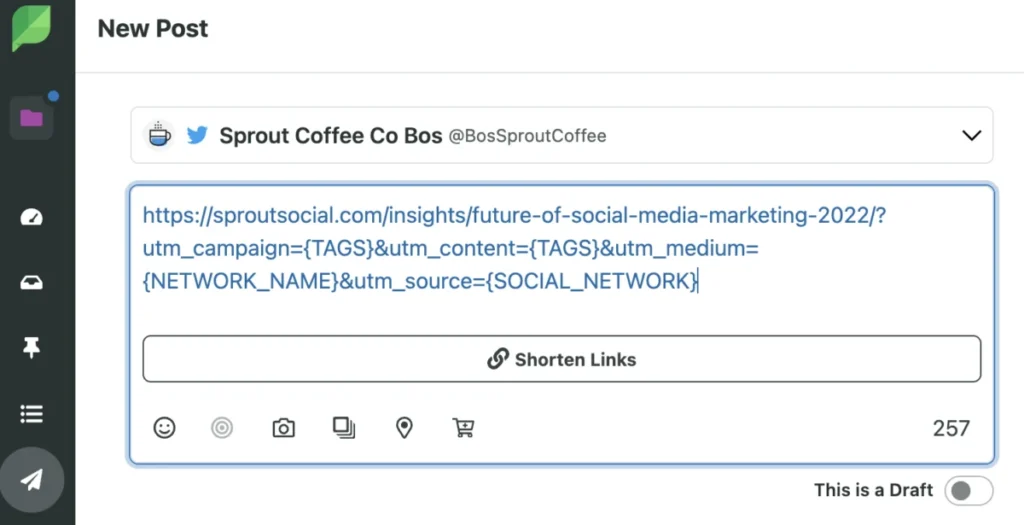
Despite the analytical power of UTM tracking, managing numerous unique links across multiple platforms, campaigns, and team members frequently introduces administrative bottlenecks. The sheer volume of URL variations can easily lead to fragmented data, human error, and messy spreadsheets, particularly for resource-constrained marketing teams. To mitigate this friction, industry solutions have emerged that streamline link creation. Integrations such as Sprout Social’s native Bitly connection allow professionals to automatically generate and shorten UTM-tagged links with a single click directly inside the post-composition window, significantly reducing manual errors and centralizing campaign oversight.
Essential Social Media Metrics to Monitor in GA4
To extract actionable intelligence from GA4, organizations must move beyond surface-level traffic counts and focus on specific analytical dimensions that correlate with commercial success. Analysts generally group these metrics into four core categories: audience composition, acquisition sources, web engagement, and conversion events.
-
Demographics: By analyzing the location, age, and language of visitors arriving via social channels, marketing teams can verify whether their social content successfully attracts and engages the organization’s intended buyer personas.
-
Session Source and Medium: Tracking specific referral paths (such as facebook/referral) identifies which individual platforms, publishing schedules, or specific campaigns generate the highest volume of inbound visitors.

-
Sessions and Engaged Sessions: GA4 defines an engaged session as a visit that lasts longer than 10 seconds, features a conversion event, or includes views of two or more pages. Monitoring this metric effectively filters out accidental "fat-finger" clicks, highlighting genuine user interest originating from social feeds.
-
Average Engagement Time: This metric measures the exact duration users actively spend consuming content on a website. It serves as a vital quality check, determining whether the landing page content successfully fulfills the implicit promise made in the original social media post.
Measuring Conversions and Calculating ROI
The ultimate benchmark of social media effectiveness is its ability to drive meaningful conversions, whether those actions involve purchasing an e-commerce product, subscribing to a newsletter, or registering for a software demo. In the architecture of Google Analytics 4, these vital user actions are designated as "key events" (formerly referred to simply as conversions).
A key event represents any user interaction on a website or application that holds high business value. Meanwhile, the modern definition of a "conversion" is reserved for key events specifically exported to advertising platforms like Google Ads to optimize automated bidding strategies and ad delivery performance. GA4 automatically tracks several standard events out of the box, such as article reads, product views, form submissions, and cart additions.
Marketers can manually promote any of these tracked interactions to key event status to monitor social media return on investment. For example, to track user sign-ups originating from social channels, an administrator must verify that the standard event name sign_up is actively logging data within the GA4 property. Once verified, the administrator navigates to the admin settings, selects the "Data display" menu, accesses "Events," and toggles the designated event to active key event status. If a newly created event does not immediately appear in recent logs, administrators can manually input the event name via the dedicated "Key events" administrative column.
Implications and Future Outlook for Digital Marketing
As digital privacy regulations tighten and third-party data tracking faces increasing platform restrictions, the importance of robust first-party analytics integration will only accelerate. Organizations that rely solely on native social platform metrics risk operating in a strategic vacuum, vulnerable to algorithmic shifts and superficial reporting.
The synthesis of social media execution and comprehensive web analytics provides the empirical foundation required to secure executive confidence. By systematically tracking UTM-tagged campaigns, monitoring deep engagement metrics, and configuring precise key events in Google Analytics 4, marketing professionals can definitively prove the commercial viability of their social strategies. Ultimately, bridging the gap between social engagement and website conversion transforms social media from a creative cost center into a predictable, measurable engine for enterprise growth.