
In an increasingly competitive digital landscape, search engine performance often hinges on the technical health and structural integrity of individual web pages. When a high-priority product page experiences a sudden dip in search rankings or fails to convert traffic, site owners and marketers require immediate, actionable intelligence. Rather than initiating a resource-intensive, site-wide crawl that may take hours to process, professionals are increasingly turning to streamlined, on-page diagnostic tools. The SEOquake Chrome extension, developed by Semrush, provides a comprehensive, real-time framework for auditing technical signals, on-page SEO factors, and linking strategies without requiring the user to navigate away from the page under review.

The Role of Rapid Diagnostics in Modern SEO Workflows
The necessity for rapid diagnostic tools has grown in tandem with the increasing complexity of search engine algorithms. Modern SEO is no longer defined solely by keyword density; it now encompasses Core Web Vitals, structured data implementation, and the nuanced semantic relationships between content elements. When a specific page underperforms—whether it is a product listing losing visibility or a landing page failing to meet conversion benchmarks—the ability to triage issues in minutes allows teams to distinguish between minor cosmetic errors and critical technical failures.

SEOquake operates as a browser-based diagnostic layer. By utilizing a color-coded reporting system, the extension allows auditors to instantly identify potential red flags—such as broken schema or missing meta tags—while maintaining a clear view of the page’s live environment. This methodology facilitates a "triage-to-diagnosis" workflow that can be completed in approximately three minutes, ensuring that resources are directed toward the most impactful fixes first.

Triage Phase: The Initial Sixty Seconds
The first minute of an audit is dedicated to high-level triage. The objective is to answer a single question: Are there glaring technical or structural issues inhibiting the page’s performance? Upon clicking the SEOquake icon, users are presented with a "Quick View" pop-up. This interface is partitioned into five specific tabs: Page Info, Audit, Content, Links, and Semrush data.

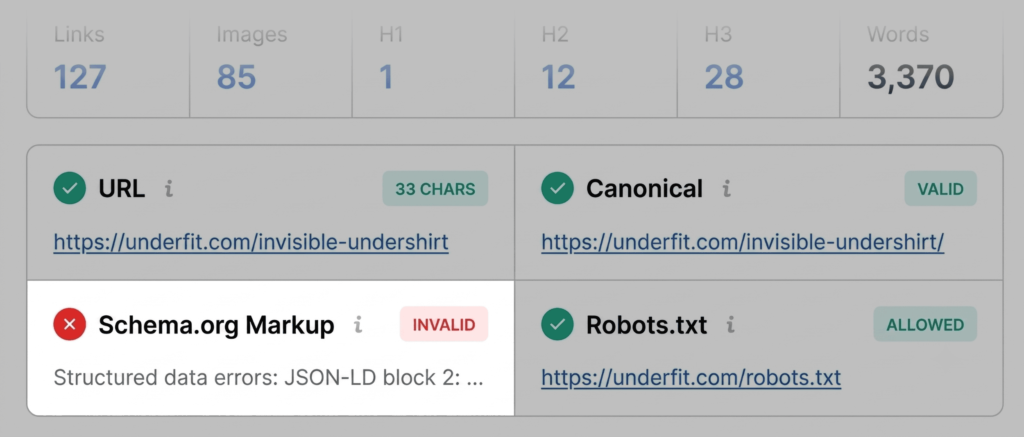
In the initial stage, auditors typically focus on the "Page Info" and "Content" tabs. The Page Info tab provides a summary of foundational SEO elements, including the canonical tag, meta description, and the presence of structured data. If the tool highlights these in red, it serves as an immediate indicator that search engine crawlers may struggle to index or parse the content correctly. For example, invalid JSON-LD schema on a product page is a critical finding, as it directly impacts a page’s eligibility for rich results—such as price, availability, and user ratings—in search engine results pages (SERPs).

During the second thirty seconds of this phase, the focus shifts to the Content tab. Here, the auditor evaluates the heading structure. A well-optimized page should follow a logical hierarchy, typically beginning with an H1 and descending through H2s and H3s. Disjointed structures, such as jumping from an H1 to an H4, can complicate navigation for both users and search engines, and may even hinder AI systems in their attempts to interpret the content’s primary topic.

The Diagnostic Phase: Minutes Two and Three
Once the triage is complete and a list of potential issues is established, the audit transitions into the diagnostic phase. By clicking "View Full Report," the user accesses a more granular analysis. This report includes six distinct panels: Audit, Density, Internal Links, External Links, Compare, and Semrush.

The "Audit" panel is the primary tool for investigating technical errors. It evaluates crawlability, indexation, mobile compliance, and sitemap accessibility. If the initial triage identified an issue with the sitemap, the audit panel will verify whether the file is correctly linked and reachable by crawlers. In many cases, these issues are not limited to a single page; an XML sitemap error often indicates a configuration failure at the site-wide level.

The "Keyword Density" panel serves as an additional diagnostic layer. While keyword stuffing is a relic of early SEO, understanding the distribution and prominence of terms remains vital. This panel allows auditors to verify that the core product or service terms are represented in the title, meta description, and primary headings. Furthermore, it helps identify "noise"—terms appearing in the page’s code, such as those within interactive buttons or image labels—that may distract from the primary content.

Analyzing Link Health and Structural Integrity
Link health is a fundamental component of site authority. The "Links" panel in the full report provides a breakdown of all internal and external links on the page. In a professional audit, identifying broken external links is standard practice, as these dead ends degrade the user experience and can negatively impact the site’s credibility.

The diagnostic process for these links involves determining if they are functional or if they have been affected by changes in the site’s architecture. For instance, many broken links are identified as JavaScript-based. Auditors must determine whether these are genuine errors or if the tool is simply struggling to render the specific dynamic elements of the page. By exporting these results as a CSV file, teams can systematically verify each link and update their internal documentation accordingly.

Implications and Strategic Decision Making
The final stage of the three-minute audit involves utilizing the Semrush panel to provide context for the findings. By reviewing domain-level metrics such as traffic volume and backlink profiles, an auditor can differentiate between page-level errors and broader, domain-wide technical debt.

If a page has high authority but poor performance, the issue is likely rooted in on-page content or technical implementation. Conversely, if the domain shows signs of low authority, the issues may require a more extensive site-wide audit rather than a simple page-level tweak. The ability to connect a Semrush account to the extension further enhances this by providing engagement metrics, such as bounce rates and average visit duration, which are essential for understanding how users are interacting with the page in real-time.

Conclusion
The SEOquake methodology demonstrates that a comprehensive SEO audit does not always require hours of deep-crawling. By focusing on rapid triage, targeted diagnostics, and informed decision-making based on domain context, digital professionals can identify and resolve performance-hindering issues with maximum efficiency. As search engines continue to evolve, the ability to maintain the technical health of individual pages—and to do so with speed and precision—will remain a critical skill for any site owner or marketer. Through the consistent application of these tools, teams can ensure their content remains both discoverable and valuable to their target audience.