
The digital cinematography landscape has been revolutionized by the proliferation of action cameras, drones, and high-end smartphones, allowing filmmakers to capture perspectives that were once physically impossible. However, the miniaturization of camera technology brings inherent technical compromises, most notably the prevalence of aliasing artifacts. This visual distortion, characterized by jagged edges or "stair-stepping" on diagonal lines, often undermines the professional quality of high-resolution 4K footage. To address this, post-production specialists are increasingly turning to advanced software solutions, specifically the FXAA (Fast Approximate Anti-Aliasing) plugin for Adobe After Effects, to restore visual fidelity without sacrificing the inherent sharpness of the source material.
The Technical Anatomy of Aliasing in Small-Sensor Optics
Aliasing is a phenomenon rooted in the fundamental principles of digital signal processing. In the context of video, it occurs when the spatial frequency of the detail in a scene exceeds the sampling rate of the camera’s sensor. This is governed by the Nyquist-Shannon sampling theorem, which dictates that to accurately represent a signal, the sampling frequency must be at least twice the highest frequency present in the signal.
Action cameras, such as the GoPro Hero series, DJI Osmo Action, and various drone platforms, typically utilize sensors significantly smaller than the 35mm full-frame sensors found in cinema cameras. While these sensors may boast high pixel counts (often 12MP to 20MP or more), the individual photosites are extremely small. To compensate for the lack of light-gathering surface area and to make images appear "clearer" to the average consumer, manufacturers often implement aggressive internal sharpening algorithms.

When these internal algorithms interact with fine, repetitive patterns—such as the surface of water, distant foliage, or architectural lines—the result is aliasing. Because many action cameras lack a physical Optical Low Pass Filter (OLPF), which traditionally blurs the light slightly before it hits the sensor to prevent high-frequency detail from causing moiré, the raw digital data is prone to these "crunchy" or jagged edges.
A Chronology of Post-Production Mitigation Strategies
The quest to eliminate aliasing has evolved alongside the hardware. In the early days of digital action footage (circa 2010–2015), editors had limited options for dealing with over-sharpened images.
- In-Camera Profiles: Professionals began by hacking the source. By using "Flat" or "ProTune" profiles, users could lower the internal sharpening to its minimum setting. While this helped, the hardware’s base-level processing often still left artifacts in the high-frequency range.
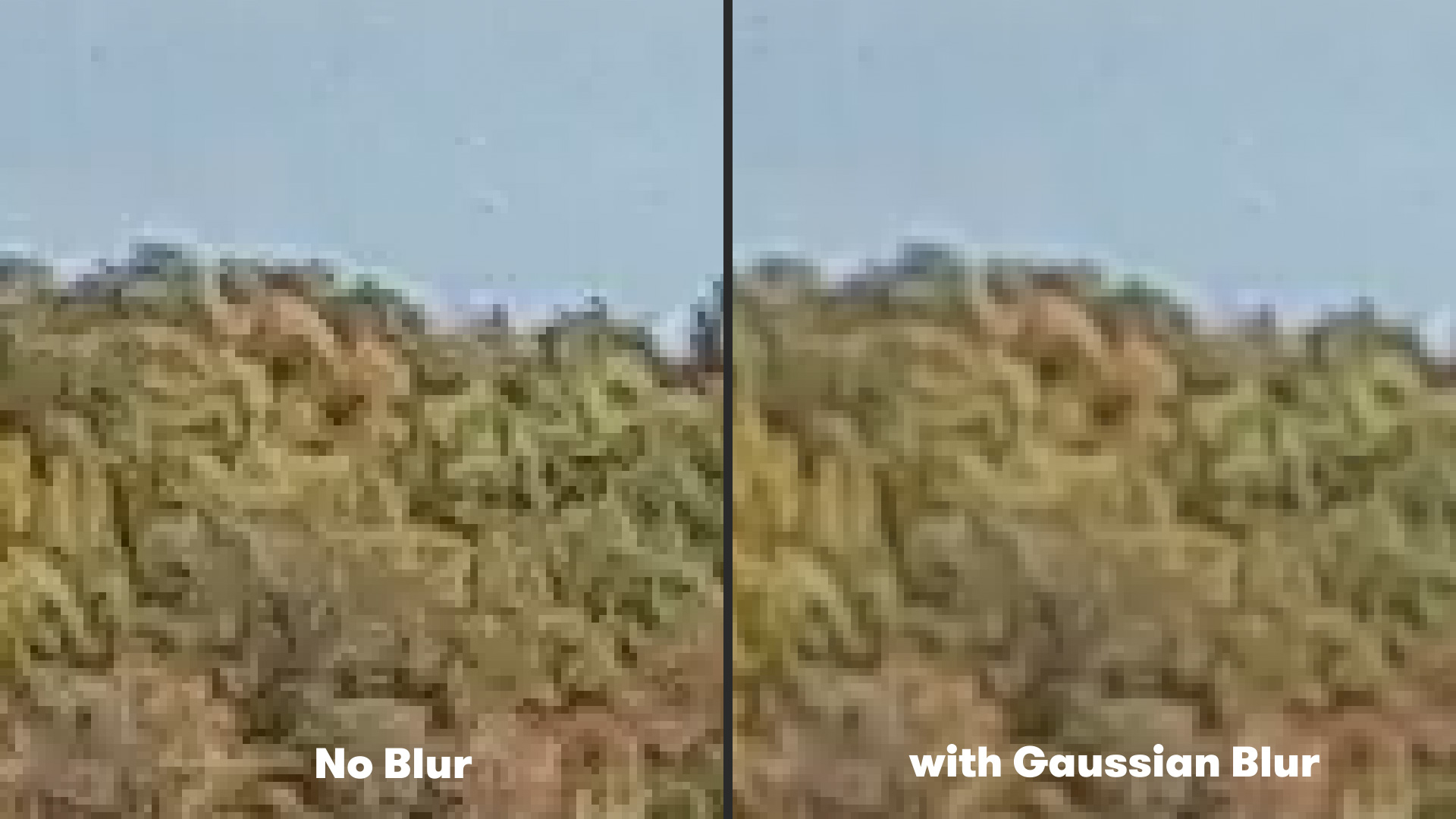
- Global Gaussian Blurring: The first common post-production fix involved applying a subtle Gaussian Blur across the entire frame. While effective at softening jagged edges, this method was destructive. It reduced the resolution of the entire image, turning crisp 4K footage into something that looked more like upscaled 1080p.
- The Rise of Intelligent Anti-Aliasing: As the gaming industry developed more efficient ways to smooth edges in real-time environments, film post-production tools began to adopt these algorithms. This led to the development of FXAA, a post-processing technique that identifies edges and smooths them selectively, rather than blurring the entire frame.
Comparing Methodologies: Gaussian Blur vs. FXAA
For years, the standard advice for After Effects users was to navigate to Effect > Blur & Sharpen > Gaussian Blur and set the blurriness to a value between 1.0 and 2.5. This would "take the edge off" the digital sharpness. However, data analysis of pixel luminance shows that Gaussian Blur affects every pixel equally, regardless of whether it is part of a high-contrast edge or a smooth gradient.
In contrast, the FXAA plugin, developed by Plugin Everything, utilizes a luma-based edge detection algorithm. FXAA was originally designed by Timothy Lottes at NVIDIA as a high-speed alternative to MSAA (Multisample Anti-Aliasing) for video games. When ported to After Effects, it serves a similar purpose: it analyzes the contrast between adjacent pixels to find "jaggies." Once an edge is identified, the plugin applies a sub-pixel blend that smooths the transition.
The primary advantage of FXAA in a professional workflow is its speed and selectivity. Because it is a single-pass filter, it renders almost instantaneously, even on complex 4K timelines. Furthermore, it preserves the "perceived sharpness" of the image better than a global blur because it leaves the interior textures of objects largely untouched while only addressing the problematic boundaries.
Implementation Guide: Using FXAA in Adobe After Effects
Integrating FXAA into a professional workflow is a streamlined process. After downloading the free plugin from Plugin Everything, the user installs the .aex file into the After Effects plugins folder.
- Import and Composition: The user imports the action camera or drone footage into a new composition. It is recommended to perform color correction and stabilization before applying anti-aliasing to ensure the algorithm is working on the final pixel positions.
- Applying the Effect: Navigating to Effect > Plugin Everything > FXAA applies the default smoothing.
- Stacking for Precision: In cases of extreme aliasing—often found in 120fps high-speed footage where the sensor binning creates more artifacts—a single instance of FXAA may not be sufficient. Post-production artists often "stack" the effect, applying two or three instances of the plugin. This creates a cumulative smoothing effect that can make digital action footage look more like it was shot on a larger, more organic sensor.
Industry Data and Market Context
The demand for these post-production fixes is driven by the explosive growth of the action camera and drone markets. According to market research data, the global action camera market was valued at approximately USD 3.9 billion in 2022 and is projected to reach over USD 6.5 billion by 2030. Similarly, the consumer drone market continues to expand at a Compound Annual Growth Rate (CAGR) of nearly 15%.
As these devices become standard tools for B-roll in documentaries, reality television, and even feature films, the gap between "consumer-looking" footage and "cinema-looking" footage has become a primary concern for colorists. A 2023 survey of digital imaging technicians (DITs) indicated that "over-sharpening" and "aliasing" were among the top three complaints when integrating drone or GoPro footage into professional color grades.
Broader Implications for Digital Cinematography
The shift toward using tools like FXAA represents a broader trend in the industry: the "analog-ification" of digital assets. As sensor technology pushes toward 8K and beyond, the goal of the modern filmmaker is often not more detail, but better detail. The goal is to move away from the clinical, harsh aesthetic of digital sensors and toward the softer, more roll-off-heavy look of traditional celluloid.
By mitigating aliasing, editors are able to "de-digitalize" their footage. This allows for a more seamless blend between a $50,000 ARRI Alexa primary camera and a $400 GoPro action camera mounted to a vehicle or a helmet. When the jagged edges are removed, the viewer’s eye is less likely to be distracted by the "digital-ness" of the shot, allowing the narrative and the action to take center stage.
Furthermore, the availability of free, high-quality tools like FXAA democratizes professional-grade post-production. It allows independent creators and hobbyists to achieve a level of polish that was previously reserved for high-end post-production houses with expensive proprietary software.
Expert Analysis: The Future of Post-Processing
Looking forward, the industry is likely to see the integration of AI-driven anti-aliasing. Technologies like DLSS (Deep Learning Super Sampling) in the gaming world suggest a future where neural networks can reconstruct edges with near-perfect accuracy, eliminating aliasing while actually increasing resolution.
However, for the current generation of filmmakers, the FXAA method remains the gold standard for efficiency and reliability. It addresses the hardware limitations of small-sensor cameras with a software-based surgical precision that traditional blurs cannot match. As action cameras continue to shrink in size while growing in resolution, the necessity for intelligent anti-aliasing in the post-production suite will only continue to increase, making tools like FXAA essential components of the modern editor’s toolkit.