
The rapid evolution of artificial intelligence, particularly the advent of agentic AI systems, is fundamentally reshaping human-computer interaction. These advanced systems, capable of autonomous decision-making and multi-step task execution, present a new paradigm for user experience design, particularly concerning transparency and trust. While traditional software interfaces have long relied on familiar loading indicators like spinning wheels or progress bars to signal system activity, these patterns prove woefully inadequate for the sophisticated, often opaque "thinking" processes inherent in agentic AI. The challenge for designers and developers now lies in creating interface patterns that not only communicate system status but actively reveal the AI’s process, decision-making, and limitations, transforming moments of latency from anxiety-inducing waits into opportunities for building user confidence and understanding.
The Inadequacy of Legacy Loading Patterns in the Age of AI
For decades, the ubiquitous spinner, throbber, and linear progress bar have served as the primary visual cues for system latency. These patterns effectively convey a simple technical reality: data is being retrieved, a file is downloading, or a process is momentarily occupied due to bandwidth or file size constraints. Users have been conditioned to understand that such delays are typically brief and mechanistic. However, the operational reality of agentic AI introduces a fundamentally different kind of waiting period. When an AI agent pauses for several seconds, or even minutes, it is not merely fetching information; it is engaged in complex cognitive processes. It is analyzing prompts, formulating plans, weighing probabilities, accessing external tools, generating content, and orchestrating sequences of actions. This profound shift in underlying computational activity renders traditional loading patterns obsolete and, more critically, counterproductive.
Research and anecdotal evidence suggest that presenting a generic spinning icon during an AI agent’s "thinking time" frequently leads to user confusion, frustration, and anxiety. Users are left to speculate whether the system is stalled, has crashed, or is merely grappling with a particularly complex request. This ambiguity erodes trust and can lead to abandonment, as users perceive the AI as unreliable or broken. A 2023 study by Salesforce found that 61% of consumers are concerned about AI’s transparency, highlighting a critical trust gap that interface design must address. The core imperative is to transform passive "something is happening" messages into active, informative dialogues that articulate "here is exactly how I am working to solve your problem."
From Generic Status to Agentic Clarity: The Power of Microcopy

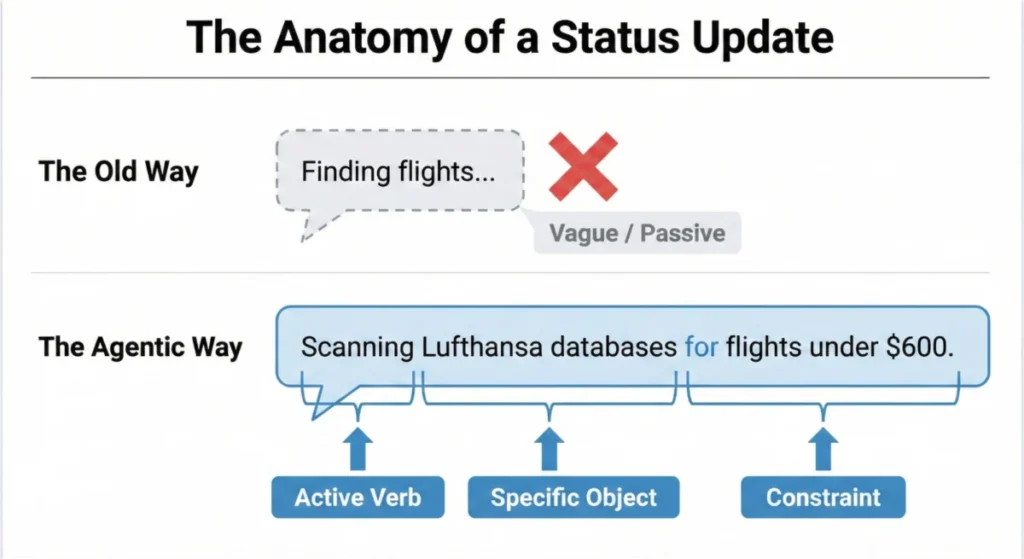
Addressing this transparency deficit begins not with complex visual effects, but with the precise application of language – microcopy. The move from static software to dynamic, agentic AI necessitates the retirement of vague placeholders such as "Loading" or "Working." These terms, remnants of a simpler computational era, fail to capture the agency and multi-faceted operations of modern AI. Instead, status updates must be meticulously crafted to reflect the system’s active engagement and progress.
Consider an agentic AI designed to manage calendar scheduling for a team. A generic message like "Checking availability" offers minimal insight. Users remain unaware of whose calendars are being checked, what subsequent steps are involved, or if the AI has accurately registered the purpose and participants of the meeting request. This informational void can transform anticipation into unease.
The solution lies in adopting an "Agentic Update Formula," a structured approach to microcopy that grounds technical processes in user-centric understanding. This formula typically comprises three key elements: a strong Action Word, a Specific Item the AI is currently processing, and any relevant Limits or parameters governing its action. For instance, instead of "Searching for flights," a more informative update might be: "Scanning flight options to Paris for October 20th within a $500 budget." This level of detail confirms the AI’s comprehension of the request and its adherence to specified constraints, fostering immediate reassurance. Platforms like Perplexity AI exemplify this approach, providing real-time, step-by-step updates on their search and synthesis processes, explicitly listing research terms and information sources, thereby building confidence through explicit process revelation.

Calibrating AI Persona: Tone, Risk, and User Research
Beyond the content of status updates, the tone of an AI’s communication plays a crucial role in shaping user perception and trust. The appropriate "personality" for an AI is not universal but must be meticulously matched to the task’s importance, a determination often guided by an Impact/Risk Matrix derived from a prior Decision Node Audit.
For low-risk, routine tasks, a friendly, conversational tone can enhance user comfort. A scheduling assistant, for example, might appropriately state, "Just cross-referencing everyone’s calendars for the best time." This approach humanizes the interaction and creates an easygoing user experience. Conversely, high-stakes operations demand a tone characterized by mechanical accuracy and precision. If an AI is executing a significant financial transfer or a complex data migration, users prioritize clarity and factual reporting over conversational charm. A message like "Initiating secure funds transfer, verifying account routing numbers" instills confidence, whereas a playful "I’m thinking hard about your money!" could induce panic.

Crucially, the ultimate arbiter of appropriate AI voice and tone is rigorous user research. No set of predefined rules can universally predict which language or tone will build trust or cause stress across diverse user groups and contexts. User research, involving qualitative methods like interviews, usability testing, and contextual inquiries, is indispensable. It allows designers to:
- Observe users’ emotional responses to different AI prompts and status messages.
- Uncover specific anxieties or expectations related to AI’s performance.
- Iteratively refine language and tone based on direct user feedback, ensuring the AI’s communication aligns with the target audience’s needs and comfort levels.
This empirical approach ensures that the AI’s "personality" is not arbitrarily assigned but is carefully calibrated to foster genuine trust and effectiveness within its specific operational environment.
A Comprehensive Library of Interface Patterns for Agentic AI

With clear microcopy established, the next critical step is designing the "container" – the interface pattern – that delivers these messages effectively. The goal is to match the message’s weight and urgency to the pattern’s visibility and prominence, creating a library of solutions that address various transparency needs.
-
The Living Breadcrumb: For low-importance, background tasks where constant user attention is unnecessary, the Living Breadcrumb offers a subtle yet persistent status indicator. Instead of a static icon, this pattern smoothly transitions between different text updates within a peripheral application area (e.g., a menu bar or application border). An AI drafting an email might display a pulsing sequence: "Analyzing email content" -> "Drafting initial response" -> "Refining tone and grammar." This provides quiet assurance that the task is progressing without disrupting the user’s primary focus.
-
Dynamic Checklists: When an AI undertakes critical, high-stakes, multi-step tasks, such as complex financial transactions or large-scale data migrations, a Dynamic Checklist is invaluable. This pattern visually anchors the user to the process’s progress by laying out every planned step. It clearly highlights the currently active step, marks preceding steps as complete, and lists future actions as pending. For example, during an international money transfer, the checklist might show: "1. Validating recipient details (Complete) -> 2. Converting currency (In Progress) -> 3. Authorizing transaction (Pending) -> 4. Confirming transfer (Pending)." This provides superior clarity compared to a traditional progress bar, especially when faced with unpredictable delays. If currency conversion takes longer than expected, the user understands where the delay is occurring, reducing anxiety and increasing patience. Implementing a dynamic checklist requires robust backend integration, often utilizing webhooks to trigger front-end state updates in real-time. Devin AI provides a compelling example of this, offering users a comprehensive visual roadmap of its coding tasks.

-
The Thinking Toggle: For users with higher information needs or a demand for deep transparency, the Thinking Toggle offers a progressive disclosure mechanism. This UI control, often a chevron or "View Logs" button, allows users to expand a friendly status update into a raw, sanitized terminal view of the AI agent’s logic logs. This could display sequences such as: "Called API ‘calendar.checkAvailability’ for ‘Alice’" -> "Identified 3 potential slots" -> "Checked ‘project-alpha’ database for conflicting deadlines." While many users may never engage with this feature, its mere presence acts as a powerful signal of trust, reassuring them that the system is not concealing its internal workings. A critical technical caveat here is the absolute necessity to sanitize and abstract these raw logs to prevent the exposure of proprietary business logic, internal data structures, or security tokens.
-
Designing for Partial Success: Unlike traditional software, where operations are often binary (succeed or fail), agentic AI frequently operates in shades of gray. An AI might successfully complete 90% of a complex task, only to encounter an unforeseen obstacle on the remaining 10%. Displaying a generic "Request Failed" banner in such scenarios is misleading and detrimental to user trust. Instead, interfaces must be designed to communicate partial success. For instance, an AI planning a trip might report: "Flights booked to London (Complete), Hotel confirmed (Complete), Car rental failed due to unavailability (Action Required)." This granular feedback empowers users to quickly address the specific points of failure while acknowledging and leveraging the AI’s successful contributions.
-
Disentangling the Tool: When an AI system encounters an error, it is crucial to accurately attribute the cause of the failure. Users often mistakenly blame the AI itself for problems that originate from an external service or tool the AI relies upon. For example, if an AI assistant attempts to access Google Calendar but the API connection is down, the error message should clearly differentiate. Instead of "I failed to check your calendar," a more transparent message would be: "Unable to access your calendar. The Google Calendar API is currently unresponsive." This distinction is vital for maintaining user trust in the AI’s capabilities, even when external dependencies falter.

-
The Audit Trail: Trust After the Fact: Real-time transparency, while crucial, is transient. If a user steps away from their desk, they miss the dynamic updates. Upon returning to a completed task, if the result seems anomalous, they have no immediate means to verify the AI’s process. This underscores the necessity of a persistent Audit Trail. This pattern provides a "Show Work" interaction, offering a link or history log on the final result screen that allows users to replay the AI’s decision logic. An audit trail for a booked trip might show: "Verified flight prices against 3 airlines, selected cheapest non-stop option based on budget constraints, confirmed hotel availability near conference venue." This "receipt" acts as the ultimate safety net, allowing users to spot-check the output’s validity and providing persistent transparency. The absence of such a mechanism, as evidenced by past issues with ChatGPT’s hidden "memory" influencing interactions without user awareness or auditability, can significantly erode trust, even when the AI attempts personalization. The audit trail transforms an opaque outcome into a verifiable process.
The Reality of User Attention and Enterprise Demands
While these interface patterns offer robust solutions for transparency, designers must contend with the reality of user attention, especially in professional contexts. High-volume users, such as insurance underwriters processing dozens of quotes daily, rarely fixate on progress bars or real-time status updates. They initiate a task, switch tabs to other work, and return only when a result is delivered. For these experts, the primary measure of an AI system’s value and trustworthiness is the final output’s accuracy and alignment with their expectations.

If an AI-generated insurance premium falls within the expected range, trust is instantaneously established, and the system is perceived as an efficient accelerator. However, if the output deviates significantly from expectations – for example, an unexpected $900 quote instead of an anticipated $550 – the user immediately halts. In such moments of misalignment, real-time explanations, such as a "high-risk surcharge" pop-up, are often missed. Without a persistent record, the user has no means to understand the discrepancy. This typically leads to a manual recalculation, effectively rendering the AI’s effort useless and eroding confidence. For enterprise-grade AI tools, this lack of persistent transparency in moments of disagreement is a primary barrier to adoption. The audit trail, in particular, becomes indispensable in these scenarios, preventing AI from inadvertently creating more work for users.
Predictability, Reliability, and Understanding: The True Product
Ultimately, the goal of designing for AI transparency is not to build a "magic trick" that conceals its inner workings, but to cultivate a reliable "colleague." A good colleague keeps you informed, explains delays, and transparently addresses challenges. Applying this philosophy to AI, through specific status updates, dynamic checklists, acknowledgments of partial success, and persistent audit trails, shifts the perception of AI from a mysterious black box to a manageable, trustworthy team member.

True transparency in agentic AI extends beyond merely explaining complex algorithms. It means presenting the AI’s process and performance precisely when and where the user needs it. This encompasses plainly communicating the AI’s current status, its known limits, and an easy-to-follow history of its decisions. This level of openness transforms the user’s interaction from passive acceptance to active collaboration, empowering them to understand outcomes, intervene effectively, and guide the system towards optimal results. As AI systems become increasingly integrated into daily personal and professional lives, fostering this profound level of predictability, reliability, and understanding will be paramount to their widespread adoption and sustained success. The future of human-AI collaboration hinges on our ability to design interfaces that genuinely illuminate the AI’s journey, rather than merely hinting at its presence.